
baconfy / prompt

Manage AI prompts in Laravel with Markdown + YAML front matter, multiple drivers (file/database), and Blade rendering.
Requires
- php: ^8.3
- illuminate/console: ^12.0|^13.0
- illuminate/contracts: ^12.0|^13.0
- illuminate/database: ^12.0|^13.0
- illuminate/filesystem: ^12.0|^13.0
- illuminate/support: ^12.0|^13.0
- illuminate/view: ^12.0|^13.0
- symfony/yaml: ^7.0|^8.0
Requires (Dev)
- larastan/larastan: ^3.0
- laravel/pint: ^1.18
- orchestra/testbench: ^9.0|^10.0|^11.0
- pestphp/pest: ^3.0|^4.0
- pestphp/pest-plugin-laravel: ^3.0|^4.0
Suggests
None
Provides
None
Conflicts
None
Replaces
None
README

Manage AI prompts in Laravel as Markdown files (with optional YAML front matter) or database records, rendered through Blade.
Why
LLM prompts are configuration. They drift across the codebase, get duplicated, and end up hardcoded as long strings inside services. This package treats prompts as first-class assets:
- One file or DB record per prompt
- YAML front matter for model/temperature/required variables
- Blade rendering for variable interpolation
- Drivers for file and database storage
- Strict validation of required variables
Requirements
- PHP 8.3+
- Laravel 12+
Installation
composer require baconfy/prompt
The service provider auto-registers. Publish what you need:
php artisan vendor:publish --tag=prompt-config
php artisan vendor:publish --tag=prompt-migrations    # only if you plan to use the database driver
php artisan migrate
Quick start
Create a prompt at resources/prompts/welcome.md:
---
model: claude-opus-4-5
temperature: 0.7
required: [name]
---
You are a helpful assistant. Greet {{ $name }} warmly and ask how you can help today.
Render it:
$prompt = prompt('welcome', ['name' => 'John']);

$prompt->content;           // rendered string
$prompt->metadata['model']; // 'claude-opus-4-5'
(string) $prompt;           // same as ->content (implements Stringable)
Use the metadata to drive your LLM call:
$prompt = prompt('welcome', ['name' => 'John']);

$response = $anthropic->messages()->create([
    'model'       => $prompt->metadata['model'],
    'temperature' => $prompt->metadata['temperature'],
    'messages'    => [['role' => 'user', 'content' => (string) $prompt]],
]);
Front matter
Front matter is an optional YAML block at the top of the prompt:
---
model: claude-opus-4-5
temperature: 0.7
required: [user_name, context]
description: Onboarding greeting
tags: [onboarding, greeting]
---
Hello {{ $user_name }}! Considering {{ $context }}, welcome aboard.
Behavior:
- If the file does not start with
---, it is treated as plain content (no metadata, no validation, just Blade). required: [...]is enforced. Missing variables throwMissingRequiredVariablesException.- Anything else is metadata. The package does not interpret it; read it via
$prompt->metadata['anything'].
Drivers
File driver
Default. Reads from resources/prompts/*.md. Dot notation maps to subfolders:
prompt('auth.login');               // resources/prompts/auth/login.md
prompt('emails.welcome.subject');   // resources/prompts/emails/welcome/subject.md
Database driver
Stores prompts in a prompts table with name and content columns. The content column holds raw markdown — exactly the same format as the file driver. Front matter, when present, sits inline at the top of content.
use Baconfy\Prompt\Models\Prompt;

Prompt::create([
    'name'    => 'welcome',
    'content' => <<<'MD'
        ---
        model: claude-opus-4-5
        required: [name]
        ---
        Hello {{ $name }}!
        MD,
]);

prompt('welcome', ['name' => 'John']);   // works the same way
Migrating prompts between file and database drivers is a copy/paste — the storage format is identical.
Switch the default driver in .env:
PROMPTS_DRIVER=database
PROMPTS_CONNECTION=mysql       # optional, falls back to DB_CONNECTION
PROMPTS_TABLE=prompts          # optional
Or use both side by side:
// config/prompt.php
'drivers' => [
    'system' => [
        'driver' => 'file',
        'folder' => resource_path('prompts/system'),
    ],
    'user' => [
        'driver' => 'database',
        'table'  => 'user_prompts',
    ],
],
Prompt::driver('system')->find('welcome');
Prompt::driver('user')->find('welcome');
API
Helper
prompt(string $name, array $data = []): RenderedPrompt
Facade
use Baconfy\Prompt\Facades\Prompt;

Prompt::get('welcome', ['name' => 'John']);   // RenderedPrompt
Prompt::source('welcome');                     // ParsedFrontMatter|null
Prompt::driver('database');                    // Driver instance (defaults to active)
RenderedPrompt
$prompt->content;    // rendered string
$prompt->metadata;   // array<string, mixed>
(string) $prompt;    // same as ->content
ParsedFrontMatter
What Prompt::source() returns — pre-render. Useful when you want metadata without rendering Blade:
$source = Prompt::source('welcome');
$source->metadata['model'];   // 'claude-opus-4-5'
$source->content;             // raw template, with Blade tags untouched
Prompt model
Eloquent model on the prompts table. Use it to seed, update, or otherwise manage DB-backed prompts:
use Baconfy\Prompt\Models\Prompt as PromptModel;

PromptModel::create([
    'name'    => 'welcome',
    'content' => <<<'MD'
        ---
        model: claude-opus-4-5
        ---
        Hello {{ $name }}!
        MD,
]);

PromptModel::where('name', 'welcome')->update(['content' => 'Hi {{ $name }}!']);
The driver itself does not depend on this model — it reads via Query Builder. The model is a convenience for your CRUD layer.
CLI
Three Artisan commands ship with the package:
php artisan prompt:list                              # list prompts across all configured drivers
php artisan prompt:list database                     # list prompts for a specific driver
php artisan prompt:show welcome                      # show metadata and raw content for a single prompt
php artisan prompt:show welcome --driver=database    # target a specific driver
php artisan prompt:make welcome                      # scaffold resources/prompts/welcome.md
prompt:list accepts an optional driver argument (the name of any driver defined in config/prompt.php); omitting it iterates all drivers. prompt:show accepts a --driver= option to target a specific named driver instead of the active default. prompt:make is file-driver only — database prompts are created directly via the prompts table.
prompt:show is your debug companion: confirm what Prompt::source('welcome') will return before rendering anywhere.
Testing
Faking prompts
In your application's tests, replace the real driver with a stub so prompts don't hit the filesystem or database:
use Baconfy\Prompt\Facades\Prompt;
use Baconfy\Prompt\RenderedPrompt;

Prompt::fake([
    'welcome' => 'Hello stub!',
    'auth.login' => new RenderedPrompt('Stub login.', ['model' => 'gpt-4']),
]);

// code under test
prompt('welcome', ['name' => 'whatever']);

Prompt::assertCalled('welcome');
Prompt::assertNotCalled('checkout');
A plain string stub is wrapped in a RenderedPrompt with empty metadata; pass a RenderedPrompt instance when your code reads $prompt->metadata.
Factories
The Prompt model ships with an Eloquent factory for seeding test data when you use the database driver:
use Baconfy\Prompt\Models\Prompt;

Prompt::factory()->create();
Prompt::factory()->count(5)->create();
Prompt::factory()->create(['name' => 'welcome', 'content' => 'Hi!']);
Configuration
config/prompt.php:
return [
    'default' => env('PROMPTS_DRIVER', 'file'),

    'drivers' => [
        'file' => [
            'driver' => 'file',
            'folder' => env('PROMPTS_FOLDER', resource_path('prompts')),
        ],
        'database' => [
            'driver'     => 'database',
            'connection' => env('PROMPTS_CONNECTION'),
            'table'      => env('PROMPTS_TABLE', 'prompts'),
        ],
    ],
];
The drivers array supports any number of named entries. Each one has a driver field (file or database) plus the keys that driver needs. The same type can appear under multiple names (e.g. two file folders for system vs. user prompts).
Exceptions
use Baconfy\Prompt\Exceptions\PromptNotFoundException;
use Baconfy\Prompt\Exceptions\MissingRequiredVariablesException;
PromptNotFoundException— thrown byPrompt::get()when the name is not found by the active driver. Exposes->name.MissingRequiredVariablesException— thrown when the prompt declaresrequiredin its metadata and any variable is missing from$data. Exposes->variables(the list of missing names).
Admin Panel
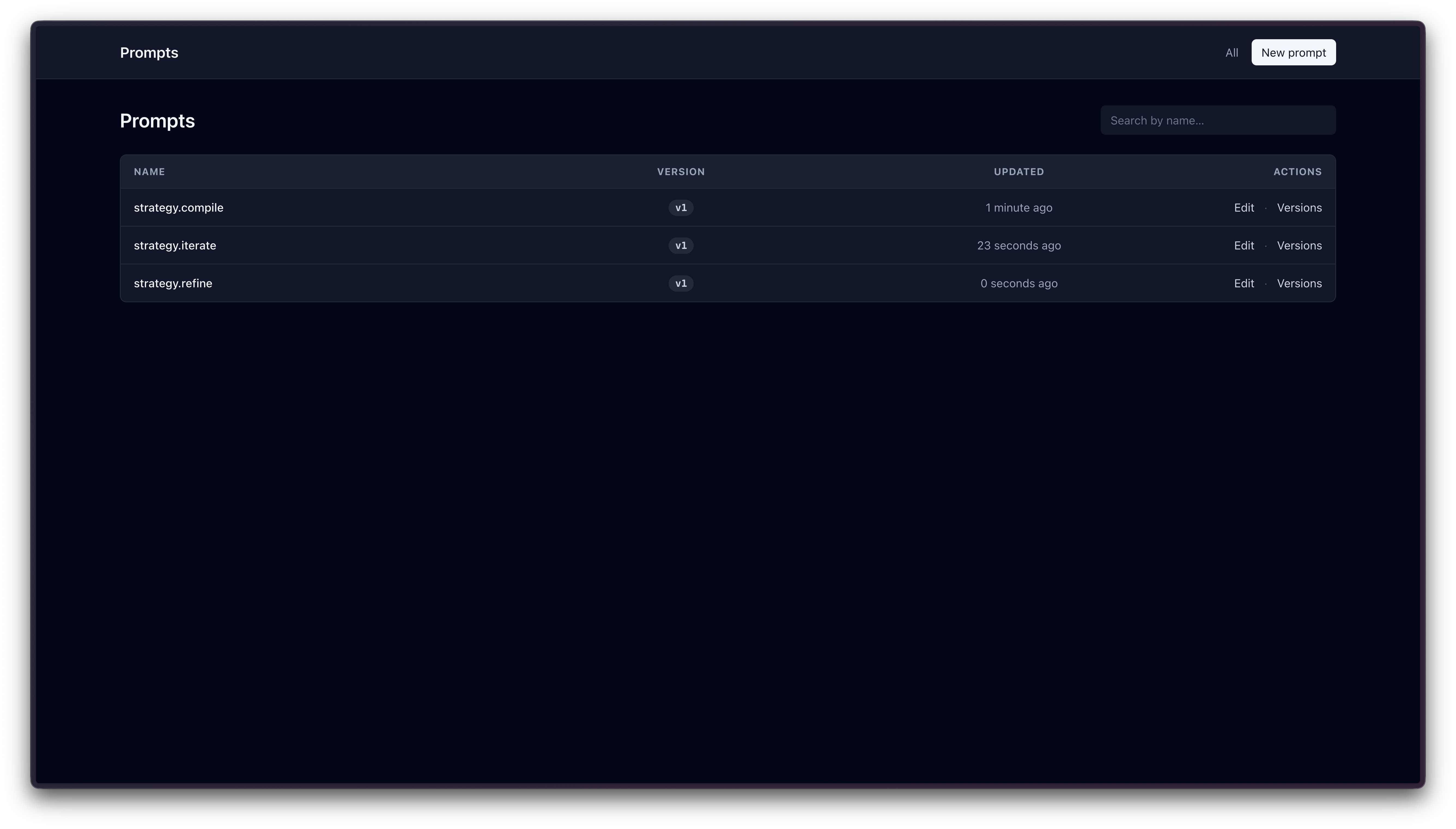
Optional admin panel for managing prompts stored in the database driver. The file driver remains read-only and is meant to be managed via Git.
The panel ships as plain Blade views styled with Tailwind via CDN — no front-end build step, no JavaScript framework, no extra dependencies. Routes are mounted at /_prompts by default whenever prompt.panel.enabled is true.
Authorization
Two equivalent options (the callback wins if both are present):
// AppServiceProvider::boot() — closure style (like Horizon::auth)
use Baconfy\Prompt\Panel;

Panel::auth(fn ($user = null) => $user?->email === 'you@example.com');
// or via a regular Gate
use Illuminate\Support\Facades\Gate;

Gate::define('viewPrompts', fn ($user = null) => $user?->isAdmin());
If neither is defined, the panel responds 403.
Features
- Index at
/_prompts— paginated list of every prompt name (latest version per name) with avNbadge and live search. - Editor at
/_prompts/createand/_prompts/{prompt}/edit— form with live preview that renders the prompt through Blade using JSON variables. Refuses to save if the content is identical to the current latest version. - Versions at
/_prompts/{prompt}/versions— accordion of every revision with a unified diff against the current version. Each older row can be Restored (creates a new version on top with the chosen content) or Deleted.
Versioning model
Every save inserts a new row in the prompts table; existing rows are never updated. Rows sharing a name form a version chain:
- First save → new row with
root_id = null(the root, v1). - Subsequent saves → new row with
root_idpointing to the v1 row. Prompt::get('welcome')always resolves to the latest version (MAX(id)pername).
Configuration
// config/prompt.php
'panel' => [
    'enabled'    => env('PROMPTS_PANEL_ENABLED', true),
    'path'       => env('PROMPTS_PANEL_PATH', '_prompts'),
    'gate'       => 'viewPrompts',
    'middleware' => ['web'],
],
Publish the views to customize them:
php artisan vendor:publish --tag=prompt-views
Security
Blade compiles prompt content. Do not load prompt content from untrusted sources. A prompt containing {{ system('rm -rf /') }} would execute that PHP if rendered. Treat prompts as code, not user input.
The panel is gated by Panel::auth() / Gate and ships behind the web middleware group by default — it is not safe to expose publicly without authorization.
Development
Run the package test suite:
composer test            # pest
composer test:coverage   # 100% required
composer test:types      # phpstan
composer format          # pint
Boot a local dev environment (Orchestra Testbench workbench + SQLite):
composer dev # builds the workbench DB and serves at http://127.0.0.1:8000
The workbench wires Panel::auth() to always allow, so / redirects to /_prompts ready to use.
Credits
License
See LICENSE for details.