
phoenix1331 / laravel-ai-headroom-ledger

Store and query per-request AI token usage and cost from Headroom.
Package info
github.com/phoenix1331/laravel-ai-headroom-ledger
pkg:composer/phoenix1331/laravel-ai-headroom-ledger
Requires
- php: ^8.3
- dragonmantank/cron-expression: ^3.4
- illuminate/console: ^12.0|^13.0
- illuminate/contracts: ^12.0|^13.0
- illuminate/database: ^12.0|^13.0
- illuminate/support: ^12.0|^13.0
- phoenix1331/laravel-ai-headroom: ^0.1
Requires (Dev)
- larastan/larastan: ^3.0
- laravel/pint: ^1.32
- orchestra/testbench: ^10.0|^11.0
- pestphp/pest: ^4.2|^5.0
- pestphp/pest-plugin-laravel: ^4.0|^5.0
Suggests
None
Provides
None
Conflicts
None
Replaces
None
This package is not auto-updated.
Last update: 2026-10-18 20:07:42 UTC
README
A ledger of every AI request your app makes: estimated, used, spent.
The Headroom family: Headroom counts and guards requests · Headroom Ledger records them (this package) · Headroom for Filament shows them in a Filament panel
Headroom Ledger records Headroom's events in your database, one row per provider call: what was estimated before it was sent, what was actually used, what it cost, how close it came to the context limit, and whether it was warned or blocked. Then it answers questions about them through a typed query API and an artisan report.


Ledger::query()
    ->lastDays(30)
    ->forAgent(SupportAgent::class)
    ->forTag('tenant_id', 42)
    ->spend();                 // actual where known, else estimated, flagged as such

Ledger::query()->lastDays(7)->byModel()->tokens();        // input, output, cached per model
Ledger::query()->lastDays(30)->accuracy();                // estimate error per model and count method
Ledger::query()->lastDays(7)->nearLimit(80)->entries();   // requests at or above 80% of context
Landing page: phoenix1331.github.io/laravel-ai-headroom-ledger
What this demonstrates
AI cost dashboards already exist for Laravel. They know what a request cost after it ran. Headroom Ledger also knows what was predicted before it ran, because Headroom counted it first. That pre-flight side answers questions a cost log cannot:
- How far off are the estimates? Estimate against actual input tokens, per model and count method, measured from your own traffic
- What is creeping towards its context limit? Average and maximum context usage per agent, model or tenant, and the requests at or above any percentage
- What was stopped, and what nearly was? Every warned and blocked request, with the limit it hit
- What did the requests that never finished cost? Blocked requests and abandoned streams keep their estimate, flagged as an estimate, rather than vanishing or counting as zero
It is the second of three packages: Headroom counts and guards and fires events but stores nothing, so it stays lean with no migrations; this package stores them and provides the query API; Headroom for Filament is the dashboard built on that API.
The interesting engineering is in staying correct without coordination:
- Order does not matter. Recording is queued, so
TokensUsedcan be processed beforeTokensCounted. Every listener upserts the same row by request ID and only writes the columns its event owns, and outcomes change only through conditional updates. A test replays every ordering of each mix of events and requires an identical row, on SQLite, PostgreSQL, MySQL and MariaDB. - Missing is not zero. A request with no reported usage has
nullactual figures, and spend keeps reported and estimate-only parts apart. - Rollups never change the answer. Aggregates read closed days from daily rollups and today from raw entries, and a test checks every aggregate against reading raw entries only.
- No text, enforced. Model casts reject anything but token counts and reason codes, and an architecture test fails the build if a column could hold prompt or response text.
Tech stack
| PHP | 8.3+ |
| Laravel | 12 or 13 |
| Headroom | phoenix1331/laravel-ai-headroom ^0.1 (which brings laravel/ai ^1.2) |
| Databases | SQLite, PostgreSQL, MySQL and MariaDB, all tested in CI |
| Tests | Pest with Orchestra Testbench, Larastan at max level, Pint, 90% coverage gate |
Getting started
Install
composer require phoenix1331/laravel-ai-headroom-ledger
php artisan vendor:publish --tag=headroom-ledger-migrations
php artisan migrate
php artisan vendor:publish --tag=headroom-ledger-config   # optional
Recording starts straight away. No code changes are needed beyond Headroom's own setup: any request Headroom counts (through EnsureHeadroom or Headroom::for()) is recorded.
Recording is queued, so run a queue worker (php artisan queue:work), or set HEADROOM_LEDGER_QUEUE_CONNECTION=sync to record inline. Make sure your scheduler runs (php artisan schedule:run every minute) so rollups and pruning happen.
Prerequisites for contributors
- PHP 8.3+ with
mbstringandpdo_sqlite; Composer 2; Node and npm osv-scannerfor the pre-commit security audit:go install github.com/google/osv-scanner/cmd/osv-scanner@latest- Run
npm installonce after cloning to activate the Husky git hooks pcovorxdebugonly if you want coverage locally (sudo apt install php8.4-pcov)
No database server is needed: the tests run on in-memory SQLite. CI also runs them on PostgreSQL, MySQL and MariaDB; CONTRIBUTING.md shows how to point them at a local database.
Commands
composer installnpm installcomposer test(unit, feature and architecture tests)composer test:coverage(fails below 90% onsrc/)composer analyse(Larastan, max level)composer lint/composer lint:test(Pint)composer check(lint, analyse and coverage-gated tests in order)
To try it with demo data, seed a week of traffic into a scratch database through Testbench:
touch /tmp/ledger-demo.sqlite
export DB_CONNECTION=sqlite DB_DATABASE=/tmp/ledger-demo.sqlite
vendor/bin/testbench migrate:fresh
vendor/bin/testbench db:seed --class="Workbench\Database\Seeders\DemoLedgerSeeder"
vendor/bin/testbench headroom-ledger:report --by=agent
Environment variables
| Key | Description | Default |
|---|---|---|
HEADROOM_LEDGER_ENABLED |
Record Headroom events; when false, nothing is written | true |
HEADROOM_LEDGER_DB_CONNECTION |
A separate database connection for the ledger tables | app default |
HEADROOM_LEDGER_TABLE_PREFIX |
Prefix for the ledger tables | headroom_ledger_ |
HEADROOM_LEDGER_QUEUE_CONNECTION |
Queue connection for recording; sync records inline |
app default |
HEADROOM_LEDGER_QUEUE |
Queue name for recording | app default |
HEADROOM_LEDGER_RETENTION_ENTRIES |
Days to keep raw entries; empty keeps them forever | 90 |
HEADROOM_LEDGER_RETENTION_ROLLUPS |
Days to keep daily rollups; empty keeps them forever | 730 |
HEADROOM_LEDGER_ROLLUP_ENABLED |
Build daily rollups and read closed days from them | true |
HEADROOM_LEDGER_ROLLUP_SCHEDULE |
Cron expression for headroom-ledger:rollup, or false to schedule it yourself |
15 0 * * * |
HEADROOM_LEDGER_PRUNE_SCHEDULE |
Cron expression for headroom-ledger:prune, or false to schedule it yourself |
30 0 * * * |
Tags are configured in the published config/headroom-ledger.php, not the environment (see Tags and privacy).
Usage
Query API
The query API is the only supported way to read the ledger, so the schema can change without breaking anything built on it. Every result is a final, readonly value object; no Eloquent model leaves the package.
use Phoenix1331\AiHeadroom\Enums\CountMethod;
use Phoenix1331\AiHeadroomLedger\Enums\EntrySort;
use Phoenix1331\AiHeadroomLedger\Facades\Ledger;

$query = Ledger::query()
    ->between(now()->subDays(30), now())   // whole days, in the app timezone; or ->lastDays(30)
    ->forAgent(SupportAgent::class)
    ->forModel('claude-sonnet-5-5')        // the model that answered, else the one counted
    ->forProvider('anthropic')
    ->forTag('tenant_id', 42)              // repeat for several tags
    ->forCountMethod(CountMethod::Native)  // one or several Headroom count methods
    ->nearLimit(80)                        // estimate used at least 80% of the context window
    ->blocked();                           // blocked or warned; blocked(includeWarned: false) for blocked only

$query->entries(50);                       // LedgerEntries, newest first
$query->orderBy(EntrySort::Cost)->entries(10);              // most expensive first; descending: false for cheapest
$query->paginate(perPage: 25, page: 2);    // LedgerPage: entries, total, page, perPage, lastPage(), hasMorePages()
$query->find($requestId);                  // one LedgerEntry matching every filter, or null
$query->run($invocationId);                // RunSummary of the steps matching every filter, or null
$query->count();
$query->spend();       // SpendSummary
$query->tokens();      // TokenTotals
$query->context();     // ContextUsage: average and max context %, warned, blocked, failed
$query->accuracy();    // AccuracyStats per model and count method

Ledger::query()->lastDays(7)->byDay()->spend();     // Breakdown<SpendSummary>, every day of the range
Ledger::query()->lastDays(7)->byModel()->tokens();  // also byProvider(), byAgent(), byRun(), byTag('tenant_id')
Ledger::query()->lastDays(7)->byAgent()->context();
Ledger::query()->lastDays(30)->byDay()->accuracy();  // Breakdown<AccuracyStats>: estimate accuracy over time

Ledger::find($requestId);    // one LedgerEntry, or null; unscoped, see Tags and privacy
Ledger::run($invocationId);  // RunSummary: every step of one agent run, with totals; unscoped
Sorting and paging. orderBy() takes an EntrySort: CountedAt (the default, newest first), PercentUsed, Cost (actual, else the estimate), InputTokens (reported, else the estimate) or OutputTokens. Requests without the figure sort last in either direction, on every database, and ties fall back to the request ID, so consecutive pages never overlap or skip a row. Cost sorts by the stored amount, so a ledger with several currencies is not converted first. paginate() follows the same order and filters; a page past the end is empty but still carries the total. LedgerPage is a plain value object, so wrap it in your framework's paginator if you want page links.
Spend is honest. spend() returns a SpendSummary with three parts, each grouped by currency:
| Part | Holds |
|---|---|
actual |
Cost the provider's usage reported |
estimatedOnly |
Pre-flight estimates for requests that never reported usage (blocked, abandoned, counted only) |
total |
Both, flagged as estimated when it includes any estimate |
$spend = Ledger::query()->lastDays(30)->spend();

$spend->total->sole()->amount();   // 24.475057, when everything is in one currency
$spend->total->in('GBP');          // Money or null; currencies are never added together
$spend->isEstimated();             // true when any request never reported usage
Money is held as integer millionths of the currency, so a request that cost a fraction of a cent is exact. Money::$microUnits is the exact figure; amount() is for display.
Artisan
php artisan headroom-ledger:report --since=7d --by=agent         # tables
php artisan headroom-ledger:report --since=30d --by=model --json # one JSON document
php artisan headroom-ledger:report --since=2026-10-01 --by=tag:tenant_id

php artisan headroom-ledger:rollup                       # catch up every closed day since the last run
php artisan headroom-ledger:rollup --from=2026-09-01     # backfill, or rebuild days whose entries arrived late
php artisan headroom-ledger:prune --pretend              # what retention would delete
report groups --by model, provider, agent, day, run or tag:<key> and prints three tables: spend and tokens, context usage and limits, and estimate accuracy.
Scheduling rollups and pruning
Both commands are scheduled for you, on one server, when your scheduler runs:
// config/headroom-ledger.php
'rollup' => ['enabled' => true, 'schedule' => '15 0 * * *'],
'prune'  => ['schedule' => '30 0 * * *'],
The schedules take any cron expression. Each rollup run catches up every closed day since the last one (up to 31 days), so any frequency is safe, from hourly to weekly.
To schedule them yourself, set either schedule to false (or HEADROOM_LEDGER_ROLLUP_SCHEDULE=false) and add your own entry, for example in routes/console.php:
use Illuminate\Support\Facades\Schedule;

Schedule::command('headroom-ledger:rollup')->hourly()->onOneServer();
Schedule::command('headroom-ledger:prune')->daily()->onOneServer();
Keep onOneServer(). It needs a cache store that supports locks (Redis, Memcached, database or DynamoDB). A day being rebuilt is also locked in the database, so a manual run during a scheduled one waits rather than doubling it.
Retention. Raw entries are kept for 90 days and rollups for two years by default. Pruning rolls up any day it is about to delete first, so long-term totals survive without the per-request detail.
Tags and privacy
Headroom can tag every request with your own context through Headroom::resolveContextUsing(). The ledger stores a tag only if its key is on the allowlist, which is empty by default:
// config/headroom-ledger.php
'tags' => [
    'allowed' => ['tenant_id'],
    'primary_tag' => 'tenant_id',   // kept in the daily rollups, so per-tenant queries stay fast
],
Tag values are stored as strings of up to 191 characters; longer values are skipped and reported rather than truncated. A user ID is personal data, so record it only if you need it.
For a data subject request:
Ledger::forgetTag('user_id', 123); // returns how many entries carried the tag
This deletes the tag from every entry, gives that person's agent runs new random invocation IDs so they no longer match your own logs, and clears it from the rollups. Token counts and costs stay, so totals remain correct. Run it once the ledger queue has drained.
Multi-tenant apps: scope lookups by ID. Ledger::find() and Ledger::run() return any request or run, whichever tenant it belongs to, so an ID taken from a URL could show another tenant's data. Look them up through a filtered query instead; it returns null unless the request matches every filter:
Ledger::query()->forTag('tenant_id', $tenant->id)->find($requestId);
Ledger::query()->forTag('tenant_id', $tenant->id)->run($invocationId);
A date filter applies too, so a run that crosses the edge of the range comes back with only the steps inside it.
Events
| Event | When |
|---|---|
LedgerEntryRecorded |
After every write, with the request ID, invocation ID and the outcome after that write |
LedgerEntryCompleted |
Once a request's usage is recorded, so its actual tokens and cost are known |
Both are final and readonly and never carry a model; read the details with Ledger::find($event->requestId). Use them for alerts, such as a tenant passing a spend threshold.
Testing your app
LedgerEntryFactory ships with the package, for seeding demos, dashboards and tests. It needs no Faker, and every entry is internally consistent (the breakdown sums to the estimate; costs follow the tokens and the model's price):
use Phoenix1331\AiHeadroomLedger\Database\Factories\LedgerEntryFactory;

LedgerEntryFactory::new()->count(50)->create();
LedgerEntryFactory::new()->blocked()->forAgent(SupportAgent::class)->create();
LedgerEntryFactory::new()->count(3)->inRun()->withTags(['tenant_id' => 42])->create();
States: counted, completed, warned, blocked, failed, streamed, abandoned, approximateCost, failover, inRun, forAgent, forModel, countMethod, inCurrency, at, withTags.
Your own dashboard
The query API is all a dashboard needs. This one is a plain Livewire page, tested in a copy of laravel-docs-rag-playground (a Laravel app that answers questions about the Laravel docs) with Headroom and the ledger installed from Packagist. It shows 7 days of real Gemini requests and demo traffic:
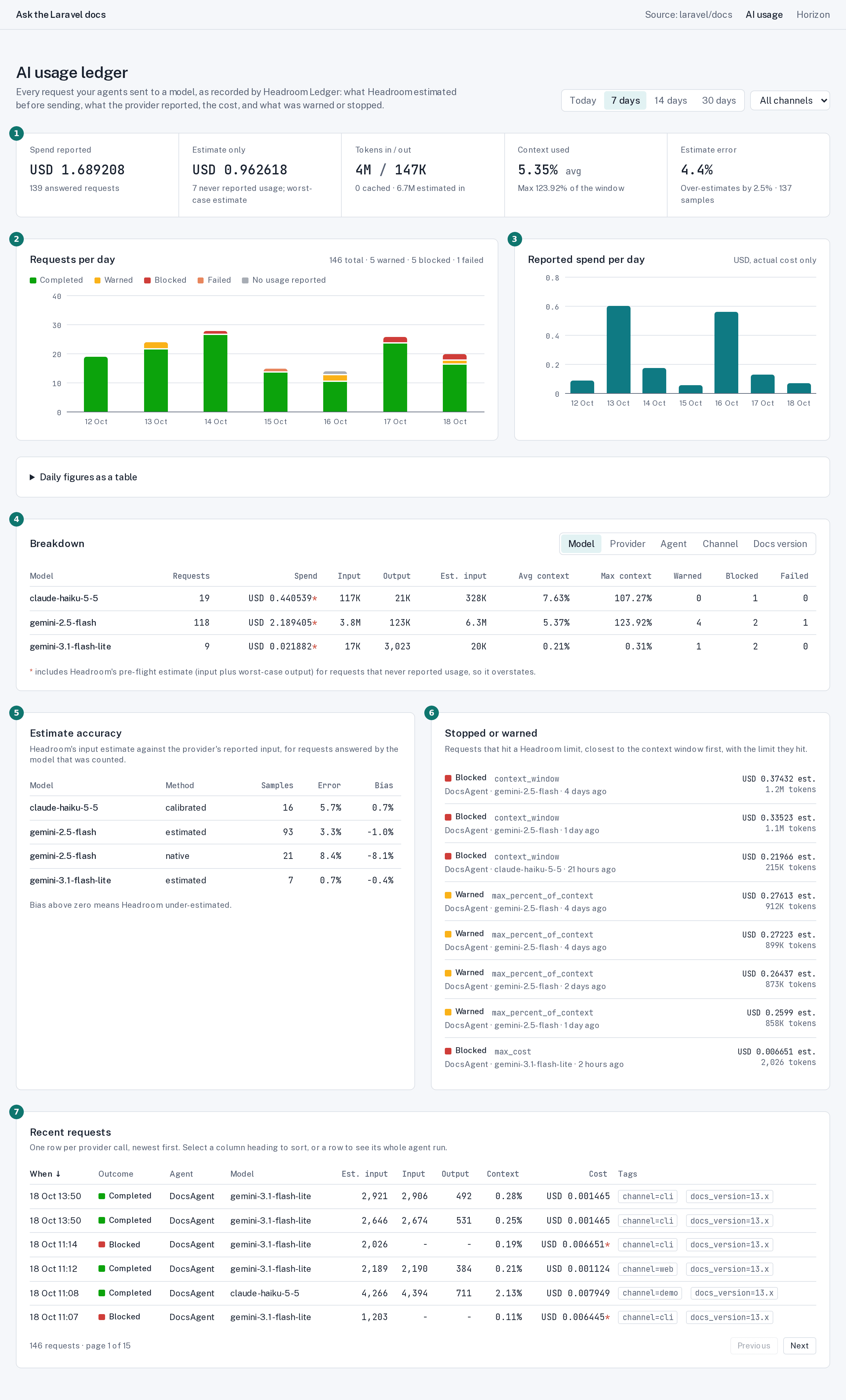
| Panel | Query API |
|---|---|
| 1 Headline tiles | spend() (reported and estimate-only kept apart), tokens(), context(), accuracy()->overall() |
| 2 Requests per day by outcome | byDay()->context() and byDay()->tokens(); every day of the range, empty days included |
| 3 Reported spend per day | byDay()->spend() |
| 4 Breakdown | byModel(), byProvider(), byAgent() or byTag($key), then spend(), tokens(), context() |
| 5 Estimate accuracy | accuracy(), per model and count method |
| 6 Stopped or warned | blocked()->orderBy(EntrySort::PercentUsed)->entries(8), closest to the limit first |
| 7 Recent requests | orderBy(...)->paginate(10, $page) with sortable columns; selecting a row opens $query->run($invocationId), scoped to the filter |
The whole page is in examples/livewire-dashboard (Livewire 3 or 4 and Tailwind v4) to copy into your app. It is not part of the package. On Filament, Headroom for Filament packages a fuller dashboard as a panel plugin.
Architecture notes
- One row per provider call, keyed by Headroom's request ID. An agent run with tool steps makes several calls, grouped by the SDK's invocation ID;
byRun()andLedger::run()aggregate per run. - Column ownership instead of locking. Each listener upserts only its own event's columns, a
nullfrom an event never overwrites a recorded value, and the outcome changes only through conditional updates (usage marks a request completed unless it was warned; a block applies only while no usage is recorded). Nothing reads before it writes, so queue workers never race. - Usage is proof. A request that failed and then succeeded by failover records as completed, against the model that actually answered. Accuracy leaves failover answers out, because another model's tokeniser produced them.
- Inline recording never breaks a request. With the
syncconnection, a recording failure is reported, not thrown. Queued recording throws so the job retries. - Rollups are planned per query, per day. Closed days listed in a
rollup_daystable come from rollups; today, unrolled days and days built with a different primary tag come from raw entries, matched withexistssubqueries rather than date lists. Filters a rollup cannot answer (nearLimit(), outcomes, runs, other tags) read raw entries. - Portable by construction. No raw SQL from event data, no driver-specific types or date functions, explicit short index names (MySQL's 64-character limit), dates stored as
Y-m-d(SQLite compares them as text), and absolute error computed withoutabs(a - b)(MySQL rejects unsigned subtraction below zero). - Privacy is enforced at write time. Model casts reject any breakdown that is not whole token counts and any reason that is not a limit type or an exception class with HTTP status. An architecture test lists every column and fails if one is added without review.
Limitations
- Estimated cost is Headroom's worst case. Headroom prices a request's estimate as its input plus the model's maximum output, because that is what its cost guard protects against. Estimate-only spend (blocked and never-reported requests) therefore overstates what those requests would have cost, sometimes by a lot. Actual cost is what the provider reported.
- Rollups are a snapshot. An entry that arrives for a closed day after it was rolled up is hidden until that day is rebuilt. Each run rebuilds the last rolled-up day again, which covers normal queue lag; for anything older, run
headroom-ledger:rollup --from=.... - A stream the client abandons never reports usage, so it stays
counted, and it is not marked as streamed because onlyTokensUsedsays so. - Pruned days cannot be rebuilt. Once a day's entries are past retention, the rollup command keeps its existing rollup rather than rebuilding it from nothing.
- Currencies are never converted. Amounts are grouped per currency;
Spend::sole()throws if there is more than one. - 0.x. The schema and query API become stable at 1.0. Headroom for Filament is now built on them, and the gaps it exposed were added in 0.1.1; until 1.0 a minor version may still change them, with notes in the changelog.
Security
The ledger stores numbers, model and agent names, and the tags you allowlist; never prompt, instruction, tool or response text, and never exception messages. It makes no network calls. See SECURITY.md for exactly what is stored, retention, erasure and how to report a vulnerability.
Links
- Landing page
- Changelog
- Contributing
- Releasing
- Headroom
- Livewire dashboard example
- Headroom for Filament
- Packagist
Licence
MIT. See LICENSE.