
madebyclowd / laravel-documentable

Laravel file uploads straight to S3, R2 or MinIO with presigned URLs, resumable multipart, versioning, deduplication and cleanup for Eloquent models.
Package info
github.com/madebyclowd/laravel-documentable
pkg:composer/madebyclowd/laravel-documentable
Requires
- php: ^8.3
- ext-fileinfo: *
- illuminate/auth: ^12.0|^13.0
- illuminate/cache: ^12.0|^13.0
- illuminate/console: ^12.0|^13.0
- illuminate/database: ^12.0|^13.0
- illuminate/events: ^12.0|^13.0
- illuminate/filesystem: ^12.0|^13.0
- illuminate/http: ^12.0|^13.0
- illuminate/routing: ^12.0|^13.0
- illuminate/support: ^12.0|^13.0
- illuminate/validation: ^12.0|^13.0
- league/flysystem-aws-s3-v3: ^3.0
Requires (Dev)
- larastan/larastan: ^3.0
- laravel/pint: ^1.13
- orchestra/testbench: ^10.0|^11.0
- phpunit/phpunit: ^11.5|^12.0|^13.0
Suggests
- laravel/boost: Auto-discovers this package's AI guidelines and agent skill from resources/boost/ — no extra setup needed.
Provides
None
Conflicts
None
Replaces
None
- dev-main
- 3.x-dev
- v3.1.0
- v3.0.0
- v3.0.0-alpha.11
- v3.0.0-alpha.10
- v3.0.0-alpha.9
- v3.0.0-alpha.8
- v3.0.0-alpha.7
- v3.0.0-alpha.6
- v3.0.0-alpha.5
- v3.0.0-alpha.4
- v3.0.0-alpha.3
- v3.0.0-alpha.2
- v3.0.0-alpha.1
- 2.x-dev
- v2.1.3
- v2.1.2
- v2.1.1
- v2.1.0
- v2.0.0
- v1.0.0
- dev-chore/next-release
- dev-fix/client-null-type-rules
- dev-fix/release-version-from-highest-tag
This package is auto-updated.
Last update: 2026-11-03 22:31:44 UTC
README
Let users upload files to your Laravel app, store them in S3, R2 or MinIO, and keep every version, without sending a single byte through your PHP server.
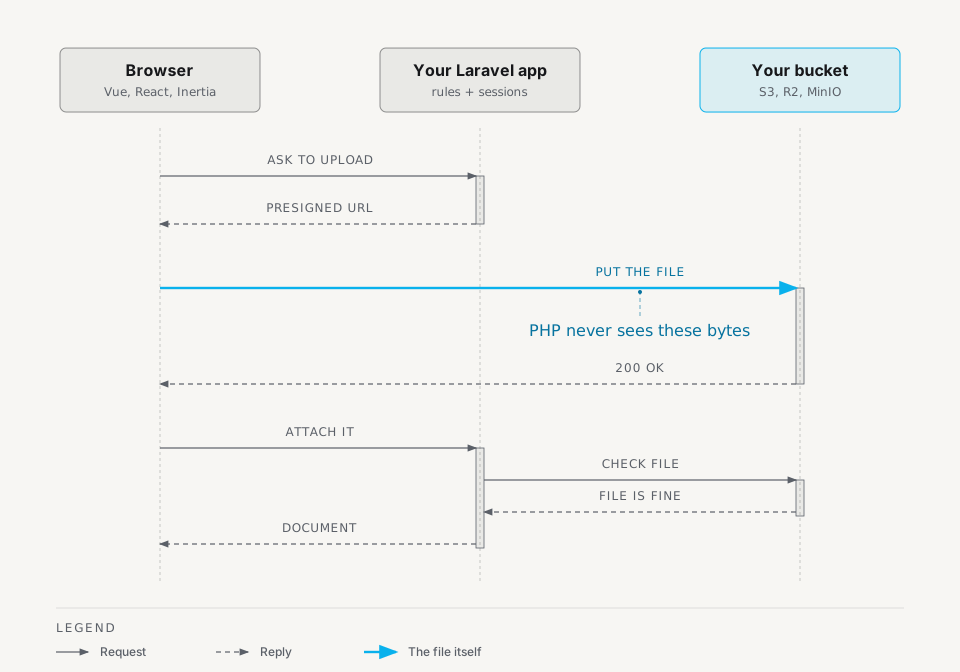
Laravel Documentable attaches documents (PDFs, scans, contracts, photos) to any Eloquent model. The browser uploads straight to your bucket with a presigned URL. Big files upload in parts, and an interrupted upload can continue from the parts that finished. A file you upload twice is stored once. Old versions are kept, then deleted on the schedule you choose.
composer require madebyclowd/laravel-documentable
$invoice->documentOfType('invoice-pdf')->first();   // the latest PDF of this invoice
$service->getUrl($document, now()->addMinutes(5));  // a private link that expires in 5 minutes
Small on purpose
Storage::put() is small, but you then write direct uploads, big-file handling, versions, duplicate detection, cleanup and access checks yourself. A full media library covers more, and adds admin screens, image processing and tables you may not want.
Documentable is the middle option. It handles one thing, business documents that belong to a model, and leaves everything else to you.
| Feature | What it does |
|---|---|
| Direct to bucket | The browser sends the file to the bucket. PHP's upload_max_filesize, post_max_size and request timeout do not apply to it. |
| Resumable big files | After a drop, a multipart upload continues from the parts that finished. Your app stores the session id and passes it back. |
| Same file, stored once | Files with the same SHA-256 share one stored copy. A user cannot claim a file by guessing its hash, because the server asks for proof that they hold the bytes. |
| Versions and retention | A new passport scan keeps the old one. You set how many versions or how many days to keep. |
| File checks | The server reads the file type from the bytes, not the file name, so a .exe renamed to .pdf is refused. |
| Authorizer required | Every action asks your authorizer. In production the app does not boot without one. |
| Cleanup | Commands delete half-finished uploads and bucket files that no document points to. You schedule them. |
| S3-compatible buckets | Runs on the S3 API. Run against real AWS S3, Cloudflare R2 and RustFS (MinIO-compatible) buckets. Other providers use the same API and are listed in the provider table. |
| No admin UI | You build your own screens on plain Eloquent models and a small HTTP API. |
The package also ships an optional TypeScript upload helper that hashes files, retries failed parts, resumes with a saved session id and reports progress, so your Vue, React or Inertia front end does not need its own version of that code.
Is it for you?
Use it when users upload documents that must be kept, versioned, protected and audited: invoices, contracts, IDs, certificates, medical or legal files, permit applications.
Skip it when you only need a profile picture or a one-off file field, or when you need image resizing, galleries or a media browser. A simple store() call or a media library fits those better.
Quick start (5 minutes)
Six steps: install, say which files you accept, mark your model, upload, read it back, and set access rules before production. You do not need to know S3 first.
1. Install the package
composer require madebyclowd/laravel-documentable
php artisan documents:install
The installer publishes the configuration and database migrations, offers to run php artisan migrate, and asks for your owner key type, application shape, multipart ETag strategy, catalog mode and whether to scaffold an authorizer. Every question has a matching option, such as --key-type=uuid, for scripted installs.
2. Define a document type
Add a document type definition in config/documentable.php:
'types' => [
    'invoice-pdf' => [
        'name' => 'Invoice PDF',
        'max_size_mb' => 10,
        'allowed_mimes' => ['application/pdf'],
        'disk' => 's3',
        'path_prefix' => 'invoices',
        'requires_versioning' => true,
        'allows_multiple' => false,
    ],
],
Sync the type configuration into your database:
php artisan documents:sync-types
3. Attach the trait to your model
Add use Documentable; to your owning model:
namespace App\Models;

use Illuminate\Database\Eloquent\Model;
use MadeByClowd\Documentable\Traits\Documentable;

class Invoice extends Model
{
    use Documentable;
}
Or run the helper command:
php artisan documents:attach-model Invoice
4. Upload a file
Upload a file from a controller action using DocumentService:
namespace App\Http\Controllers;

use App\Models\Invoice;
use Illuminate\Http\JsonResponse;
use Illuminate\Http\Request;
use MadeByClowd\Documentable\Models\DocumentType;
use MadeByClowd\Documentable\Services\DocumentService;

class InvoiceDocumentController extends Controller
{
    public function store(Request $request, Invoice $invoice, DocumentService $service): JsonResponse
    {
        $type = DocumentType::where('code', 'invoice-pdf')->firstOrFail();

        $document = $service->upload(
            $request->file('file'),
            $type,
            $invoice
        );

        return response()->json($document, 201);
    }
}
5. Read the document back
// Retrieve the latest document for the invoice:
$document = $invoice->documentOfType('invoice-pdf')->first();

// Generate a temporary download URL valid for 5 minutes:
$url = $service->getUrl($document, now()->addMinutes(5));

// Or read the raw file contents safely:
$contents = $service->readContents($document);
6. Before production: say who may do what
The steps above work on your machine without any access rules, because DocumentService is plain PHP. The HTTP routes are different. They ask an authorizer, and the default denies everything. In production the app also refuses to boot until you set one.
Generate one and fill in your own checks:
php artisan documents:make-authorizer AppDocumentAuthorizer --style=class
// config/documentable.php
'authorization' => [
    'resolver' => \App\Documentable\AppDocumentAuthorizer::class,
],
Prefer Laravel Gates? Run php artisan documents:make-authorizer --style=gates and define the abilities in a service provider. Details are in Authorization.
To upload from client applications directly to storage over HTTP, see Upload flows.
Documentation
The README is the short version. Everything else is in docs/:
| Read this | When you want to |
|---|---|
| Concepts | Learn the words: document type, session, attach, version, status. |
| Authorization | Decide who may upload, see and delete. |
| Upload flows | Use presigned PUT, multipart, dedup, or upload before the owner exists. |
| Browser client | Use the TypeScript helper in Vue, React or Inertia. |
| Reading documents | Show, download, stream and list files. |
| Versions and retention | Keep, restore, promote and prune versions. |
| Operations | Run the doctor, cleanup, CORS, proxies and the deploy checklist. |
| Configuration | Look up every config key. |
| Security | Check the safety rules before production. |
| Testing your app | Fake storage, factories and assertions. |
AI agent context (Laravel Boost)
The package ships guidelines and skills for Laravel Boost: resources/boost/guidelines/laravel-documentable.blade.php (conventions and pitfalls) and resources/boost/skills/laravel-documentable/SKILL.md (the detailed reference). Boost finds them in vendor/ on its own. Boost copies them into your project, so run php artisan boost:update after each package update.
Upgrading from 2.x
Follow UPGRADE.md. It lists the breaking changes and the exact command order.
License
The MIT License (MIT). Please see the LICENSE file for more information.