
loupekit / laravel

Loupe for Laravel — embeddable visual feedback that stores comments in your own database, gates access per user, serves the Loupe dashboard, and exposes the backlog to Claude Code over MCP.
Requires
- php: ^8.2
- illuminate/console: ^11.0|^12.0|^13.0
- illuminate/database: ^11.0|^12.0|^13.0
- illuminate/filesystem: ^11.0|^12.0|^13.0
- illuminate/http: ^11.0|^12.0|^13.0
- illuminate/routing: ^11.0|^12.0|^13.0
- illuminate/support: ^11.0|^12.0|^13.0
Requires (Dev)
- laravel/mcp: ^0.8
- mockery/mockery: ^1.6
- orchestra/testbench: ^9.0|^10.0|^11.0
- phpunit/phpunit: ^11.0|^12.0
Suggests
- laravel/mcp: Enables `php artisan mcp:start loupe` — hands the feedback backlog to Claude Code. Use ^0.8 (supports Laravel 11, 12 and 13).
Provides
None
Conflicts
None
Replaces
None
- dev-main
- v0.14.2
- v0.14.1
- v0.14.0
- v0.13.1
- v0.13.0
- v0.12.0
- v0.11.1
- v0.11.0
- v0.10.28
- v0.10.27
- v0.10.26
- v0.10.25
- v0.10.24
- v0.10.23
- v0.10.22
- v0.10.21
- v0.10.20
- v0.10.19
- v0.10.18
- v0.10.17
- v0.10.16
- v0.10.15
- v0.10.14
- v0.10.13
- v0.10.12
- v0.10.11
- v0.10.10
- v0.10.9
- v0.10.8
- v0.10.7
- v0.10.6
- v0.10.5
- v0.10.4
- v0.10.3
- v0.10.2
- v0.10.1
- v0.10.0
- v0.9.3
- v0.9.2
- v0.9.1
- v0.9.0
- v0.8.1
- v0.8.0
- v0.7.0
- v0.6.0
- v0.5.2
- v0.5.1
- v0.5.0
- v0.4.3
- v0.4.2
- v0.4.1
- v0.4.0
- v0.3.4
- v0.3.3
- v0.3.2
- v0.3.1
- v0.3.0
This package is auto-updated.
Last update: 2026-10-08 18:40:35 UTC
README
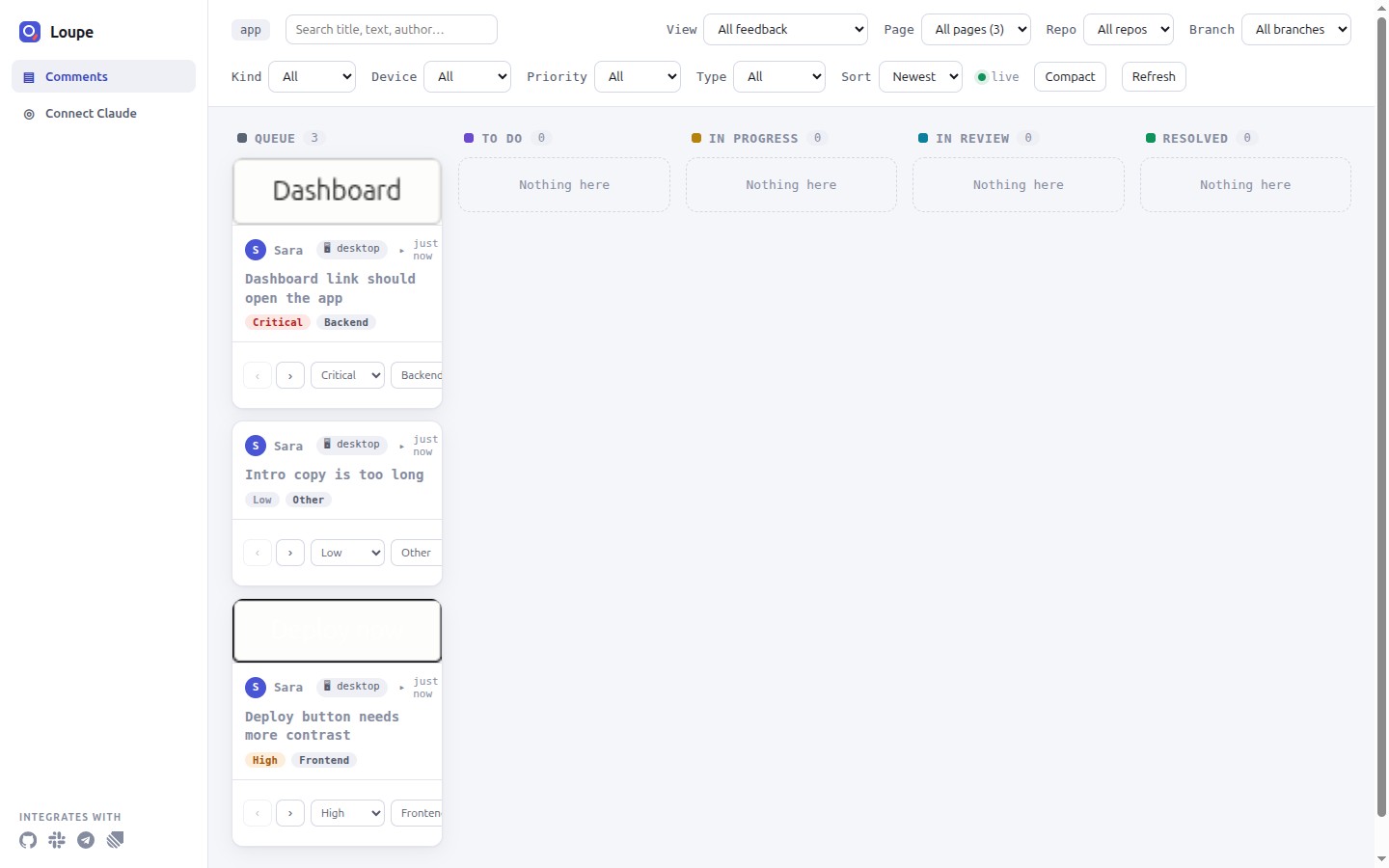
Loupe for Laravel adds a visual feedback widget to your app, stores every comment in your own database, and serves a triage board on your own routes.
Docs: Install guide · Full reference · All docs · Changelog
Contents
- Features
- Requirements
- Install
- Authorization
- Configuration
- Dashboard
- Claude Code over MCP
- Loupe Hub
- Upgrading
- Testing
Features
- One Blade directive.
@loupeWidgetrenders the widget for signed-in, authorized users. It authenticates with your session and CSRF token, so you manage no extra keys. - Your database. Comments are Eloquent rows in
loupe_comments. Screenshots and recordings go to a filesystem disk you choose. - Five-stage board. The dashboard at
/loupe/dashboard(by default) moves feedback through Queue, To Do, In Progress, In Review and Resolved. - Conversations. Each comment has a reply thread with @mentions and emoji reactions. In-app notifications cover mentions and replies, and status changes made in another project through Loupe Hub.
- Activity log. Creates, edits, status moves, deletes, replies and Hub deliveries made through the widget, the dashboard and Hub are recorded in
loupe_activityand shown in the widget's Activity tab. Writes made by the MCP tools or by your own code are not recorded. - Loupe Hub. Loupe Hub is a separate service that connects the Loupe apps in one organization. Through it, you can forward new comments to another project, receive tickets from other projects, and sync status changes and replies both ways.
- Claude Code over MCP. Claude Code is Anthropic's coding agent. MCP (Model Context Protocol) is a protocol that lets an agent call tools. With
laravel/mcpinstalled,php artisan mcp:start loupestarts an MCP server with four tools that read and update your comments. - Events.
CommentCreated,CommentStatusChanged,CommentDeletedandMessageAddedfire whenever the model is saved or deleted through Eloquent, whoever writes it. They do not fire for query-builder bulk writes such asComment::where(...)->update().TicketReceivedandHubUpdateReceivedfire when Hub delivers a ticket or an update.
Requirements
| Requirement | Supported versions |
|---|---|
| PHP | 8.2 or later (Laravel 13 needs PHP 8.3 or later) |
| Laravel | 11, 12, 13 |
| Database | Any database Eloquent supports |
| Authentication | A way for users to sign in (a login route) |
| MCP (optional) | laravel/mcp ^0.8 |
Install
Prerequisites: an app that meets the requirements, and a user account you can sign in with.
-
Require the package:
composer require loupekit/laravel
-
Publish the config, migrations, browser assets and the
App\Providers\LoupeServiceProviderstub. The command also registers the provider inbootstrap/providers.php:php artisan loupe:install
You should see
Published config,Published migration,Published assets,Published dashboard providerandRegistered LoupeServiceProvider, followed by a list of next steps.- If your app has no
loginroute, the command warns you and suggests installing auth scaffolding such as Laravel Breeze. - If your app has no
bootstrap/providers.php, the command warns that it could not register the provider. AddApp\Providers\LoupeServiceProvider::classto your providers list by hand. - To overwrite files you published before, run
php artisan loupe:install --force.
- If your app has no
-
Create the Loupe tables:
php artisan migrate
-
Add the widget to your layout, just before
</body>:@loupeWidget </body>
The directive renders nothing for a guest or for a user who fails the
loupe:usecheck. In thelocalenvironment, any signed-in user passes. -
Grant access for every environment except
local. A gate is a Laravel authorization check, and an ability is the name a gate is defined under. Openapp/Providers/LoupeServiceProvider.phpand add the email addresses that may use the widget and the dashboard:Gate::define('loupe:use', function ($user) { return in_array($user->email, [ 'sara@acme.com', ]); }); Gate::define('loupe:admin', function ($user) { return in_array($user->email, [ 'sara@acme.com', ]); });
Replace
sara@acme.comwith your users' addresses. Users not in the list get no widget and a403from the dashboard. -
Sign in and reload any page that uses the layout. You should see the Loupe widget.
-
Open
/<LOUPE_PATH>/dashboard, where<LOUPE_PATH>is theLOUPE_PATHvalue (defaultloupe). Inlocal, or once your email is inloupe:admin, you should see the board with five empty columns.
Verify
Leave a comment with the widget, then open the dashboard. You should see the comment in the Queue column.
Troubleshooting
| Symptom | Cause | Fix |
|---|---|---|
| The widget does not appear. | You are not signed in, you fail loupe:use, LOUPE_ENABLED is false, or the assets are not published. |
Sign in, add your email to loupe:use (step 5), check .env, and run php artisan vendor:publish --tag=loupe-assets --force. |
The dashboard returns 403. |
Outside local, your user fails loupe:admin. |
Add your email to loupe:admin (step 5). |
For the full walkthrough, see Install the Laravel package.
Authorization
Two abilities control access: loupe:use shows the widget and allows the API, and loupe:admin opens the dashboard. The package defines both gates to deny by default. For each request, Loupe checks these in order and uses the first that applies:
- An
authorize.useorauthorize.dashboardclosure inconfig/loupe.php. - A closure registered with
Loupe::useWhen()orLoupe::adminWhen(). allow_in_local: while it istrue, any signed-in user is allowed in thelocalenvironment.- The
loupe:useandloupe:admingates.
A denied user gets no widget markup, and the API and dashboard answer 403.
allow_in_local has no env var. To require authorization in local too, publish the config and set 'allow_in_local' => false in config/loupe.php.
See Authorize who can use Loupe in Laravel.
Configuration
These are the most-used keys in config/loupe.php. Set them in .env.
| Env var | Config key | Type | Default | Purpose |
|---|---|---|---|---|
LOUPE_ENABLED |
enabled |
bool | true |
Master switch. When false, the directive renders nothing and no HTTP routes are registered. The MCP server is still available when laravel/mcp is installed. |
LOUPE_PATH |
path |
string | loupe |
Route prefix for the API, blobs and dashboard. |
LOUPE_DOMAIN |
domain |
string | empty (any domain) | Domain the Loupe routes are registered on. Example: admin.example.com. |
LOUPE_PROJECT_KEY |
project_key |
string | app |
Name of this app's project. It scopes comments, activity and notifications. |
LOUPE_GUARDS |
guards |
comma-separated list | empty (default guard) | Auth guards to resolve the user through, in order. Example: web,admin. |
LOUPE_ALLOWED_EMAILS |
allowed_emails |
comma-separated list | empty | Users of the configured guards who can be @mentioned. People who already wrote in a thread can be mentioned too. Example: sara@acme.com,omar@acme.com. |
LOUPE_ASSET_URL |
asset_url |
string | empty (app.url) |
Origin that serves public/vendor/loupe. Loupe does not use ASSET_URL. |
LOUPE_TIMEZONE |
timezone |
string | empty (app.timezone) |
IANA time zone for widget timestamps. Example: Europe/London. |
LOUPE_LOCALE |
locale |
string | empty (browser locale) | BCP 47 locale for dates. Example: en-GB. |
LOUPE_DISK |
disk |
string | public |
Filesystem disk for screenshots, recordings and attachments. |
LOUPE_HUB_URL |
hub.url |
string | empty | Loupe Hub base URL. Example: https://hub.example.com. |
LOUPE_PROJECT_ID |
hub.project_id |
string | empty | Hub project ID (prj_…). |
LOUPE_PROJECT_SECRET |
hub.project_secret |
string | empty | Hub project secret (psk_…). Keep it out of version control. |
LOUPE_ACTIVITY |
activity.enabled |
bool | true |
Records events for the Activity tab and GET /<LOUPE_PATH>/v1/activity. |
Full reference: every key, route, event, migration and Artisan command is in docs/LARAVEL.md.
Dashboard
The dashboard is served at /<LOUPE_PATH>/dashboard behind the web and loupe.auth middleware and the loupe:admin ability. It shows five columns: Queue, To Do, In Progress, In Review and Resolved.
You can filter the board by view, page, repo, branch, kind (Element, Region, Note), device (Desktop, Tablet, Mobile), priority (Critical, High, Medium, Low) and change type (Frontend, Backend, API, Other). You can sort by newest, oldest or priority, and switch to compact density. A Connect Claude page sits next to Comments in the navigation.
Claude Code over MCP
The package registers a local MCP server named loupe only when laravel/mcp is installed. The server talks over standard input and output.
-
Install
laravel/mcp:composer require laravel/mcp:^0.8
-
Check that the server starts:
php artisan mcp:start loupe
The command waits silently for input. Press
Ctrl+Cto stop it. -
Add the server to Claude Code. Put this in
.mcp.jsonin your project's root:{ "mcpServers": { "loupe": { "command": "php", "args": ["<ABSOLUTE_PATH_TO_APP>/artisan", "mcp:start", "loupe"] } } }<ABSOLUTE_PATH_TO_APP>is the full path of your Laravel app, for example/home/sara/src/shop. -
Restart Claude Code and run
/mcp. You should seeloupein the list of servers.
The server reads your database directly and exposes four tools:
| Tool | Arguments | What it does |
|---|---|---|
list-comments |
status?, priority?, changeType?, repo?, branch?, url? |
Lists matching comments as JSON. |
get-comment |
id |
Returns the request, element HTML, computed styles, any proposal and the screen-recording URL, with the screenshot and image attachments as images. For a free note, it returns only the title, note, status, page and attachments. |
propose-change |
id, html, css?, notes? |
Stores a proposed HTML and CSS change on the comment. |
update-status |
id, status |
Moves the comment to queue, todo, in_progress, in_review or resolved. The legacy names open and done are accepted. Any other value moves the comment to queue; the HTTP API refuses it with 422 instead. |
For other MCP clients, see Connect MCP clients.
Loupe Hub
Loupe Hub connects the apps in one organization. Each app is a Hub project with its own ID and secret. Set LOUPE_HUB_URL, LOUPE_PROJECT_ID and LOUPE_PROJECT_SECRET. Until all three are set, forwarding stays off and the inbound route answers 503.
-
Send. Each new comment posted from the widget is sent to Hub by the
SendToHubjob, signed with the project secret. Comments created by your own code or by MCP are not sent. A comment whose author has no email is not sent, and a warning is logged. If your queue connection is notsync, run a queue worker:php artisan queue:work
A Hub failure is logged and never blocks the comment.
-
Receive. Set this app's inbound URL in Hub to
https://<YOUR_APP_HOST>/<LOUPE_PATH>/v1/hub/inbound, where<YOUR_APP_HOST>is your app's public host. Each delivery must carry theX-Loupe-Hub-Project,X-Loupe-Hub-TimestampandX-Loupe-Hub-Signatureheaders, with a timestamp within 300 seconds of now. The package verifies each delivery and firesLoupekit\Loupe\Events\TicketReceived. -
Sync. Status changes on the receiving project and replies on either side travel back through Hub.
To verify, post a comment from the widget. You should see it in the target project, and a Hub entry in the widget's Activity tab.
See Connect apps to Hub.
Upgrading
After you update the package, refresh the browser assets, copy the new migrations into your app, and run them. The package does not load migrations from vendor/.
php artisan vendor:publish --tag=loupe-assets --force
php artisan vendor:publish --tag=loupe-migrations
php artisan migrate
Do not pass --force to the migrations tag; without it, Laravel copies only the migrations you do not have yet. You should see one line per new migration, or Nothing to migrate.
The widget flags a published bundle whose version differs from the installed package. See Upgrade Loupe.
Testing
From packages/laravel, run composer install, then composer test. The PHPUnit suite runs on an in-memory SQLite database provided by Testbench, the package-testing harness for Laravel.
composer test:coverage-100 enforces 100% line coverage and needs a coverage driver such as pcov, a PHP extension that collects code coverage.
composer stranger-test installs the package into a fresh Laravel app, as a new user would, and checks the widget, dashboard and API end to end. It needs network access, Composer, PHP, curl and python3.
CI runs the suite on PHP 8.2 to 8.4 with Laravel 11 and 12, and on PHP 8.3 and 8.4 with Laravel 13. See docs/TESTING.md.
Related packages
- @loupekit/sdk: the embeddable widget. This package ships a built copy.
- @loupekit/mcp: the standalone MCP server for the Node backend.
- @loupekit/shared: shared types and helpers.
Author
Created and maintained by Mohamed Ashraf Elsaed — LinkedIn · GitHub