
felipearnold / laravel-health-digest

Logs slow queries and slow requests and groups them, together with application errors, into a ranked JSON digest.
Package info
github.com/felipeArnold/laravel-health-digest
pkg:composer/felipearnold/laravel-health-digest
Requires
- php: ^8.3
- illuminate/console: ^12.0|^13.0
- illuminate/database: ^12.0|^13.0
- illuminate/http: ^12.0|^13.0
- illuminate/log: ^12.0|^13.0
- illuminate/support: ^12.0|^13.0
Requires (Dev)
- laravel/boost: ^2.10
- laravel/mcp: ^1.0
- laravel/pint: ^1.18
- orchestra/testbench: ^10.0|^11.0
- pestphp/pest: ^3.0|^4.0
- pestphp/pest-plugin-laravel: ^3.0|^4.0
Suggests
- laravel/mcp: Required to let an AI agent query the digest through the MCP server (^1.0).
Provides
None
Conflicts
None
Replaces
None
This package is auto-updated.
Last update: 2026-10-22 14:49:12 UTC
README
Find out what is slowing your Laravel application down, ranked by impact.
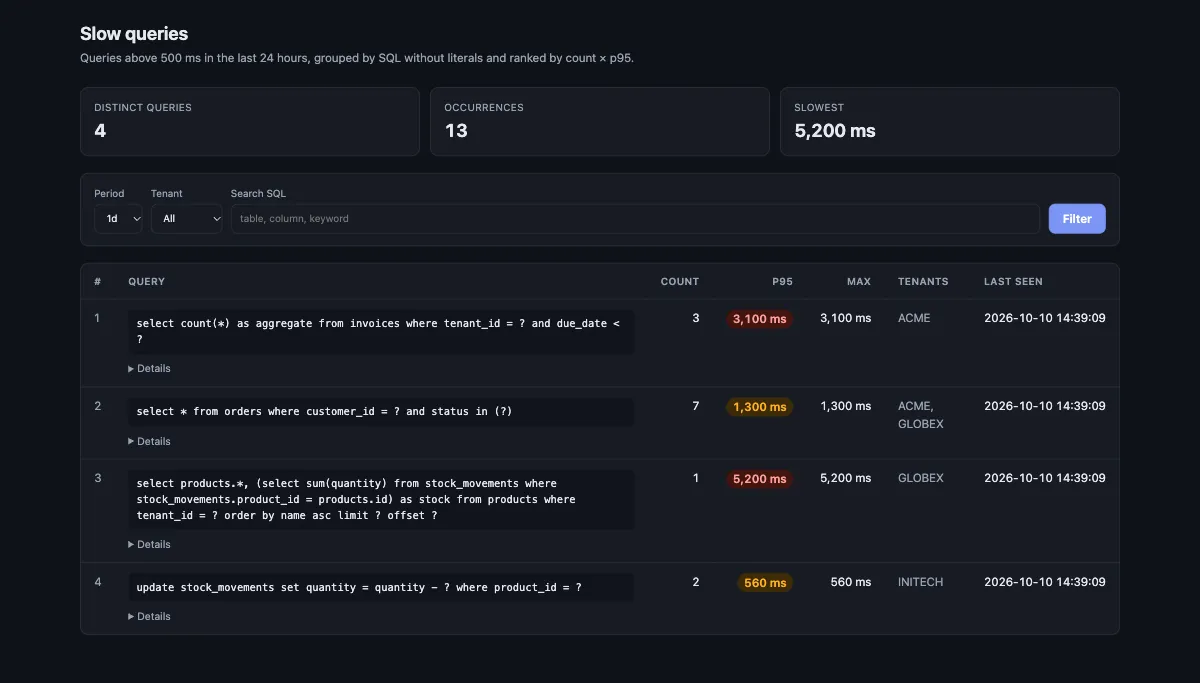
Laravel Health Digest records slow queries and slow requests, reads the errors already in your application log, and groups everything into a ranked digest. Entries that differ only by literals collapse into one item, so a query that runs a thousand times a day shows up once, with its count, p95 and the screens that triggered it. The result is a JSON file that a person or an AI agent can turn into tickets, and a dashboard to browse it.
Contents
- Features
- Requirements
- Installation
- Usage
- MCP server
- Configuration
- Digest format
- How grouping works
- Privacy
- Limitations
- Development
- Changelog
- License
Features
- Slow queries. SQL above a threshold, without bindings, attributed to the route, Livewire component and method, queued job or Artisan command that ran it.
- Slow requests. HTTP and Livewire requests above a threshold.
- Errors.
ERRORand above fromlaravel.log, single or daily, grouped by exception class and location. - Ranked digest.
php artisan health:digestwrites a JSON file ranked bycount × p95, with a stable fingerprint per item. - Dashboard. A self-contained page that lists slow queries with filters for period, tenant and SQL text. No Livewire, no asset build.
- MCP server. Ask Claude (or any MCP client) for the problems reported by the server, from your own machine.
- Multi-tenant aware. Tag every entry with the current tenant and see which tenants each problem affects.
- Safe by default. Bindings are never written, literals are masked in the digest, and a failing tenant resolver never breaks a request.
Requirements
| Dependency | Version |
|---|---|
| PHP | 8.3 or higher |
| Laravel | 12.x or 13.x |
Installation
Install the package with Composer:
composer require felipearnold/laravel-health-digest
The service provider is auto-discovered. Out of the box it:
- registers a daily JSON log channel named
health-digest, written tostorage/logs/health-digest-YYYY-MM-DD.log, unless you define one yourself; - listens to
QueryExecuted,JobProcessingandCommandStarting; - prepends the
LogSlowRequestsmiddleware to thewebmiddleware group; - registers the dashboard route and the
viewHealthDigestgate.
Optionally, publish the configuration file:
php artisan vendor:publish --tag=health-digest-config
Usage
Dashboard
Open /health-digest/slow-queries to browse the slow queries read live from
the log, grouped and ranked like the digest.
Access is controlled by the viewHealthDigest gate, which only allows the
local environment. Define the gate in your application to open the page in
other environments:
use App\Models\User;
use Illuminate\Support\Facades\Gate;

public function boot(): void
{
    Gate::define('viewHealthDigest', fn (?User $user = null): bool => $user?->is_admin === true);
}
The page runs under the web middleware group, so the gate receives the user
of the default guard. Use the dashboard.middleware option to add
authentication or to switch guards.
Digest command
php artisan health:digest --hours=12 --limit=20
| Option | Default | Description |
|---|---|---|
--hours |
12 |
Time window to analyse |
--limit |
20 |
Maximum items per section |
The digest is written to storage/app/health-digest/latest.json. Schedule it
to get a fresh report at the start of each shift:
use Illuminate\Support\Facades\Schedule;

Schedule::command('health:digest')->twiceDailyAt(7, 13, 30)->withoutOverlapping();
Identifying the tenant
Register a resolver to tag every entry with the current tenant:
use FelipeArnold\HealthDigest\HealthDigest;

public function boot(): void
{
    HealthDigest::resolveTenantUsing(fn () => auth()->user()?->company_id);
}
The value appears as tenant in each log entry and as tenants in the digest
and the dashboard. A resolver that throws is treated as null.
Routes outside the web group
Requests that skip the web group are not timed, and their slow queries are
attributed to console. Filament panels are the common case, because each
panel declares its own middleware list. Add the middleware to each panel:
use FelipeArnold\HealthDigest\Http\Middleware\LogSlowRequests;

$panel->middleware([
    LogSlowRequests::class,
    EncryptCookies::class,
    // ...
]);
MCP server
The package ships an MCP server built on
laravel/mcp, so an AI agent can read the
problems reported by the server without anyone copying logs around. It exposes
one read-only tool, list-problems, that returns the same grouped and ranked
items as the digest.
Install laravel/mcp on the server (composer require laravel/mcp), then
connect from your machine in one of two ways.
Over SSH
Nothing is exposed over HTTP. The agent starts the server on the host and talks to it through stdio:
claude mcp add health-digest-prod -- \
  ssh forge@your-server "cd /home/forge/your-site && php artisan mcp:start health-digest"
Over HTTP
Set a token in the server's .env. Without it the endpoint does not exist.
HEALTH_DIGEST_MCP_TOKEN=a-long-random-string
Then register the endpoint, sending the token as a Bearer header:
claude mcp add --transport http health-digest-prod https://your-app.com/mcp/health-digest \
  --header "Authorization: Bearer a-long-random-string"
The endpoint answers 404 when no token is configured and 401 when the token
is missing or wrong. Use a long random value, serve it over HTTPS only, and
keep it out of version control.
The list-problems tool
| Argument | Description |
|---|---|
section |
all (default), errors, slow_queries or slow_requests |
hours |
Time window, 1 to 720. Default 24 |
limit |
Maximum items per section, 1 to 100. Default 20 |
search |
Keeps items whose SQL, message or origin contains the text |
tenant |
Keeps slow queries and slow requests of one tenant. Errors carry no tenant and are not filtered |
fingerprint |
Returns only the item with that fingerprint |
Ask for example: "list the errors from production in the last 6 hours and open
the code at each location." Items hold normalized text and a file:line
location, never raw values.
Configuration
| Key | Environment variable | Default |
|---|---|---|
enabled |
HEALTH_DIGEST_ENABLED |
true |
channel |
— | health-digest |
log_path |
HEALTH_DIGEST_LOG_PATH |
storage/logs/health-digest.log |
retention_days |
HEALTH_DIGEST_RETENTION_DAYS |
14 |
query_threshold_ms |
HEALTH_DIGEST_QUERY_MS |
500 (0 disables) |
request_threshold_ms |
HEALTH_DIGEST_REQUEST_MS |
3000 (0 disables) |
middleware_groups |
— | ['web'] |
error_log_path |
HEALTH_DIGEST_ERROR_LOG_PATH |
storage/logs/laravel.log |
output_path |
HEALTH_DIGEST_OUTPUT_PATH |
storage/app/health-digest/latest.json |
dashboard.enabled |
HEALTH_DIGEST_DASHBOARD_ENABLED |
true |
dashboard.path |
HEALTH_DIGEST_DASHBOARD_PATH |
health-digest |
dashboard.middleware |
— | ['web'] |
mcp.token |
HEALTH_DIGEST_MCP_TOKEN |
none (HTTP endpoint off) |
mcp.path |
HEALTH_DIGEST_MCP_PATH |
mcp/health-digest |
Digest format
{
  "generated_at": "2026-10-05 13:30:00",
  "since": "2026-10-05 01:30:00",
  "slow_queries": [
    {
      "fingerprint": "3f9a1c0b7d2e",
      "sample": "select * from orders where customer_id = ?",
      "count": 3,
      "p95_ms": 1000,
      "max_ms": 1000,
      "tenants": ["ACME", "GLOBEX"],
      "origins": ["GET orders", "livewire orders.list@save"],
      "first_seen": "2026-10-05 09:00:00",
      "last_seen": "2026-10-05 11:00:00"
    }
  ],
  "slow_requests": [],
  "errors": [
    {
      "fingerprint": "a81c22e09f41",
      "sample": "Inconsistent balance for account ?",
      "exception": "App\\Exceptions\\BalanceException",
      "location": "app/Actions/Foo.php:42",
      "level": "ERROR",
      "count": 2,
      "first_seen": "2026-10-05 10:00:00",
      "last_seen": "2026-10-05 11:00:00"
    }
  ]
}
fingerprint is stable across runs, so it can be used to deduplicate tickets.
How grouping works
| Section | Grouped by |
|---|---|
| Slow queries | SQL with numbers, quoted strings and IN (...) lists replaced by ? |
| Slow requests | Origin: METHOD uri or livewire component[updated properties]@method |
| Errors in your code | Exception class and file:line |
Errors inside vendor/ |
Exception class, file:line and normalized message |
Items are ranked by count × p95, so a moderately slow query that runs all day
ranks above a single very slow one.
Privacy
- Query bindings are never logged.
- Error samples drop the
(Connection: …, SQL: …)suffix of query exceptions and mask quoted strings, numbers, dates, documents and e-mails. - Livewire component, method and property names are accepted only when they look like identifiers, so free text from the request payload never becomes an origin. Updated properties are logged by name only, never with their values.
- The dashboard and the digest show normalized SQL. The raw log file stores
$query->sqlas executed, so values written directly into the SQL instead of bound stay in the log until it rotates.
Limitations
- The MCP server reads the logs of the server it runs on. On a multi-server setup, register one connection per server.
- Logs are local files. On a multi-server setup each server keeps its own log, and the digest only covers the server it runs on.
- Platforms without a persistent disk, or a log channel that writes to
stderr, leave the digest empty. - Fingerprints of errors include the line number, so they change when the code above that line changes.
Development
composer test     # Pest
composer format   # Pint
The repository ships a Laravel Boost MCP
server for AI agents. It runs through Testbench, since the package has no
artisan:
vendor/bin/testbench boost:mcp
vendor/bin/testbench serve boots a local application with the package
installed, which is useful to work on the dashboard.
Changelog
See CHANGELOG.md for what changed in each release.
License
The MIT License. See LICENSE for details.