
wit3 / filament-relation-navigator

Give every Filament relation manager its own page (/{record}/{relation}) and switch between them from the breadcrumb, reusing the relation managers you already have.
Package info
github.com/wit3/filament-relation-navigator
pkg:composer/wit3/filament-relation-navigator
Requires
- php: ^8.2
- filament/filament: ^4.13|^5.0
- spatie/laravel-package-tools: ^1.15
Requires (Dev)
- larastan/larastan: ^3.0
- laravel/pint: ^1.18
- orchestra/testbench: ^10.0|^11.0
- pestphp/pest: ^3.0|^4.0
- pestphp/pest-plugin-browser: ^4.0
- pestphp/pest-plugin-laravel: ^3.0|^4.0
- pestphp/pest-plugin-livewire: ^3.0|^4.0
Suggests
None
Provides
None
Conflicts
None
Replaces
None
README
Relation Navigator for Filament
Documentation: guides, configuration reference, upgrade guide and search on wit3.github.io/filament-relation-navigator.
Latest release: What's new
In other languages: the documentation in Italiano · Español · Português · Français · Deutsch · 中文 · 日本語 · Русский · العربية. Each one has its README in this repository too (
README.it.md,README.es.md...).
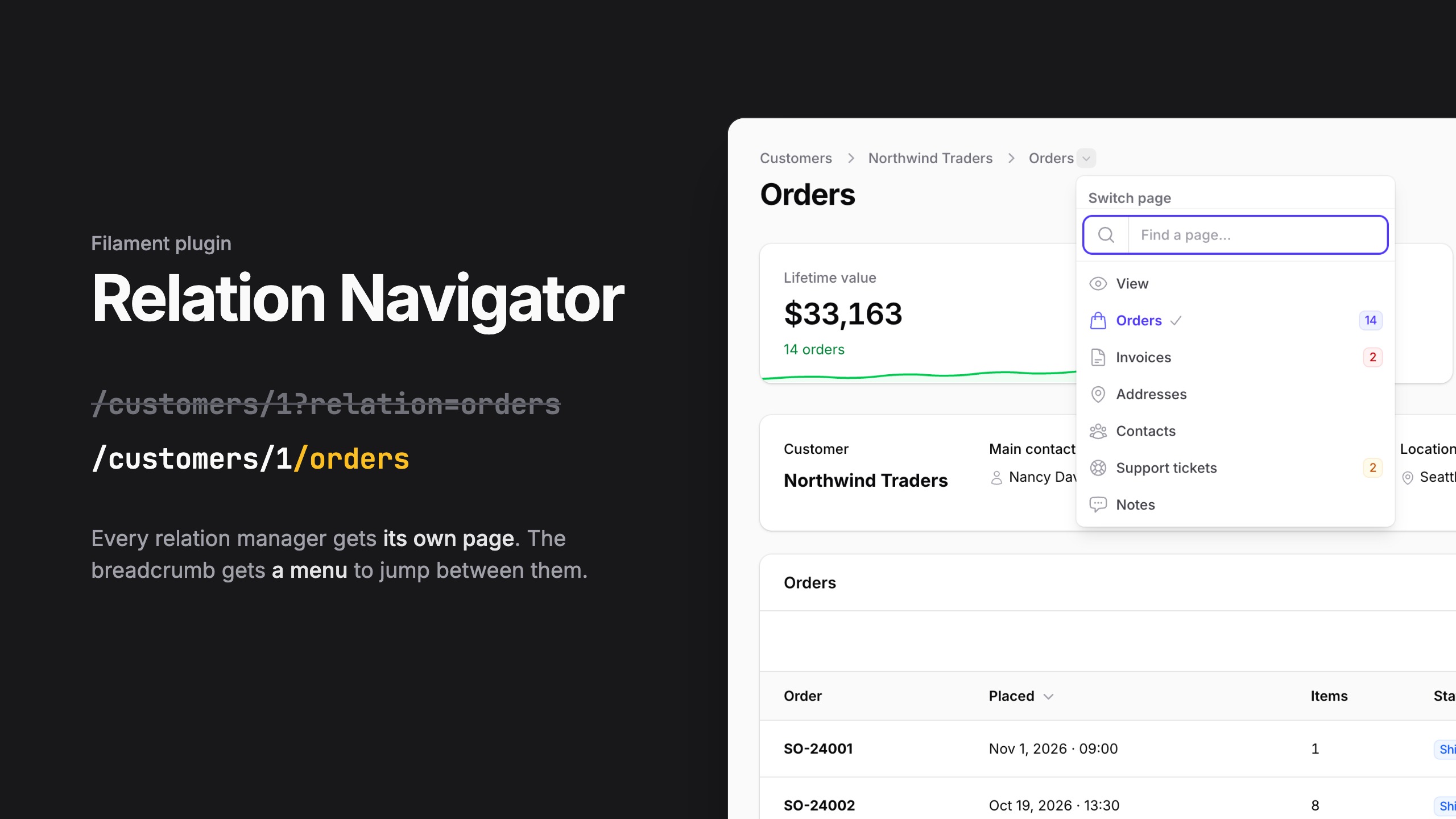
Give every relation manager of a Filament resource its own page, and jump between them from a menu in the breadcrumb.
/customers/1?relation=ordersbecomes/customers/1/orders: a real route you can link, bookmark and open in a new tab.- The page renders the relation manager you already have: same table, filters, actions, badges and authorization. Nothing is duplicated.
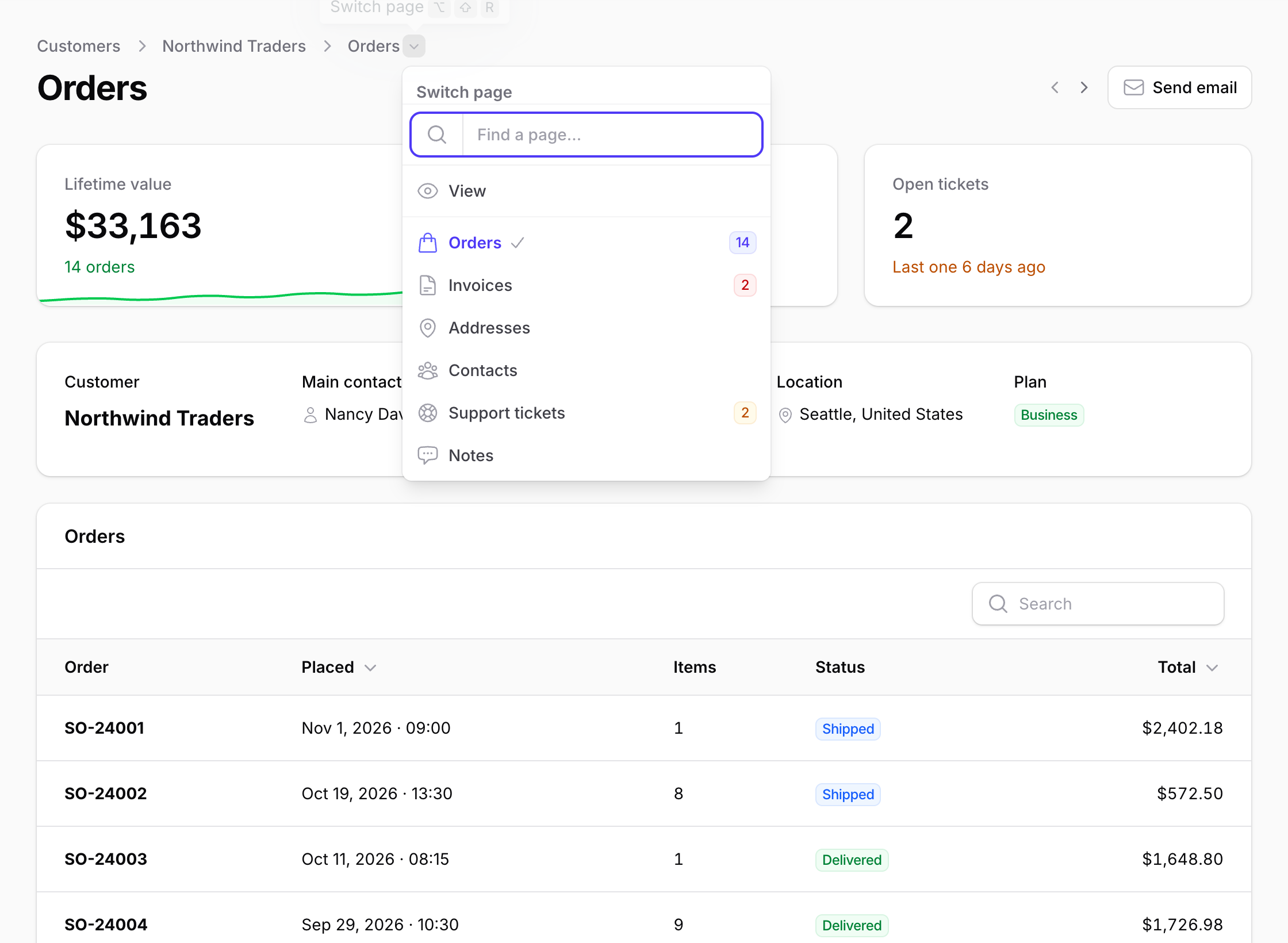
- Add a header above the relation (the record's card, widgets, actions), taken from the resource.
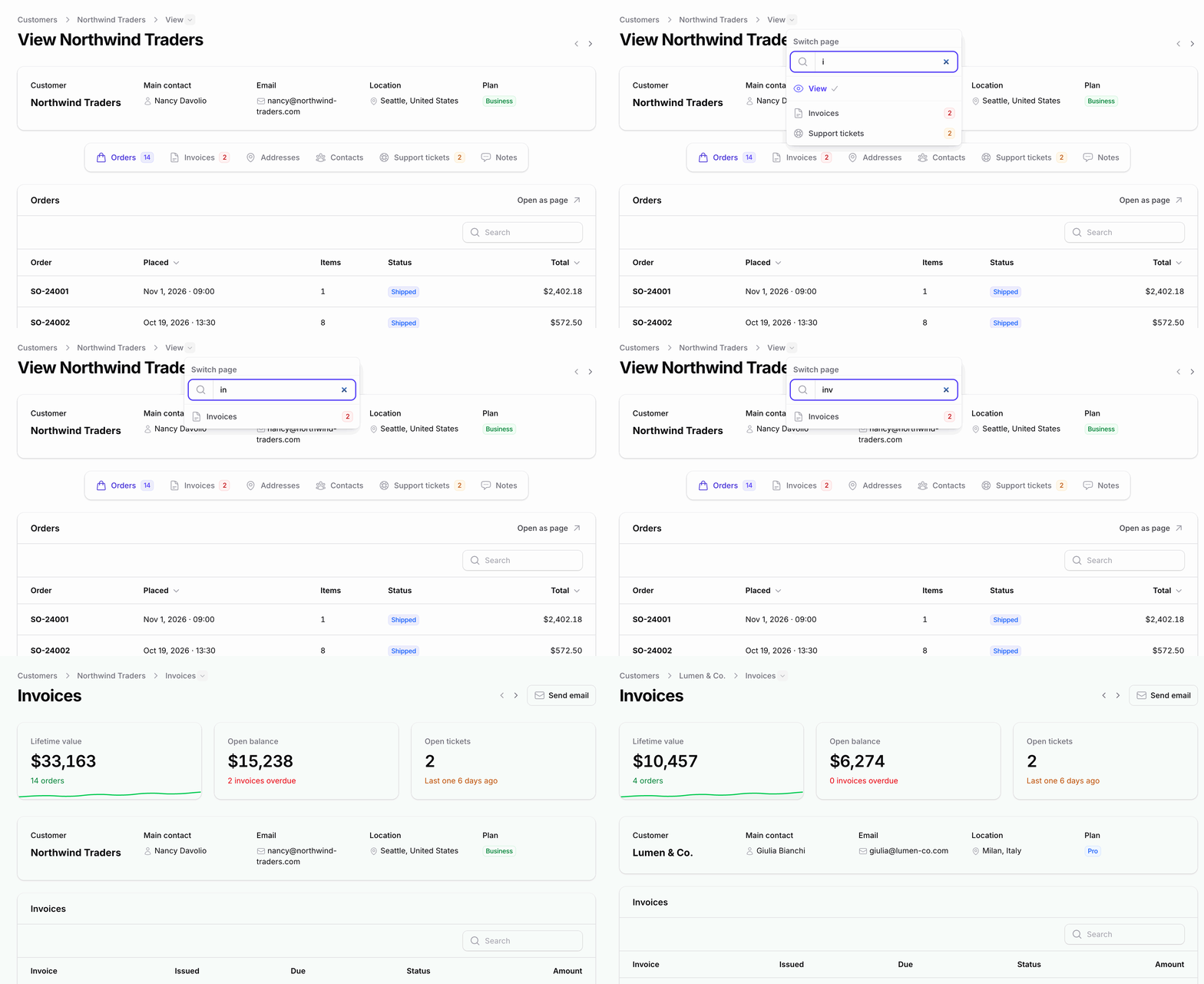
- The last breadcrumb opens a menu with the record's pages and every relation the user can see, with icons and badges. Two looks, optional search and keyboard navigation, a view of your own, and a version for small screens.
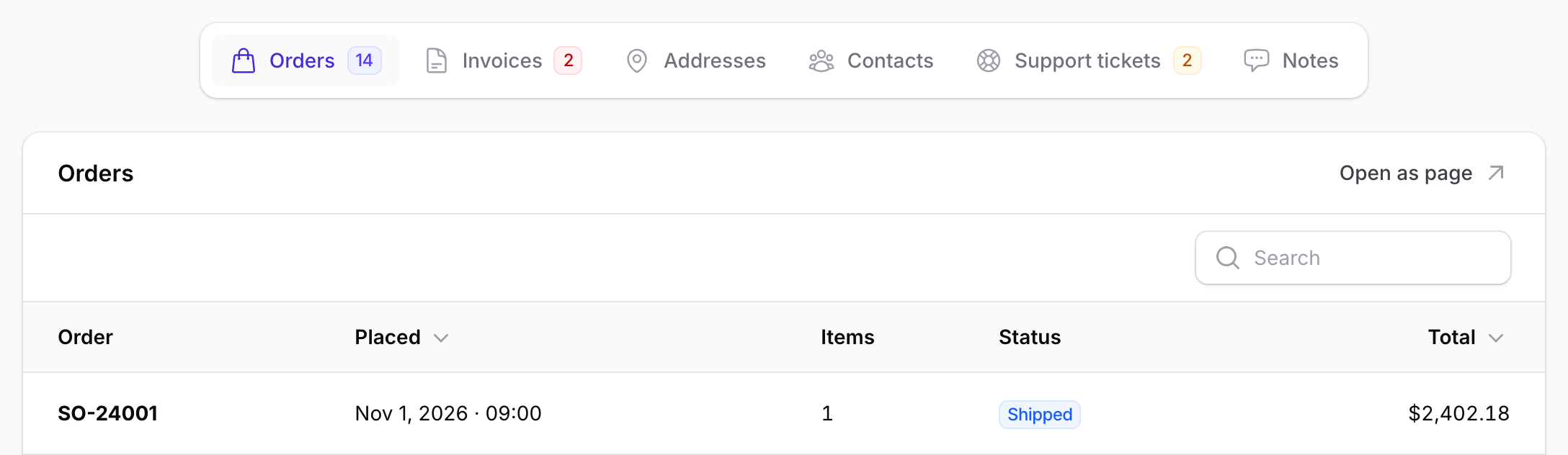
- Previous and next record on the same page, an "Open as page" action on every relation manager table, and links to old tabs that land on the new pages: each one switchable globally, per resource or per page.
- One trait, no page classes: no files to generate, nothing to add to
getPages()or to the panel provider. - 32 languages, right to left ones included, with Filament's codes. The documentation is in 10.
Requirements
| Package | Version |
|---|---|
| PHP | 8.2+ |
| Laravel | 12, 13 |
| Filament | 4.13+, 5.x |
Installation
composer require wit3/filament-relation-navigator
php artisan filament:assets
Run filament:assets again after each update: Filament copies the plugin's
stylesheet into public/.
Quick start
1. Give the relations a page. Add the trait to the resource:
use Wit3\FilamentRelationNavigator\Concerns\HasRelationPages;

class CustomerResource extends Resource
{
    use HasRelationPages;

    public static function getRelations(): array
    {
        return [
            'orders' => OrdersRelationManager::class,
            'invoices' => InvoicesRelationManager::class,
            NotesRelationManager::class,
        ];
    }
}
Every relation now has its page: /customers/1/orders, /customers/1/invoices,
/customers/1/notes.
2. Add the menu to the view page:
use Wit3\FilamentRelationNavigator\Concerns\HasRelationNavigator;

class ViewCustomer extends ViewRecord
{
    use HasRelationNavigator;
}
That's all. The relation pages have the menu already, and the tabs on the view page keep working as before.
Relation pages
Opting in
Opt in on the resource, for every relation manager, or only on the relation managers you want:
use Wit3\FilamentRelationNavigator\Concerns\InteractsWithRelationPage;

class OrdersRelationManager extends RelationManager
{
    use InteractsWithRelationPage;
}
| Setup | Relations with a page |
|---|---|
HasRelationPages on the resource |
all, minus the ones that opt out |
InteractsWithRelationPage on a manager |
only the managers that opt in |
| A page class you wrote (see below) | all, minus the ones that opt out |
To leave some relations out:
// On the resource
public static function hasRelationPage(string $slug): bool
{
    return $slug !== 'notes';
}

// On a relation manager, with InteractsWithRelationPage
protected static bool $hasRelationPage = false;
A relation manager shared by two resources opts in for both: use the
resource's hasRelationPage() to leave one of them out.
URLs and slugs
getRelations() entry |
URL |
|---|---|
'orders' => OrdersRelationManager::class |
/customers/1/orders |
SupportTicketsRelationManager::class (no key) |
/customers/1/support-tickets |
RelationGroup::make('Activity', [...]) |
/customers/1/activity |
A relation manager's own slug wins
(protected static ?string $relationPageSlug = 'tickets';), then the key in
getRelations(), then the kebab-cased relationship name (or the group label:
give groups a key, since a translated label changes with the language). Slugs
equal to one of the resource's page keys (edit, view...) are skipped, and
so is a second relation with a slug already taken.
Each page is a named route, relations.{slug}:
CustomerResource::getUrl('relations.orders', ['record' => $customer]);
Authorization and behaviour
The relation manager receives the resource's view page as $pageClass
(the edit page when there is no view page), so isReadOnly(),
canViewForRecord(), getBadge() and every other check behave exactly as in
the tab. The view page is found by its key (view, edit, or
$contextPage on a page class you wrote) or by its class.
A relation page needs what the view page needs (its canAccess() and the
record's view policy; update when it stands for the edit page) and the
manager's canViewForRecord(). Without a view or an edit page, the view
policy applies. A policy that denies as not found gives a 404, an unknown
slug too. The menu, global search and "Open as page" only link the pages the
user can open.
Relation pages do not run the view page's own code: checks in its
authorizeAccess() or a getRelationManagers() filtered per user do not
apply there. Put them in policies, in canViewForRecord(), or veto a relation
page per record on the resource:
public static function canAccessRelationPage(Model $record, string $slug): bool
{
    return $slug !== 'audit-logs' || auth()->user()->isAdmin();
}
Header, actions and widgets
Above the relation, a relation page can show part of the record's view, header actions and widgets. Define them on the resource for every relation page, or on a relation manager for its own page:
public static function relationPageHeader(Schema $schema): Schema
{
    // The whole infolist (static::infolist($schema)) or a piece of it.
    return $schema->components([
        CustomerCard::make(),
    ]);
}

public static function getRelationPageHeaderActions(): array
{
    return [
        Action::make('email')
            ->url(fn (Customer $record): string => "mailto:{$record->email}"),
    ];
}

public static function getRelationPageHeaderWidgets(): array
{
    return [CustomerStats::class]; // receives the record as $record
}

public static function getRelationPageFooterWidgets(): array
{
    return [];
}
- The header of a relation manager replaces the resource's one; actions and widgets of both are shown, the resource's first.
- Header actions act on the record the relation belongs to.
- With a header, the record's name is not repeated under the title.
- Pieces that only exist inside the view page class (its own methods and modals) are not reachable from here: move them to the resource, to an action class or to a trait.
The breadcrumb menu
HasRelationNavigator needs a page with a record: ViewRecord, EditRecord
and pages using InteractsWithRecord already have the two methods it
declares, getRecord() and hasRecord(). On a page without a record PHP
says so as soon as the class is loaded.
A record page is in the menu if, and only if, it uses HasRelationNavigator:
the view page, the edit page or any custom page of the record. On those pages
the last breadcrumb opens the menu. The relation pages are always listed,
after the record pages, with the relation managers' icons and badges, and
only when the user can see them.
If the page already builds its own breadcrumbs, pass them through
withRelationNavigator():
/**
 * @return array<string | int, string | Htmlable>
 */
public function getBreadcrumbs(): array
{
    return $this->withRelationNavigator([
        CustomerResource::getUrl('index') => 'Customers',
        $this->getBreadcrumb(),
    ]);
}
A custom page that uses InteractsWithRecord itself, instead of extending
ViewRecord or EditRecord, has two getBreadcrumbs() methods. Unless it
defines its own, tell PHP which one wins:
class CustomerActivity extends Page
{
    use HasRelationNavigator, InteractsWithRecord {
        HasRelationNavigator::getBreadcrumbs insteadof InteractsWithRecord;
        InteractsWithRecord::getBreadcrumbs as getRecordBreadcrumbs;
    }
}
The menu uses the page's $navigationLabel and $navigationIcon, and shows
it only when canAccess() allows it for the record.
Open as page
On the view and edit pages, every relation manager that has its own page gets an Open as page action in the header of its table, next to its title and before its own actions. It opens the relation manager's own page, or the page of its relation group when it has no page of its own. On a group's page the managers with a page of their own get the action too; on its own page a manager never links to itself.
Turn it off where you need to:
// config/filament-relation-navigator.php: everywhere
'relation_manager_link' => false,
// On a resource: all its relation managers
public static function hasRelationPageLinks(): bool
{
    return false;
}
// On a relation manager (with InteractsWithRelationPage)
protected static bool $hasRelationPageLink = false;

// or, without the trait
public static function hasRelationPageLink(): bool
{
    return false;
}
Its look
A link with an arrow by default. Change it in the config:
'relation_manager_action' => [
    'style' => 'button',        // link, button or icon_button (the label becomes a tooltip)
    'label' => 'Full page',     // text or translation key; null: "Open as page", translated
    'icon' => 'heroicon-m-arrow-top-right-on-square', // any Filament icon, or null
    'icon_position' => 'after', // or before
    'color' => 'gray',
    'size' => null,             // sm, md, lg...
    'new_tab' => false,
],
Or change the Filament action itself, for everything else but its URL and when it shows, which the package sets. Every level gets the action as the previous one left it:
// A service provider: every relation manager
RelationNavigator::configureRelationPageActionUsing(
    fn (Action $action, RelationManager $relationManager) => $action->outlined()->badge('new'),
);
// A resource, or a relation manager: only there
public static function configureRelationPageAction(Action $action): Action
{
    return $action->iconButton()->tooltip('Open the orders on their own page');
}
RelationNavigator::getRelationManagerPageUrl($relationManager) returns the
same URL, for a button of your own.
Previous and next record
Two buttons before the header actions open the previous or the next record on the same page: from a customer's invoices to the next customer's invoices.
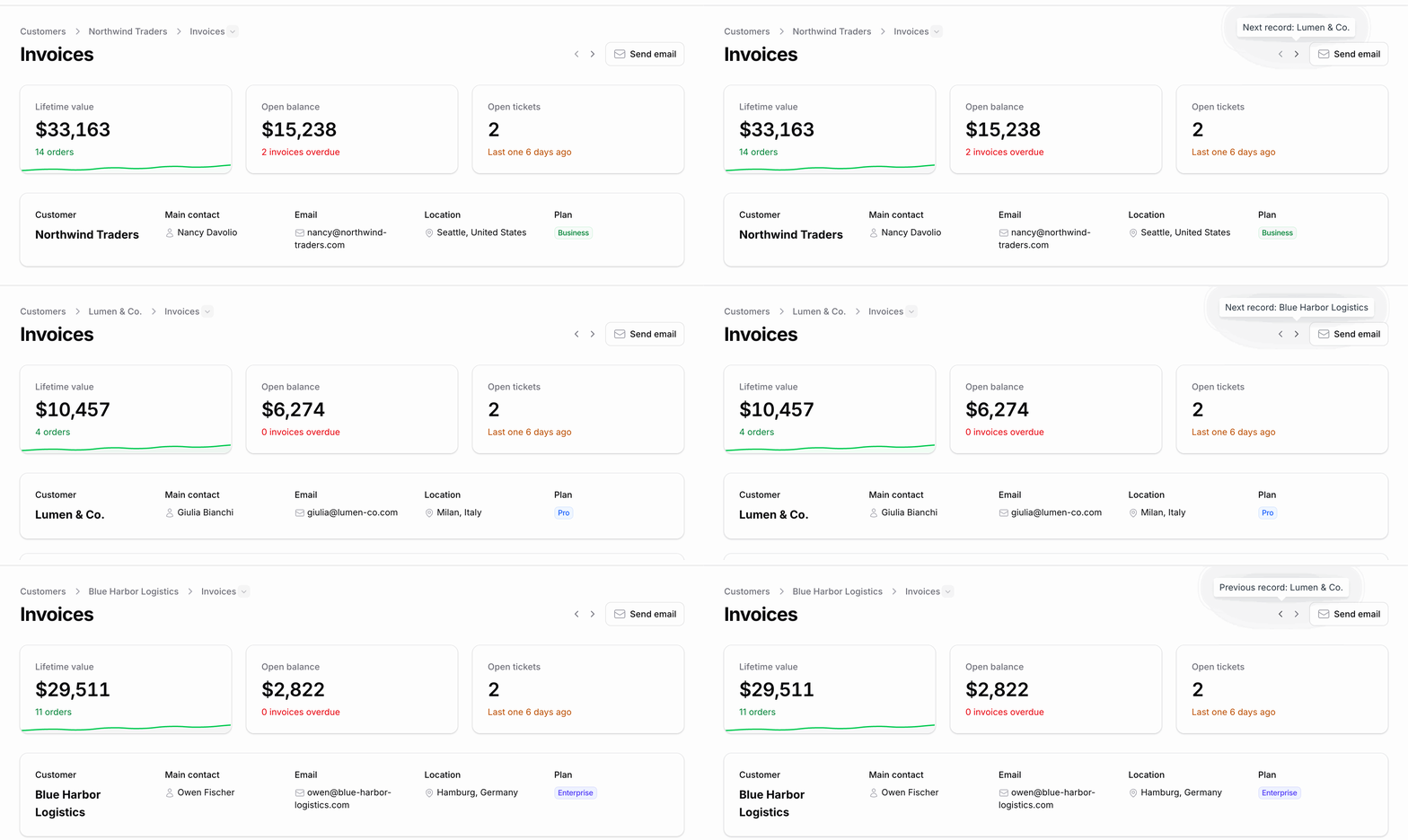
A record that cannot open that page opens on its first page in the menu. They are off by default, since they add a few queries per render:
'record_navigation' => true,
They follow the list the user came from: its sort, filters, search and tab, as on screen (up to 100 records; about 30 with UUID keys). From the first or the last record of that list there is nothing further, rather than a jump to another order. A record that is not in the list (opened from a link) walks by key. To always walk by key:
'record_navigation_follows_list' => false,
The list remembers its records only when record navigation is on in the
config or on the resource (hasRelationNavigatorRecordNavigation()), since
the list page cannot ask a record page.
They walk through the resource's own query (getRecordRouteBindingEloquentQuery()),
so tenancy and your scopes apply, and skip the records the user cannot view.
Per page:
public function hasRelationNavigatorRecordNavigation(): bool
{
    return true;
}

public function getRelationNavigatorRecordNavigationQuery(): ?Builder
{
    return Customer::query()->where('active', true);
}
On a nested resource they stay within the parent: from one of a
customer's orders to the next order of the same customer. The list there is
the parent's relation manager: they follow its order when the nested resource
is its related resource (protected static ?string $relatedResource), except
with the cookie session driver, which keeps the parent's list only.
Links to relation manager tabs
Once the relation pages replace the tabs, old links such as
/customers/1?relation=orders can open /customers/1/orders instead:
'redirect_relation_tabs' => true,
Tabs without a relation page, or that the record cannot see, stay where they are.
Global search
Global search results can link straight to the record's relation pages:
search a customer, jump to its orders. Off by default, since it runs the
relation managers' canViewForRecord() for every result:
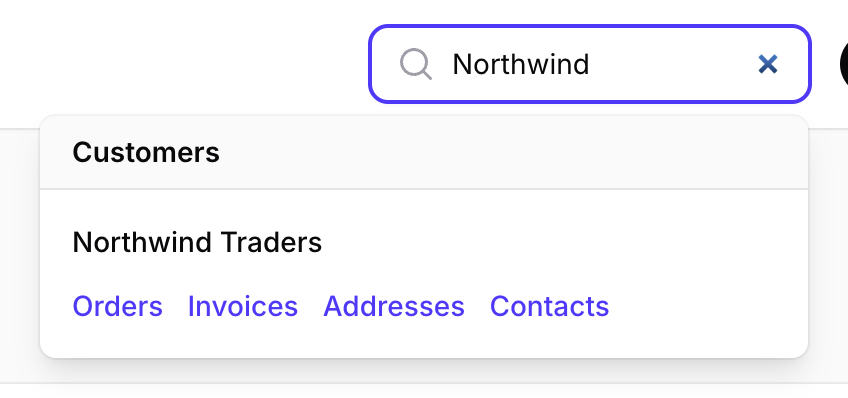
// config/filament-relation-navigator.php
'global_search_actions' => 3, // true for all of them, or the most links per result
// On a resource: on or off for this resource only
public static function hasRelationPageGlobalSearchActions(): bool
{
    return true;
}
// On a relation manager (with InteractsWithRelationPage): never linked
protected static bool $hasRelationPageGlobalSearchAction = false;
Resources with HasRelationPages get the links by themselves. A resource
that defines getGlobalSearchResultActions() itself, or that opts in only
from its relation managers, merges them in:
public static function getGlobalSearchResultActions(Model $record): array
{
    return [
        // ...your actions
        ...RelationNavigator::getGlobalSearchResultActions(static::class, $record),
    ];
}
The links follow the same rules as the menu: only the relation pages the user can open.
Menu presets
Publish the config:
php artisan vendor:publish --tag=filament-relation-navigator-config
'menu' => [
    'preset' => 'github',   // 'simple', a preset of yours, or a view name
    'presets' => [
        'simple' => 'filament-relation-navigator::menu.simple',
        'github' => 'filament-relation-navigator::menu.github',
    ],
    'searchable' => true,   // a search field on top of the list, whatever the preset
    'search_from' => 0,     // ...from this many items
    'badges' => 'lazy',     // the relation managers' badges: 'lazy' when the menu opens, true with the page, false off
    'max_height' => '24rem',
    'separator' => true,    // record pages and relation pages in two blocks
    'mobile' => true,       // the menu above the heading on small screens
    'shortcut' => 'alt+shift+r', // opens the menu; null turns it off
],
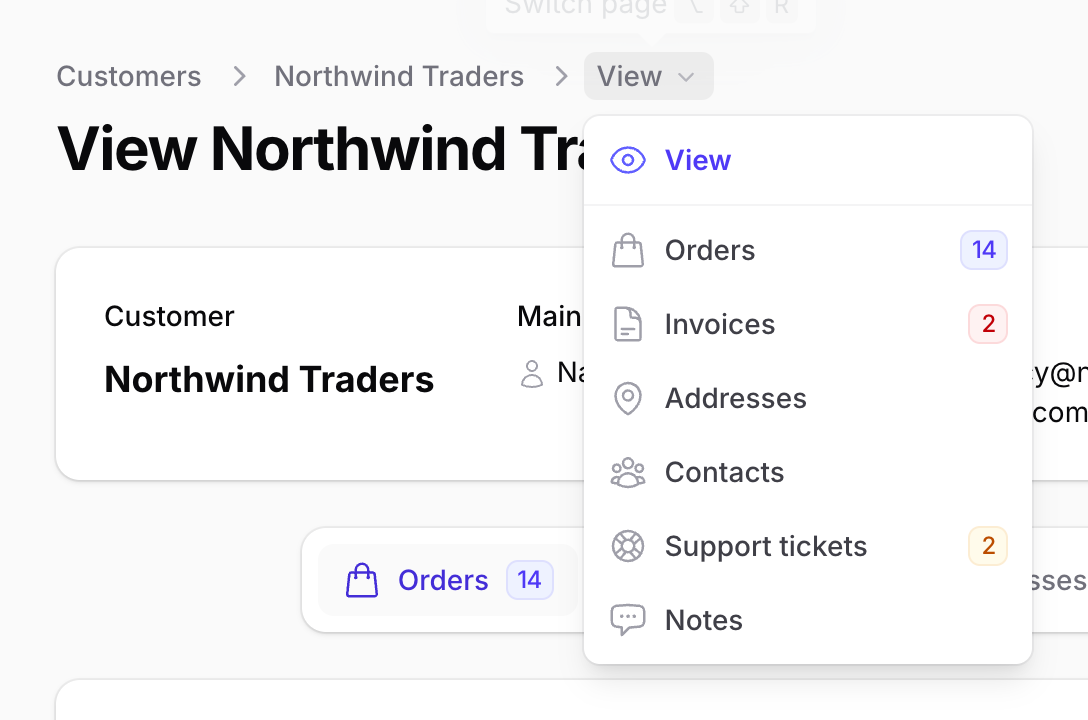
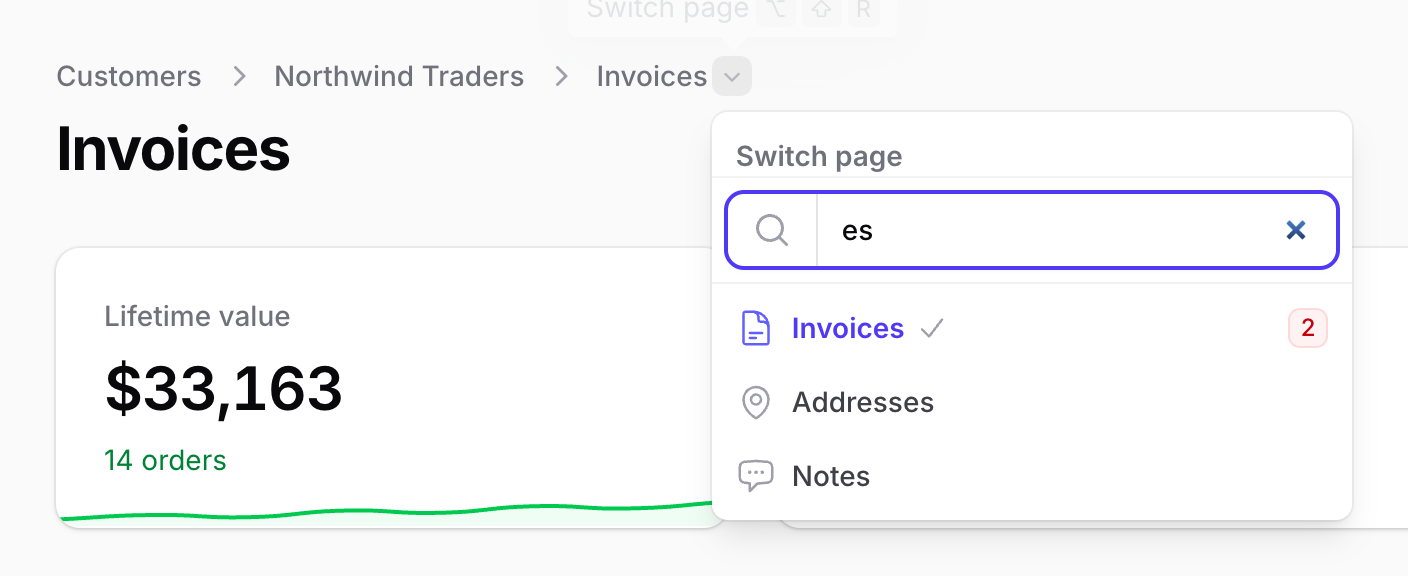
github (the default): the last breadcrumb stays text and a caret next to it opens a panel with a heading, a search field and a check on the current page, like GitHub's repository switcher. The field gets the focus when the menu opens and Enter opens the first match.
simple: the last breadcrumb itself opens the list. For the menu of 1.2
and earlier, set 'preset' => 'simple' and 'searchable' => false.
Badges
The menu shows the relation managers' badges, as in their tabs. By default they are loaded when the menu opens: the menu is closed until then, so the page renders without their queries, also on every Livewire request that redraws the breadcrumbs. A spinner shows for the moment they take.
'badges' => 'lazy', // default; true: with the page; false: no badges
Turn them off where you need to:
// A page, or a resource (static): no badges in this menu
public function hasRelationNavigatorBadges(): bool
{
    return false;
}

// A relation manager (with InteractsWithRelationPage): its badge stays in
// the tab, not in the menu
protected static bool $hasRelationNavigatorBadge = false;
A relation manager whose tab badge is lazy in Filament
(protected static ?bool $isBadgeLazyLoaded = true;, or $isBadgeDeferred on
Filament 4.13) is lazy in the menu too, even with 'badges' => true.
Menu views that cannot load badges later (package views published before
1.3, or presets of your own that render $item->badge themselves) get them
with the page, as before: nothing disappears.
Keyboard: from the search field, Down moves into the list; Up and Down move between the pages, Enter opens one, Escape closes the menu.
Shortcut and tooltip
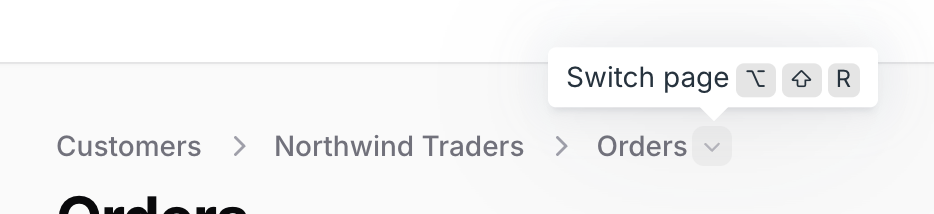
The button that opens the menu has a tooltip with the shortcut, shown with Mac or Windows/Linux keys. The shortcut opens the menu from anywhere on the page, with the search field ready, like GitHub's repository switcher: ⌥ ⇧ R on a Mac, Alt Shift R elsewhere. Change it in the config or per page:
'shortcut' => 'mod+shift+p', // mod is ⌘ on a Mac and Ctrl elsewhere
public function getRelationNavigatorShortcut(): ?string
{
    return null; // no shortcut on this page
}
It is built not to get in the way:
- it matches the physical key, so it works with any keyboard layout and with Option on a Mac (where ⌥⇧R types ‰);
- it does nothing while you type in a field;
- a shortcut of the panel's global search (
globalSearchKeyBindings()) is never taken: the menu then has no shortcut; - only the visible menu opens (breadcrumbs or small screens).
Supported keys: alt, shift, ctrl, meta, mod plus a letter, a digit
or / . , ;.
Page, resource or config
Every option has three levels. The page wins, then the resource, then the config:
| Page method (static on the resource) | Config key |
|---|---|
getRelationNavigatorPreset(): string |
menu.preset |
isRelationNavigatorSearchable(): bool |
menu.searchable |
hasRelationNavigatorBadges(): bool |
menu.badges |
hasDeferredRelationNavigatorBadges(): bool |
menu.badges = 'lazy' |
getRelationNavigatorShortcut(): ?string |
menu.shortcut |
hasRelationNavigatorMobileMenu(): bool |
menu.mobile |
hasRelationNavigatorRecordNavigation(): bool |
record_navigation |
shouldRelationNavigatorRecordNavigationFollowList(): bool |
record_navigation_follows_list |
shouldRedirectRelationNavigatorTabs(): bool |
redirect_relation_tabs |
// On one page
public function isRelationNavigatorSearchable(): bool
{
    return false;
}
// On a resource: the same method, static, for all its pages
public static function hasRelationNavigatorRecordNavigation(): bool
{
    return true;
}
Small screens
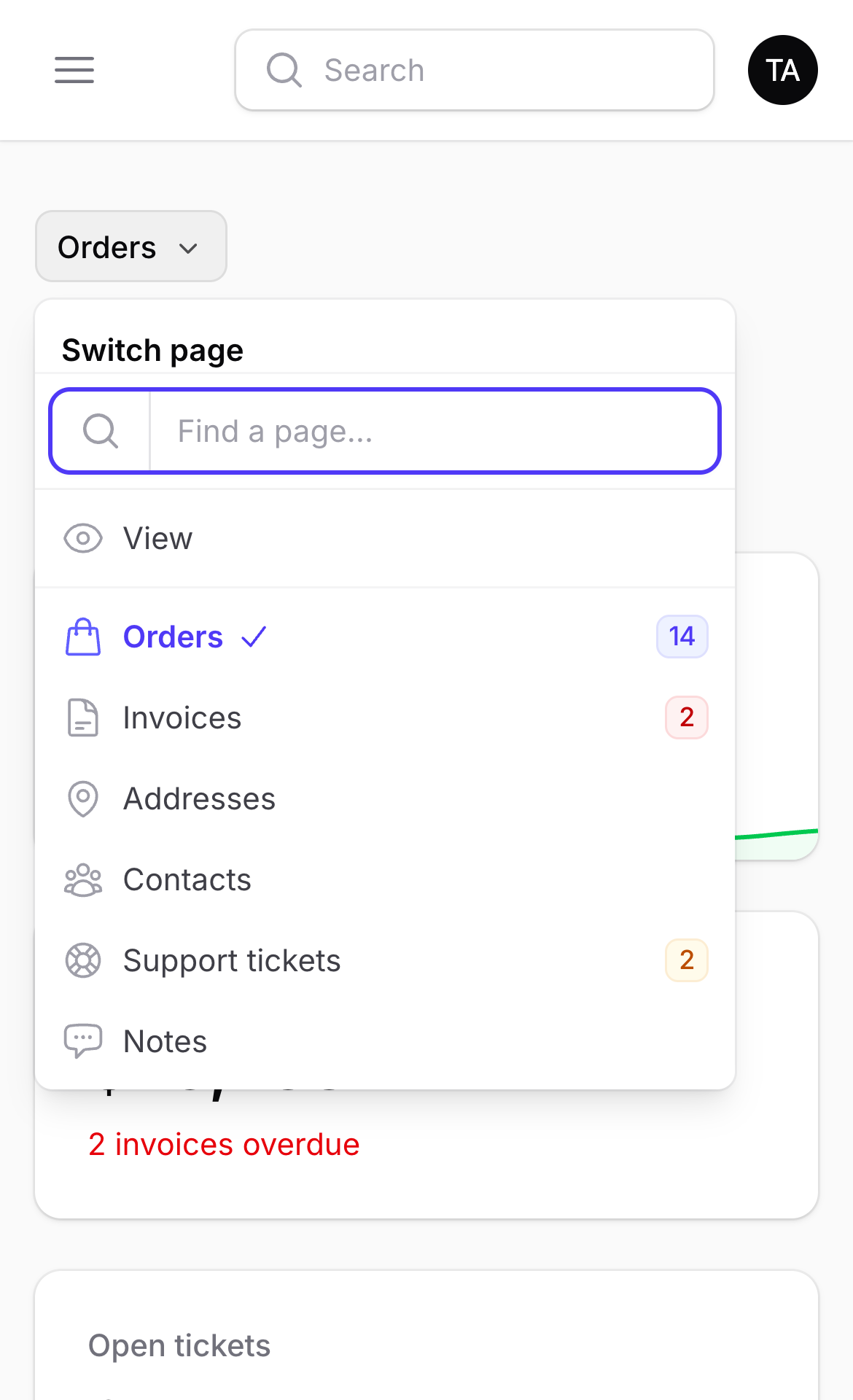
Filament hides the breadcrumbs below 40rem. There the menu shows above the
page heading instead, on every page that uses HasRelationNavigator, with
the same preset options. Turn it off with 'mobile' => false, or per page:
public function hasRelationNavigatorMobileMenu(): bool
{
    return false;
}
Translations
32 languages, with the same codes as Filament: Arabic, Bulgarian, Catalan, Chinese (simplified and traditional), Czech, Danish, Dutch, English, Finnish, French, German, Greek, Hebrew, Hungarian, Indonesian, Italian, Japanese, Korean, Norwegian, Persian, Polish, Portuguese (Portugal and Brazil), Romanian, Russian, Slovak, Spanish, Swedish, Turkish, Ukrainian and Vietnamese. In right to left languages the previous and next arrows turn around. Publish the translations to change them or add a language:
php artisan vendor:publish --tag=filament-relation-navigator-translations
A preset of your own
Start from one of the package presets:
php artisan make:filament-relation-navigator-preset compact --from=github
It copies the preset to
resources/views/filament/relation-navigator/compact.blade.php. Register it
and change it as you like:
'preset' => 'compact',
'presets' => [
    // ...
    'compact' => 'filament.relation-navigator.compact',
],
Any view name works as preset too. To change the package presets
themselves, publish their views:
php artisan vendor:publish --tag=filament-relation-navigator-views
A preset view receives:
| Variable | Content |
|---|---|
$label |
The last breadcrumb |
$items |
The menu items: key, label, url, icon, badge, badgeColor, isActive |
$heading |
"Switch page", translated |
$isSearchable |
Whether to show the search field |
$hasSeparator |
Whether to split record pages and relation pages in two blocks |
$shortcut |
The shortcut, or null |
$shortcutKeys |
The shortcut keys to show: ['mac' => [...], 'other' => [...]] |
$searchPlaceholder |
"Find a page…", translated |
$emptyLabel |
"No pages found.", translated |
$maxHeight |
menu.max_height |
To give your button the tooltip and the shortcut, include
filament-relation-navigator::menu.partials.trigger-attributes inside its
tag. Each item also has isRelationPage(). To reuse the search field, the list
(with the separator and the keyboard navigation) and the "no results" line,
include filament-relation-navigator::menu.partials.list with showCheck.
Customising the relation pages
Title, subheading and breadcrumb of one relation
A relation manager can set them for its own page, from the record, with no page class:
class OrdersRelationManager extends RelationManager
{
    public static function getRelationPageTitle(Model $ownerRecord): string|Htmlable|null
    {
        return "Orders of {$ownerRecord->name}";
    }

    public static function getRelationPageSubheading(Model $ownerRecord): string|Htmlable|null
    {
        return 'Last 12 months';
    }

    public static function getRelationPageBreadcrumb(Model $ownerRecord): ?string
    {
        return 'Orders';
    }
}
Return null to keep the default. A page class you wrote (below) wins with
its own $title, $subheading and $breadcrumb. The menu and the tabs keep
the relation manager's title. Relation groups have no relation manager, so
their page uses the group label.
A page class of your own
The generated relation pages cover most needs. To change their title, their breadcrumbs or anything else a Filament page can do, write the page class yourself; the package then uses yours for that resource:
php artisan make:filament-relation-navigator CustomerResource
class CustomerRelationPage extends RelationPage
{
    protected static string $resource = CustomerResource::class;

    protected static ?array $relations = ['orders', 'invoices'];  // only these
    protected static array $excludedRelations = ['notes'];         // never these
}
public static function getPages(): array
{
    return [
        'index' => ListCustomers::route('/'),
        'view' => ViewCustomer::route('/{record}'),
        ...CustomerRelationPage::relationRoutes(),
    ];
}
The class is a regular Filament page: override getTitle(),
getBreadcrumbs(), getHeaderActions(), use your own traits, and so on.
Native record sub-navigation
The same items can feed Filament's record sub-navigation:
public static function getRecordSubNavigation(Page $page): array
{
    return RelationNavigator::getRecordSubNavigation($page);
}
How it works
- The routes are registered through Filament's own
Resource::registerRoutes(), inside each resource's route group: slug, cluster, parent resource and tenant are handled by Filament. - The page class of a resource is written on demand to
storage/framework/cache, the way Laravel's real-time facades work, and registered with Livewire. It works withroute:cache. - The relation page embeds the relation manager as Filament does in the tabs, so its state, actions and modals stay in the relation manager.
AI agents
The package teaches AI coding agents how to use it, so Claude Code, Codex, Cursor, Copilot and the like write the traits and options correctly:
- Laravel Boost: the package ships guidelines and a skill
(
relation-navigator-development). Pickwit3/filament-relation-navigatorwhen you runphp artisan boost:install(orboost:update). - llms.txt: the documentation is also published for agents, as an
index (llms.txt)
and as one file
(llms-full.txt).
Every page has a Markdown version too: add
.mdto its URL. - Without Boost: point your agent to
vendor/wit3/filament-relation-navigator/resources/boost/skills/relation-navigator-development/SKILL.md, for example from yourAGENTS.mdorCLAUDE.md.
Testing
composer test        # the test suite
composer analyse     # PHPStan, level 8
composer format      # Pint
The suite runs on Filament 4 and 5, Laravel 12 and 13, PHP 8.2 to 8.5, and covers nested resources, clusters, tenancy and SPA mode.
The browser tests (the searchable menu) need Playwright:
npm install && npx playwright install chromium
vendor/bin/testbench filament:assets
composer test:browser
Changelog
See CHANGELOG.
Contributing
Issues and pull requests are welcome. Please run composer test,
composer analyse and composer format before opening a pull request.
Security
Please report security issues privately through GitHub security advisories rather than in public issues.
Credits
License
The MIT License (MIT). See LICENSE.