
pushonltd / magento-patchline

Checks and syncs Adobe's isolated security patches for a Magento store.
Requires
- php: >=8.2
- composer-runtime-api: ^2.0
- ext-hash: *
- ext-json: *
- ext-openssl: *
- composer/semver: ^3.2
- guzzlehttp/guzzle: ^7.4.5 || ^8.0.0
- symfony/console: ^5.4 || ^6.4 || ^7.0
- symfony/process: ^5.4 || ^6.4 || ^7.0
Requires (Dev)
Suggests
None
Provides
None
Conflicts
None
Replaces
None
README

Finds the Adobe security patches a Magento Open Source store is missing and downloads them into m2-hotfixes/.

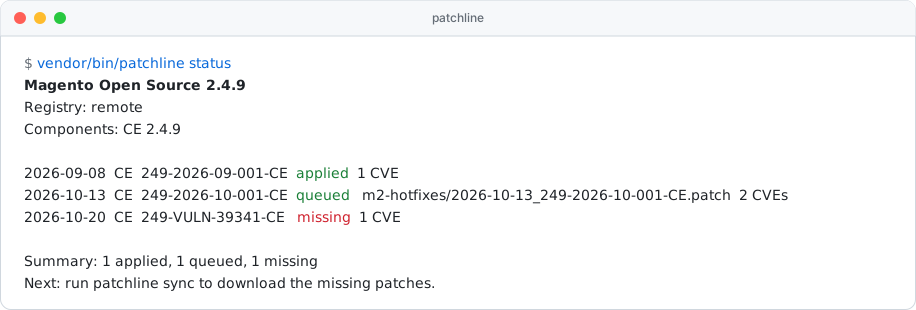
Adobe publishes isolated security patches for Magento in a public registry,
repo.magento.com/patch/patch-registry.json, the same one
its own patch-status tool reads. Up to magento/magento-cloud-patches 1.1.18 these patches came with
ece-patches apply. Later versions no longer ship them for Open Source, so an Open Source store has to fetch them
itself.
Patchline checks the store against the registry, reports which patches are missing, and downloads them into
m2-hotfixes/. It does not apply them. ece-patches apply does that, as it does for any file in m2-hotfixes/.
Important
Patchline is an add-on to Adobe's Quality Patches Tool, not a
replacement. It expects the store to install patches the way Adobe documents it:
composer require magento/quality-patches, which brings magento/magento-cloud-patches and
vendor/bin/ece-patches, and ece-patches apply on every build.
How it fits with Adobe's patch tooling
ece-patches apply applies three sets of patches, in this order:
| # | Patches | Chosen by |
|---|---|---|
| 1 | Required patches bundled in magento/magento-cloud-patches |
Adobe |
| 2 | Quality patches from magento/quality-patches listed in QUALITY_PATCHES |
You |
| 3 | m2-hotfixes/*.patch |
You, and Patchline for security patches |
Patchline only writes to step 3. Quality patches are Adobe's non-security fixes; you choose them and
magento/quality-patches supplies them, as before. Patchline does not track them, and verify does not replay them.
What the commands do
flowchart LR
    registry[(Adobe registry)] --> status
    store[Store code<br>and m2-hotfixes/] --> status
    status["<b>status</b><br>applied, queued or missing?"] -->|missing| sync
    sync["<b>sync</b><br>download into m2-hotfixes/"] --> verify
    verify["<b>verify</b><br>replay the queue on a temporary copy"] --> ok([ece-patches apply will succeed])
Loading
statuslists every registry patch for the store's Magento version and whether it is already in the code, queued forece-patches apply, or missing. Read-only.syncdownloads the missing patches intom2-hotfixes/. It never overwrites a file and never touchesvendor/.verifyreplays the queue on a temporary copy of the store, like a fresh deploy, and names the first patch that fails.
A fourth command, rewind, is a workaround for ece-patches apply itself: see
Applying on every install.
Getting started
Requirements: Magento 2.4.6 or newer with magento/quality-patches
installed, PHP 8.2+, a patch binary.
curl -fsSL https://github.com/pushonltd/magento-patchline/releases/latest/download/install.sh | bash
php patchline.phar status
php patchline.phar sync
php patchline.phar verify
Commit m2-hotfixes/. The next ece-patches apply applies the new patches.
The installer checks the PHAR's sha256, and its build provenance when gh is logged in. Pass
--version=vX.Y.Z (or PATCHLINE_VERSION) to pin a release and --path=FILE to install elsewhere:
curl -fsSL https://github.com/pushonltd/magento-patchline/releases/latest/download/install.sh | bash -s -- --version=vX.Y.Z --path=/usr/local/bin/patchline
The package is also on Packagist as pushonltd/magento-patchline, which you need for the next section.
Recommended wiring
To apply the patches on every composer install, run ece-patches apply from the store's Composer scripts.
Stock ece-patches apply fails when vendor/ already contains the patches, which happens on hosts and local setups
that keep vendor/ between installs (DDEV, for example). patchline rewind reverses the queued patches first, so
ece-patches apply starts from clean code:
composer require pushonltd/magento-patchline # not --dev: the scripts also run on install --no-dev
"scripts": {
    "post-install-cmd": ["@apply-patches"],
    "post-update-cmd": ["@apply-patches"],
    "apply-patches": ["vendor/bin/patchline rewind", "vendor/bin/ece-patches apply"]
}
rewind is the only command that writes to vendor/:
- On a fresh
vendor/it does nothing. - It rehearses on a temporary copy first. If that fails, it changes nothing and exits 1. It works offline.
- It stops when a patch is applied in
vendor/but missing from the queue, usually because a hotfix file was deleted. Runsyncto restore it. - Between
rewindandece-patches apply,vendor/is unpatched. Use it in a build step, never on a live docroot.
Don't put status in these scripts. It goes online and exits 1 whenever Adobe releases a new patch, which would
break composer install. Run it in CI instead.
Running in CI
- Daily:
sync --adopt --prune, and open a pull request ifm2-hotfixes/changed. Adobe has no fixed release day. - On every pull request:
statusandverify.--format=githubadds annotations and a job summary;junitworks with GitLab and Jenkins.
Commands
patchline status [options]
patchline sync [options]
patchline verify [options]
patchline rewind [--root=ROOT] [--dry-run]
status
Lists every registry patch for the store's Magento version with its state. Read-only.
sync
Downloads missing patches as m2-hotfixes/<released>_<id>.patch. ece-patches apply applies m2-hotfixes/ in
file name order, so the date prefix keeps patches in release order. Never overwrites a file, never touches vendor/.
verify
Replays cloud-patches' required patches and m2-hotfixes/ on a temporary copy of the store and names the first
patch that fails.
rewind
Reverses the queued patches in vendor/, newest first, so ece-patches apply can run on it. See
Recommended wiring.
Options
| Option | Commands | Meaning |
|---|---|---|
--root=ROOT |
all | Store root (default: current directory) |
--format=FORMAT |
all but rewind |
text, json, github or junit (default github on GitHub Actions) |
--fail-on=FAIL-ON |
all but rewind |
States that exit 1 (default missing,duplicate,misordered; also cross-check) |
--registry=REGISTRY |
all but rewind |
Registry URL or file instead of repo.magento.com |
--cache-dir=CACHE-DIR |
all but rewind |
Cache directory (default <root>/var/patch_metadata, shared with patch-status) |
--no-cache |
all but rewind |
Don't use cached files |
--include-entitled |
all but rewind |
Include Commerce-only patches (needs repo.magento.com keys) |
--cross-check |
all but rewind |
Compare the result with vendor/bin/patch-status |
--no-update-check |
all but rewind |
Don't check for a newer Patchline release |
--dry-run |
sync, rewind |
Show the plan, change nothing |
--adopt |
sync |
Rename hand-copied hotfix files to the dated naming |
--prune |
sync |
Remove hotfix files that duplicate cloud-patches files |
Patch states
| State | Meaning |
|---|---|
applied |
🟢 Already in the code |
queued |
🟢 Will be applied by ece-patches apply |
missing |
🔴 Not in the code and not queued |
duplicate |
🔴 Queued more than once, which makes ece-patches apply fail |
misordered |
🔴 Queued before a patch it depends on |
entitled |
🟡 Commerce-only, skipped without --include-entitled |
unknown |
🟡 Could not be checked, e.g. locally modified files |
not_applicable |
⚪ Only touches packages your store has removed |
🔴 states fail the run by default (see --fail-on).
A patch counts as applied when it dry-runs in reverse on a temporary copy of the code, the same check Adobe's
patch-status does.
Exit codes
| Code | Meaning |
|---|---|
| 0 | All good |
| 1 | Needs action (see --fail-on), sync or verify failed, or rewind was blocked |
| 2 | Wrong usage |
| 3 | Could not run: no registry, no patch binary, unreadable store, or no magento-cloud-patches for rewind |
Configuration
Every option also works as a PATCHLINE_* environment variable or under extra.patchline in the store's
composer.json. A flag wins over the environment, and the environment wins over composer.json.
{ "extra": { "patchline": { "fail-on": ["missing", "duplicate"] } } }
repo.magento.com keys come from COMPOSER_AUTH or auth.json and are sent only to repo.magento.com. Set
HTTPS_PROXY to use a proxy.
Network
Patchline downloads the registry and the patch files from repo.magento.com and checks each file against the sha256
in the registry. Adobe confirmed the registry is meant for public, automated use. The only other request is a daily
check of Packagist for a newer Patchline release; turn it off with --no-update-check or
PATCHLINE_NO_UPDATE_CHECK=1. rewind makes no requests.
Thanks to @s-renz for finding the registry endpoint.
Development
composer check      # code style, PHPStan level 10, tests
composer build      # dist/patchline.phar
composer mutation   # mutation tests
Authors
- PushON Ltd
- Jiří Brada (@jbrada)
License
MIT, © 2026 PushON Ltd.