
leandrocfe / filament-ptbr-form-fields

Brazilian pt-BR form fields.
Package info
github.com/leandrocfe/filament-ptbr-form-fields
pkg:composer/leandrocfe/filament-ptbr-form-fields
Requires
- php: ^8.2 || ^8.3
- archtechx/money: ^0.5.1
- filament/filament: ^5.0
- laravellegends/pt-br-validator: ^12.2 || ^13.0
- moneyphp/money: ^4.5
- spatie/laravel-package-tools: ^1.14.0
Requires (Dev)
- larastan/larastan: ^3.5
- laravel/pint: ^1.27
- nunomaduro/collision: ^8.8
- orchestra/testbench: ^10.4
- pestphp/pest: ^3.8
- pestphp/pest-plugin-arch: ^3.1
- pestphp/pest-plugin-laravel: ^3.2
- phpstan/extension-installer: ^1.4
- phpstan/phpstan-deprecation-rules: ^2.0
- phpstan/phpstan-phpunit: ^2.0
Suggests
None
Provides
None
Conflicts
None
Replaces
None
README
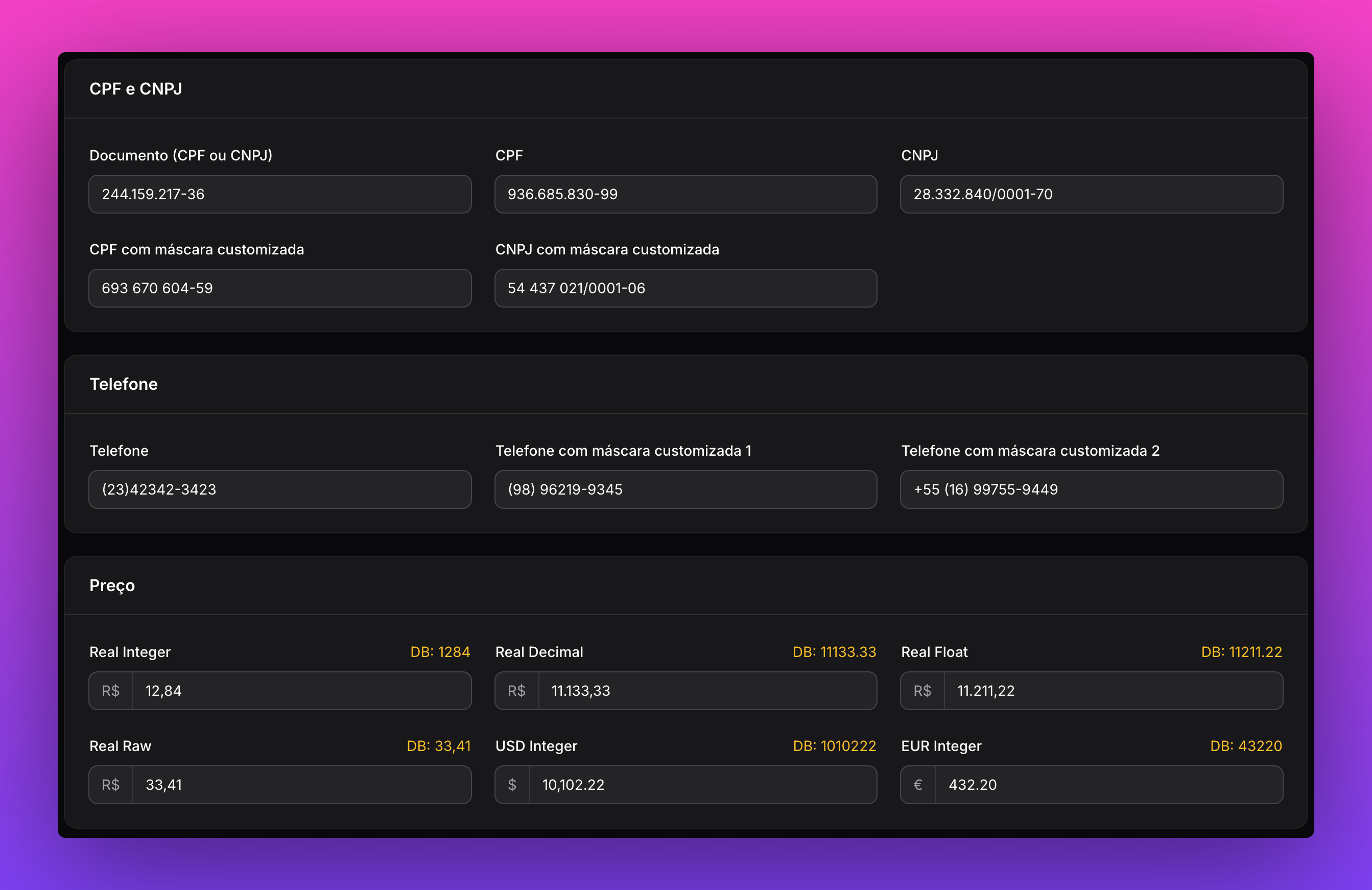
This package provides custom form fields for Filament that are commonly used in Brazilian web applications, such as CPF/CNPJ validation, phone number formatting, money with currency symbol, and CEP integration with ViaCep.
This package uses LaravelLegends/pt-br-validator to validate Brazilian Portuguese fields.
Installation
Version 5.1 targets PHP 8.2+, Filament 5, and laravellegends/pt-br-validator ^12.2 || ^13.0.
The validator minimum is now 12.2 for alphanumeric CNPJ support; applications pinned to 10.x, 11.x,
or 12.0–12.1 must upgrade that dependency before upgrading this package.
You can install the package via Composer:
composer require leandrocfe/filament-ptbr-form-fields:"^5.0"
php artisan filament:assets
Filament V2 - if you are using Filament v2.x, you can use this section
Filament V3 - if you are using Filament v3.x, you can use this section
Filament V4 - if you are using Filament v4.x, you can use this section
Usage
CPF / CNPJ
To create a dynamic input that accepts either CPF or CNPJ, use:
use Leandrocfe\FilamentPtbrFormFields\Document;
//CPF or CNPJ
Document::make('cpf_or_cnpj')
    ->dynamic()
If you want to create an input that only accepts CPF or only accepts CNPJ, use:
//CPF
Document::make('cpf')
    ->cpf()
// CNPJ (accepts the new alphanumeric format by default: **.***.***/****-99, also compatible with numeric CNPJs)
Document::make('cnpj')
    ->cnpj()

// Or strictly enforce the classic numeric CNPJ format: 99.999.999/9999-99
Document::make('cnpj')
    ->cnpj(alphanumeric: false)
For dynamic CPF/CNPJ inputs:
// Dynamic CPF or CNPJ (supports alphanumeric CNPJ by default)
Document::make('cpf_or_cnpj')
    ->dynamic()

// Dynamic CPF or CNPJ using only the classic numeric masks
Document::make('cpf_or_cnpj')
    ->dynamic(alphanumeric: false)
alphanumeric: falseonly restricts the mask. Thecpf_ou_cnpjvalidation rule still accepts an alphanumeric CNPJ that reaches the field from another source (an imported record, a request payload, etc.).
cnpj() also accepts the flag positionally, which is handy when you do not need a custom mask:
Document::make('cnpj')
    ->cnpj(false) // same as ->cnpj(alphanumeric: false)
You can also use mask constants directly:
Document::CPF_MASK;               // '999.999.999-99'
Document::CNPJ_MASK;              // '99.999.999/9999-99'
Document::CNPJ_ALPHANUMERIC_MASK; // '**.***.***/****-99'

Document::make('cnpj')
    ->cnpj(Document::CNPJ_MASK)
If you want to use a custom mask for the input, use the cpf() or cnpj() method with a string argument representing the desired mask:
Document::make('cpf')
    ->cpf('999999999-99')
Document::make('cnpj')
    ->cnpj('99999999/9999-99')
Uppercase normalization
The alphanumeric CNPJ (Anexo XV of IN RFB nº 2.119/2022) only assigns values to uppercase letters, so
Document normalizes the field:
- the input is displayed in uppercase (
text-transform: uppercase); - the state is uppercased before validation and before being dehydrated (saved).
Behavior change: the dehydrated state is now always uppercased, even when
dehydrateMask()is not used. A value typed as12.abc.345/01de-35is saved as12.ABC.345/01DE-35(or12ABC34501DE35withdehydrateMask()). While the user is still typing, the live Livewire state keeps the original casing, so a customafterStateUpdated()callback may receive lowercase characters.
Validation
Document uses LaravelLegends/pt-br-validator to validate Brazilian Portuguese fields by default - cpf_ou_cnpj | cpf | cnpj
You can disable validation using the validation(false) method:
Document::make('cpf_or_cnpj')
    ->validation(false)
    ->dynamic()
Document::make('cpf')
    ->validation(false)
    ->cpf()
Phone number
To create a dynamic input that formats phone numbers with DDD, use:
use Leandrocfe\FilamentPtbrFormFields\PhoneNumber;
PhoneNumber::make('phone_number')
If you want to use a custom phone number format, use the `mask() method with a string argument representing the desired format:
PhoneNumber::make('phone_number')
    ->mask('(99) 99999-9999')
PhoneNumber::make('phone_number')
    ->mask('+99 (99) 99999-9999')
Money
To create a money input field, use the following syntax:
use Leandrocfe\FilamentPtbrFormFields\Money;
Money::make('price')
    ->default('100,00')

#output: 100.00
The field uses a calculator-style mask: type only digits and the thousands/decimal separators are applied for you. Typing 100020 displays 1.000,20. You do not type . or ,.
When editing an amount in the middle, the caret and selected digit range stay at the same logical digits as the mask adds or removes separators. If Backspace or Delete lands directly on a separator, the adjacent digit is removed while preserving the caret by digit position. Pressing - toggles the sign while retaining the caret or selection. Both operations dispatch a bubbling input event, so wire:model receives the updated value. Readonly and disabled inputs are preserved.
Input compatibility and optional decimal parsing
By default, 5.1 preserves the 5.0.1 input contract: remove . and ,, then read the remaining
integer as cents. For example, 1.230 displays 12,30, 1.000 displays 10,00, 10,5 displays
1,05, and an integer 1000 displays 10,00. Empty or null input displays 0,00 and saves zero.
intFormat() chooses integer-cent output; it does not change this default input contract.
For persisted decimal units (including database floats), explicitly opt in:
Money::make('price')
    ->decimalInput()
    ->emptyAsNull() // optional: blank input displays blank and saves null
In decimalInput() mode, numeric 1000 and 1000.2 represent units, canonical strings 1000.20
and 1000.2000 represent 1000.2 units, and digit-only strings remain calculator-style cents.
With intFormat(), integer numbers and integer strings represent cents. Localized values such as
1.234,50 are supported. Extra fractional digits must be zero: 1000.2001 is rejected at scale 2.
Ambiguous BRL strings such as 1.230 are rejected in this opt-in mode; use 1.23 for 1.23 units or
1.230,00 for 1230 units. The explicit .000 convention (1.000) and multiple groups
(1.234.567) represent thousands. This convention applies to currencies with . as their
thousands separator and a different decimal separator.
Invalid, ambiguous, or overflowing input throws InvalidArgumentException during hydration or
dehydration, instead of clearing or saving an altered value. Validate/normalize imported amounts
before filling a form. Both opt-ins accept a boolean or closure and can be disabled with false.
nullable() alone does not enable emptyAsNull(); blank-to-null behavior is independent of validation.
Integer cents and their formatted masks remain exact throughout the PHP integer range, including
values above JavaScript's safe integer limit. The browser mask uses BigInt. The legacy Currency.masking() helper separately retains numeric-unit
versus string-cent input semantics, locales, and the options object for Intl.NumberFormat
(including minimumFractionDigits / maximumFractionDigits). Current fields use the new mask directly.
Ordinary decimal
output keeps the legacy float type; amounts whose cents exceed 2^52 return an exact decimal
string instead. Use intFormat() with PHP integers or integer strings, or dehydrateMask(), when
exact large amounts are required. Do not pass large amounts as floats: their precision is already
lost before the field receives them; unsafe or non-finite floats are rejected.
Upgrading subclasses and published assets
Run php artisan filament:assets after upgrading. The asset is now money under
leandrocfe/filament-ptbr-form-fields; the previous public/js/money-script.js can be removed.
If no published asset exists, the field uses an inline copy of the same mask.
The protected sanitizeState(?string $state): ?int, getOnKeyPress(): array, getOnKeyUp(): array,
and getOnBlur(): array extension points remain available and are invoked. sanitizeState() applies
to default parsing; opting in to decimalInput() selects the new parser instead. The keyboard hooks
now return keydown and input.capture attributes by default; subclasses overriding them may keep
their attributes or migrate to those events to support paste, sign changes, and caret preservation.
Using Integer Values
If you prefer to work with integer values, you can format the money input using the intFormat() method:
use Leandrocfe\FilamentPtbrFormFields\Money;
Money::make('price')
    ->default(10000)
    ->intFormat()

#output: 10000
Getting the Raw State
To retrieve the formatted state of the field, you can use the dehydrateMask() method:
use Leandrocfe\FilamentPtbrFormFields\Money;
Money::make('price')
    ->default('100,00')
    ->dehydrateMask()

#output: 100,00
If you need to remove the prefix from the money input, simply pass null to the prefix() method:
Money::make('price')
    ->prefix(null)
Currency Formatting
This package leverages the archtechx/money package under the hood. By default, it uses the BRL (Brazilian Real) format for currency values.
If you want to switch to the USD (United States Dollar) format, you can do so with the following code:
use Leandrocfe\FilamentPtbrFormFields\Currencies\USD;

Money::make('price')
    ->currency(USD::class)
    ->prefix('$')
You can also define custom currencies to suit your specific needs:
/*
 * app/Currencies/EUR.php
 */

declare(strict_types=1);

namespace App\Currencies;

use ArchTech\Money\Currency;

class EUR extends Currency
{
    /*
     * Code of the currency.
     */
    public string $code = 'EUR';

    /*
     * Name of the currency.
     */
    public string $name = 'Euro';

    /*
     * Rate of this currency relative to the default currency.
     */
    public float $rate = 1.0;

    /*
     * Number of decimals used in money calculations.
     */
    public int $mathDecimals = 2;

    /*
     * Number of decimals used in the formatted value
     */
    public int $displayDecimals = 2;

    /*
     * How many decimals of the currency's values should get rounded
     */
    public int $rounding = 2;

    /*
     * Prefix placed at the beginning of the formatted value.
    */
    public string $prefix = '€';

    /*
     * The language code.
     */
    public string $locale = 'pt';

    /*
     * The character used to separate the decimal values.
     */
    public string $decimalSeparator = '.';

    /*
     * The character used to separate groups of thousands
     */
    public string $thousandsSeparator = ',';
}
use App\Currencies\EUR;

Money::make('price')
->currency(EUR::class)
->prefix('€')
CEP (Brazilian ZIP Code)
The CEP field provides automatic address lookup through configurable providers like ViaCep and BrasilAPI.
Basic Usage
use Filament\Forms\Components\TextInput;
use Filament\Schemas\Components\Utilities\Set;
use Leandrocfe\FilamentPtbrFormFields\Cep;
use Leandrocfe\FilamentPtbrFormFields\Enums\CepFieldMode;
use Leandrocfe\FilamentPtbrFormFields\Providers\ViaCepProvider;

Cep::make('postal_code')
    ->mode(CepFieldMode::SUFFIX) // or CepFieldMode::ON_BLUR
    ->api(ViaCepProvider::class, function (Set $set, ?array $response) {
        $set('street', data_get($response, 'logradouro'));
        $set('neighborhood', data_get($response, 'bairro'));
        $set('city', data_get($response, 'localidade'));
        $set('state', data_get($response, 'uf'));
    }),

TextInput::make('street'),
TextInput::make('neighborhood'),
TextInput::make('city'),
TextInput::make('state'),
Configuration
You can publish the configuration file to customize the default API endpoints:
php artisan vendor:publish --tag=filament-ptbr-form-fields-config
This will publish config/filament-ptbr-form-fields.php:
return [
    'viacep_url' => env('VIACEP_URL', 'https://viacep.com.br/ws/'),
    'brasilapi_url' => env('BRASILAPI_URL', 'https://brasilapi.com.br/api/cep/v1/'),
];
You can also override the endpoints via environment variables in your .env file:
VIACEP_URL=https://viacep.com.br/ws/
BRASILAPI_URL=https://brasilapi.com.br/api/cep/v1/
Note: The protocol (
https://), host, and trailing slash (/) are required when specifying custom URLs. If your application uses configuration caching, make sure to runphp artisan config:clear(orphp artisan config:cache) after modifying environment variables or the configuration file.
Lookup Modes
ON_BLUR (default): Automatically fetches address when the field loses focus
Cep::make('postal_code')
    ->mode(CepFieldMode::ON_BLUR)
    ->api(ViaCepProvider::class, function (Set $set, ?array $response) {
        // ...
    })
SUFFIX: Shows a search button next to the field
Cep::make('postal_code')
    ->mode(CepFieldMode::SUFFIX)
    ->api(ViaCepProvider::class, function (Set $set, ?array $response) {
        // ...
    })
Custom Error Message
Cep::make('postal_code')
    ->errorMessage('Invalid CEP')
    ->api(ViaCepProvider::class, function (Set $set, ?array $response) {
        // ...
    })
Available Providers
- ViaCepProvider: Default provider using ViaCep API
- BrasilApiProvider: Alternative provider using BrasilAPI
use Leandrocfe\FilamentPtbrFormFields\Providers\BrasilApiProvider;

Cep::make('cep')
    ->api(BrasilApiProvider::class, function (Set $set, ?array $response) {
        // ...
    })
Custom Provider
You can create your own provider by implementing CepProviderInterface:
use Leandrocfe\FilamentPtbrFormFields\Providers\CepProviderInterface;
use Illuminate\Support\Collection;

class MyCustomProvider implements CepProviderInterface
{
    public function fetch(string $cep): null|Collection|array
    {
        // Your implementation
        return $response;
    }
}
Troubleshooting
URI must include a scheme and host
If you encounter the following exception when searching for a CEP:
Illuminate\Http\Client\ConnectionException
URI must include a scheme and host. Use an absolute URI, a network-path reference starting with //, or configure a base_uri.
This occurs when the provider endpoint URL is missing the scheme (e.g., viacep.com.br/ws/ instead of https://viacep.com.br/ws/).
To resolve this:
- Ensure your
VIACEP_URLorBRASILAPI_URLenvironment variables in.envinclude the full protocol:https://viacep.com.br/ws/orhttps://brasilapi.com.br/api/cep/v1/. - If you have published
config/filament-ptbr-form-fields.php, verify that the default URLs includehttps://. - Clear the configuration cache by running:
php artisan config:clear
Legacy Method (Deprecated)
The old viaCep() method is still available for backward compatibility but will be removed:
Cep::make('postal_code')
    ->mode(CepFieldMode::SUFFIX)
    ->viaCep(
        mode: 'suffix',
        errorMessage: 'CEP inválido.',
        setFields: [
            'street' => 'logradouro',
            'district' => 'bairro',
            'city' => 'localidade',
            'state' => 'uf'
        ]
    )
Testing
composer test
Changelog
Please see CHANGELOG for more information on what has changed recently.
Contributing
Please see CONTRIBUTING for details.
Security Vulnerabilities
If you discover a security vulnerability within this package, please send an e-mail to leandrocfe@gmail.com.
Credits
License
The MIT License (MIT). Please see License File for more information.