
amjadiqbal / filament-audience-sync

Email-marketing audience sync for Filament 4 and 5: subscribe, unsubscribe, tag and update your records in a Mailchimp audience or Brevo list, with queued bulk sync, a status column and list stats. Driver-based.
Package info
github.com/amjadiqbal/filament-audience-sync
pkg:composer/amjadiqbal/filament-audience-sync
Requires
- php: ^8.2
- filament/filament: ^4.0|^5.0
- illuminate/contracts: ^12.0|^13.0
- spatie/laravel-package-tools: ^1.16
Requires (Dev)
- larastan/larastan: ^3.0
- laravel/pint: ^1.18
- orchestra/testbench: ^10.0|^11.0
- pestphp/pest: ^3.0|^4.0
- pestphp/pest-plugin-laravel: ^3.0|^4.0
- pestphp/pest-plugin-livewire: ^3.0|^4.0
Suggests
None
Provides
None
Conflicts
None
Replaces
None
README
Audience Sync for Filament
Subscribe, unsubscribe, tag and update your app's records in an email-marketing audience, right from your Filament panel. Ships with drivers for Mailchimp and Brevo, queues bulk syncs, shows each record's subscription status, and puts basic list and campaign stats on your dashboard. It works with Filament 4 and 5.
What it does
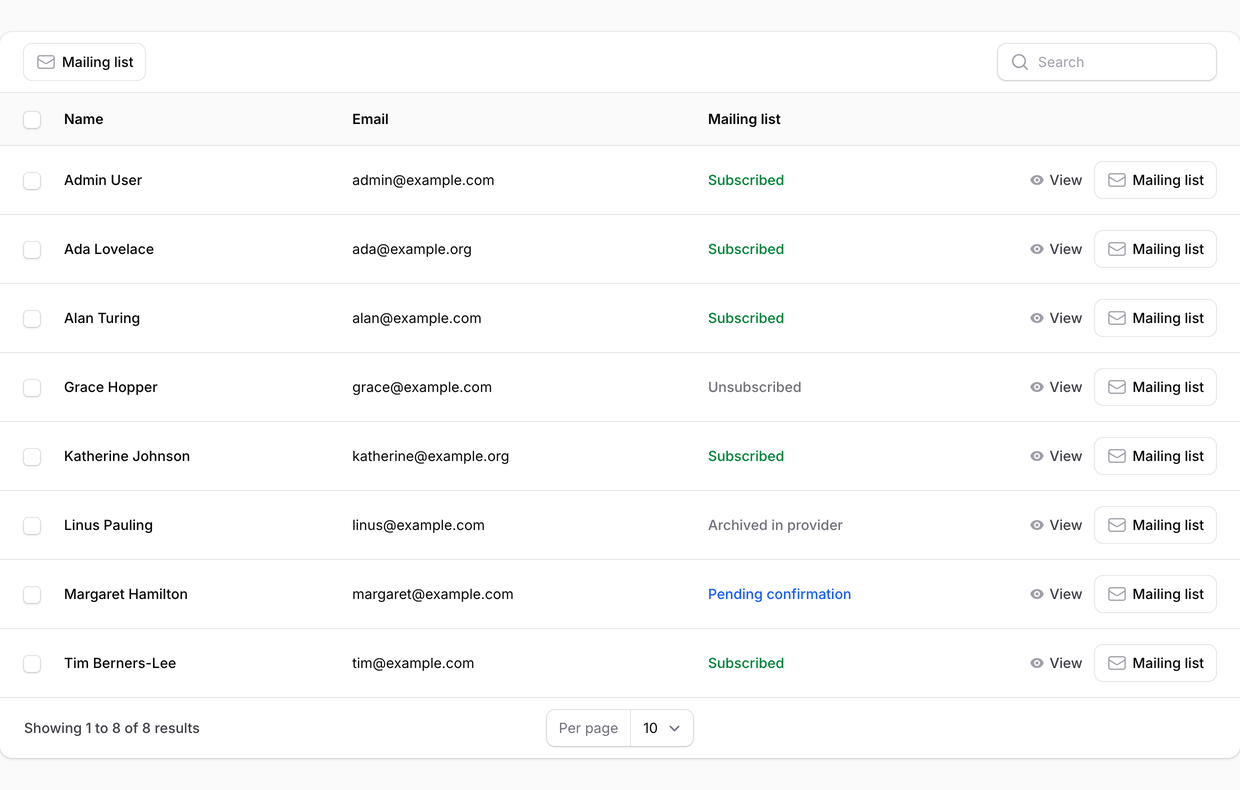
- Record actions: Subscribe, Sync details (fields and tags), Edit tags and Unsubscribe, on any resource whose model is a subscriber: users, customers, leads, members.
- Bulk actions: subscribe, sync or unsubscribe the selected records. They are queued in chunks, so a thousand records never block a request or hit a rate limit head-on.
- Status column and entry: Subscribed, Pending confirmation, Unsubscribed, Cleaned (bounced), Archived in provider or Not subscribed, read from a local status table (no API call per row); "Not synced" until the record's first sync. Cleaned and Archived are Mailchimp states. A red icon marks a record whose last sync failed; hover it for the reason.
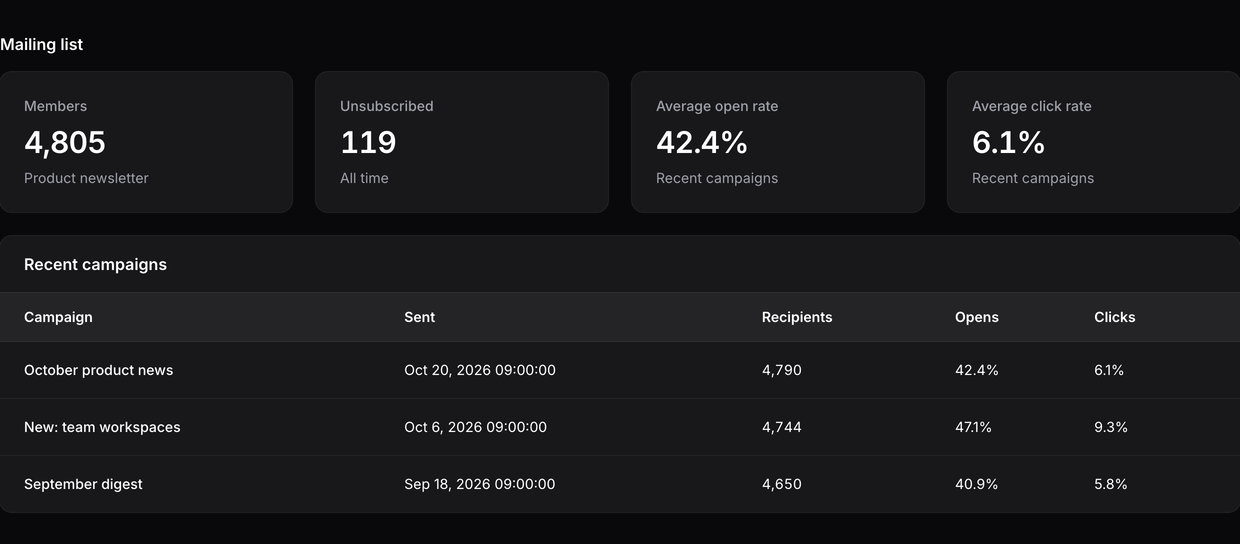
- Dashboard widgets: members, unsubscribes, open and click rates, and the latest sent campaigns with their open and click rates. Cached for five minutes. With Mailchimp the rates are the audience's own averages; with Brevo they average the last campaigns sent to the list, and "Unsubscribed" counts the list's blocklisted contacts.
- Consent first: someone the provider reports as unsubscribed (Mailchimp also: cleaned or archived; Brevo: blocklisted or unsubscribed from the list) is never subscribed again from your panel. An unsubscribe made here is recorded and blocks that address in this panel until the provider itself reports the person subscribed again (they rejoined through its own signup form). See Consent and GDPR.
- Drivers: Mailchimp (audiences, merge fields, tags, double opt-in) and Brevo (lists, attributes). The driver contract is ready for more (MailerLite, Kit, your own): see Adding a provider.
It does not send email, build campaigns or sync anything from the provider back into your models.
Requirements
- PHP 8.2+ (8.3+ for Filament 5 or Laravel 13)
- Laravel 12 or 13
- Filament 4 or 5
- A queue worker for bulk actions (any queue connection;
syncworks for small lists) - An API key for your provider: a Mailchimp API key, or a Brevo API v3 key
Installation
composer require amjadiqbal/filament-audience-sync
php artisan vendor:publish --tag=filament-audience-sync-migrations
php artisan migrate
Add your key and list to .env, then find the list id with the command:
AUDIENCE_SYNC_DRIVER=mailchimp

MAILCHIMP_API_KEY=your-key-us21
MAILCHIMP_LIST_ID=your-audience-id

# or
# AUDIENCE_SYNC_DRIVER=brevo
# BREVO_API_KEY=xkeysib-...
# BREVO_LIST_ID=7
php artisan audience-sync:lists
Make your model a subscriber. The trait sends the email attribute, splits name into first and last name, and adds
the relation the status column reads:
use AmjadIqbal\FilamentAudienceSync\Concerns\SyncsWithAudience;
use AmjadIqbal\FilamentAudienceSync\Contracts\Subscribable;

class User extends Authenticatable implements Subscribable
{
    use SyncsWithAudience;

    // Optional: send more fields and tags.
    public function audienceFields(): array
    {
        return ['first_name' => $this->first_name, 'last_name' => $this->last_name, 'COMPANY' => $this->company];
    }

    public function audienceTags(): array
    {
        return $this->is_customer ? ['customer'] : [];
    }
}
Register the plugin and add the column and actions to your resource:
use AmjadIqbal\FilamentAudienceSync\AudienceSyncPlugin;

$panel->plugin(AudienceSyncPlugin::make());
use AmjadIqbal\FilamentAudienceSync\Actions\AudienceActions;
use AmjadIqbal\FilamentAudienceSync\Tables\AudienceStatusColumn;

public static function table(Table $table): Table
{
    return $table
        ->columns([
            TextColumn::make('name'),
            TextColumn::make('email'),
            AudienceStatusColumn::make(),
        ])
        ->recordActions([AudienceActions::group()])
        ->toolbarActions([AudienceActions::bulkGroup()]);
}
On a view or edit page, use the single actions and the status entry:
use AmjadIqbal\FilamentAudienceSync\Infolists\AudienceStatusEntry;

protected function getHeaderActions(): array
{
    return [
        AudienceActions::subscribe(),
        AudienceActions::update(),
        AudienceActions::tags(),       // hidden for drivers without tags (Brevo; audienceTags() is not sent there either)
        AudienceActions::unsubscribe(),
    ];
}

// In the resource's infolist:
AudienceStatusEntry::make(),
Every action takes an optional driver name (AudienceActions::subscribe('brevo')) to target a provider other than
the default.
Field mapping
Your model returns neutral keys; each driver maps them in config/audience-sync.php
(php artisan vendor:publish --tag=filament-audience-sync-config):
| Key | Mailchimp merge field | Brevo attribute |
|---|---|---|
first_name |
FNAME |
FIRSTNAME |
last_name |
LNAME |
LASTNAME |
phone |
PHONE |
SMS |
Any other key is sent unchanged, so you can return provider field names (COMPANY) directly. Empty values are not
sent. Mailchimp rejects merge fields that do not exist in the audience; the error is shown on the record.
How each operation behaves
| Operation | What it does | Never does |
|---|---|---|
| Subscribe | Checks the local record first, then reads the contact. New: adds it (Mailchimp: subscribed, or pending with double opt-in; Brevo: added to the list). A Mailchimp "transactional" contact (never opted in to marketing) is opted in with a PUT. Already subscribed or pending: updates fields and tags. | Subscribe anyone unsubscribed (or, on Mailchimp, cleaned or archived) in the provider, or unsubscribed here. |
| Sync details | Reads the status from the provider and stores it; for an existing member also updates fields and adds tags. This is also how a local unsubscribe is lifted after the person rejoined through the provider. | Subscribe a non-member, or touch an unsubscribed member's data. |
| Edit tags (Mailchimp) | Adds and removes tags on an existing member. | Change the status. |
| Unsubscribe | Mailchimp: sets the member to unsubscribed. Brevo: blocklists the contact (as Brevo's own unsubscribe link does), or with BREVO_UNSUBSCRIBE_MODE=unlink only removes it from the list. Records the choice locally either way. |
Delete the contact. |
From code, the same rules apply through the facade:
use AmjadIqbal\FilamentAudienceSync\Facades\AudienceSync;

AudienceSync::subscribe($user);                 // SyncResult: outcome + status
AudienceSync::update($user, 'brevo');
AudienceSync::unsubscribe($user);
AudienceSync::queue(User::whereNotNull('email_verified_at')->get(), 'subscribe');
Rate limits and queues
A 429 or 5xx answer, or a dropped connection, is retried up to three times, after the provider's Retry-After
or rate-limit reset header when it sends one (seconds, an HTTP date or a Unix timestamp), else after 0.5 s, 1 s,
2 s. One call never sleeps more than max_wait_seconds (20) in total, in a web request or a queued job. A queued
chunk that is still rate limited is released for the provider's wait (at least 30 s, at most an hour) and runs
again, up to six tries; other failures retry after 30 s to 10 minutes. Records are processed one by one, so each
operation is safe to repeat. Brevo cannot filter campaigns by list, so the campaigns widget reads the account's
latest 100 sent campaigns and keeps those sent to your list. Tune http, queue.chunk,
queue.connection and queue.name in the config.
Who can use it
With no rule set, anyone who can reach the panel can use the actions and see the widgets. Define a gate to restrict it, or pass a closure:
Gate::define('manageAudience', fn (User $user, string $ability, ?Model $record) => $user->isAdmin());

AudienceSyncPlugin::make()
    ->authorizeUsing(fn (string $ability, ?Model $record, ?User $user) => $user?->can('marketing'))
    ->dashboardWidgets(false); // keep the stats widgets off the dashboard
Abilities: subscribe, unsubscribe, update, tag, stats.
API keys
Keys are read from your .env through the config only. They are never stored in the database, shown in the panel
or written to logs, and every provider error message is cleaned of anything that looks like a key before it is
shown or saved on the record. Use a key with the smallest access the provider offers.
Consent and GDPR
You are the data controller. This plugin is a tool for sending your data to a processor of your choice; it does not collect consent for you. Before you subscribe anyone:
- Have a lawful basis (usually freely given, specific consent) and keep a record of it in your app. Bulk subscribing every user is rarely lawful in the EU/UK.
- Prefer Mailchimp's double opt-in (
MAILCHIMP_DOUBLE_OPT_IN=true): the provider then sends the confirmation and keeps the proof. - Respect unsubscribes. The plugin will not subscribe anyone the provider reports as unsubscribed (on Mailchimp also cleaned or archived; on Brevo blocklisted or unsubscribed from the list), or who was unsubscribed from your panel. A person who changes their mind can rejoin through the provider's own signup form; the next Sync details then shows them as subscribed and lifts the local block.
- Send only the fields you need, list your provider in your privacy notice, and have a data processing agreement with it.
- On an erasure request, delete the contact in the provider too (this plugin does not delete contacts) and delete
the record's rows in
audience_sync_members.
This is not legal advice.
Adding a provider
A driver implements AmjadIqbal\FilamentAudienceSync\Contracts\AudienceDriver. Extend Drivers\HttpDriver to get
authentication, retries, backoff and key redaction for free, then register it:
use AmjadIqbal\FilamentAudienceSync\Facades\AudienceSync;

// config/audience-sync.php: 'drivers' => ['mailerlite' => ['api_key' => env('MAILERLITE_API_KEY'), 'list' => env('MAILERLITE_GROUP_ID')]]
AudienceSync::extend('mailerlite', fn () => new MailerLiteDriver('mailerlite', config('audience-sync.drivers.mailerlite')));
The consent rules and status storage live in the manager, so every driver gets them.
Testing
composer test
The tests use recorded provider responses (tests/Fixtures/responses) through Laravel's HTTP fake; nothing calls
Mailchimp or Brevo. scripts/ci-local.sh runs Pint, PHPStan and Pest on PHP 8.2 to 8.5 with Laravel 12 and 13 and
Filament 4 and 5.
Pro (planned)
A paid Pro version is planned: two-way sync through provider webhooks, audience segments from Filament table filters, automations on model events, re-consent flows, scheduled full syncs, and more providers. The free version stays free.
Changelog
See CHANGELOG.md.
Support
- 🐛 Bug or feature request: open an issue
- 🔒 Security issue: please report it privately through GitHub's security tab
Need this customised, or something built?
I'm available for custom development, package integration, and technical consulting.
More packages
This is part of a family of open-source packages. See all of them.
| filament-billing-console | A read-only billing console for Laravel Cashier (Stripe) in Filament |
| filament-uptime-monitor | Uptime and SSL checks managed in Filament, for spatie/laravel-uptime-monitor |
| filament-deleted-records | A recycle bin for Filament, for spatie/laravel-deleted-models |
Credits
- Amjad Iqbal
- If you only need subscribe and unsubscribe from code, without a panel, look at spatie/laravel-newsletter (MIT). This plugin does not use it.
This is an independent project. It is not affiliated with, endorsed by or sponsored by Intuit Mailchimp, Brevo, Kit, MailerLite or Laravel Holdings Inc. Their names are trademarks of their owners and are used here only to say which services the plugin works with.
License
The MIT License (MIT). See LICENSE.md.