
yii2-extensions / app-base

Shared Yii2 scaffold with standalone actions, authentication, RBAC, mail, views, and CLI tooling.
Package info
github.com/yii2-framework/app-base
Type:yii2-scaffold
pkg:composer/yii2-extensions/app-base
Requires
- php: >=8.3
- ext-ctype: *
- ui-awesome/form-model: ^0.2
- ui-awesome/html: ^0.6
- ui-awesome/html-core-component: ^0.4
- ui-awesome/html-field: ^0.1
- ui-awesome/html-interop: ^0.4
- ui-awesome/model: ^0.2
- yii2-extensions/debug: ^0.2
- yiisoft/yii2: ^22.0@dev
- yiisoft/yii2-symfonymailer: ^4.0|^22.0@dev
Requires (Dev)
- codeception/codeception: ^5.3
- codeception/module-asserts: ^3.3
- codeception/module-filesystem: ^3.0
- codeception/module-yii2: ^2.0
- codeception/verify: ^3.4
- maglnet/composer-require-checker: ~4.17.0
- php-forge/baseline: ^0.1@dev
- php-forge/coding-standard: ^0.3@dev
- php-forge/scaffold: ^0.3@dev
- phpstan/extension-installer: ^1.4
- phpstan/phpstan: ^2.2
- phpstan/phpstan-strict-rules: ^2.0.3
- yii2-extensions/phpstan: ^0.5
Suggests
None
Provides
None
Conflicts
None
Replaces
None
This package is auto-updated.
Last update: 2026-11-09 13:52:22 UTC
README
App Base
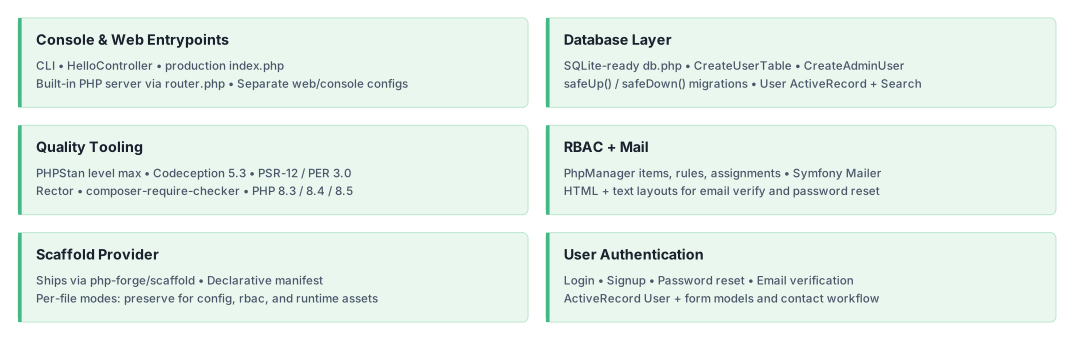
yii2-framework/app-base is a reusable Yii2 application scaffold. It provides standalone web actions, user
authentication, RBAC configuration, migrations, mail templates, semantic PHP views, console tooling, and secure web
entry points.
How it works
This package has Composer type yii2-scaffold. The php-forge/scaffold plugin copies the paths declared in
scaffold.json into the consumer project. The resulting files belong to the consumer and can be inspected, customized,
or ejected from scaffold tracking.
The scaffold distinguishes between two modes used by this provider:
replace: updates an unmodified file and skips a file changed by the consumer.preserve: creates a missing file but never overwrites an existing one.
See the scaffold workflow for update and ownership commands.
Requirements
- PHP
>=8.3. - PHP ctype support, supplied by the extension or a Composer-compatible polyfill.
- Composer
^2.10. - Yii
^22.0@dev. - Scaffold plugin
^0.3@devin the consumer project.
Quick start
Create an empty project directory with this composer.json:
{
    "name": "my-company/my-app",
    "type": "project",
    "minimum-stability": "dev",
    "prefer-stable": true,
    "require": {
        "php": ">=8.3",
        "yii2-framework/app-base": "^0.1@dev",
        "php-forge/scaffold": "^0.3@dev"
    },
    "autoload": {
        "psr-4": {
            "app\\": "src"
        }
    },
    "extra": {
        "scaffold": {
            "allowed-packages": [
                "yii2-framework/app-base"
            ]
        },
        "yii\\composer\\Installer::postCreateProject": {
            "setPermission": [
                {
                    "runtime": "0775",
                    "public/assets": "0775",
                    "yii": "0755"
                }
            ]
        },
        "yii\\composer\\Installer::postInstall": {
            "generateCookieValidationKey": [
                "config/params.php"
            ]
        }
    },
    "config": {
        "allow-plugins": {
            "php-forge/scaffold": true,
            "yiisoft/yii2-composer": true
        }
    },
    "scripts": {
        "post-create-project-cmd": [
            "yii\\composer\\Installer::postCreateProject",
            "yii\\composer\\Installer::postInstall"
        ],
        "post-install-cmd": [
            "yii\\composer\\Installer::postInstall"
        ],
        "post-update-cmd": [
            "yii\\composer\\Installer::postInstall"
        ]
    }
}
Install, configure the seeded administrator before migration, and start the application:
composer install
./yii migrate
php -S localhost:8080 -t public public/router.php
Open http://localhost:8080. The default database is runtime/db.sqlite.
What is included
src/
├── commands/                 Console command example
├── migrations/               User table and administrator seed
└── usecases/
    ├── shared/               CSRF filter, user model, and view adapters
    ├── site/                 Home, about, contact, and error actions
    └── user/                 Authentication, recovery, and administration actions
config/                       Web, console, database, and application parameters
rbac/                         PhpManager roles, rules, and assignments
resources/
├── mail/                     HTML and text mail templates
└── views/                    Complete layouts and site/user PHP views
public/                       Web entry point, router, images, and asset directory
runtime/.gitignore            Runtime directory placeholder
yii                           Console entry point
The bundled views generate semantic HTML through UI Awesome packages. The provider intentionally does not impose a CSS framework, JavaScript runtime, or asset build pipeline. See presentation customization for styling, view ownership, and alternate renderer options.
Documentation
- Installation guide
- Configuration reference
- Scaffold workflow
- Presentation customization
- Dependency policy
- Testing and quality
Security before deployment
The default administrator credentials, SQLite database, and file-based mail transport are development conveniences. Complete the production checklist before exposing a generated application.
AI assistance
AI agents: read the documentation index and fetch the Markdown version
of a page by appending index.md to its URL. The
AI agents guide covers skill installation, client setup and
verification.
🧭 yii2-framework skill: Yii 22.0 application
conventions.
The hosted documentation covers Yii 22.0. If it does not match the installed revision or is unavailable, use the repository guides, the source PHPDoc and the changelog.
Built with AI
License
This package is released under the BSD 3-Clause License.