
ui-awesome / html-interop

Shared backed enums classifying HTML elements by category (block, inline, list, table, void, metadata, root) for the UI Awesome ecosystem.
Requires
- php: ^8.3
Requires (Dev)
- php-forge/baseline: ^0.1
- php-forge/coding-standard: ^0.3
- phpstan/phpstan: ^2.2
- phpstan/phpstan-strict-rules: ^2.0
- phpunit/phpunit: ^12.5
- yii2-extensions/scaffold: ^0.2
Suggests
None
Provides
None
Conflicts
None
Replaces
None
README

Html Interop
Type-safe string-backed enums for HTML tag interoperability
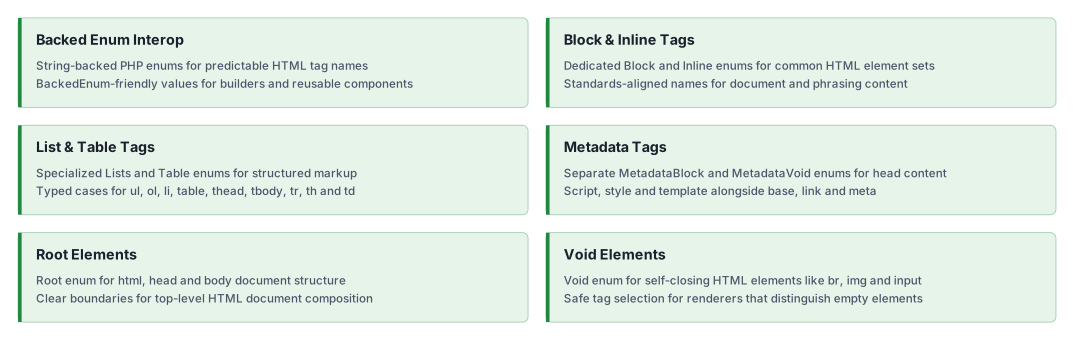
Provides standardized tag collections for block, inline, list, root, table, metadata, and void elements.
Features
Installation
composer require ui-awesome/html-interop:^0.4
Quick start
Using block-level HTML tags
Access standardized block-level tag names through the Block enum.
<?php

declare(strict_types=1);

namespace App;

use UIAwesome\Html\Interop\Block;

echo Block::DIV->value;
// 'div'

echo Block::ARTICLE->value;
// 'article'

echo Block::SECTION->value;
// 'section'
Using inline-level HTML tags
Access standardized inline-level tag names through the Inline enum.
<?php

declare(strict_types=1);

namespace App;

use UIAwesome\Html\Interop\Inline;

echo Inline::SPAN->value;
// 'span'

echo Inline::STRONG->value;
// 'strong'

echo Inline::A->value;
// 'a'
Using void (self-closing) HTML tags
Access standardized void element tag names through the Voids enum.
<?php

declare(strict_types=1);

namespace App;

use UIAwesome\Html\Interop\Voids;

echo Voids::IMG->value;
// 'img'

echo Voids::INPUT->value;
// 'input'

echo Voids::BR->value;
// 'br'
Using specialized HTML tag collections
Use specialized enums for list, root, and table elements.
<?php

declare(strict_types=1);

namespace App;

use UIAwesome\Html\Interop\{Lists, Root, Table};

// List elements
echo Lists::UL->value;
// 'ul'

echo Lists::OL->value;
// 'ol'

echo Lists::LI->value;
// 'li'

// Root elements
echo Root::HTML->value;
// 'html'

echo Root::HEAD->value;
// 'head'

echo Root::BODY->value;
// 'body'

// Table elements
echo Table::TABLE->value;
// 'table'

echo Table::THEAD->value;
// 'thead'

echo Table::TR->value;
// 'tr'

echo Table::TD->value;
// 'td'
Type safety with BackedEnum
Use BackedEnum to accept any string-backed enum in your rendering implementations.
<?php

declare(strict_types=1);

namespace App;

use BackedEnum;
use UIAwesome\Html\Interop\Block;

/**
 * Render HTML using any string-backed enum.
 */
function renderBlock(BackedEnum $tag, string $content): string
{
    return sprintf('<%s>%s</%s>', $tag->value, $content, $tag->value);
}

echo renderBlock(Block::DIV, 'Content');
// <div>Content</div>

echo renderBlock(Block::ARTICLE, 'Article content');
// <article>Article content</article>
Filtering and iterating tags
Leverage PHP 8.1+ enum features for filtering and tag operations.
<?php

declare(strict_types=1);

namespace App;

use UIAwesome\Html\Interop\Block;

// Filter heading elements
$headings = array_filter(
    Block::cases(),
    fn (Block $tag) => str_starts_with($tag->name, 'H'),
);

foreach ($headings as $heading) {
    echo $heading->value . PHP_EOL;
}
// h1
// h2
// h3
// h4
// h5
// h6

// Get all block tag names
$tagNames = array_map(fn (Block $tag) => $tag->value, Block::cases());
Contracts package (optional)
If you need contract-based typing, install ui-awesome/html-contracts and use its element interfaces.
UIAwesome\Html\Contracts\Element\BlockInterfaceUIAwesome\Html\Contracts\Element\InlineInterfaceUIAwesome\Html\Contracts\Element\VoidInterface
composer require ui-awesome/html-contracts:^0.1
Documentation
For detailed configuration options and advanced usage.
Package information
Project status
Our social networks