
power-components / livewire-powergrid

PowerGrid generates Advanced Datatables using Laravel Livewire.
Package info
github.com/Power-Components/livewire-powergrid
pkg:composer/power-components/livewire-powergrid
Fund package maintenance!
Requires
- php: ^8.3
- laravel/prompts: ^0.1|^0.2|^0.3
- livewire/blaze: ^1.0
- livewire/livewire: ^4.0
- power-components/partials: ^0.2.0
- power-components/turbine: ^0.14.1
Requires (Dev)
- composer/composer: ^2.10
- laradumps/laradumps: ^5.0
- larastan/larastan: ^3.10
- laravel/pint: ^1.29
- laravel/scout: ^11.3
- openspout/openspout: ^5.0
- orchestra/testbench: ^10.0|^11.0
- pestphp/pest: ^4.7|^5.0
Suggests
- openspout/openspout: Required to export XLS and CSV (v5)
Provides
None
Conflicts
- illuminate/support: <12.0
- laravel/framework: <12.0
Replaces
None
- 7.x-dev
- v7.0.1
- v7.0.0
- v7.0.0-beta.8
- v7.0.0-beta.7
- v7.0.0-beta.6
- v7.0.0-beta.5
- v7.0.0-beta.4
- v7.0.0-beta.3
- v7.0.0-beta.2
- v7.0.0-beta.1
- 6.x-dev
- v6.11.1
- v6.11.0
- v6.10.7
- v6.10.6
- v6.10.5
- v6.10.4
- v6.10.3
- v6.10.2
- v6.10.1
- v6.10.0
- v6.9.2
- v6.9.1
- v6.9.0
- v6.8.2
- v6.8.1
- v6.8.0
- v6.7.7
- v6.7.6
- v6.7.5
- v6.7.4
- v6.7.3
- v6.7.2
- v6.7.1
- v6.7.0
- v6.6.7
- v6.6.6
- v6.6.5
- v6.6.4
- v6.6.3
- v6.6.2
- v6.6.1
- v6.6.0
- v6.5.5
- v6.5.4
- v6.5.3
- v6.5.2
- v6.5.1
- v6.5.0
- v6.4.2
- v6.4.1
- v6.4.0
- v6.3.2
- v6.3.1
- v6.3.0
- v6.2.2
- v6.2.1
- v6.2.0
- v6.1.16
- v6.1.15
- v6.1.14
- v6.1.13
- v6.1.12
- v6.1.11
- v6.1.10
- v6.1.9
- v6.1.8
- v6.1.7
- v6.1.6
- v6.1.5
- v6.1.4
- v6.1.3
- v6.1.2
- v6.1.1
- v6.1.0
- v6.0.6
- v6.0.5
- v6.0.4
- v6.0.3
- v6.0.2
- v6.0.1
- v6.0.0
- v6.0.0-beta7
- v6.0.0-beta6
- v6.0.0-beta5
- v6.0.0-beta4
- v6.0.0-beta3
- v6.0.0-beta2
- v6.0.0-beta1
- 5.x-dev
- v5.10.7
- v5.10.6
- v5.10.5
- v5.10.4
- v5.10.3
- v5.10.2
- v5.10.1
- v5.10.0
- v5.9.0
- v5.8.1
- v5.8.0
- v5.7.1
- v5.7.0
- v5.6.4
- v5.6.3
- v5.6.2
- v5.6.1
- v5.6.0
- v5.5.0
- v5.4.12
- v5.4.11
- v5.4.10
- v5.4.9
- v5.4.8
- v5.4.7
- v5.4.6
- v5.4.5
- v5.4.4
- v5.4.3
- v5.4.2
- v5.4.1
- v5.4.0
- v5.3.8
- v5.3.7
- v5.3.6
- v5.3.5
- v5.3.4
- v5.3.3
- v5.3.2
- v5.3.1
- v5.3.0
- v5.2.6
- v5.2.5
- v5.2.4
- v5.2.3
- v5.2.2
- v5.2.1
- v5.2.0
- v5.1.18
- v5.1.17
- v5.1.16
- v5.1.15
- v5.1.14
- v5.1.13
- v5.1.12
- v5.1.11
- v5.1.10
- v5.1.9
- v5.1.8
- v5.1.7
- v5.1.6
- v5.1.5
- v5.1.4
- v5.1.3
- v5.1.2
- v5.1.1
- v5.1.0
- v5.0.7
- v5.0.6
- v5.0.5
- v5.0.4
- v5.0.3
- v5.0.2
- v5.0.1
- v5.0.0
- v5.0.0-beta.3
- v5.0.0-beta.2
- v5.0.0-beta
- 4.x-dev
- v4.9.8
- v4.9.7
- v4.9.6
- v4.9.5
- v4.9.4
- v4.9.3
- v4.9.2
- v4.9.1
- v4.9.0
- v4.8.11
- v4.8.10
- v4.8.9
- v4.8.8
- v4.8.7
- v4.8.6
- v4.8.5
- v4.8.4
- v4.8.3
- v4.8.2
- v4.8.1
- v4.8.0
- v4.7.1
- v4.7.0
- v4.6.3
- v4.6.2
- v4.6.1
- v4.6.0
- v4.5.2
- v4.5.1
- v4.5.0
- v4.4.4
- v4.4.3
- v4.4.2
- v4.4.1
- v4.4.0
- v4.3.4
- v4.3.3
- v4.3.2
- v4.3.1
- v4.3.0
- v4.2.1
- v4.2.0
- v4.1.2
- v4.1.1
- v4.1.0
- v4.0.2
- v4.0.1
- v4.0.0
- 3.x-dev
- v3.7.13
- v3.7.12
- v3.7.11
- v3.7.10
- v3.7.9
- v3.7.8
- v3.7.7
- v3.7.6
- v3.7.5
- v3.7.4
- v3.7.3
- v3.7.2
- v3.7.1
- v3.7.0
- v3.6.2
- v3.6.1
- v3.6.0
- v3.5.13
- v3.5.12
- v3.5.11
- v3.5.10
- v3.5.9
- v3.5.8
- v3.5.7
- v3.5.6
- v3.5.5
- v3.5.4
- v3.5.3
- v3.5.2
- v3.5.1
- v3.5.0
- v3.4.1
- v3.4.0
- v3.3.0
- v3.2.9
- v3.2.8
- v3.2.7
- v3.2.6
- v3.2.5
- v3.2.4
- v3.2.3
- v3.2.2
- v3.2.1
- v3.2.0
- v3.1.0
- v3.0.5
- v3.0.4
- v3.0.3
- v3.0.2
- v3.0.1
- v3.0.0
- v2.4.13
- v2.4.12
- v2.4.11
- v2.4.10
- v2.4.9
- v2.4.8
- v2.4.7
- v2.4.6
- v2.4.5
- v2.4.4
- v2.4.3
- v2.4.2
- v2.4.1
- v2.4.0
- v2.3.7
- v2.3.6
- v2.3.5
- v2.3.4
- v2.3.3
- v2.3.2
- v2.3.1
- v2.3.0
- v2.2.6
- v2.2.5
- v2.2.4
- v2.2.3
- v2.2.2
- v2.2.1
- v2.2.0
- v2.1.2
- v2.1.1
- v2.1.0
- v2.0.1
- v2.0.0
- v1.5.1
- v1.5.0
- v1.4.7
- v1.4.6
- v1.4.5
- v1.4.4
- v1.4.3
- v1.4.2
- v1.4.1
- v1.4.0
- v1.3.6
- v1.3.5
- v1.3.4
- v1.3.3
- v1.3.2
- v1.3.1
- v1.3.0
- v1.2.11
- v1.2.10
- v1.2.9
- v1.2.8
- v1.2.7
- v1.2.6
- v1.2.5
- v1.2.4
- v1.2.3
- v1.2.2
- v1.2.1
- v1.2.0
- v1.1.7
- v1.1.6
- v1.1.5
- v1.1.4
- v1.1.3
- v1.1.2
- v1.1.1
- v1.1.0
- 1.0.2
- 1.0.1
- 1.0.0
- dev-refactor/cleanup-dead-code
- dev-fix/raw-search-group
- dev-main
This package is auto-updated.
Last update: 2026-10-31 18:40:32 UTC
README
⚡ Livewire PowerGrid ⚡
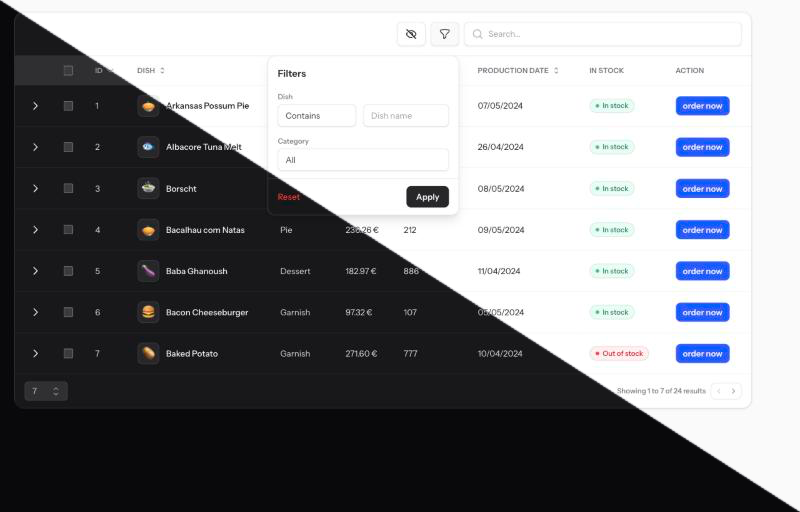
Livewire PowerGrid creates modern, powerful and easy-to-customize data tables based on Laravel Livewire library.
With PowerGrid, you can effortlessly create advanced data tables in a matter of minutes.
🚀 Ready out of the box
Tables have basic features activated by default. Ready to go!
👍 Extensible
Extend and customize your Table including plugins (inline editing, toggles, date pickers), global search, column filters, bulk actions, and data export.
🛠️ Developer-friendly scaffold
Generated table components include usage examples. Just uncomment some code, enter your data, and it works!
🔥 Features
PowerGrid offers a range of features that are readily available:
| Feature | PowerGrid |
|---|---|
| Tailwind CSS / DaisyUI / Flux themes | ✅ |
Custom Theme via struct() API |
✅ |
| Pagination | ✅ |
| Column Sorting | ✅ |
| Filters & Global Search | ✅ |
| Custom Filter Builder | ✅ |
| Inline Editing plugin (click to edit) | ✅ |
| Toggle Switch plugin | ✅ |
| Date Picker plugin (Flatpickr) | ✅ |
| Row Buttons, Checkboxes, Dropdown menu | ✅ |
| Custom Cell Content (links, images, currency formatting) | ✅ |
| Multi-row Bulk Actions | ✅ |
| Conditional Action Rules for Rows, Buttons, and Checkboxes | ✅ |
| Column Summaries (Sum, Count & Average) | ✅ |
| Server-side Actions (full Blade rendering, no JS cache) | ✅ |
Livewire DOM isolation via Hot Zones (pg-tbody, pg-pagination, pg-filters) |
✅ |
| Data Export to XLSX/CSV (OpenSpout) | ✅ |
| Queue Export for large datasets | ✅ |
| Responsive | ✅ |
| Laravel Scout support | ✅ |
| Plugin system (extendable column behaviors) | ✅ |
| Multi Language | Available in 🇺🇸 🇧🇷 🇪🇸 🇮🇹 🇩🇪 and more... |
📚 Learn more in our Documentation.
Get started
Requirements
- PHP 8.3+
- Laravel 12+
- Livewire 4.0+
- Tailwind CSS 4.x
Install PowerGrid
Require PowerGrid via composer.
composer require power-components/livewire-powergrid
Then, follow the steps indicated in the Documentation - Install page.
Upgrading from v6
Read UPGRADE.md and the full Upgrade Guide.
AI-assisted development (Laravel Boost)
PowerGrid ships Agent Skills and an AI guideline for Laravel Boost — so your AI agent (Claude Code, Cursor, Codex, Gemini, and more) understands PowerGrid's v7 conventions and can scaffold themes and plugins for you.
If your app uses Boost, install PowerGrid's skills and guideline into your selected agents with:
composer require laravel/boost --dev
php artisan boost:install
Already using Boost? Pick up PowerGrid's resources (and any other newly installed package's) with:
php artisan boost:update --discover
Reusing a Grid Definition
PowerGrid runs on the framework-agnostic Turbine engine. You can describe a grid once in a portable Turbine\GridDefinition class and share it between a Livewire PowerGrid component and an Inertia (React / Vue) or REST endpoint — handy when migrating a screen from one front-end to another without rewriting the grid.
Extend TurbineTable and point definition() at a portable Turbine\GridDefinition. PowerGrid pulls datasource, columns, fields, filters, setUp, relationSearch, searchMorphs and transformQuery from it.
use PowerComponents\LivewirePowerGrid\TurbineTable;
use PowerComponents\Turbine\Contracts\GridSchema;

class UserTable extends TurbineTable
{
    public string $tableName = 'users';

    protected function definition(): GridSchema
    {
        return new UsersGrid(); // the same class an Inertia controller uses
    }
}
UsersGrid is the portable class shown in the Turbine README. Migrating between Livewire and Inertia keeps that class untouched — only the adapter changes.
definition() is also available on plain PowerGridComponent (returns null by default, so existing components are unaffected). TurbineTable just adds the datasource() wiring on top; use it whenever a component is fully driven by a definition.
Row actions stay explicit: forward actions() / actionRules() on the component only when the grid has them, and add a Column::action() in the definition's columns() — PowerGrid requires an action column whenever an actions() method exists.
Support & Community
👥 Interact with the PowerGrid community at our Discussions tab.
You can share ideas, find questions and answers, and collaborate with other PowerGrid users.
🛟 For technical inquiries, bug reports, and feature requests, please use the Issues tab.
Please look into our previous Issues and Discussions before submitting a new issue.
Contribute
🙏 You can help PowerGrid in a number of ways; contributing goes beyond writing code.
Please read the Contributing Guide to see what kind of contributions you can make and what steps you should follow.
Credits
- Created by Luan Freitas and @DanSysAnalyst
- All Contributors
- Logo & artwork by Caneco
Sponsored by:
With the support of:
Notice of Non-Affiliation and Disclaimer: Livewire PowerGrid is not affiliated with, associated with, endorsed by, or in any way officially connected with the Laravel Livewire - copyright by Caleb Porzio. Laravel is a trademark of Taylor Otwell.