
jotham-lec / statamic-marketing-toolkit

The marketing fundamentals for a Statamic website: SEO, tracking tags, Consent Mode, favicons and redirects, Search Console numbers, site reports with a score and conversion events.
Package info
github.com/Jotham-LEC/statamic-marketing-toolkit
Type:statamic-addon
pkg:composer/jotham-lec/statamic-marketing-toolkit
Fund package maintenance!
Requires
- php: ^8.3
- ext-curl: *
- ext-dom: *
- simonhamp/the-og: ^0.8
- statamic/cms: ^6.34
Requires (Dev)
- larastan/larastan: ^3.0
- laravel/boost: ^2.10
- laravel/pint: ^1.20
- orchestra/testbench: ^10.8|^11.0
- pestphp/pest: ^4.0
Suggests
- ext-gd: Draws favicons when Imagick isn't installed
- ext-imagick: Draws the share cards and favicons
- laravel/boost: Gives AI coding agents the addon's guidelines, skills and read-only MCP tools
Provides
None
Conflicts
None
Replaces
- jotham-lec/statamic-co-seo: v0.29.3
- dev-main
- v0.29.3
- v0.29.2
- v0.29.1
- v0.29.0
- v0.28.0
- v0.27.2
- v0.27.1
- v0.27.0
- v0.26.0
- v0.25.1
- v0.25.0
- v0.24.1
- v0.24.0
- v0.23.1
- v0.23.0
- v0.22.5
- v0.22.3
- v0.22.2
- v0.22.1
- v0.22.0
- v0.21.6
- v0.21.5
- v0.21.4
- v0.21.3
- v0.21.2
- v0.21.1
- v0.21.0
- v0.20.0
- v0.19.0
- v0.18.4
- v0.18.3
- v0.18.2
- v0.18.1
- v0.18.0
- v0.17.0
- v0.16.0
- v0.15.0
- v0.14.0
- v0.13.3
- v0.13.2
- v0.13.1
- v0.13.0
- v0.12.0
- v0.11.0
- v0.10.0
- v0.9.0
- v0.8.0
- v0.7.0
- v0.6.0
- v0.5.1
- v0.5.0
- v0.4.0
- v0.3.3
- v0.3.2
- v0.3.1
- v0.3.0
- v0.2.1
- v0.2.0
- v0.1.0
This package is auto-updated.
Last update: 2026-10-19 06:24:24 UTC
README
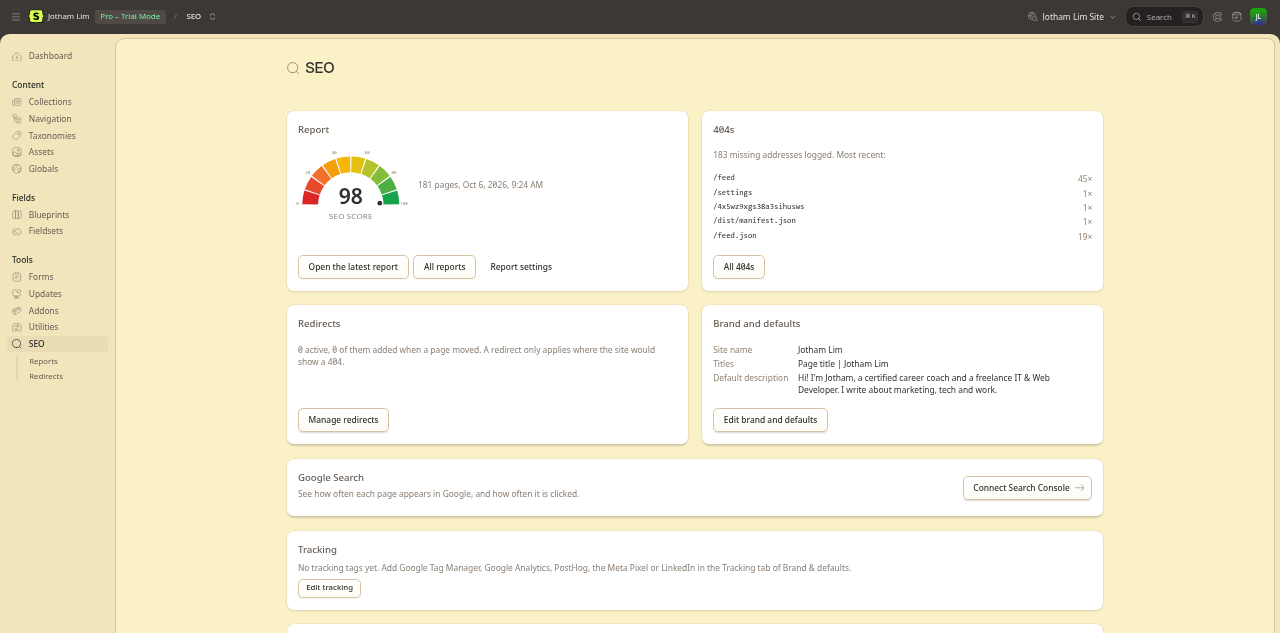
SEO, redirects, 404s, SEO reports, tracking tags and Consent Mode for Statamic. Built for teams where marketing has ownership over SEO & Analytics, so that designers/developers can focus on app logic and design. A Laravel Boost extension gives AI coding agents the same knowledge.
For marketers
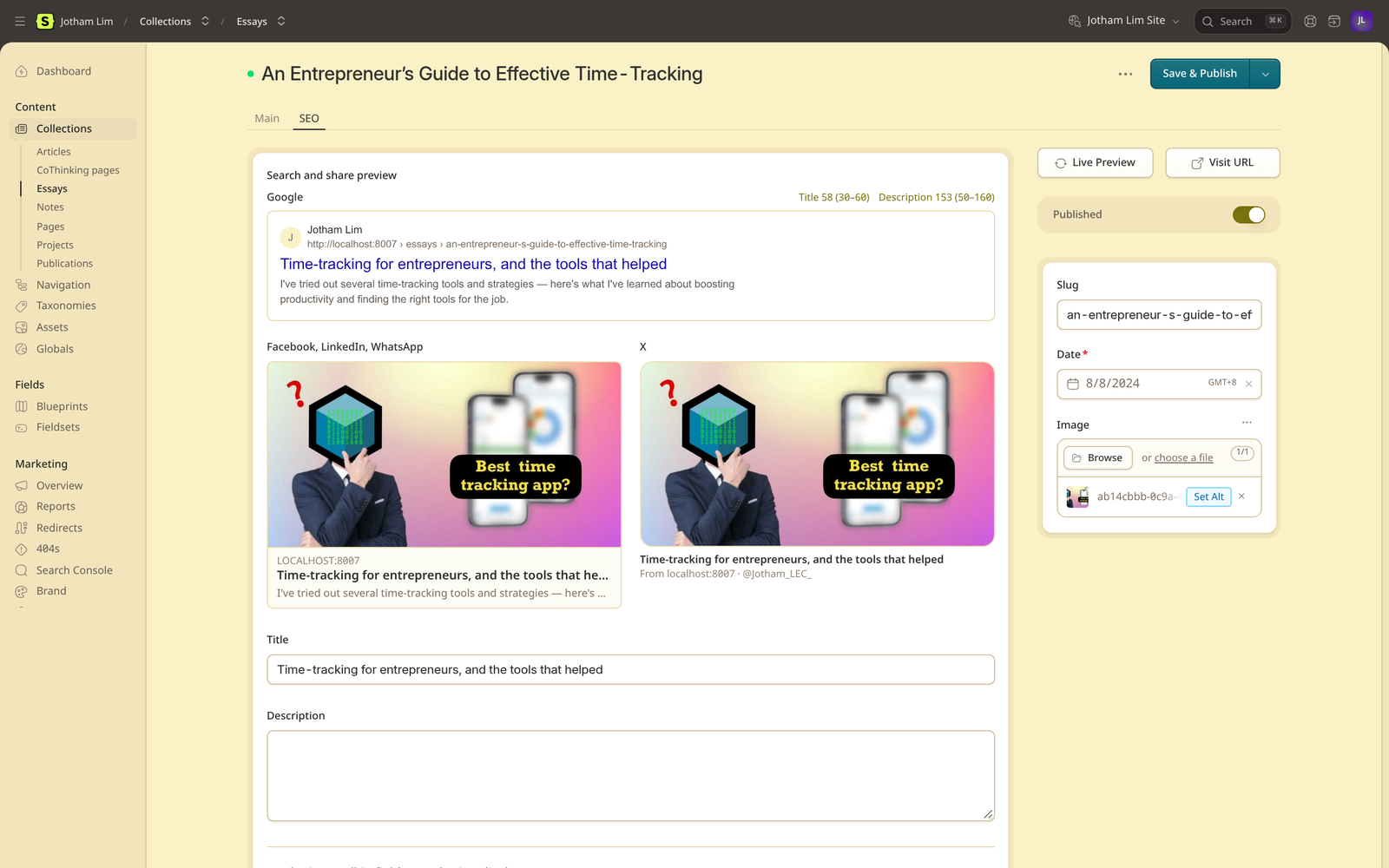
- SEO Control: Modify SEO title, description, share image, canonical address, indexing, and structured data of every page, and a preview shows how the page will look in Google and on social media as you type.
- Sensible Defaults: Every page gets its tags, a sitemap, robots.txt, and llms.txt without anyone filling in a field.
- Redirects & 404s: Anyone can add redirects, wildcards and 410s included. Moving a page adds one for you, and missing pages are logged. Bulk import from a CSV.
- SEO Score: Every page is checked and scored out of 100. Each problem links straight to the entry that fixes it.
- Front-end Toolbar: Signed in, every page of the live site shows its score, failing checks, search preview, redirects and tracking, with a link to fix each.
- Tracking Tags: Paste your GTM, GA4, PostHog, Meta Pixel, or LinkedIn ID. Tags load on the live site only.
- Integrations: Search Console numbers per page, form submissions sent on as leads with their source, and UTM campaign links.
- Consent Mode v2: Works with the cookie banner you already have, with defaults per region.
For developers
- Statamic native: Fieldsets, globals, forms, and tags. Your layout needs only two tags,
<s:mt:head />and<s:mt:body />. - Lean: No front-end script unless a feature needs one. Files are served without sessions or cookies.
- Feature toggles: Switch off what you don't use, and it isn't loaded at all.
- Ready for AI coding agents: A Laravel Boost extension; see below.
How it works under the hood is in For developers.
For AI coding agents: a Laravel Boost extension
The addon extends Laravel Boost, Laravel's official AI toolkit, so that Claude Code, Cursor, Codex and other agents work with it rather than around it. Install Boost (composer require laravel/boost --dev) and run php artisan boost:install: the addon is listed among the packages with guidelines and skills.
- Guidelines: how the addon fits a site, and what an agent must not hand-write: meta tags, JSON-LD, sitemaps, redirect routes, tracking scripts.
- Skills:
marketing-toolkit-seo-rules: point the addon at a collection's own fields, page builders included;marketing-toolkit-extend: change a rule in aSiteSeosubclass, or add a share-card design.
- MCP tools, added to Boost's own MCP server, read-only:
marketing-toolkit-page-seo: what a page's<head>prints;marketing-toolkit-report: the latest SEO report's failing checks;marketing-toolkit-redirect: which redirect answers a path.
Every name starts with marketing-toolkit-, beside Boost's and Statamic's own and never in their place. Without Boost nothing changes, and nothing leaves the site. Details are in configuration.md.
Screens
The preview updates as you type, for Google and for shares on Facebook, LinkedIn, WhatsApp, and X.
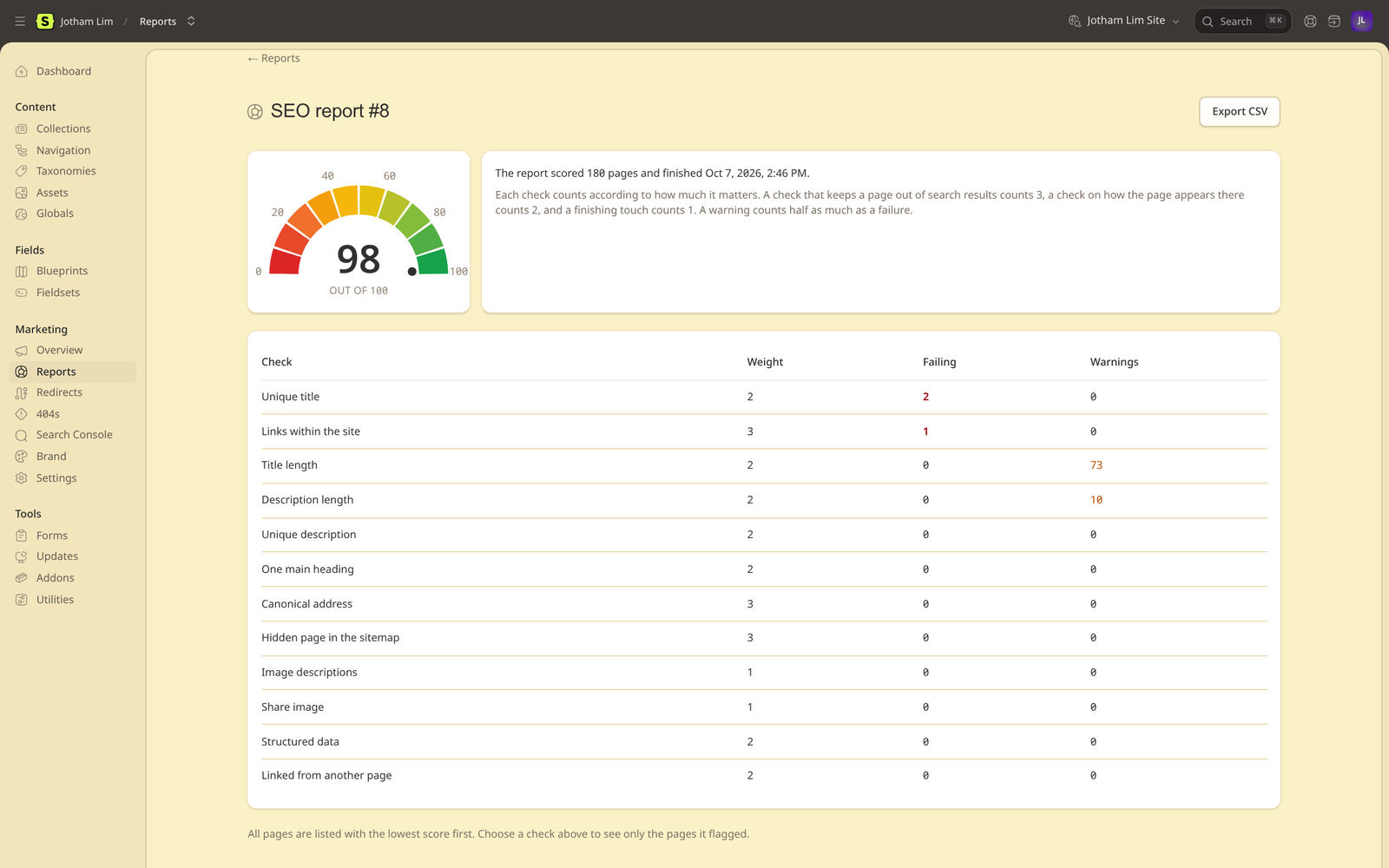 Each check lists the pages it flagged. Export the report as a CSV. |
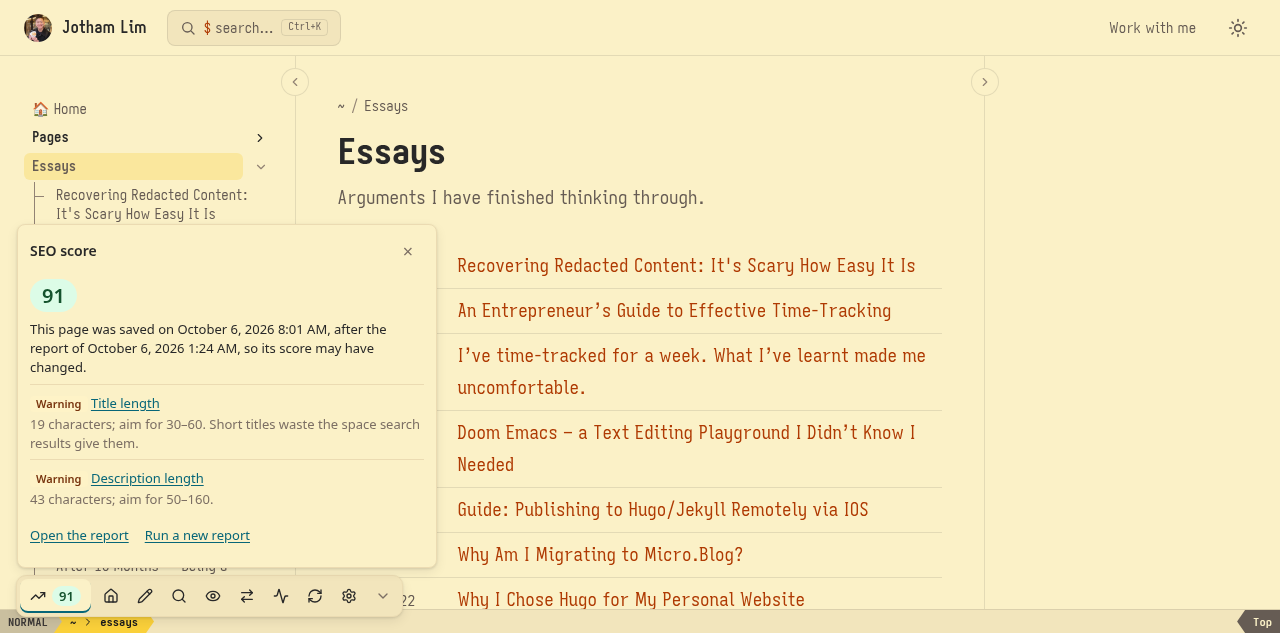 Signed in, each page of the live site shows its score and what to fix. |
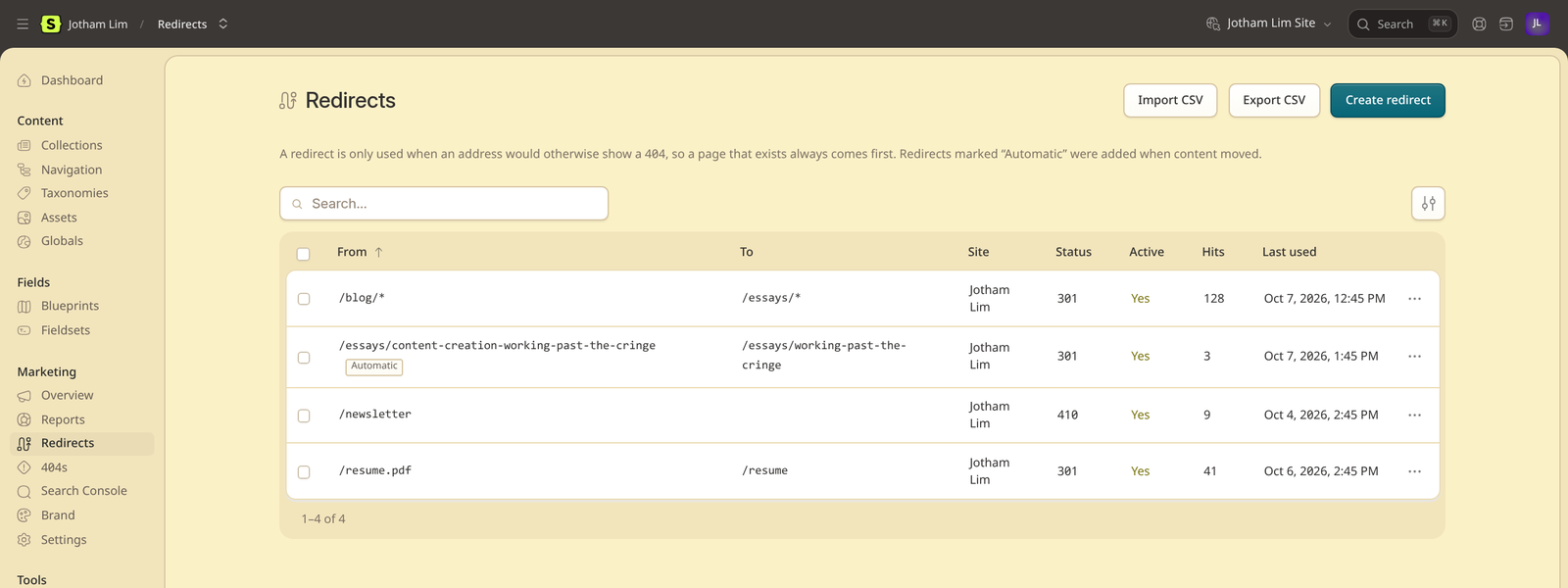 Moved pages get their redirect automatically. |
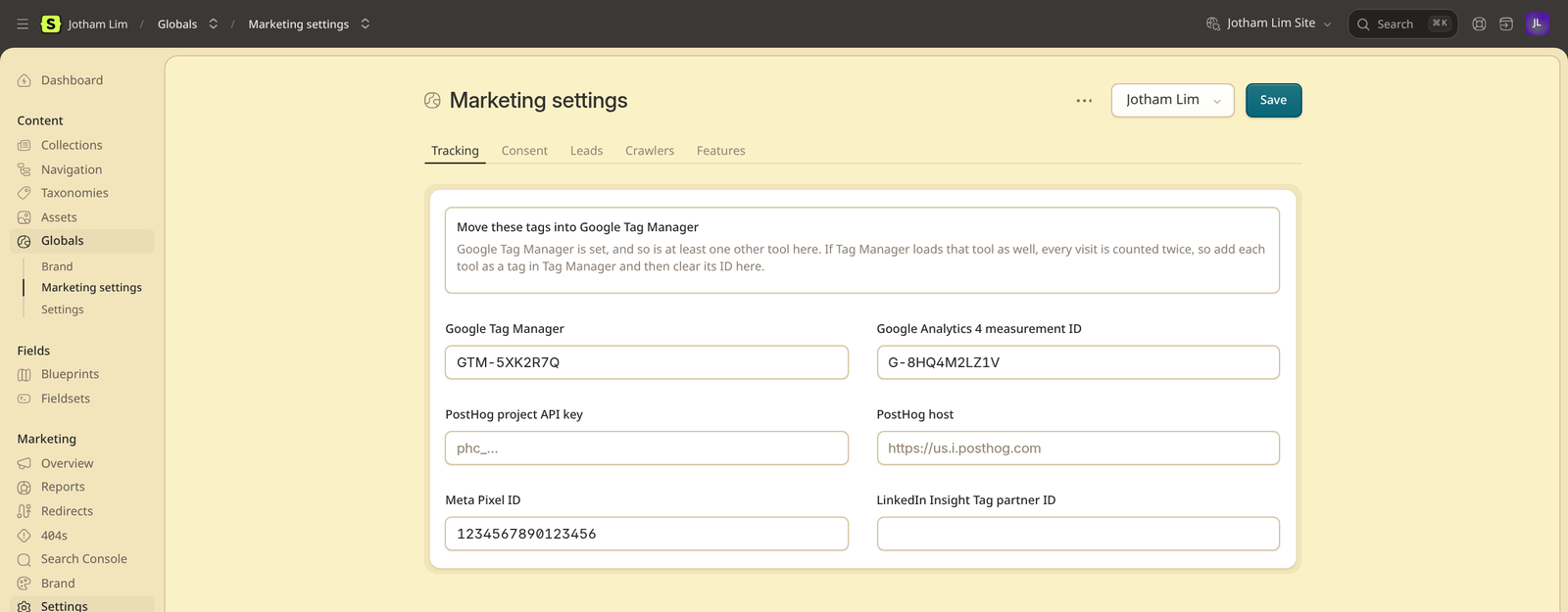 You're warned when GTM and another tag would count each visit twice. |
Requirements
- PHP 8.3+ with
curlanddom, and thembstringandopensslthat Laravel itself requires. - Statamic 6.34+. Core is enough; multi-site needs Statamic Pro, as Statamic itself does.
- A database Laravel can migrate, even on a flat-file site, for the 404 log, reports and redirect hit counts. SQLite is fine. Redirect rules are YAML files in
content/redirects/, committed with the site, or a table if you prefer. - A serializing cache store:
file,redis,database, ormemcached, notarray. Automatic redirects compare an entry with the copy loaded before it was edited. imagickfor share cards and favicons. Without it, pages use their uploaded share image, andgddraws favicons from a PNG or JPEG.- Laravel's scheduler for scheduled reports and the Search Console import. A queue worker is optional.
- Optional: Laravel Boost 2.10+ for the guidelines, skills and tools for AI coding agents.
Details are in Getting started.
Installation
composer require jotham-lec/statamic-marketing-toolkit
php artisan migrate
php please mt:install
php artisan migrate creates the mt_redirects, mt_redirect_hits, mt_404s, mt_reports, mt_report_pages and mt_search_stats tables. mt:install:
- creates the Brand and Marketing settings global sets and their blueprints, using the first asset container for images (choose another with
--container=) - fills their empty fields with what the site already uses: the home page's description, and the control panel kept out of robots.txt
- gives each routed collection that has no blueprint yet one with an SEO tab (skip it with
--no-blueprints), and names the blueprints you already have that lack it, without changing them - names files in
public/, such as a new site'srobots.txtand emptyfavicon.ico, that the web server would serve instead of the add-on's, and offers to delete them
Running it again overwrites nothing. It adds only what is missing, such as the fields a newer version brings.
Then add one tag after <meta charset> and the viewport, and one right after <body>:
<s:mt:head />
<s:mt:body />
In Antlers, use {{ mt:head }} and {{ mt:body }}.
Next steps are in Getting started. Moving a site that already has SEO set up? Follow the migration checklist, or hand it to an AI agent with the migration skill.
Where things are
Everything is in the Marketing section of the control panel, after Statamic's own sections (each user can move it under Preferences → Nav):
| Screen | What's there |
|---|---|
| Overview | The latest score, recent 404s, redirects, Search Console clicks, and the files the site serves, with any file in public/ that shadows one |
| Reports | Run a report, see each check and the pages it flagged, export a CSV, and schedule reports |
| Redirects | Add, import and export redirects |
| 404s | Missing pages real visitors hit, how often, and the last page that linked there |
| Search Console | Connect Google Search Console, step by step, and import its numbers |
| Brand | Title separator, default description and share image, icon, publisher, share-card colours |
| Settings | Tracking IDs, Consent Mode, leads, verification codes, robots.txt, ads.txt, and the feature switches |
Each entry's SEO fields and preview are on its SEO tab. Who sees which screen is set under Users → Roles, in the Marketing group.
Scheduled tasks
Registered automatically, provided Laravel's scheduler is running:
| Command | When |
|---|---|
mt:report |
Off by default. Daily or weekly, at 03:00 unless you choose another time (Marketing → Reports → Settings) |
mt:search-console |
Daily, 04:30, once a Search Console property is connected |
Security and privacy
- Visitors never see the toolbar. Its loader is the same 300 bytes for everyone, so pages stay safe to cache, and it asks the site about a page only for signed-in control panel users, checking the session and each permission.
- Every Marketing screen checks its permission: viewing, managing redirects, and running reports are separate.
- Tracking tags print only in production, never in Live Preview, and an ID that doesn't look like one is never printed.
- Copies of the site outside production are
noindex, and their robots.txt disallows everything, so staging stays out of search results. - The sitemap, robots.txt, share cards and favicons are served without a session or cookies.
- It sends nothing to me. What it sends to other services, such as IndexNow pings for changed pages (on by default, in production), is listed in What it sends where.
How it compares with other add-ons
Statamic has great add-ons for each part of this. Pick them instead if:
- You want first-party support. SEO Pro is by the Statamic team. This is one developer's project, supported through GitHub issues.
- You prefer one add-on per job. Switched-off features here cost nothing, but the add-ons below do their jobs well.
- You prefer hand-written code. I build this with heavy AI assistance. Every change goes through the test suite and CI on SQLite and Postgres, but you should know.
| Add-on | What it covers |
|---|---|
| SEO Pro | SEO, sitemap, redirects, 404s, and reports, by the Statamic team |
| Advanced SEO | SEO, sitemaps, redirects, social images, and multi-site |
| Aardvark SEO | On-page SEO, schema, and redirects |
| Redirect | Redirects and 404s |
| 404 Logger | A log of 404 requests |
| Consent Manager | A cookie banner and consent for tracking scripts |
| Favicons | Favicons from one image |
| AB Tester | A/B experiments |
Documentation
- Getting started
- Moving an existing site
- Migration skill for AI agents
- For editors
- Tracking and Consent Mode
- Configuration
- For developers
- Troubleshooting
- Upgrading from Co-SEO
- Changelog
Development
composer install
composer test      # Pest, in parallel
composer lint      # Pint
composer analyse   # PHPStan
npm run build      # the control panel's assets and the toolbar
How the tests are set up, and how to run them on Postgres, is in CONTRIBUTING.
Licence and support
Free and open source under the MIT licence. No editions, no licence key. Questions and bugs go to GitHub issues.
If it's useful to you, please give it a heart on the Statamic Marketplace, and if it saves you time, you can buy me a coffee.