
datlechin / flarum-ai-summarize

AI summaries of Flarum discussions, written once, shown under the first post, citing the posts they come from.
Package info
github.com/datlechin/flarum-ai-summarize
Language:TypeScript
Type:flarum-extension
pkg:composer/datlechin/flarum-ai-summarize
Fund package maintenance!
Requires
- php: ^8.3
- datlechin/flarum-ai: ^1.0
- flarum/core: ^2.0
Requires (Dev)
- flarum/likes: *
- flarum/markdown: *
- flarum/mentions: *
- flarum/phpstan: ^2.0
- flarum/tags: *
- flarum/testing: ^2.0
- laravel/pint: ^1.18
Suggests
None
Provides
None
Conflicts
None
Replaces
None
This package is auto-updated.
Last update: 2026-10-27 10:18:42 UTC
README
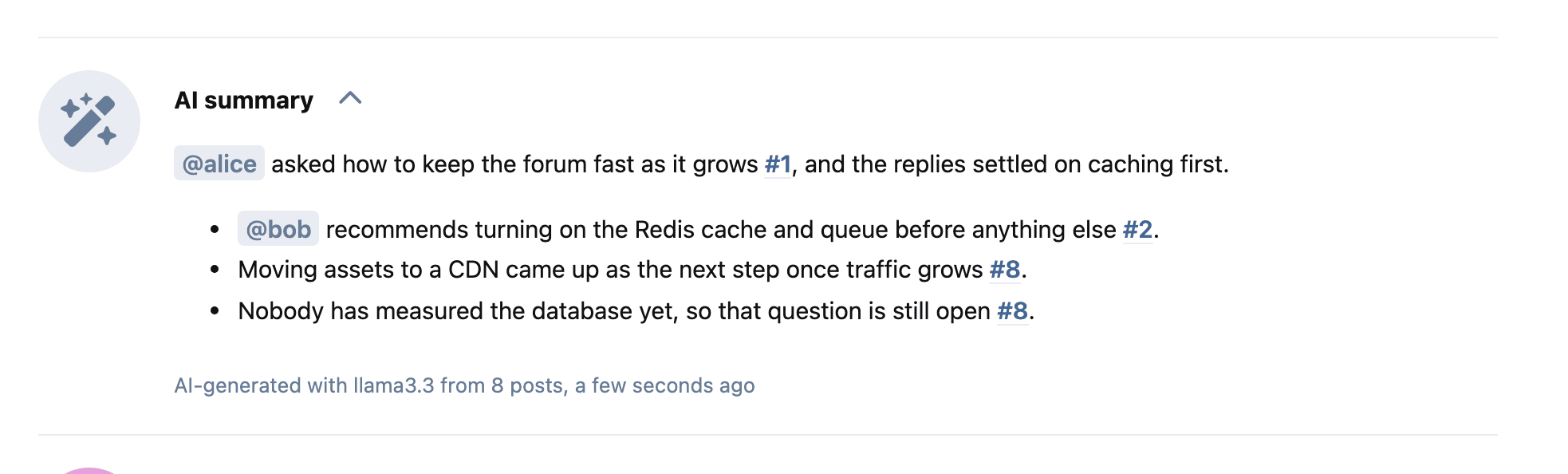
A short AI summary of a discussion, under its first post. It is written once and saved, so readers don't wait for it or cost anything. Each point links to the posts it comes from.
Install
composer require datlechin/flarum-ai-summarize
This also installs AI, which connects the forum to a model provider. Enable both under Admin > Extensions, then set up a provider on the AI page. Needs Flarum 2.0 and PHP 8.3.
How it works
- Someone with Write AI summaries clicks Summarize this discussion under the first post, or Summarize in the discussion menu.
- The summary appears as the model writes it, then is saved.
- Everyone with View AI summaries sees the saved summary, with the model that wrote it, how many posts it covers and when.
- When new replies arrive, the summary stays and says how many it hasn't seen. Update writes a new one.
- When a post the summary covers is hidden, edited or deleted, the summary is deleted, so it never repeats what was taken back.
- Moderators who can edit posts can remove a summary from the discussion menu.
Summaries are written in the forum's default language, whatever language the posts are in.

What the model reads
- The title and the comments everyone in the discussion can see. Hidden posts and posts waiting for approval are left out.
- Long discussions: the first 5 posts, the last 5, and the most liked in between, up to Posts to read at most.
- Long posts: their beginning and end.
It is asked to use only what the posts say, to name people by username and to cite post numbers. Citations of posts it wasn't given are dropped, and an @mention of someone who didn't post in the discussion becomes plain text.
Settings
Admin > Extensions > AI Summarize.
| Setting | Default | What it does |
|---|---|---|
| Posts needed for a summary | 3 | Shorter discussions can't be summarized. |
| Posts to read at most | 100 | Caps what one summary costs. |
| Automatic summaries per hour | 0 (off) | Summarizes up to this many recently active discussions per hour without anyone asking. |
| Extra instructions | Empty | Added to the built-in instructions, for example about tone. |
Permissions
| Permission | Default | Allows |
|---|---|---|
| View AI summaries | Everyone, guests included | Seeing saved summaries. |
| Write AI summaries | Moderators | Writing a summary, and a new one once replies arrive. Six per five minutes per person. |
Both can be set per tag.
Automatic summaries
php flarum summaries:backfill runs every ten minutes through the Flarum scheduler, so the scheduler's cron entry must be set up. Each run takes a sixth of the hourly budget. It picks discussions active in the last 30 days, ones without a summary first, and refreshes a summary at most once an hour.
Streaming behind a proxy
The summary is sent line by line as it is written. If your server or proxy buffers responses, it still works, but the text shows up all at once at the end. On nginx, the response already sends X-Accel-Buffering: no. Turn off any compression or buffering in front of /api/discussions/*/summary if you want to see it stream.
Update
composer update datlechin/flarum-ai-summarize
php flarum migrate
php flarum cache:clear
From 0.1.x, the custom system prompt becomes Extra instructions, added to the built-in prompt instead of replacing it. The changelog lists what changed.
For extension authors
- The discussion resource has a
summaryrelationship todiscussion-summaries, included by default when showing one discussion, and acanSummarizeattribute there. - A summary has
contentHtml,model,createdAt,postCount,newReplyCountandcanDelete. POST /api/discussions/{id}/summarywrites one and answers with newline-delimited JSON:{"type":"text","text":"..."}lines, then{"type":"done"}or{"type":"error","message":"..."}.DELETE /api/discussion-summaries/{id}removes one.