
datlechin / flarum-ai

Connect Flarum to OpenAI, Anthropic, Gemini or any OpenAI-compatible API, for other extensions to generate text with.
Fund package maintenance!
Requires
- php: ^8.3
- flarum/core: ^2.0
- guzzlehttp/guzzle: ^7.7
Requires (Dev)
- flarum/phpstan: ^2.0
- flarum/testing: ^2.0
- laravel/pint: ^1.18
Suggests
None
Provides
None
Conflicts
None
Replaces
None
- dev-main
- v1.0.0
- v0.1.1
- v0.1.0
- dev-depfu/update/composer/guzzlehttp/guzzle-8.3.1
- dev-depfu/update/composer/flarum/testing-2.0.1
- dev-depfu/update/composer/flarum/core-2.0.2
- dev-depfu/update/composer/flarum/core-2.0.1
- dev-depfu/update/composer/flarum/testing-2.0.0
- dev-depfu/update/composer/guzzlehttp/guzzle-8.2.0
- dev-depfu/update/composer/guzzlehttp/guzzle-8.0.2
- dev-depfu/update/composer/guzzlehttp/guzzle-8.0.1
- dev-refactor/v2
This package is auto-updated.
Last update: 2026-11-02 07:31:02 UTC
README
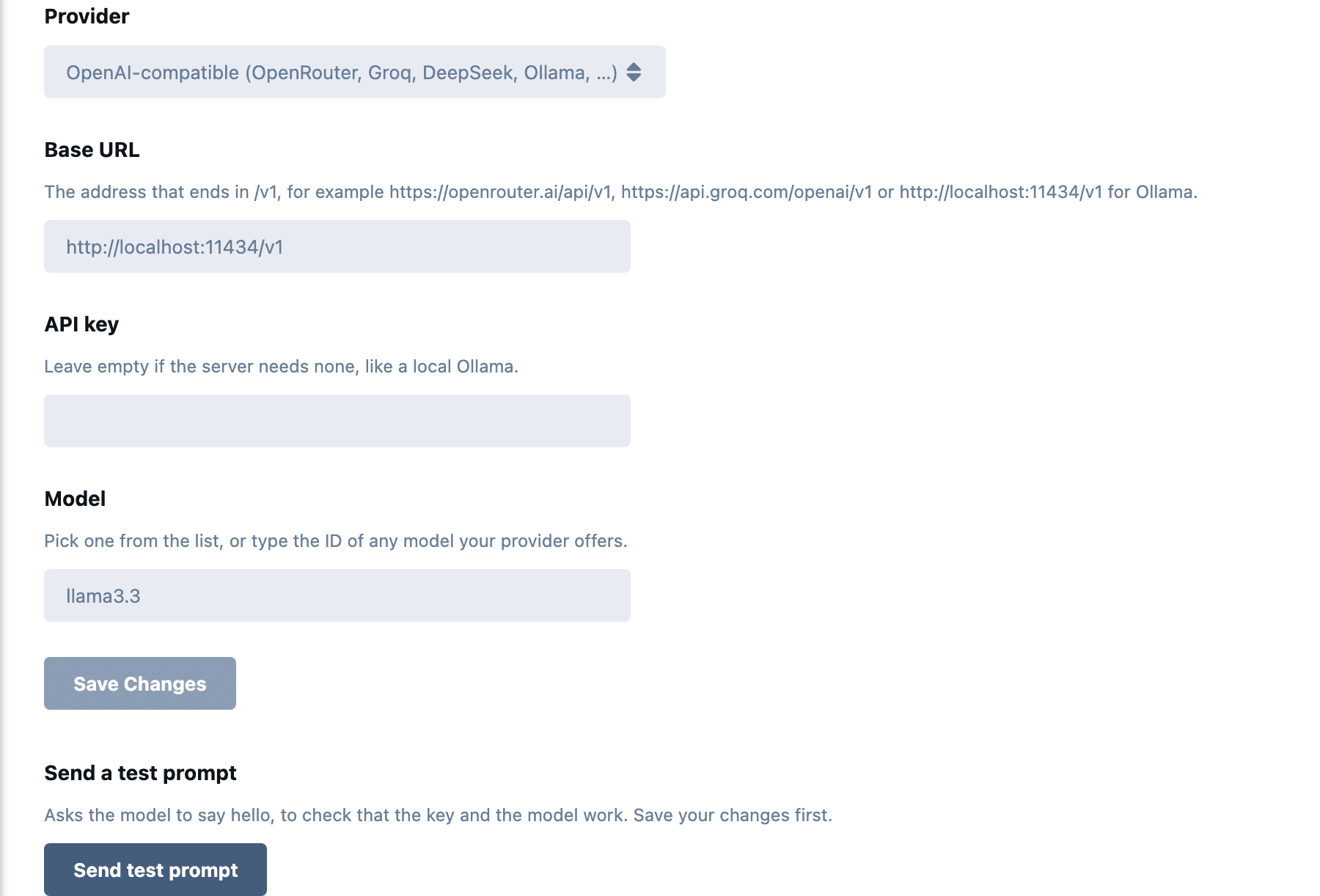
Connects Flarum to a model provider: OpenAI, Anthropic, Google Gemini, or any server with an OpenAI-compatible API, such as OpenRouter, Groq, DeepSeek or a local Ollama.
It adds nothing to the forum by itself. Extensions such as AI Summarize use it to write text.
Install
composer require datlechin/flarum-ai
Enable AI under Admin > Extensions. Needs Flarum 2.0 and PHP 8.3.
Set up
On the AI extension page:
- Choose a provider.
- Paste its API key. For an OpenAI-compatible server, also its base URL.
- Save, then choose a model. The list comes from the provider, and you can type any other model ID.
- Save again and click Send test prompt. The model's reply shows up as a message.
| Provider | Needs | Calls |
|---|---|---|
| OpenAI | API key | Responses API, with response storage off |
| Anthropic | API key | Messages API |
| Google Gemini | API key | generateContent |
| OpenAI-compatible | Base URL, and an API key if the server asks for one | Chat Completions |
Until a provider, a key and a model are set, extensions that use AI stay off.
Each provider keeps its own key and model, so switching back and forth loses nothing. Keys are stored in the settings table and only admins see them.
When a request fails, the provider's error goes to the Flarum log in storage/logs.
What leaves the forum
Everything an extension puts in a prompt goes to the provider you choose. For AI Summarize, that is the posts of the discussion being summarized. Check the provider's data policy before turning it on.
Update
composer update datlechin/flarum-ai
php flarum migrate
php flarum cache:clear
From 0.1.x, the provider, its key and its text model carry over. An OpenAI provider with a custom base URL becomes OpenAI-compatible. The changelog lists what was removed.
For extension authors
Require datlechin/flarum-ai and inject Datlechin\Ai\Ai:
use Datlechin\Ai\Ai;
use Datlechin\Ai\Prompt;

$response = $ai->generate(Prompt::make(
    instructions: 'Reply with one sentence.',
    input: $text,
    maxOutputTokens: 300,
));

$response->text;
$response->model;
$response->usage->inputTokens;
$response->usage->outputTokens;
$response->truncated;
stream() takes the same prompt, yields the text as it arrives, and returns the Response at the end:
$stream = $ai->stream($prompt);

foreach ($stream as $text) {
    // ...
}

$response = $stream->getReturn();
For a conversation, pass the messages yourself: new Prompt($instructions, [Message::user('...'), Message::assistant('...'), Message::user('...')]).
Call $ai->isConfigured() before offering a feature. Otherwise:
| Exception | When | Unhandled in an API request |
|---|---|---|
Datlechin\Ai\Exception\NotConfiguredException |
No provider, key or model | 503 ai_not_configured |
Datlechin\Ai\Exception\ProviderException |
The provider refused or failed | 502 ai_provider_error |
Datlechin\Ai\Event\Generated fires after every generation with the driver name, the prompt and the response, token usage included. Listen to it to keep track of spending.
Adding a provider
use Datlechin\Ai\Extend\Ai;

return [
    (new Ai())->driver('mistral', MistralDriver::class),
];
A driver implements Datlechin\Ai\Driver\DriverInterface:
label(): a translation key for the provider list.fields(): the settings it needs, asDatlechin\Ai\Driver\Fieldobjects. The AI page shows and validates them.models(): model IDs for the model list.generate()andstream().
Extending Datlechin\Ai\Driver\HttpDriver gives it the shared HTTP client, provider error messages and a server-sent events reader. The chosen model is stored in datlechin-ai.{name}.model.