
asignua / filament-image-annotations

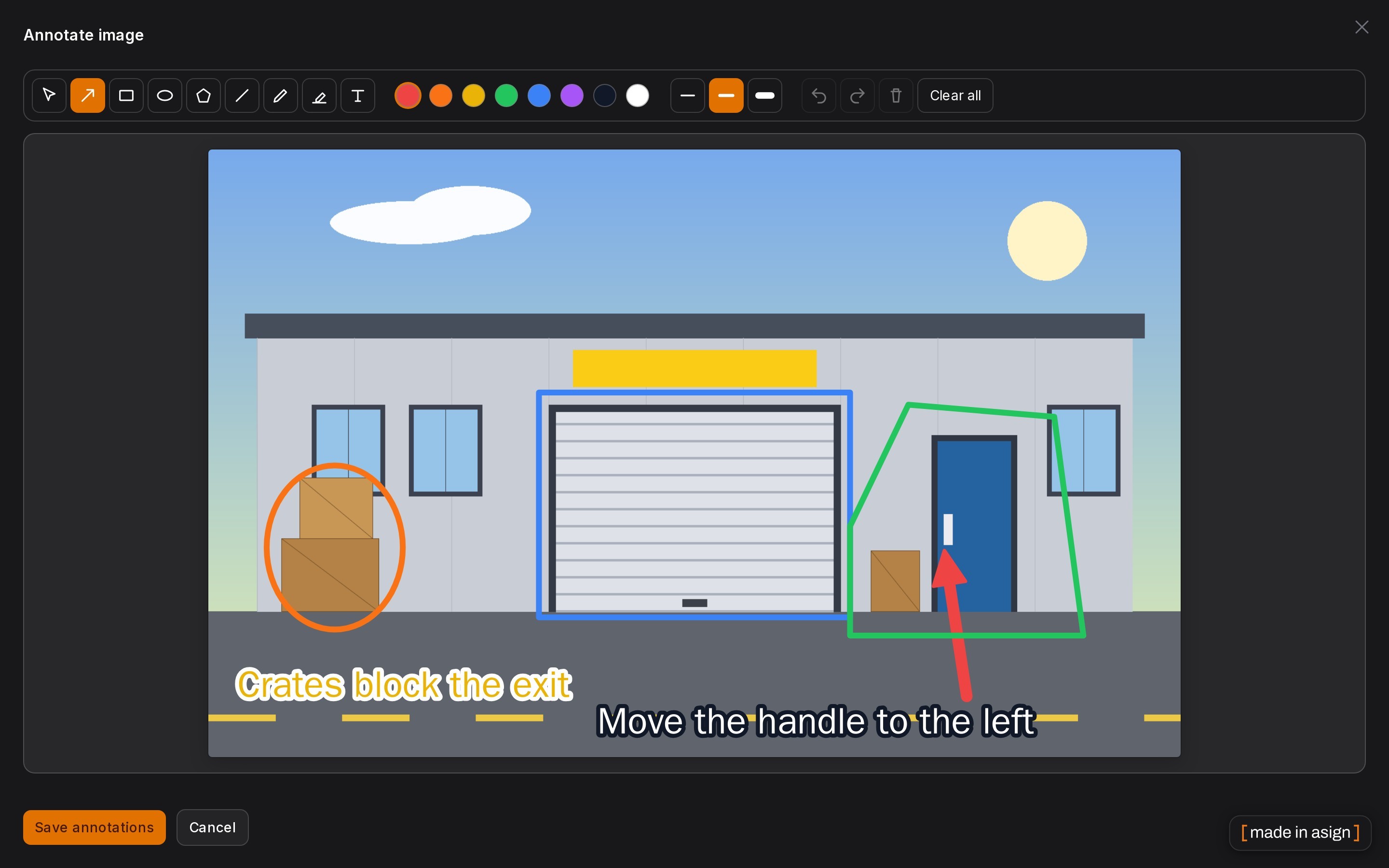
Non-destructive vector annotations for Filament 5: arrows, rectangles, ellipses, lines, a pen, a highlighter and text drawn over an image as a separate JSON layer, with an editor, a read-only viewer and an Annotate button for uploads. The original file is never modified.
Package info
github.com/asignua/filament-image-annotations
pkg:composer/asignua/filament-image-annotations
Requires
- php: ^8.3
- filament/filament: ^5.0
- illuminate/contracts: ^12.0|^13.0
- spatie/laravel-package-tools: ^1.16
Requires (Dev)
- filament/spatie-laravel-media-library-plugin: ^5.0
- larastan/larastan: ^3.0
- laravel/pint: ^1.18
- orchestra/testbench: ^10.0|^11.0
- phpunit/phpunit: ^11.5|^12.0
- spatie/laravel-medialibrary: ^11.0
Suggests
- filament/spatie-laravel-media-library-plugin: Annotate images stored through Spatie Media Library.
- spatie/laravel-medialibrary: Annotate Spatie Media items; their annotations are removed together with the media.
Provides
None
Conflicts
None
Replaces
None
README
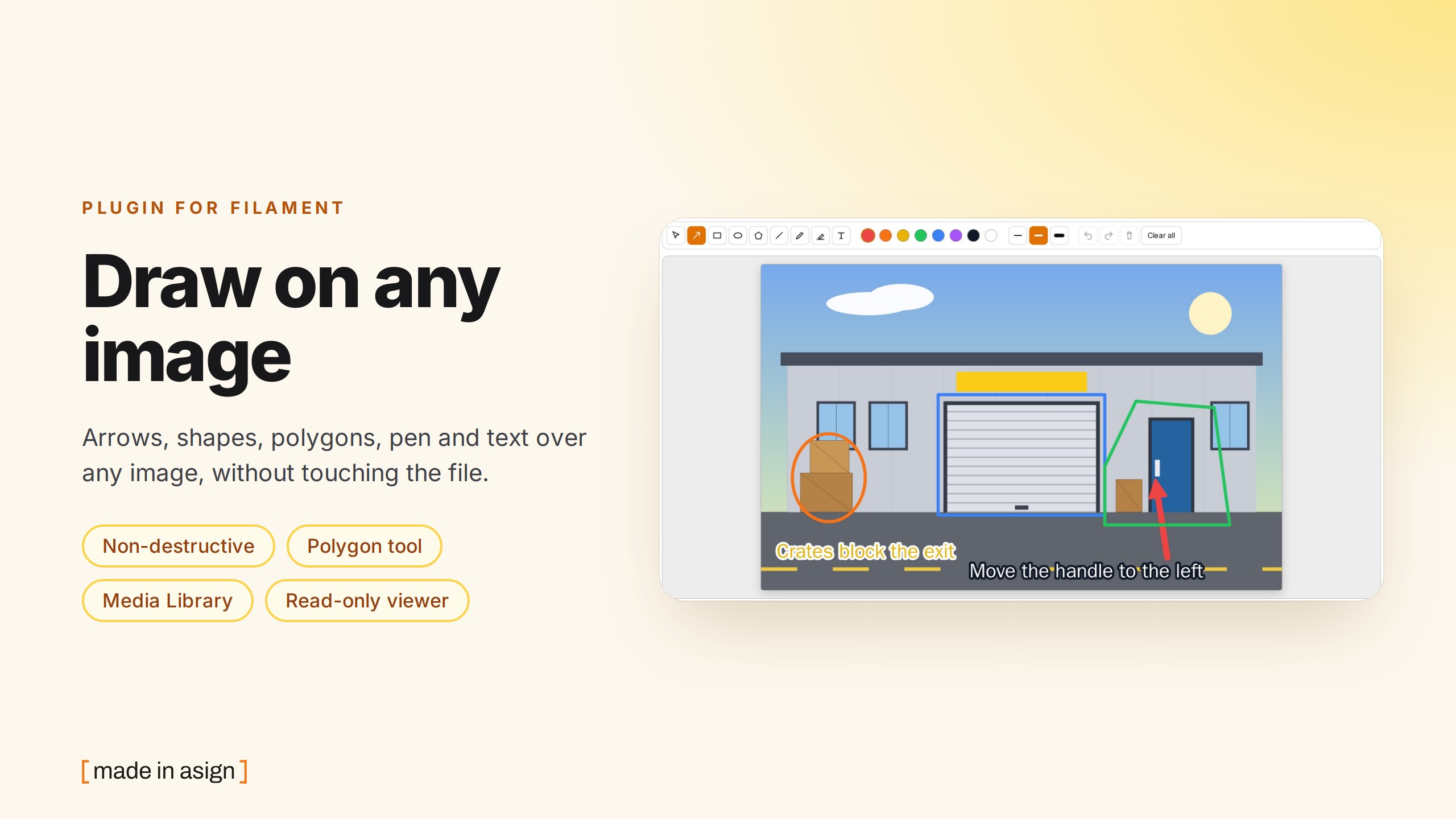

Draw arrows, rectangles, ellipses, polygons, lines, freehand pen strokes, a highlighter and text over any image in a Filament 5 panel, without touching the file. The annotations are a separate, tiny JSON layer in their own table: the original image is never modified, the markup can be edited or removed at any time, and the same layer can be shown read-only anywhere, in the panel or on your public site.
- Non-destructive. The file stays byte-for-byte what was uploaded. Delete the layer and you have the original.
- A real editor. Nine tools, eight colours, three stroke widths, undo/redo, move and recolour a selected shape, touch and pen support, keyboard shortcuts.
- Works with what you have. A Spatie Media Library item, a path in a
FileUploadcolumn, or anything you teach it through a smallImageSourcecontract. - Safe by construction. Everything the browser sends is sanitised on save (shape types, coordinates, colours, lengths)
and the renderer builds SVG with
createElementNSandtextContentonly, neverinnerHTML.
Reviewing images as a team (a layer per author, numbered pins with comment threads)? That is the paid add-on - see Free or Pro.
- Screenshots
- Requirements
- Installation
- Usage
- The editor
- Image sources
- Authorization
- Configuration
- Stored format
- Events and cleanup
- Front end
- Pro
- Gotchas
- Demo
- Translations
- AI agents
- Testing
Screenshots
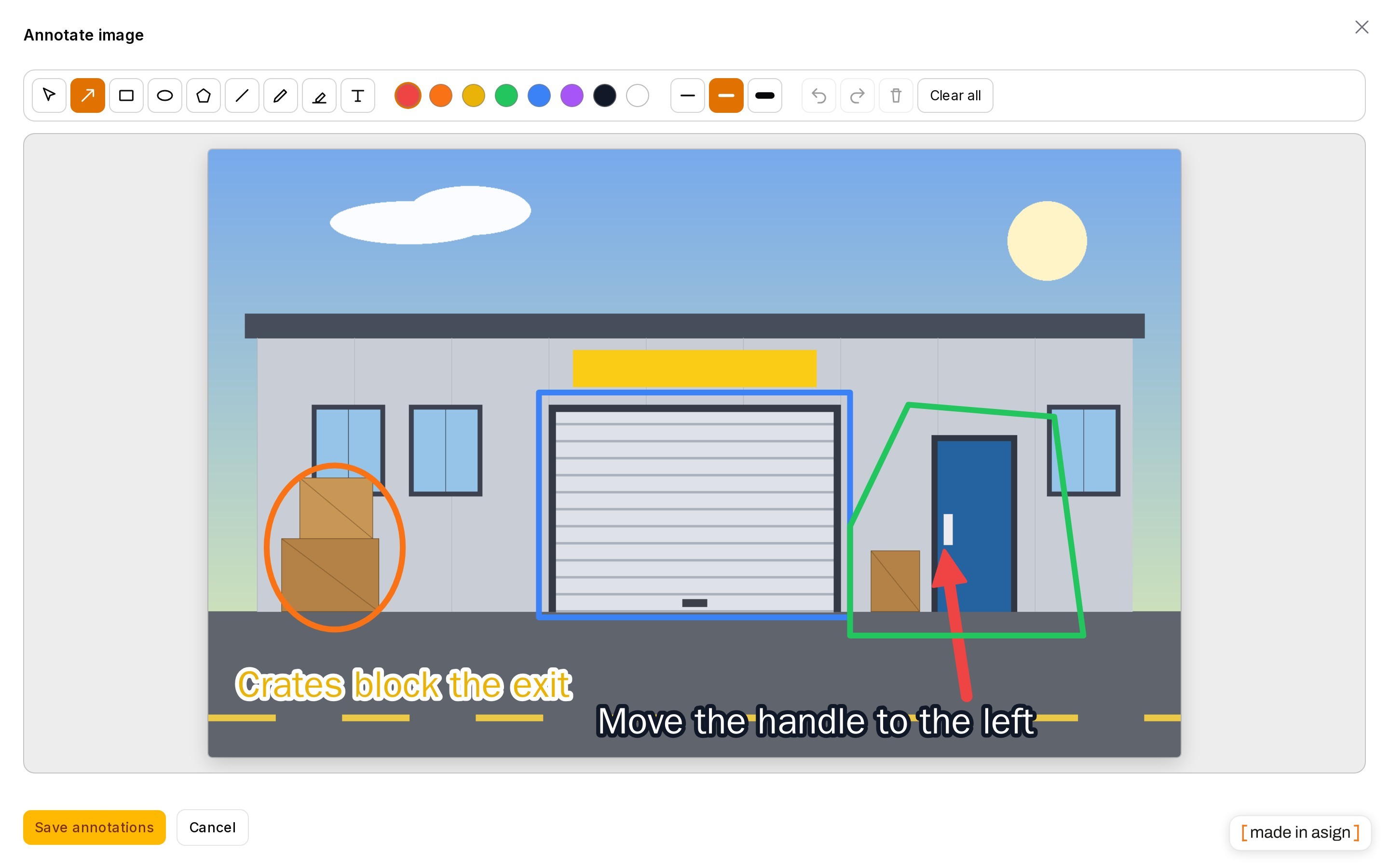
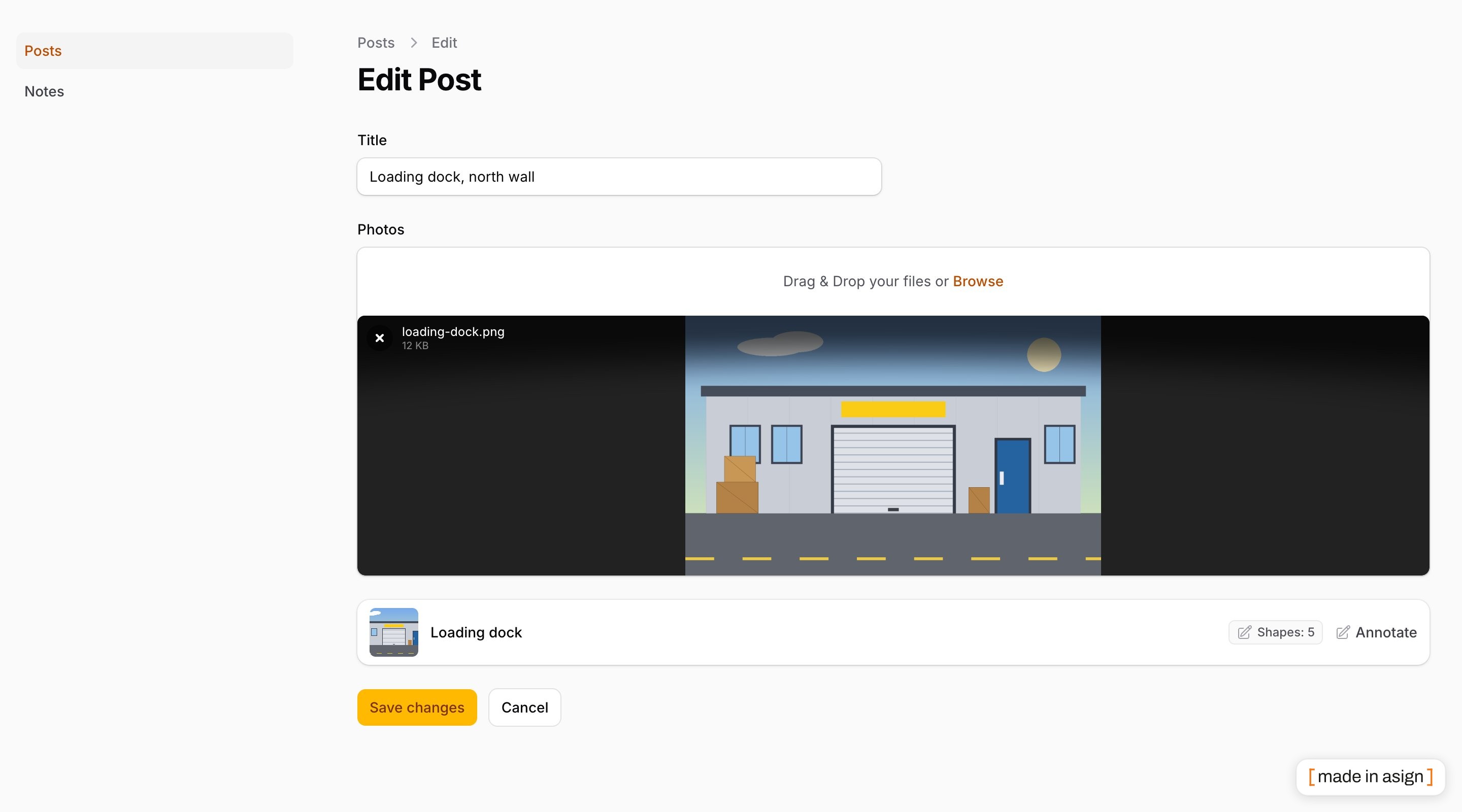
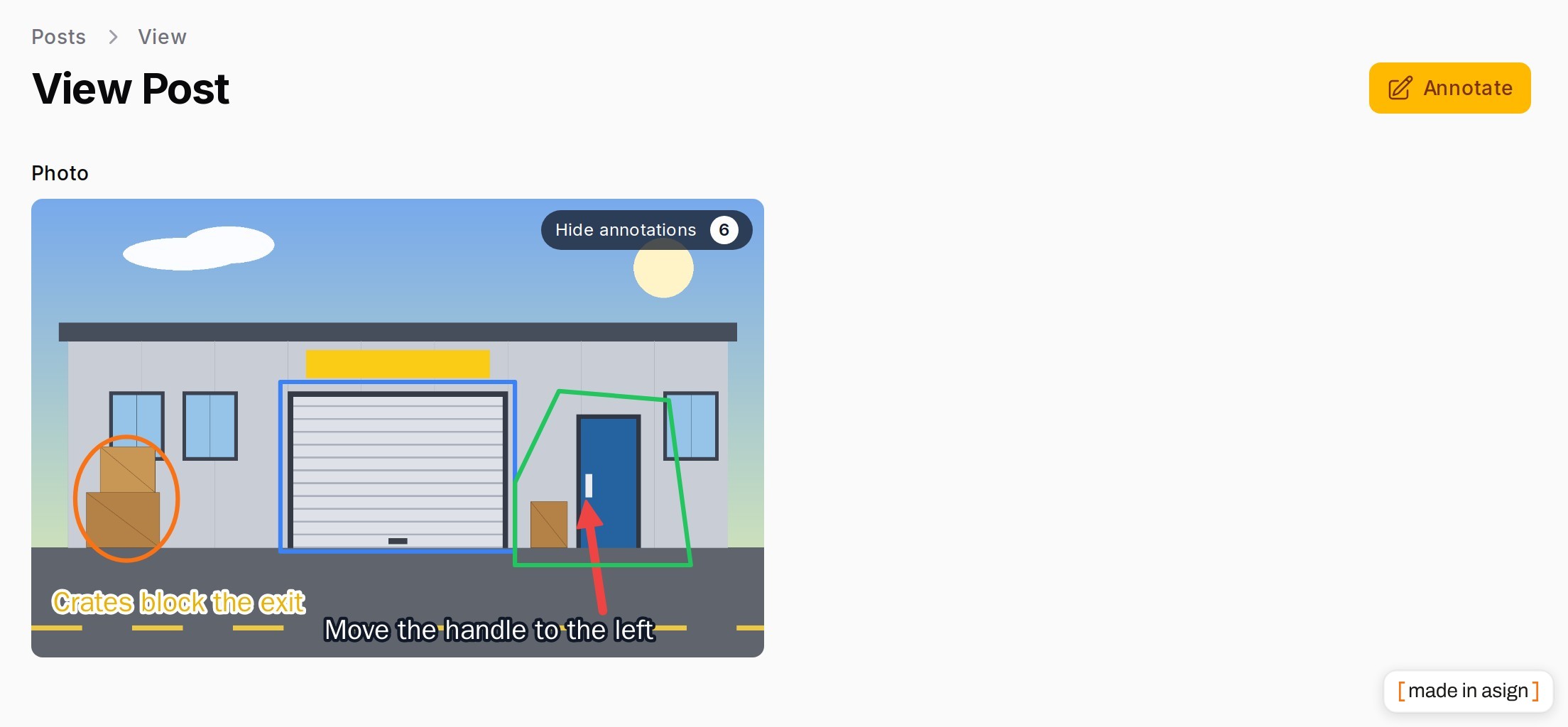
Dark mode:
Requirements
- PHP 8.3+
- Laravel 12 or 13
- Filament 5
Optional: spatie/laravel-medialibrary and filament/spatie-laravel-media-library-plugin for Media Library images.
Installation
composer require asignua/filament-image-annotations
php artisan vendor:publish --tag=filament-image-annotations-migrations
php artisan migrate
php artisan filament:assets
The service provider is auto-discovered. Registering the plugin on a panel is optional (it adds nothing yet):
use Asignua\FilamentImageAnnotations\ImageAnnotationsPlugin;

$panel->plugin(ImageAnnotationsPlugin::make());
The editor and the viewer are small Alpine components that are only downloaded by a page that uses them. Optionally
publish the config (--tag=filament-image-annotations-config) and the translations
(--tag=filament-image-annotations-translations).
Usage
Every entry point takes the image through ->image(...): an ImageSource, a Spatie Media, any class you registered
(see Image sources), or a Closure returning one (it may take the usual $record). A Closure
returning null means "no image here" and the button hides itself.
AnnotateImageAction: a button that opens the editor
use Asignua\FilamentImageAnnotations\Actions\AnnotateImageAction;

// table record action, header action or infolist action: it is a normal Filament action
AnnotateImageAction::make()->image(fn (Post $record) => $record->getFirstMedia('photos'));
It opens a full-screen modal with the editor, pre-filled with the stored layer; Save annotations writes it. The
button is hidden for a record without an image and for a user who may not annotate it. Inside an ActionGroup it works
like any other row action.
AnnotatedImageEntry: read-only view
use Asignua\FilamentImageAnnotations\Infolists\Components\AnnotatedImageEntry;

AnnotatedImageEntry::make('photo')
    ->image(fn (Post $record) => $record->getFirstMedia('photos'))
    ->alt('Front door');
The picture with the layer on top and a Show / Hide annotations toggle (with a count). With no layer, or for a viewer
who may not see it, it is the plain picture. Without ->image() the entry's own state is the image.
<x-image-annotations::image>: anywhere
<x-image-annotations::image :image="$media" alt="Front door" class="rounded" />
The same viewer for any Blade view, see Front end.
AnnotatedUpload: an Annotate button per file of an upload
use Asignua\FilamentImageAnnotations\AnnotatedUpload;

AnnotatedUpload::make(
    FileUpload::make('image')->image()->disk('public')->directory('notes'),
)

AnnotatedUpload::make(
    SpatieMediaLibraryFileUpload::make('photos')->collection('photos')->multiple()->image(),
)
A list appears under the upload: one row per stored image with a thumbnail, the name, the number of shapes (when there are any) and an Annotate button that opens the same editor as the action. Files that are not images are skipped.
- With
SpatieMediaLibraryFileUploadthe layer belongs to the media item; with a plainFileUploadit belongs to the record and is keyed by the stored file path. - A file that is not stored yet cannot be annotated: a fresh upload, or any file on a create page. Its button is disabled with the hint Save the record first.
- Annotating saves immediately. Save annotations in the editor writes the layer through the store right away, it does not wait for the form's own Save. (The form's Save button is only about the files.)
- When a file is removed from a plain
FileUploadand the record is saved, the layer of that path is forgotten. A Media item's layer goes together with the media item. If the same path is removed and uploaded again in one edit, the old layer stays (the save cannot tell the two files apart), clear it in the editor if that matters. - Hidden per file for a user who may not annotate that image; a
->hidden()upload hides the list too. AnnotatedUpload::make()returns a plainGroupwith the upload and the list as siblings (put the result incomponents([...]), configure the upload before wrapping it, and set layout on the returned group).
ImageAnnotator: the editor as a form field
use Asignua\FilamentImageAnnotations\Forms\Components\ImageAnnotator;

ImageAnnotator::make('annotations')->image(fn (Post $record) => $record->getFirstMedia('photos'));
The state is the layer ({"v":1,"items":[...]}) and is sanitised on dehydrate. Use it in a custom page, wizard step or
your own action. Saving is on you: call ImageAnnotations::store()->save($source, $user, $state).
Reading and writing from code
use Asignua\FilamentImageAnnotations\ImageAnnotations;

ImageAnnotations::for($media);                       // the layer for the signed-in user, or null (nothing drawn / not allowed)
ImageAnnotations::store()->shapes($source, $user);   // always a sanitised layer, empty when there is none
ImageAnnotations::store()->save($source, $user, $shapes);   // throws AuthorizationException; an empty layer deletes the row
ImageAnnotations::store()->forget($source);          // removes the layer, no authorisation check
The editor
| Tool | Key | Notes |
|---|---|---|
| Select / move | V |
Click a shape to select it, drag to move it. Colour and width changes apply to the selection. |
| Arrow | A |
Shift snaps to 45 degrees. |
| Rectangle | R |
Drag any direction; Shift for a square. |
| Ellipse | E |
Shift for a circle. |
| Polygon | G |
Click to add vertices; double click, Enter or a click on the first vertex closes it, Esc cancels, Backspace removes the last vertex, Shift snaps a segment to 45°. |
| Line | L |
Shift snaps to 45 degrees. |
| Pen | P |
Freehand, smoothed. |
| Highlighter | H |
A wide, translucent stroke. |
| Text | T |
Click, type; Enter adds, Shift+Enter is a new line, Esc cancels. |
| Pin | N |
A numbered marker; each click places the next number. Off by default, see Extending. |
| Shortcut | Action |
|---|---|
Ctrl/Cmd + Z |
Undo |
Ctrl/Cmd + Shift + Z or Ctrl + Y |
Redo |
Delete / Backspace |
Delete the selected shape |
Eight colours, three stroke widths, Clear all (click twice to confirm). Mouse, touch and stylus all work; every button
has an accessible name and aria-pressed.
Image sources
An ImageSource tells the plugin which image it is, where it lives and who may touch it:
interface ImageSource
{
    public function annotatable(): Model;   // the row owner of the morph relation
    public function key(): ?string;         // null for an image that is its own model (Media); a path for a file in a column
    public function url(): string;          // displayable URL of the ORIGINAL image
    public function canView(?Authenticatable $user): bool;
    public function canAnnotate(?Authenticatable $user): bool;
}
Built in: Sources\MediaImageSource (a Spatie Media) and Sources\ModelPathImageSource ($record, $path, $disk).
Both can be told how to build the URL (a signed or CDN URL, a private disk):
MediaImageSource::urlUsing(fn (Media $media) => $media->getTemporaryUrl(now()->addMinutes(10)));
ModelPathImageSource::urlUsing(fn (Model $record, string $path, ?string $disk) => Storage::disk($disk)->temporaryUrl($path, now()->addMinutes(10)));
Teach the plugin your own image class, so ->image($thing) and <x-image-annotations::image :image="$thing"> accept it:
use Asignua\FilamentImageAnnotations\Support\ImageSources;

app(ImageSources::class)->register(Attachment::class, fn (Attachment $attachment) => new AttachmentImageSource($attachment));
Extend Sources\AbstractImageSource to get the standard authorization (below) and implement owner().
Authorization
The default rule, for every source:
- A guest never sees or edits annotations.
- A signed-in user needs the owner model's policy when there is one:
viewto see the layer,updateto change it. For a Media item the owner is the model the file belongs to. - With no policy registered for the owner model, any signed-in user may view and annotate. The plugin does not know your panel's access rules; register a policy (or the override below) if annotating should be limited.
Replace the rule globally, once, for example in a service provider:
use Asignua\FilamentImageAnnotations\ImageAnnotations;

ImageAnnotations::authorizeUsing(function (?Authenticatable $user, ImageSource $source, string $ability): bool {
    // $ability is 'view' or 'annotate'
    return $user?->can('manage-photos') ?? false;
});
AnnotationStore::save() checks canAnnotate itself and throws AuthorizationException, so a forged request cannot
bypass the buttons being hidden.
Configuration
config/filament-image-annotations.php:
| Key | Default | |
|---|---|---|
table |
image_annotations |
Table name. |
palette |
8 colours | Ordered name => #hex. The first one is the fallback for an unknown colour. |
widths |
[2, 4, 8] |
The three stroke widths of the toolbar; the middle one is the default. |
limits.shapes |
200 |
Shapes per image. The editor stops drawing and says so; the sanitiser drops the rest. |
limits.points |
2000 |
Points of one pen / highlighter stroke. |
limits.polygon_points |
100 |
Vertices of one polygon (3 at least); a polygon outside 3..N is dropped. |
limits.text |
500 |
Characters of a text shape. |
user_model |
null |
The model of user_id; null = the default auth provider's model. |
Stored format
One row per image: annotatable (morph), key (the file path for a file in a column, NULL for an image that is its
own model), user_id (the last editor, no foreign key), shapes (JSON, written unescaped so Cyrillic text stays
readable).
{
  "v": 1,
  "items": [
    {"id": "k3J9aZ0pQw", "type": "arrow", "pts": [[0.12, 0.2], [0.38, 0.45]], "color": "red", "width": 4},
    {"id": "t1", "type": "text", "pts": [[0.1, 0.62]], "color": "#ffffff", "width": 4, "text": "Check this"}
  ]
}
Coordinates are normalised 0..1 relative to the image, so the layer fits any size the image is shown at. Types:
arrow, line, rect, ellipse (two points), polygon (3 to limits.polygon_points vertices in pts, closed, no fill), pen, highlight (2 to limits.points points), text (one point and
a non-empty text).
Support\ShapeSanitizer runs on everything that is saved or displayed, it never throws and drops what it cannot fix:
- unknown types, wrong point counts and non-numeric coordinates are dropped; coordinates are clamped to 0..1 and rounded;
- colour is a palette name or
#rrggbb(stored lowercase), anything else becomes the first palette colour; - width is an integer 1..24; text has control characters stripped, is trimmed and cut to
limits.text; arrays or objects where a string belongs are dropped; - ids are
[A-Za-z0-9_-]{1,40}and unique, otherwise regenerated; unknown keys are removed; at mostlimits.shapesitems.
Text is never HTML-escaped on the way in, it is stored as typed and rendered with textContent, so <script> stays
the literal text <script>.
Events and cleanup
Events\AnnotationSavedandEvents\AnnotationDeleted($annotation,$source,$user) are fired by the store.- An empty layer deletes the row (and
save()returns a fresh, unsaved model). - Deleting a Spatie Media item removes its layer (also with a custom media model).
- For images that are paths in a model's column, add the trait to the model so its rows go with it:
use Asignua\FilamentImageAnnotations\Concerns\HasImageAnnotations;

class Note extends Model
{
    use HasImageAnnotations;   // $note->imageAnnotations(); rows removed on forceDelete()
}
The trait removes the rows on a hard delete only; a soft-deleted record can come back with its annotations.
Front end
<x-image-annotations::image> and AnnotatedImageEntry render the image, an <svg> overlay and a toggle. The layer is
passed as escaped JSON in a data-layers attribute ([{key, label, color, items}]) and drawn by an Alpine component. With two or
more layers a chip per layer appears next to the show/hide toggle.
On a public page the viewer needs Alpine and Filament's asset route (the component is fetched with x-load from
Filament's assets, run php artisan filament:assets). Without them the plain image renders: no overlay, nothing
broken. The component also checks canView for the current user; without permission it renders the plain image too,
and the layer is not put in the page at all.
If your public pages cache HTML for everybody, remember the layer is rendered per viewer.
Pro
| Image Annotations (free, MIT) | Image Annotations Pro (€69 / €169) | |
|---|---|---|
Non-destructive vector layer over any image (Media Library, FileUpload, own ImageSource) |
✓ | ✓ |
| Editor: arrow, rectangle, ellipse, polygon, line, pen, highlighter, text; colours, widths, undo/redo | ✓ | ✓ |
| Read-only view in the panel and on public pages, sanitised on save | ✓ | ✓ |
| One layer per author, all shown together, colour-coded, each with a toggle | ✓ | |
| Numbered pins with comment threads, resolve and reopen | ✓ | |
| Threads panel next to the editor and next to every annotated image | ✓ | |
| Standalone editor modal opened from any page with one browser event (signed source tokens) | ✓ | |
Events for a CRM or notifications (PinCommentAdded, PinThreadResolved, ...) |
✓ | |
| Annotate image attachments in Filament Chat Pro | ✓ |
Image Annotations Pro is an add-on: it requires the free package and builds on its seams, so existing layers carry over.
Extending
The free package is the base of the Pro one (layers per author, numbered pins with threads); these are the seams, all inert until something uses them.
Layers. AnnotationStore::layers($source, $user) returns a list<Support\Layer> (key, label, color, items,
editable, meta). Free returns one layer, default, editable when the user may annotate. Rebind the store to return more:
the viewer draws every layer with a chip each, and AnnotateImageAction passes the non-editable ones to the editor as
read-only underlays (drawn below, not selectable, never saved into the state; visibility toggles are client-side only).
Use them on a hand-built field with ImageAnnotator::make('x')->underlays([...])->layerKey('mine').
ImageAnnotations::layersFor($image) is the permission-aware list of non-empty layers.
Tools. The toolbar comes from config tools (default: all but pin) or per field: ImageAnnotator::make('x')->tools(['select', 'arrow', 'pin']).
Pins. Shape pin: one point plus an integer n (1..999). The sanitizer drops a pin with a missing or out-of-range n
and renumbers duplicates within a layer to max + 1. A pin renders as a filled circle with a white number and carries
data-id and data-pin on its SVG group. The pin tool (key N) places the highest number + 1.
JS events (bubbling CustomEvents, nothing in the free package listens to them):
| Event | detail |
Fired |
|---|---|---|
image-annotations:pin-click |
{layer, id, n} |
click on a pin in the viewer, or with the select tool in the editor |
image-annotations:change |
{items} |
every committed change in the editor (draw, move, undo, ...) |
image-annotations:pin-added |
{id, n} |
the pin tool placed a pin |
document.addEventListener('image-annotations:pin-click', (e) => openThread(e.detail.layer, e.detail.n))
Side panels. ImageAnnotations::addPanel(fn (ImageSource $source, string $context) => $html) adds HTML next to the editor
canvas ($context = 'editor') and next to the annotated image in the viewer ('viewer'); return null for no panel. The panels
and the canvas share a container marked data-ia-scope, so a panel can tell which events belong to its image. Nothing changes
visually while no panel is registered.
Saved event. After a successful save AnnotateImageAction dispatches the Livewire event image-annotations:saved
(ImageAnnotations::SAVED_EVENT) with image = ImageAnnotations::imageId($source), a non-secret sha1("morph class|id|key").
Anything on the page that shows annotation data (a pro panel, your own Livewire component) listens with
#[On('image-annotations:saved')]; the Pro pin panel always re-reads, you may compare the id to filter.
Hidden by default. A layer whose meta['hidden'] is true starts switched off (its chip is still there).
Gotchas
- Nothing happens when I open the editor on a page of my own. Run
php artisan filament:assets; the editor is loaded on demand from Filament's asset route. - Create page: the Annotate button is disabled. By design, there is no record to hang the layer on yet. Save first.
- Annotations are saved but the form's Save was not pressed. By design, see
AnnotatedUpload. - Everybody can annotate. Without a policy on the owner model any signed-in user may; see Authorization.
- Highlighter on a dark image. It uses its own colour with transparency (no multiply blend), pick a bright colour.
- Private disks.
Storage::url()of a private file is not displayable; seturlUsing()to a temporary URL. HasImageAnnotationsand soft deletes. The rows stay until the record is force-deleted.
Demo
A workbench is included (a post with a Media Library photo and a note with a plain FileUpload, both with the editor):
vendor/bin/testbench workbench:build      # sqlite db, migrations, seeder and the public/storage link (do not run db:seed on top: duplicate user)
vendor/bin/testbench filament:assets
APP_URL=http://localhost:8000 vendor/bin/testbench serve --host=0.0.0.0 --port=8000
APP_URL must carry the port you serve on, or image URLs point to the wrong place.
Log in at /admin as alice@example.com / password (bob@example.com may not touch Alice's post). Inside Docker,
publish a port for the container first.
Translations
The interface ships in English, Ukrainian, German, Spanish, French, Italian, Dutch, Polish, Brazilian Portuguese and Turkish
under the filament-image-annotations::filament-image-annotations namespace. A test keeps every language in step with the English keys. Override a
string by publishing the translations (--tag=filament-image-annotations-translations) and editing the copy in
lang/vendor/filament-image-annotations.
AI agents
The package ships Laravel Boost guidelines (resources/boost/guidelines/core.blade.php) so a
coding agent wires it up correctly.
Testing
composer install
vendor/bin/phpunit
vendor/bin/phpstan analyse --memory-limit=1G
vendor/bin/pint --test
npm ci && npm run build   # only when resources/js changed; resources/dist is committed
Changelog
See CHANGELOG.md.
License
The MIT License (MIT). See LICENSE.md.