
andriichuk / pushbox

Preview and test Laravel push notifications.
Requires
- php: ^8.4
- illuminate/contracts: ^12.0|^13.0
- illuminate/database: ^12.0|^13.0
- illuminate/http: ^12.0|^13.0
- illuminate/log: ^12.0|^13.0
- illuminate/notifications: ^12.0|^13.0
- illuminate/routing: ^12.0|^13.0
- illuminate/support: ^12.0|^13.0
- illuminate/view: ^12.0|^13.0
Requires (Dev)
- larastan/larastan: ^3.0
- laravel-notification-channels/fcm: ^6.2
- laravel/pint: ^1.0
- orchestra/testbench: ^10.0|^11.0
- phpunit/phpunit: ^11.0
Suggests
- laravel-notification-channels/fcm: Preview notifications that implement toFcm() with FcmMessage (Firebase / FCM).
Provides
None
Conflicts
None
Replaces
None
This package is auto-updated.
Last update: 2026-10-26 19:14:40 UTC
README

Pushbox
A notification studio for Laravel.
Preview FCM payloads, compare variants and translations, and send test notifications to your device.


Getting started · Variants and translations · Test sending
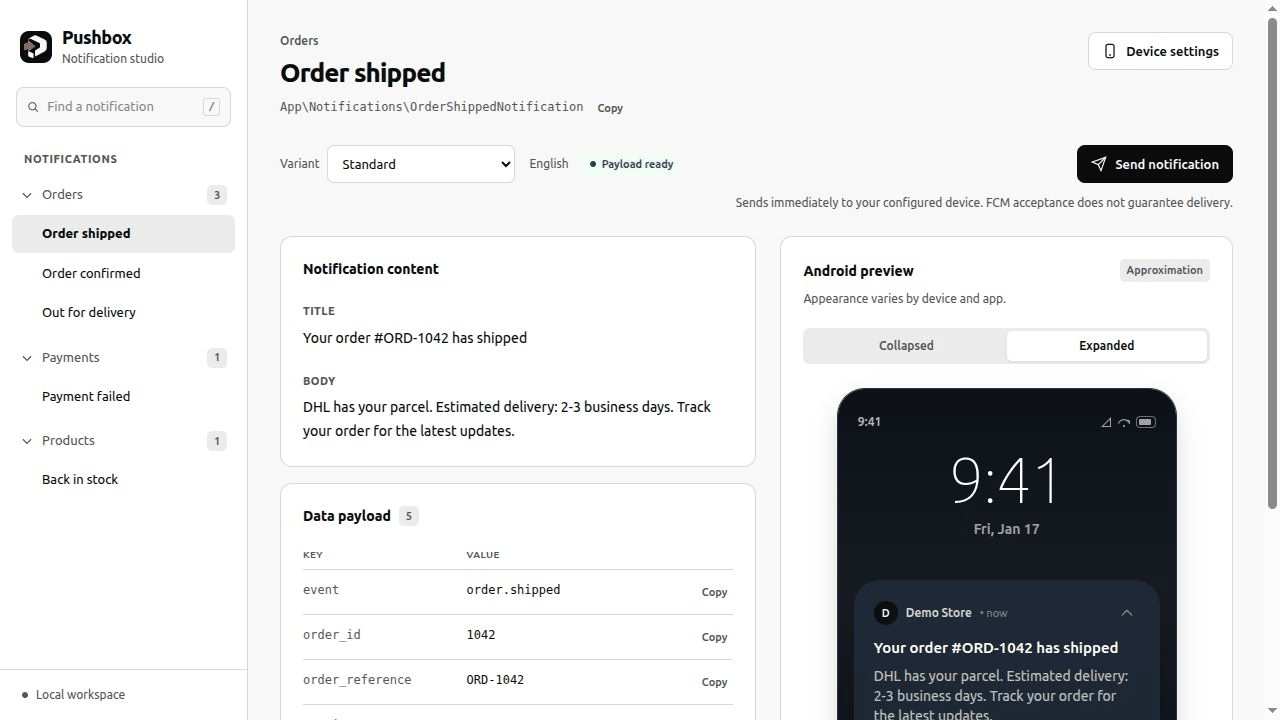
Inspired by Mailbook.
Requirements: PHP 8.4/8.5 and Laravel 12/13. The optional real-send integration supports laravel-notification-channels/fcm 6.2+ (6.x).
Install and preview
composer require andriichuk/pushbox
php artisan pushbox:install
Open /pushbox. Register notifications in the generated routes/pushbox.php.
To preview FCM notifications, install the optional channel:
composer require laravel-notification-channels/fcm:^6.2
php artisan make:notification WelcomePush
app/Notifications/WelcomePush.php:
<?php

namespace App\Notifications;

use Illuminate\Notifications\Notification;
use NotificationChannels\Fcm\FcmChannel;
use NotificationChannels\Fcm\FcmMessage;
use NotificationChannels\Fcm\Resources\Notification as FcmNotification;

class WelcomePush extends Notification
{
    public function via(object $notifiable): array
    {
        return [FcmChannel::class];
    }

    public function toFcm(object $notifiable): FcmMessage
    {
        return new FcmMessage(
            notification: new FcmNotification(
                title: __('Welcome'),
                body: 'Hello '.($notifiable->name ?? 'developer').'!',
            ),
            data: ['screen' => 'welcome'], // FCM data values must be strings.
        );
    }
}
Register it in routes/pushbox.php:
use Andriichuk\Pushbox\Facades\Pushbox;
use App\Notifications\WelcomePush;

Pushbox::add(WelcomePush::class);
Previews do not send notifications. Without the FCM channel, Pushbox can preview objects exposing toArray().
Recipients, categories, variants, and translations
Use a typed recipient and factories for different examples:
use App\Models\User;

Pushbox::to(User::factory()->make(['name' => 'Ada']))
    ->category('Onboarding')
    ->group(function () {
        Pushbox::add(WelcomePush::class)
            ->variant('Another greeting', fn (): WelcomePush => new WelcomePush);
    });
Factories must declare their concrete notification return type. To add a language selector, publish the configuration and set locales:
php artisan vendor:publish --tag=pushbox-config
// config/pushbox.php
'locales' => ['en' => 'English', 'uk' => 'Ukrainian'],
Use factory()->make() for sample recipients. PUSHBOX_DATABASE_ROLLBACK=true rolls back preview writes on the default database connection only.
Send to a test device
-
Configure Firebase using the FCM channel's installation instructions.
-
Enable sending in
.env:PUSHBOX_ALLOW_SEND=true # Optional default device token: PUSHBOX_FCM_TOKEN=your-device-token
-
Open Device settings, save your device's FCM token, then press Send notification. Use a token from the same Firebase project as your credentials.
Sends run immediately through FCM. Results show accepted, failed, or skipped; accepted does not guarantee delivery.
Enablement and access
Pushbox is enabled by default in every environment and remains installed with composer install --no-dev. To disable it:
PUSHBOX_ENABLED=false
Restrict access with your application's middleware or a viewPushbox Gate:
use App\Models\User;
use Illuminate\Support\Facades\Gate;

Gate::define('viewPushbox', function (?User $user): bool {
    return $user !== null && $user->can('use-developer-tools');
});
A defined Gate applies to every Pushbox route. Configure pushbox.middleware for authentication, pushbox.path for a custom URL, or PUSHBOX_ALLOWED_IPS for an IP allowlist.
After configuration changes, rebuild any configuration and route caches used by your application.
Contributing and support
See Contributing for development and checks, Support for help, and Security for vulnerability reports.
License
MIT.