
yii2-extensions / bootstrap6

Bootstrap 6 widgets, forms, and asset bundles for Yii2.
Package info
github.com/yii2-extensions/bootstrap6
Type:yii2-extension
pkg:composer/yii2-extensions/bootstrap6
Requires
- php: >=8.3
- ui-awesome/html-helper: ^0.7
- ui-awesome/html-svg: ^0.6.1
- yiisoft/yii2: ~2.0.55 || ^22.0@dev
Requires (Dev)
- infection/infection: ^0.35
- maglnet/composer-require-checker: ^4.1
- php-forge/coding-standard: ^0.3
- php-forge/foxy: ^0.4
- php-forge/support: ^0.3
- phpstan/extension-installer: ^1.4
- phpstan/phpstan-phpunit: ^2.0
- phpstan/phpstan-strict-rules: ^2.0.3
- phpunit/phpunit: ^12.5
- yii2-extensions/phpstan: ^0.5
Suggests
None
Provides
None
Conflicts
None
Replaces
None
This package is auto-updated.
Last update: 2026-10-22 21:18:53 UTC
README
Bootstrap 6
Bootstrap 6 widgets, forms, and asset bundles for Yii2
ESM-only Bootstrap bundle installed through Foxy, plugins loaded without a global
Important
This package pins Bootstrap 6.0.0-alpha.1. Its classes, markup, and plugin options may change before beta. Supported
browsers start at Chrome/Edge 130, Firefox 132, and Safari 18.
Features
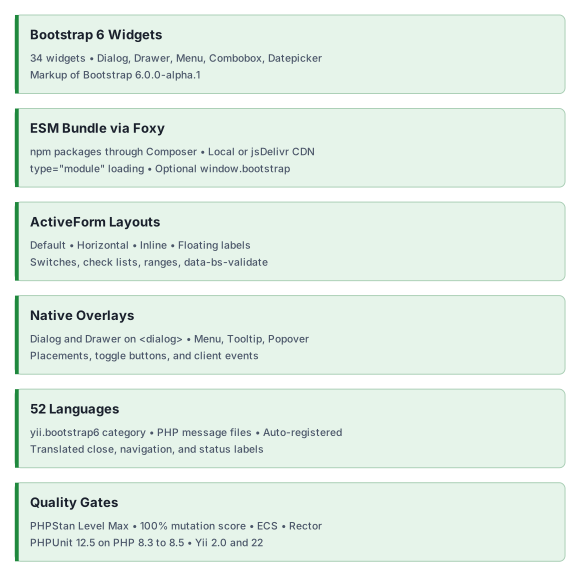
Quick start
Installation
Select the native manager in the application's root composer.json:
{
  "config": {
    "foxy": {
      "manager": "native"
    }
  }
}
Then install the extension:
composer config allow-plugins.php-forge/foxy true
composer require php-forge/foxy:^0.4 yii2-extensions/bootstrap6:^0.1
Foxy's native manager installs the frontend assets with PHP and ext-zlib; Node.js is unnecessary. Configure it in the
application's root composer.json before requiring the extension. Its default install directory is node_modules.
Point @npm to that actual directory; use @app/node_modules only when the application base path is the Composer
project root. Common Yii2 2.0.x application templates set @npm to @vendor/npm-asset; installing into vendor/npm
requires setting @npm to @vendor/npm. See installation for the complete configuration and
optional package managers.
Basic usage
Place this in a Yii view. The button opens a native dialog with a title, content, and a working close action:
use yii2\extensions\bootstrap6\{Dialog, Html};
use yii2\extensions\bootstrap6\enum\DialogSize;

Dialog::begin(
    [
        'title' => 'Welcome to your next project',
        'size' => DialogSize::LG,
        'toggleButton' => ['label' => 'Preview welcome'],
        'footer' => Html::button(
            'Start exploring',
            [
                'class' => 'btn-solid theme-primary',
                'data' => ['bs-dismiss' => 'dialog'],
            ]
        ),
    ],
);

echo '<p class="fs-5">Build clear interfaces with <strong>Yii2 and Bootstrap 6</strong>.</p>';

Dialog::end();
Widgets load their CSS and JavaScript on demand. The JavaScript bundle uses type="module" and exposes no
window.bootstrap by default; use the registered bundle's importJs() helper for custom plugin code. Titles and labels
are encoded by default, while body and footer content require encoding when they contain user data.
Documentation
Practical guides and complete examples, with API details generated from PHPDoc.
- 📚 Installation Guide: packages, aliases, assets, and CDN delivery.
- ⚙️ Configuration Guide: practical choices for plugins, items, forms, and icons.
- 💡 Usage Examples: widget gallery and complete view recipes.
- 🔄 Migration from Bootstrap 5
- 🧪 Testing Guide
- 📖 Generated API Reference
The guides and the API reference generated
from the PHPDoc in src/ are published at https://yii2-framework.github.io/docs/extensions/bootstrap6/.
AI assistance
AI agents: read the documentation index and fetch the Markdown version
of a page by appending index.md to its URL. The
AI agents guide covers skill installation, client setup and
verification.
- 🤖
yii2-bootstrap6-widgetsskill: Bootstrap 6 widgets. - 🧭
yii2-frameworkskill: Yii 22.0 application conventions.
The hosted documentation covers Yii 22.0. If it does not match the installed revision or is unavailable, use the repository guides, the skill source, the source PHPDoc and the changelog.
Package information
Project status
Our social networks