
ycloudyusa / yusaopeny_activity_finder


Y USA Open Y Activity Finder
Package info
github.com/YCloudYUSA/yusaopeny_activity_finder
Language:Vue
Type:drupal-module
pkg:composer/ycloudyusa/yusaopeny_activity_finder
Requires
- open-y-subprojects/openy_custom: ^3.2.0
Requires (Dev)
None
Suggests
None
Provides
None
Conflicts
None
Replaces
- drupal/openy_activity_finder: *
- ymcatwincities/openy_activity_finder: *
- 7.x-dev
- 7.1.0
- 7.0.0
- 6.x-dev
- 6.2.1
- 6.2.0
- 6.1.3
- 6.1.2
- 6.1.1
- 6.1.0
- 6.0.0
- 5.x-dev
- 5.5.0
- 5.4.1
- 5.4.0
- 5.3.0
- 5.2.0
- 5.1.6
- 5.1.5
- 5.1.4
- 5.1.3
- 5.1.2
- 5.1.1
- 5.1.0
- 5.0.5
- 5.0.4
- 5.0.3
- 5.0.2
- 5.0.1
- 5.0.0
- 4.x-dev
- 4.6.2
- 4.6.1
- 4.6.0
- 4.5.1
- 4.5.0
- 4.4.0
- 4.4.0-rc1
- 4.3.1
- 4.3.0
- 4.2.x-dev
- 4.2.10
- 4.2.9
- 4.2.8
- 4.2.7
- 4.2.6
- 4.2.5
- 4.2.4
- 4.2.3
- 4.2.2
- 4.2.1
- 4.2.0
- 4.1.22
- 4.1.21
- 4.1.20
- 4.1.19
- 4.1.18
- 4.1.17
- 4.1.16
- 4.1.15
- 4.1.14
- 4.1.13
- 4.1.12
- 4.1.11
- 4.1.10
- 4.1.9
- 4.1.8
- 4.1.7
- 4.1.6
- 4.1.5
- 4.1.4
- 4.1.3
- 4.1.2
- 4.1.1
- 4.1.0
- 4.0.10
- 4.0.9
- 4.0.8
- 4.0.7
- 4.0.6
- 4.0.5
- 4.0.4
- 4.0.3
- 4.0.2
- 4.0.1
- 4.0.0
- 3.x-dev
- 3.1.1
- 3.1.0
- 3.0.0
- dev-d12-core-version-requirement
- dev-d12-text-summary-service
- dev-fix/location-filter-intersection
- dev-copilot/sub-pr-59
- dev-bug/day-time-anytime-count
- dev-snyk-upgrade-9e2e3ee90e2e59b2f5800b99bdacdc3f
- dev-snyk-upgrade-864503f0ef9c95f7d23be1188260b3a9
- dev-snyk-upgrade-ea69c0951928165ff1fa83a4105ce8b0
- dev-snyk-upgrade-5dcb2aed322ea581a9a0f97cfb1f4814
- dev-snyk-upgrade-33784e1ecf8741011e8b810dba7ddfe7
- dev-snyk-upgrade-1e4f8a7d74a34471d63b5c4fd1728440
- dev-snyk-upgrade-ccefc733344eb56b92569ed3f15becbb
- dev-snyk-upgrade-79bd26da0ce8daff9798736339cc1b43
- dev-snyk-upgrade-5f66347641357ce333de56ca5e01ecac
- dev-snyk-upgrade-8f50ed61c05526c86af518210403af84
- dev-snyk-upgrade-3b4488d68e6ddcae95d3d5066a5221e7
- dev-4.x-demo
- dev-9.x-3.x
This package is auto-updated.
Last update: 2026-10-08 09:21:16 UTC
README
Requirements
This module requires the following modules:
- openy_map (For pulling the list of location-related content types.)
The data backend is pluggable (see "Backend plugin system" below). Out of the box the module ships a Mock backend (static fixtures, no infrastructure) as the default, so Activity Finder runs with no Solr.
Front-end / theme work needs no Solr. Because Mock serves real-shaped data with zero infrastructure, you no longer have to stand up a Solr stack just to work on the UI — fixing a button's colour or padding, template/markup tweaks, the Vue app, etc. Enable the Solr backend only when you need real indexed search results.
For real data, enable the Solr backend — the openy_activity_finder_solr
submodule, which needs a Solr server (preferably a server or index
per-environment).
Daxko (
openy_daxko2) is legacy and non-functional. It long predates the plugin system, its hosted API is disabled, and it has not worked for a long time — do not use it. It is not converted to anActivityFinderBackendplugin here; if a Daxko integration is ever revived it should ship its own plugin.
Backend plugin system
The data backend is a Drupal plugin type (ActivityFinderBackend),
discovered via the plugin.manager.activity_finder_backend factory. Every
Activity Finder app (AF4, AF3, Camp Finder) resolves its backend through that
factory.
- Plugins live in
src/Plugin/ActivityFinderBackend/. Shipped:mock(fixtures, no Solr — the default) andsolr(in theopeny_activity_finder_solrsubmodule). (The oldopeny_daxko2backend is legacy and non-functional — see Requirements — and is not provided as a plugin.) - Contract. Each plugin implements
OpenyActivityFinderBackendInterface: search is decomposed intogetResultsCount(),getFacets()andgetResults($params, $offset, $limit, $log_id)plus the option getters; the full response shape is assembled once inActivityFinderBackendAggregator(count summed, facets merged, the global page routed across backends). The response schema is documented infixtures/schema/runProgramSearch.schema.json. - Selection. The global default backend is set at
/admin/openy/settings/activity-finder(stored as a plugin id). An AF4 block may override it per block (a single backend) in the block form; with "Site default" selected the block inherits the global default. (Running several backends at once is an experimental follow-up — see the queue.) externals. Backends attach backend-specific extras under the responseexternalsmap without changing the shared schema.
Existing sites are migrated by hook_update_N: the legacy global service id
(openy_activity_finder.solr_backend) is mapped to the solr plugin and the
Solr submodule is enabled, so they keep using Solr. Fresh installs default to
Mock. Upgrading custom backends: see UPGRADING.md.
Recommended modules
Activity Finder is most often used with a syncer to pull data from an external source.
Installation
Activity Finder version 4 is the current major version. Prior to 9.2.10.0, the distribution required ^3.1 || ^4.0, allowing you to choose which version you want to use depending on the project requirements.
Deprecations
Outdated implementations are not removed immediately, allowing you to update your projects and migrate to new components without breaking your site. They are marked with [deprecated] notices in the next version and are planned to be removed in the future releases.
New Projects
Install as you would normally install a contributed Drupal module. For further information, see Installing Drupal Modules.
New projects should enable:
- Activity Finder (
openy_activity_finder)
then choose one or both of the front ends:
- LB (Layout Builder) Activity Finder (
lb_activity_finder) - Open Y Paragraph Activity Finder (
openy_prgf_activity_finder_4)
and finally enable one of these data stores:
- Search API Solr (
search_api_solr) - Daxko API v2 integration (
openy_daxko2)
Existing Projects
You have a choice of either staying on the same version you use or to update to the next version. It depends on your project requirements and customizations. We recommend updating to the latest release if you have resources for it.
Update from version 3.x to version 4.x
Activity Finder is a complex functionality, it connects together many different pieces and might require additional steps to make it working. The list of actions below outlines the major steps to get Activity Finder updated to version 4.
- Update the codebase using the composer command:
composer require ycloudyusa/yusaopeny_activity_finder:"^4.0" - Run database updates
drush -y updb.- Verify there were no errors and updates went fine.
- Install the new "Open Y Paragraph Activity Finder" (
openy_prgf_activity_finder_4):drush en openy_prgf_activity_finder_4 - Create or update a existing Landing Page with Activity Finder.
- Add Activity Finder paragraph (replace the deprecated paragraph), configure
it and save the page.
- Verify the page and Activity Finder functionality is working fine
- The previous version of Activity Finder used 2 landing pages with 2 paragraph types - one for wizard and another one for results. Find and remove these pages.
- Uninstall "OpenY Paragraph Activity Finder" (
openy_prgf_activity_finder). - Uninstall "OpenY Paragraph Activity Finder Search" (
openy_paragraph_activity_finder_search).
Configuration
Set up Solr
In order to install Solr - check the documentation on Drupal.org.
After enabling the above modules you should visit /admin/config/search/search-api and obtain config.zip from preconfigured by Open Y Solr Server setup
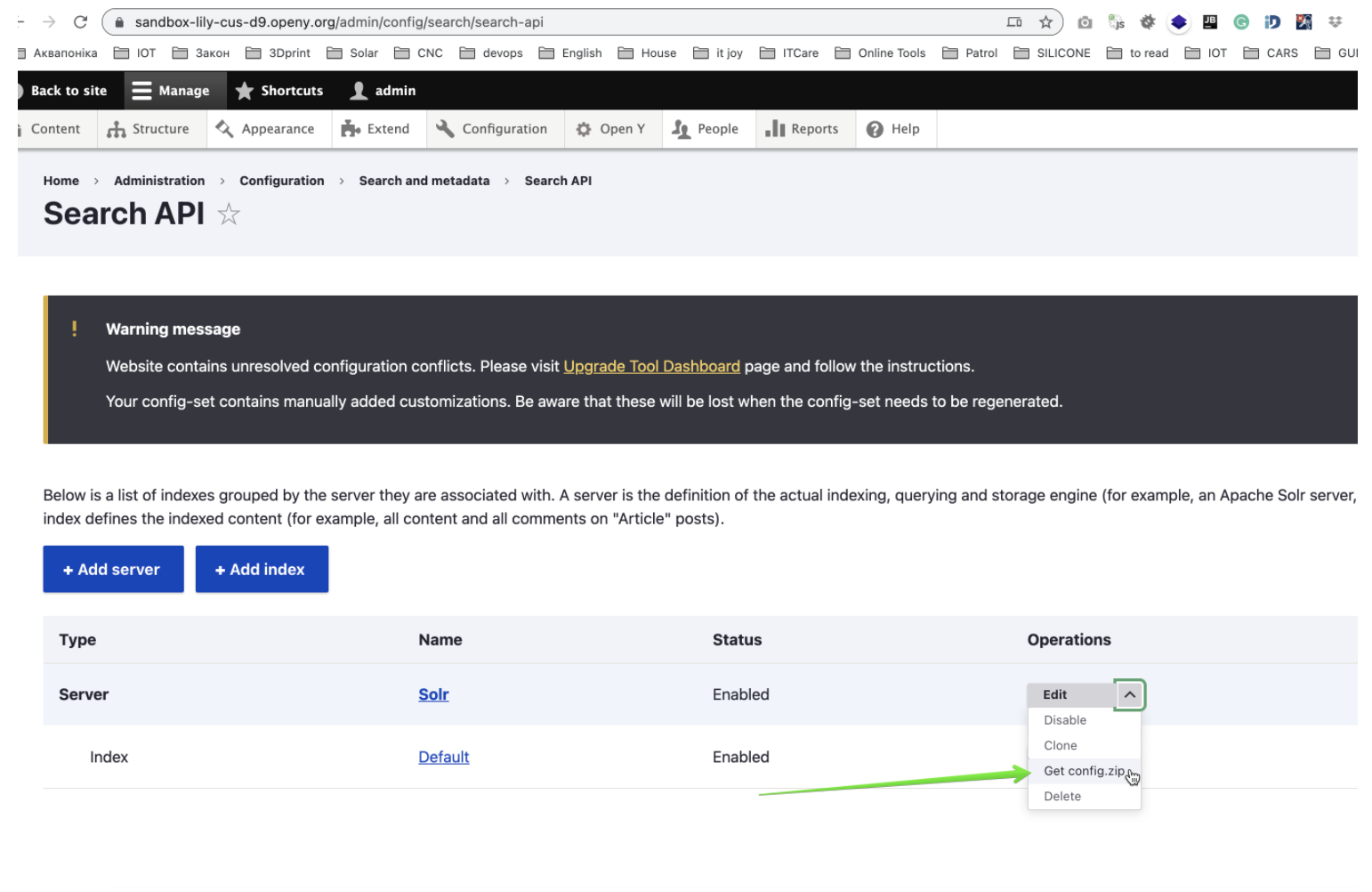
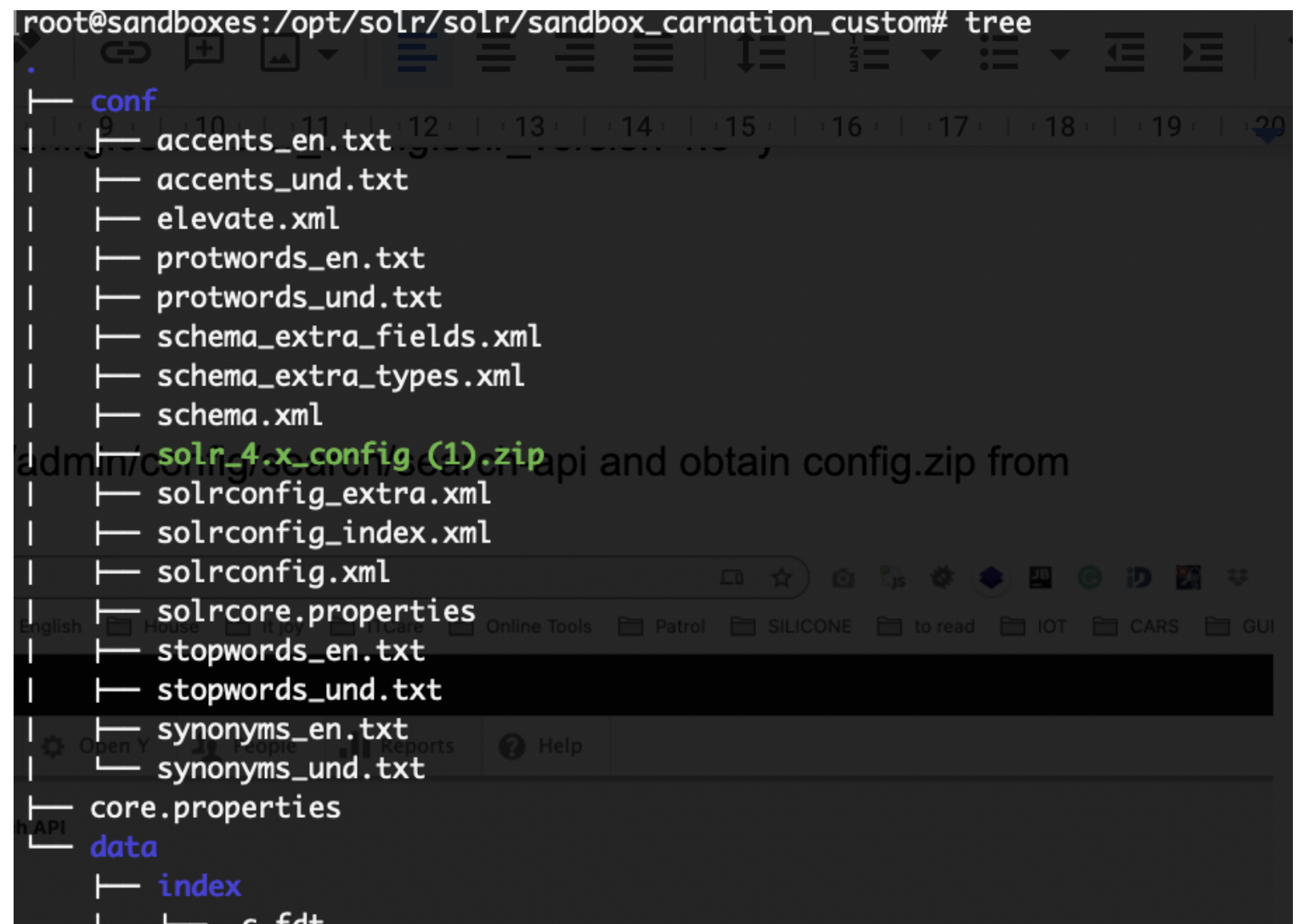
This configuration should be installed on your Solr server as an independent core. it should be extracted to the conf directory of a solr core
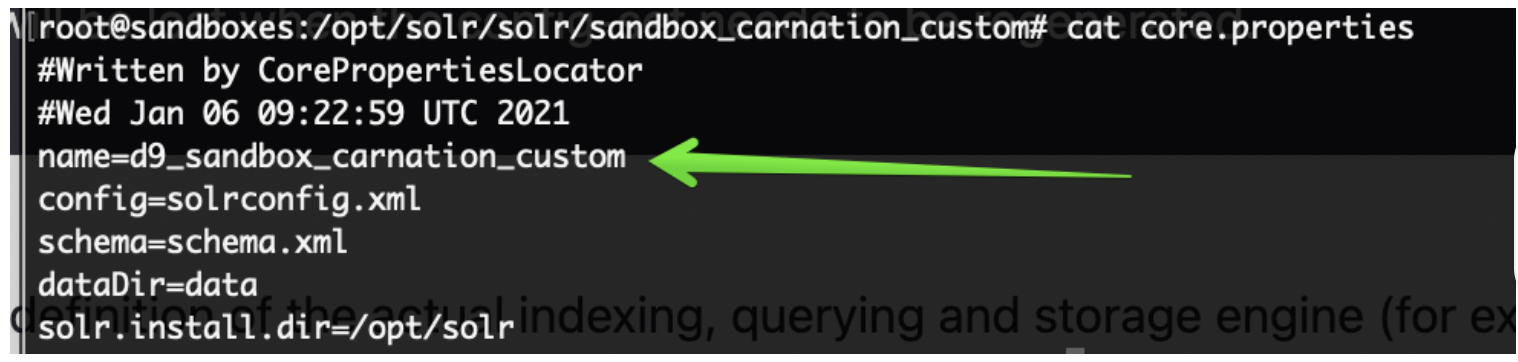
Once it is done - ensure the name of your core from core.properties file added to Solr Server config in Open Y
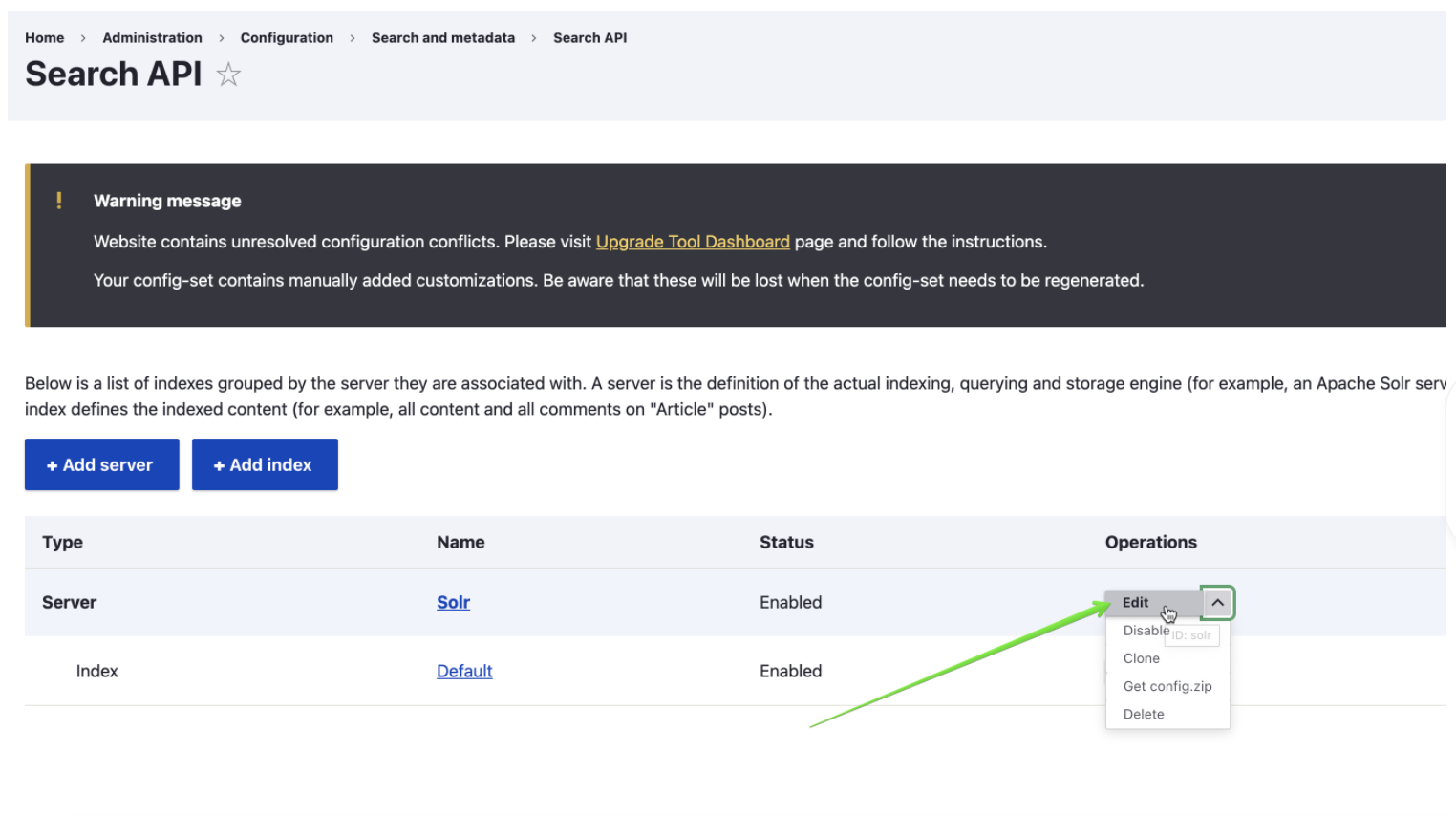
Solr server configuration could be found in Dropdown at /admin/config/search/search-api

If you prefer drush configuration you may use commands below, just replace SOLR_CORE_IS_HERE with real core name
drush cset -y search_api.server.solr backend_config.connector_config.host 127.0.0.1 -y
drush cset -y search_api.server.solr backend_config.connector_config.core ${SOLR_CORE_IS_HERE} -y
drush search-api:reset-tracker
drush search-api:index
Once this is done you should see Solr Server as Index as Enabled on a /admin/config/search/search-api
If you installed Open Y with Demo content now it is time to create a Landing Page with the Activity Finder v4 component on it.
In Open Y we have a specially created module which can this for you
Enable openy_prgf_af4_demo by drush command
drush en openy_prgf_af4_demo
and you’d get /activity-finder-v4 Landing Page created automatically which should look like
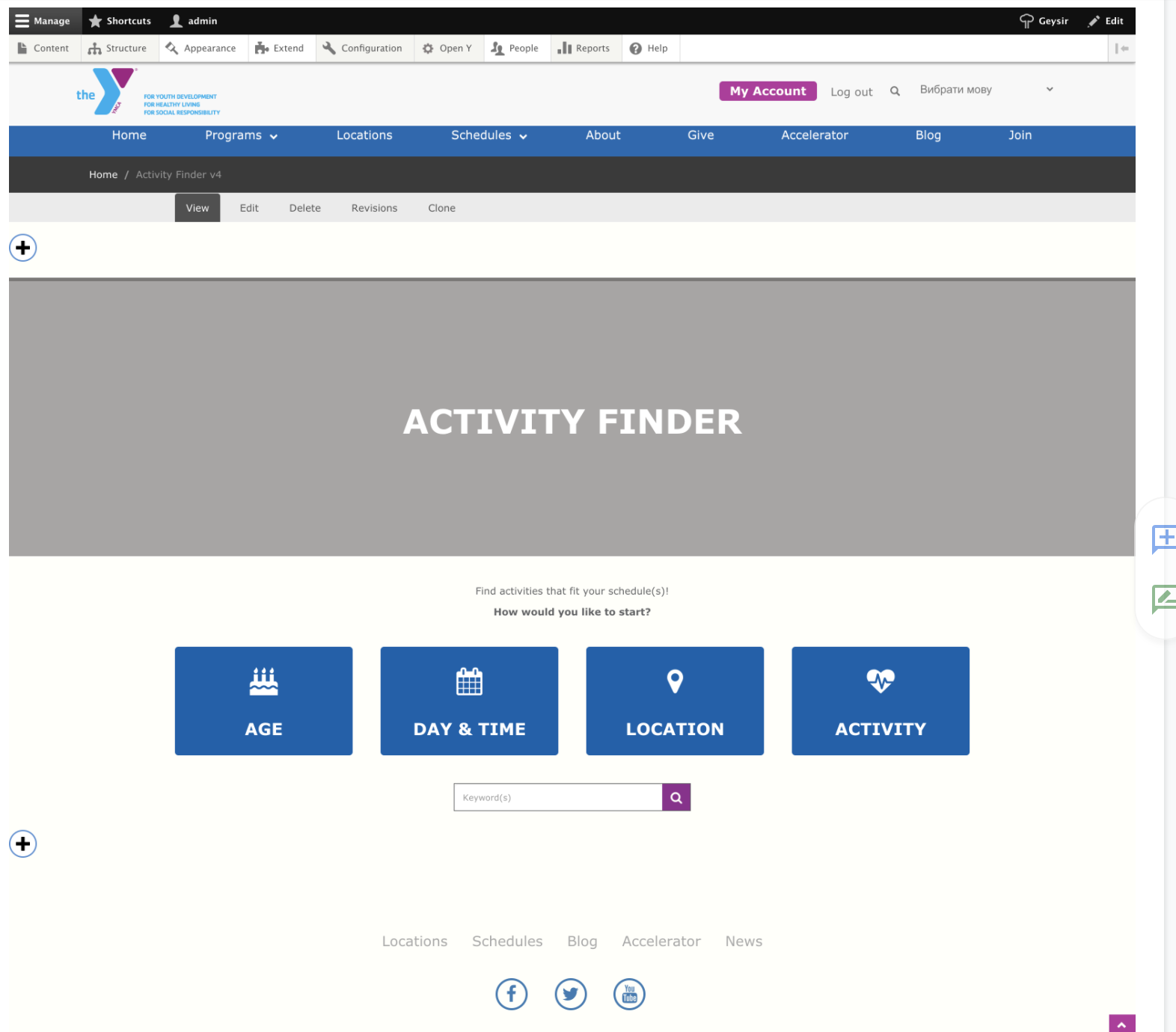
when you visited it.
By visiting /activity-finder-v4?step=results or clicking on suggested buttons you should see results, activities with filters and all other functionality, shipped with Activity Finder v4
For the Demo content from OpenY, it should look like
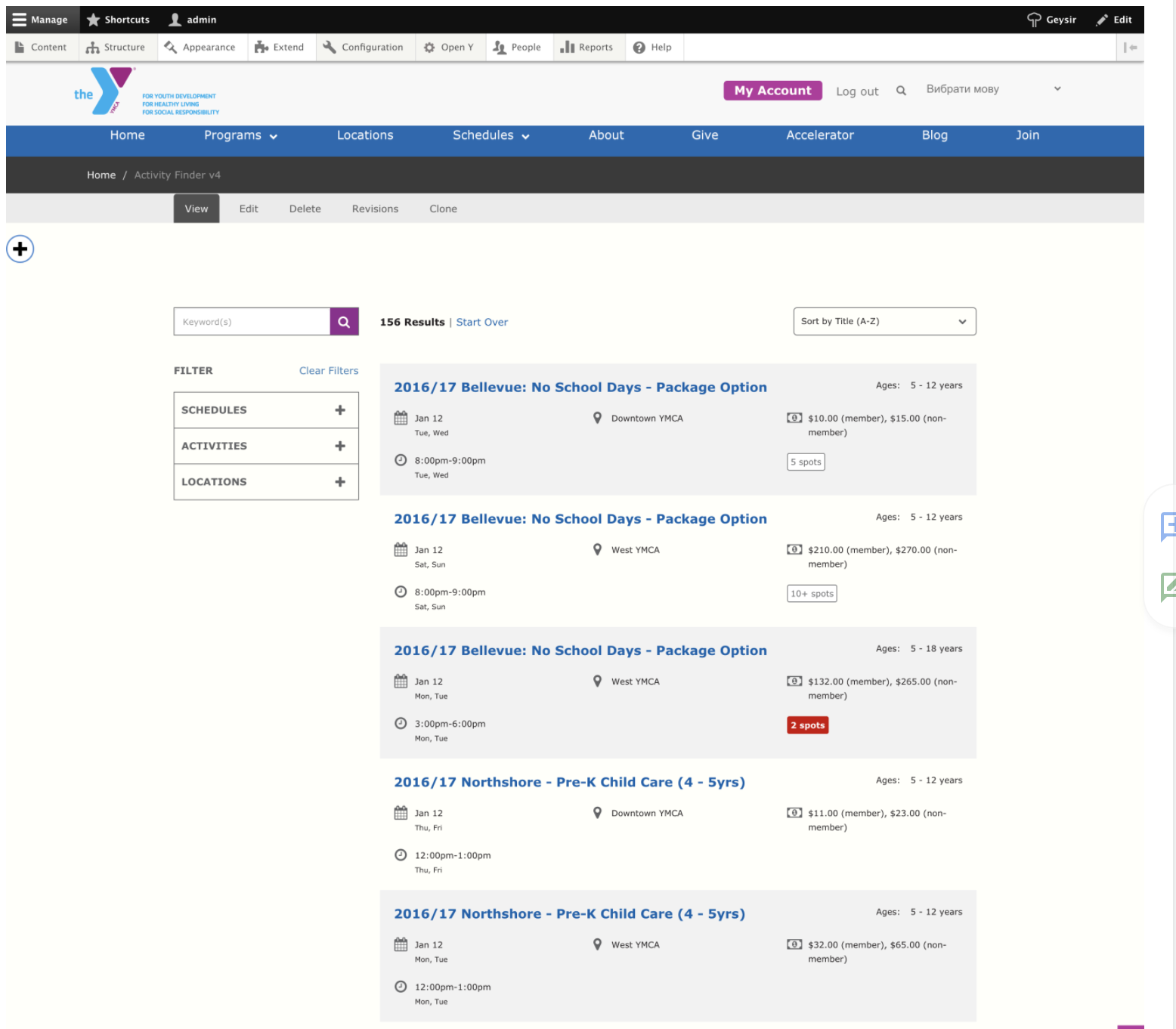
Set Trusted Redirect Host patterns
Activity Finder has a feature to track redirects to 3rd party systems. In order to control the URLs to redirect to you should use the trusted host patterns. This feature works similar to Drupal core trusted_host_patterns setting.
Example - add this section to the settings.php:
// Trusted hosts to redirect to for Activity Finder.
$settings['activity_finder_trusted_redirect_host_patterns'] = [
  '^apm\.activecommunities\.com$',
];
It is also recommended to disallow these paths in robots.txt:
# Activity Finder redirects
Disallow: /af/register-redirect/
Disallow: /index.php/af/register-redirect/
Add the Activity Finder block
See the full documentation on Activity Finder for information on how to add the block to your page and block options.
Troubleshooting & FAQ
To demo Activity Finder, see these sandboxes:
- Activity Finder v4
- Activity Finder v3
Limitations with using Daxko backend
When using the Daxko backend. Developers should be aware of these limitations:
- We can't use home branch functionality on start screen.
- We have to use Legacy mode.
- We can't display count of result for each age on the age's wizard step.
- We can't display count of available spots for each activity, before user click by activity details.
- Limited pager on results page. We can display only previous and next page link and can't display count of pages.
How to override processResults in Activity Finder
See openy_activity_finder.api.php
/**
 * Implements hook_activity_finder_program_process_results_alter().
 */
function custom_module_activity_finder_program_process_results_alter(&$data, NodeInterface $entity) {
  // Get formatted session data from some custom service.
  $formatted_session = \Drupal::service('ymca_class_page.data_provider')
    ->formatSessions([$entity], FALSE);
  $formatted_session = reset($formatted_session);

  // Fix pricing according to YMCA price customization.
  $data['price'] = '';
  if (!empty($formatted_session['prices'])) {
    foreach ($formatted_session['prices'] as $price) {
      $data['price'] .= implode(' ', $price) . '<br>';
    }
  }

  // Fix availability and registration according to YMCA customization.
  $messages = [
    'begun' => t('This class has begun.'),
    'will_open' => t('Registration for this class opens shortly. Please check back.'),
    'inperson' => t('Online registration is closed. Visit a YMCA branch to register.'),
    'included_in_membership' => t('Included in Membership'),
  ];

  if (isset($messages[$formatted_session['reg_state']])) {
    $data['availability_note'] = $messages[$formatted_session['reg_state']];
  }
}
How to add external functionality to analytics event
See openy_af4_vue_app/main.js
// Listen to a custom event to pass events in Google Analytics.
document.addEventListener('openy_activity_finder_event', (e) => {
  const { action, label, value, category } = e.detail

  if (window.gtag) {
    window.gtag('event', action, {
      event_category: category,
      event_label: label,
      value: value
    })
  } else if (window.ga) {
    window.ga('send', 'event', category, action, label, value)
  }
})
Example of custom event
document.addEventListener('openy_activity_finder_event', (e) => {
  const { action, label, value, category } = e.detail // Properties you can use for analitics.
  ...
  { your_functionality }
  ...
})
Add custom component in between of results
it allows flexibility in terms of results rendering for the developer:
          <ResultsList
            :results="data.table"
            :ages="ages"
            :selected-ages="selectedAges"
            :legacy-mode="legacyMode"
            :disable-spots-available="disableSpotsAvailable"
            @showActivityDetailsModal="showActivityDetailsModal($event)"
          />
can be changed to this:
          <ResultsList
            :results="data.table.slice(0, 2)"
            :ages="ages"
            :selected-ages="selectedAges"
            :legacy-mode="legacyMode"
            :disable-spots-available="disableSpotsAvailable"
            @showActivityDetailsModal="showActivityDetailsModal($event)"
          />
          <YGBWAds />
          <ResultsList
            :results="data.table.slice(2)"
            :ages="ages"
            :selected-ages="selectedAges"
            :legacy-mode="legacyMode"
            :disable-spots-available="disableSpotsAvailable"
            @showActivityDetailsModal="showActivityDetailsModal($event)"
          />
where YGBWAds is custom component to render custom content in between the results. See ymcatwincities#148