
statusi / mautic-plugin-statusi

All your digital marketing data in one place. Statusi connects Mautic, Google Ads, Meta Ads, Google Analytics, Looker Studio and more, turns raw data into meaningful insights inside Mautic, and works with AI assistants like ChatGPT, Claude and others.
Package info
github.com/jaldip/mautic-plugin-statusi
Type:mautic-plugin
pkg:composer/statusi/mautic-plugin-statusi
Requires
- php: >=8.2
- mautic/core-lib: ^7.0
Requires (Dev)
None
Suggests
None
Provides
None
Conflicts
None
Replaces
None
README
Stop jumping from one platform to another to understand your marketing.
Your email campaigns are in Mautic. Your ad spend is in Google Ads and Meta Ads. Your traffic is in Google Analytics. Your reports live in Looker Studio or spreadsheets. To answer one simple question, like "What is working and where should my budget go?", you open several tools, export data and put the picture together by hand.
Statusi does that work for you. It connects all your marketing apps, collects their raw data, compiles it and turns it into meaningful insights you can act on, for every kind of digital marketing project. This plugin brings Statusi into Mautic.
What you can do with Statusi
- Run every digital marketing project from one place: email marketing, paid search, paid social, SEO and website traffic, product launches, lead generation, retention campaigns and client work.
- Turn raw data into meaningful insights: Statusi pulls the raw data from each platform, cleans and combines it, and gives you performance, trends and results across all channels, not separate numbers in separate tools.
- Connect all your apps through Statusi integrations: Mautic, Google Ads, Google Analytics, AdSense, Meta (Facebook & Instagram) Ads, Mailchimp, ChatGPT Ads, Ongage, Click Go, and reporting tools such as Looker Studio.
- Get AI-powered insights: connect AI assistants such as ChatGPT and Claude to your Statusi data and ask questions in plain language, like "Which campaign gave the best return last month?". You get clearer, deeper and more meaningful insights from all your marketing data at once.
- Measure what matters: campaign performance, ad spend and return, email engagement (sends, opens, clicks, bounces, unsubscribes), lead and contact growth, and which channel brings the best results.
- Report to clients and teams faster: agencies and in-house teams get detailed, up-to-date reports without manual exports or copy-pasting between tools.
What this plugin adds to Mautic
- Statusi reports inside Mautic: your Statusi reports in a Statusi reports section of the Mautic sidebar, so you see the full picture without leaving Mautic.
- Statusi integrations inside Mautic: connect, edit, activate and deactivate your marketing platforms from Mautic. Sign in with Google, Facebook or Mailchimp and choose your accounts. No coding needed.
- Automatic daily sync: Mautic contacts and email activity sync to Statusi every day, so your insights stay current.
- Secure and read-only: Statusi can only read your Mautic contacts and emails, never change them. Tokens are encrypted, and you can disconnect at any time.
Built for digital marketers, marketing agencies and growth teams who run campaigns across email, search, social and web, and want every result in one place.
Get started in minutes: install the plugin, click Connect to Statusi and add your platforms.
Screenshots
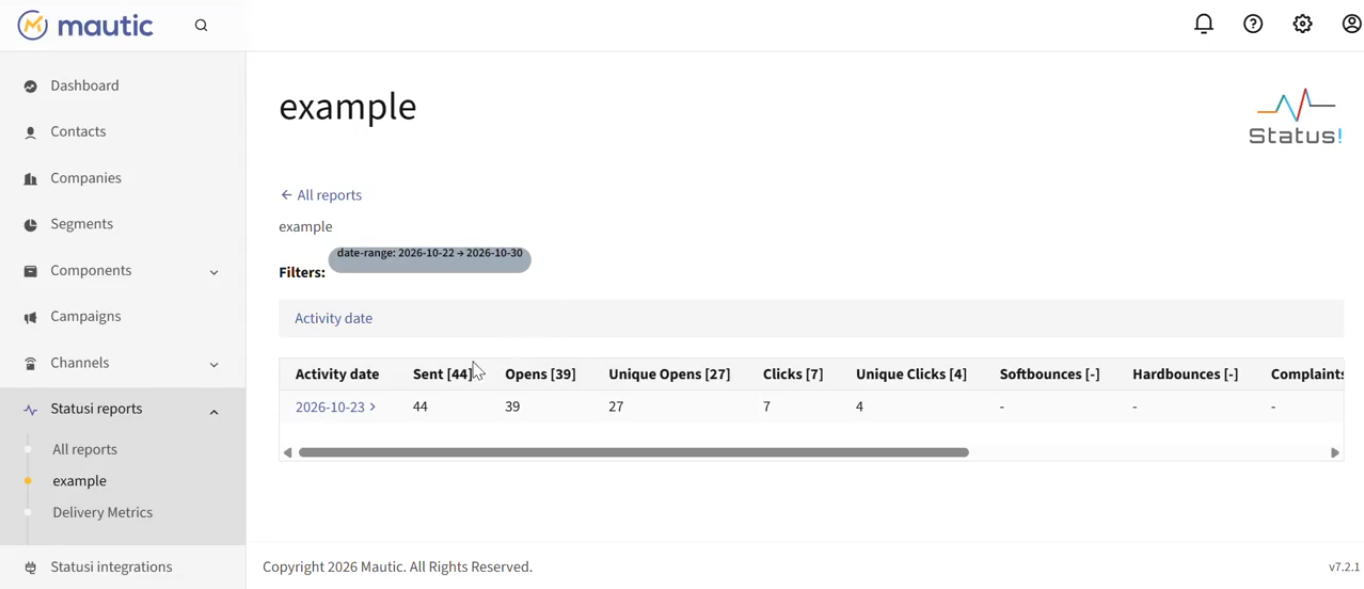
A Statusi report in Mautic
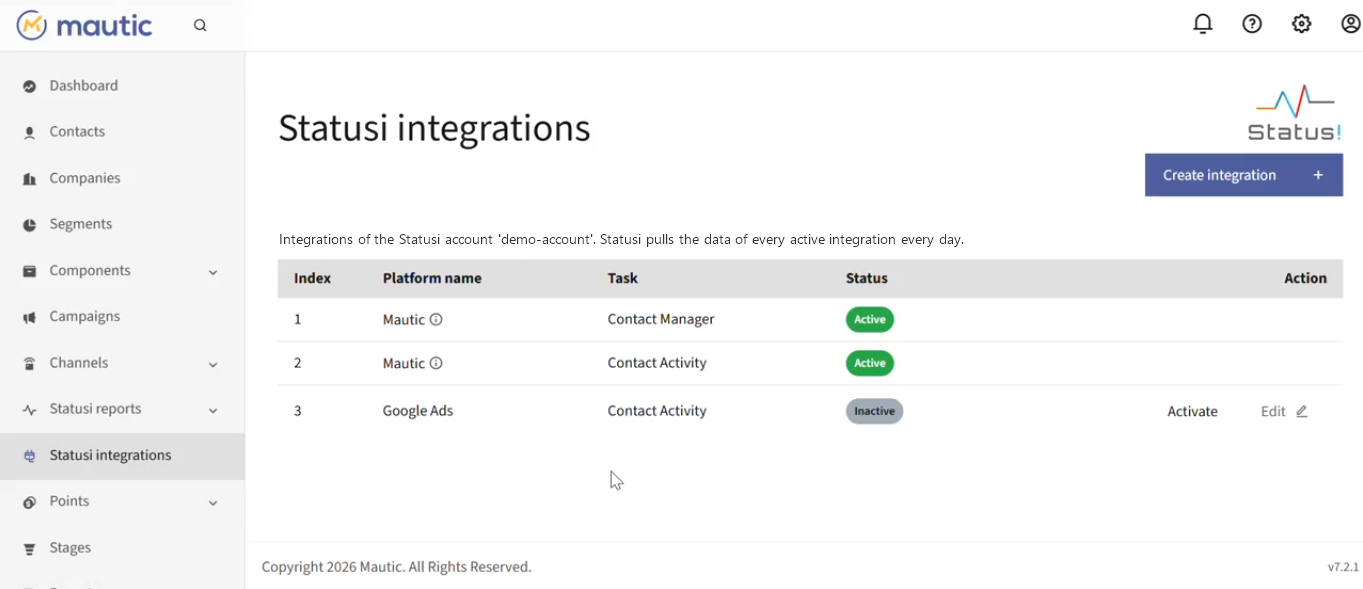
Statusi integrations
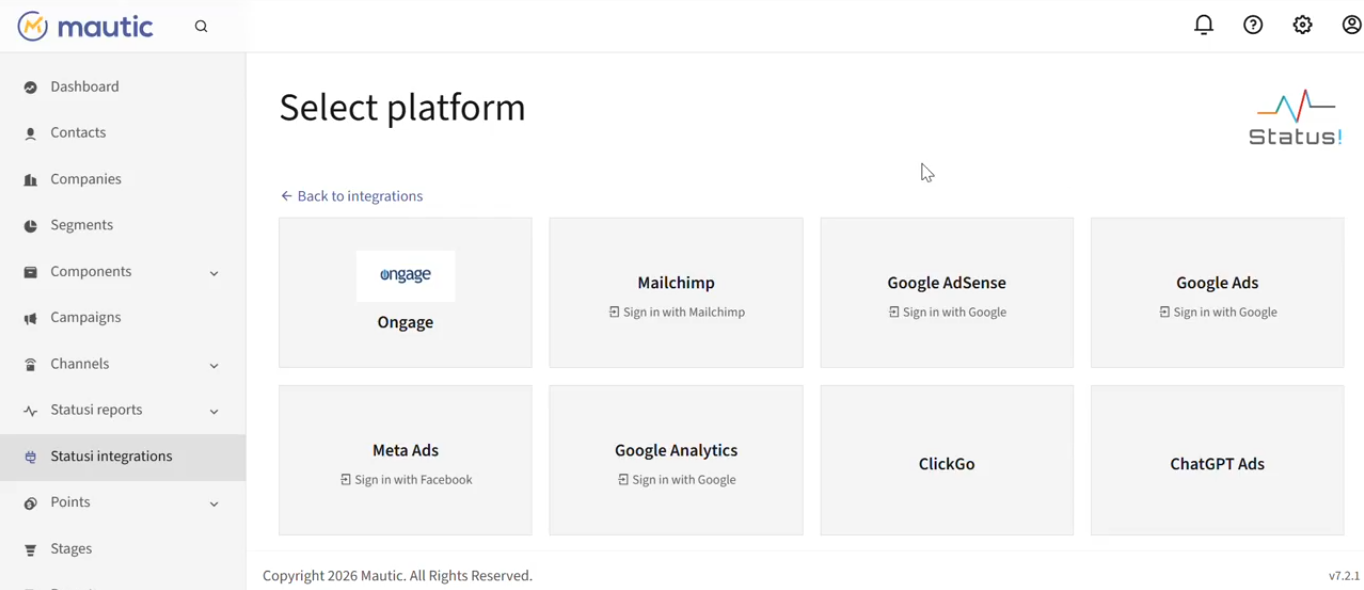
Creating an integration
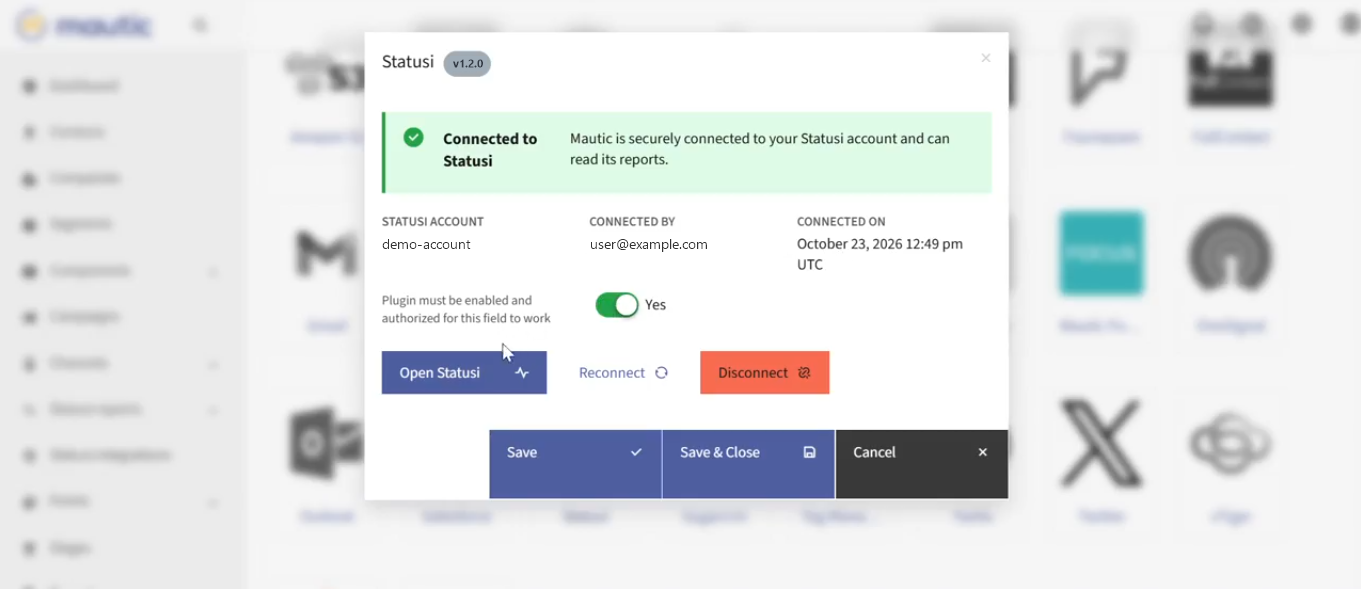
Connecting to Statusi (Settings > Plugins > Statusi)
Requirements
- A Statusi account (sign up).
- Mautic 7 and PHP 8.2 or newer (a Composer-based Mautic install is recommended).
- Mautic reachable from Statusi's servers over https, for the daily sync (Statusi accepts http only for localhost).
config/local.phpwritable, so connecting can turn on Mautic's API (otherwise turn it on yourself under Settings > Configuration > API Settings).
Install
From the Mautic root directory (the folder with composer.json):
composer require statusi/mautic-plugin-statusi
php bin/console mautic:plugins:reload
php bin/console cache:clear
Composer puts the plugin in plugins/MauticStatusiBundle (docroot/plugins/MauticStatusiBundle on Mautic's
recommended-project setup). In production (APP_ENV=prod) also rebuild Mautic's assets, so the report pages
get the plugin's JavaScript and CSS:
php bin/console mautic:assets:generate
Then open Settings > Plugins > Statusi and click Connect to Statusi.
Upgrade: composer update statusi/mautic-plugin-statusi, then the same bin/console commands.
Without Composer: download MauticStatusiBundle-<version>.zip from the latest
GitHub Release and unzip it into Mautic's plugins/
folder, so you get plugins/MauticStatusiBundle (the folder must have exactly this name; to upgrade, replace the
old folder). Then run the same commands, or use Settings > Plugins > Install/Upgrade Plugins.
Uninstall: disconnect first (this revokes Statusi's access and deletes its API client), then
composer remove statusi/mautic-plugin-statusi, php bin/console mautic:plugins:reload and
php bin/console cache:clear.
Connect
Settings > Plugins > Statusi > Connect to Statusi opens the Statusi sign-in popup (email and password only). After you choose an account the popup closes and the plugin shows Connected to Statusi. When you close the plugin window, the Statusi reports and Statusi integrations sidebar items appear.
Connecting also turns on Mautic's API and creates one read-only API client for Statusi's daily sync (see Daily data sync to Statusi).
Disconnect revokes the token in Statusi, removes it from Mautic and deletes Statusi's API client.
Reports
The Statusi reports sidebar section lists All reports plus one item per report of the connected account. The list is cached for 5 minutes (a failed fetch for 1 minute, with a 5 second timeout), so Mautic pages do not call Statusi on every request. Every Statusi page shows the Statusi logo in its header.
Integrations
The Statusi integrations sidebar item (separate from Statusi reports) lists the connected account's integrations like Statusi's own Integrations page (platform, task, status) and lets every Mautic user who can see the Statusi reports:
- Activate / Deactivate an integration (Statusi only pulls data for active ones).
- Create integration for any Statusi platform, and Edit existing ones, all inside Mautic:
- Ongage: API key and task. Contact Manager integrations get the field mapping page (default mapping from the default Ongage list, plus list specific mappings).
- Click Go and ChatGPT Ads: API key forms. ChatGPT Ads can manage several ad accounts (status, display name, remove, replace key).
- Google Ads / AdSense / Analytics, Meta Ads, Mailchimp: "Sign in with Google / Facebook / Mailchimp"
starts the provider sign-in from Mautic. The provider returns to Statusi, which stores the tokens and sends
the browser back to Mautic (
/s/statusi/integrations/oauth/<platform>), where you pick the accounts or properties (Mailchimp: the tracking days).
- The Mautic integration created by Connect is shown read-only; it is managed with Connect / Disconnect.
Security
- Authorization code + PKCE (S256) +
state; the code is exchanged server-to-server, so the API token never passes through the browser. - Every call sends
X-Statusi-Client: mautic. Statusi only accepts the token with that flag, and only on the report endpoints (/report/dynamic_query,/report/get-reports) and the integration endpoints Statusi > Integrations uses (/integration/get_lists,/integration/platforms,/integration/integration-status, Click Go and ChatGPT Ads). Each request names the account in theAccount-Idheader and Statusi refuses any other account than the token's. - The token is locked to one Statusi account. It stops working when it is revoked, or when the user who connected it leaves the account.
- Mautic stores the token encrypted in the integration's API keys. Statusi stores only a SHA-256 hash of it.
- Statusi accepts an http Mautic URL only for localhost. Every other Mautic URL must use https.
- Statusi's API client for the daily pulls can only read contacts and emails (writes get 403). Its secret travels only in the server-to-server token request; Statusi stores it encrypted. Disconnect deletes the client.
Daily data sync to Statusi
Connecting gives Statusi read-only access to Mautic's API (a dedicated OAuth2 client-credentials client
with a view-only role), and Statusi's daily jobs pull contacts and email activity through two flat,
cursor-paged exports: GET /api/custom/email-activity-export and GET /api/custom/contact-attribute-export.
Field mapping, the Statusi side and the rollout checklist: Docs/STATUSI_DATA_SYNC.md.
Email activity report API
GET /api/custom/email-activity-report?dateFrom=…&dateTo=… returns every email activity in a date range,
grouped email → contacts → activities (sends, opens, clicks, failures, unsubscribes, bounces, campaign steps),
using Mautic's API authentication. Parameters, response, field sources, performance and limitations:
Docs/EMAIL_ACTIVITY_REPORT.md.
Contact attribute change API
GET /api/custom/contact-attributes?dateFrom=…&dateTo=… returns the contacts created or updated in a date range
with their current attributes, and (with includeHistory=true) the field-level history Mautic recorded in its audit log.
Definitions, parameters, response, limits and measurements:
Docs/CONTACT_ATTRIBUTES_REPORT.md.
Development
Statusi environment
The plugin uses two Statusi addresses:
https://app.statusi.io: the Statusi web app, opened in the sign-in popup when you connect.https://api.statusi.io: the Statusi API, used server-to-server for the token, reports and integrations.
To use another Statusi environment (e.g. staging), set environment variables (e.g. in .env.local; they take
precedence) or config/local.php:
MAUTIC_STATUSI_APP_URL=https://app.staging.example.com
MAUTIC_STATUSI_API_URL=https://api.staging.example.com
'statusi_app_url' => 'https://app.statusi.io', // Statusi web app (login popup)
'statusi_api_url' => 'https://api.statusi.io', // Statusi API
Run php bin/console cache:clear after changing them.
Reading reports in code
$data = $statusiClient->dynamicQuery([
    'rows'   => [...],
    'values' => [...],
    // columns, filters, pagination, base, ... as in Statusi's dynamic_query
]);
account_id is filled in automatically from the connection.
FAQ
Can I see all my marketing data in one place in Mautic? Yes. Statusi collects data from Mautic, Google Ads, Meta Ads, Google Analytics and your other connected apps, and shows the reports inside Mautic under Statusi reports.
How do I combine Google Ads, Meta Ads and email marketing data? Connect each platform once under Statusi integrations. Statusi pulls their raw data every day and combines it into one set of reports.
Does Statusi work with Looker Studio and other reporting tools? Yes. Statusi integrates with reporting tools such as Looker Studio, so you can use your combined marketing data there too.
Can I use ChatGPT, Claude or other AI assistants with my marketing data? Yes. Connect AI assistants such as ChatGPT and Claude to Statusi and ask questions about all your marketing data in plain language, for clearer and more meaningful insights.
Is it only for dashboards? No. Statusi supports every kind of digital marketing project: email campaigns, paid ads, SEO and traffic, launches, lead generation and client reporting.
Can Statusi change my Mautic data? No. Statusi's access to Mautic is read-only: it can read contacts and email activity, nothing else.
Support
Report bugs and questions in GitHub Issues. Changes per version: CHANGELOG.md.
License
GPL-3.0-or-later. See LICENSE.