
sitefinitysteve / php-diff-text

PHP library to generate HTML diff output with multiple diff strategies. PHP variant of vue-diff-text.
Requires
- php: >=8.1
- ext-mbstring: *
Requires (Dev)
- ext-dom: *
- ext-libxml: *
- phpunit/phpunit: ^10.0|^11.0
Suggests
None
Provides
None
Conflicts
None
Replaces
None
README
PHP library to generate HTML diff output with multiple diff strategies. No Composer dependencies (needs ext-mbstring).
This is a PHP variant of vue-diff-text, a Vue 3 plugin for displaying text and HTML differences. Same diff strategies, same HTML output, same CSS classes — just in PHP.
Author: Steve McNiven-Scott
Requirements
PHP 8.1+ with ext-mbstring.
Installation
composer require sitefinitysteve/php-diff-text
That's it — Composer's autoloader handles the rest. No service providers, no config files.
Demo
Live demo: https://sitefinitysteve.github.io/diff-text/php/
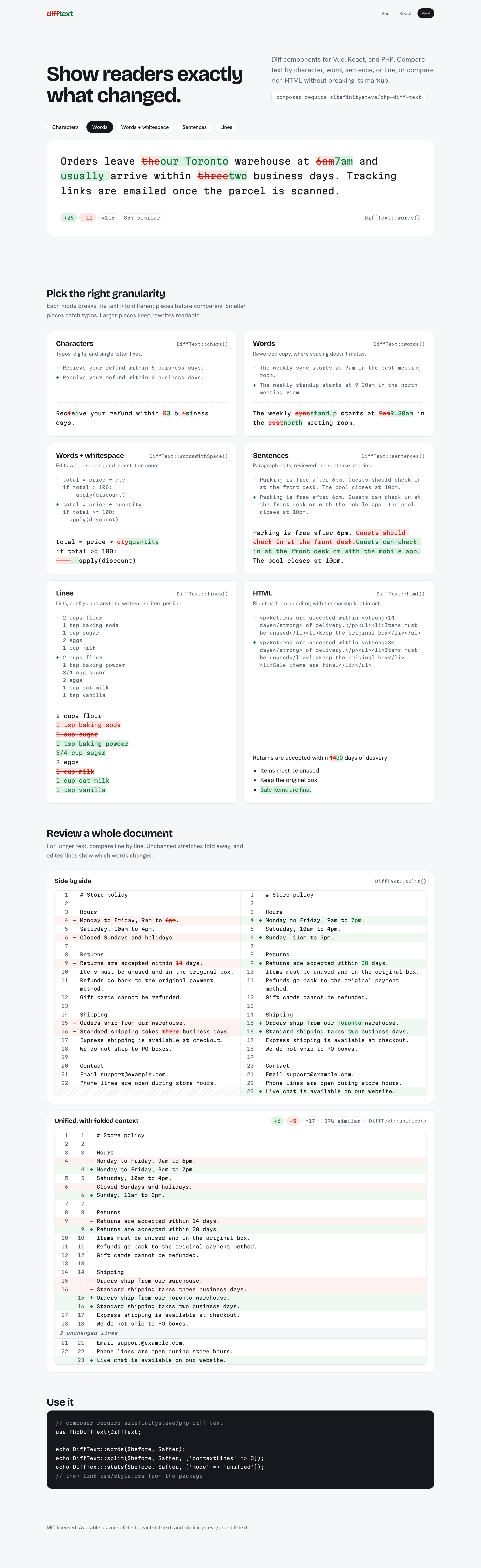
The demo page, rendered server-side: every text mode, the HTML diff, side-by-side and unified document views, and the stats badge.
The page above is demo/index.php. It renders every mode, the side-by-side and
unified views, and the stats badge with this library, and uses no JavaScript. To run it from this
folder:
composer demo # syncs the shared assets, then serves on http://127.0.0.1:8080
or from the monorepo root:
php -S 127.0.0.1:8080 -t packages/php/demo
demo/demo.css and demo/content.json are copies of the shared template in the monorepo's
demo/ folder. Run composer demo:sync after changing those files.
Usage
Each diff class takes old and new text and returns HTML with .diff-added and .diff-removed spans.
The text modes produce exactly the same change lists as jsdiff v8,
which the Vue and React packages use, so all three libraries highlight the same things.
Quick start (any PHP project)
use PhpDiffText\DiffText;

// One-liner — pick your strategy
echo DiffText::words('The quick brown fox', 'The slow brown fox');
echo DiffText::chars('cat', 'car');
echo DiffText::lines($oldFile, $newFile);
echo DiffText::unified($oldFile, $newFile);   // line numbers, collapsed context
echo DiffText::split($oldFile, $newFile);     // side by side
echo DiffText::stats($old, $new);             // +added −removed =unchanged, % similar
Or use the individual classes directly:
use PhpDiffText\DiffWords;

echo DiffWords::render('The quick brown fox', 'The slow brown fox');

// Get raw Change[] array for custom rendering
$changes = DiffWords::diff('old text', 'new text');
// Each Change has ->value, ->added, ->removed and ->count (number of tokens)
Laravel Blade example
In your controller:
use PhpDiffText\DiffText;

public function show()
{
    return view('document.diff', [
        'diffHtml' => DiffText::words($oldVersion, $newVersion),
    ]);
}
In your Blade template:
{{-- Include the diff styles (in your layout or the specific view) --}}
<link rel="stylesheet" href="{{ asset('vendor/php-diff-text/style.css') }}">

{{-- Render the diff output (already safe HTML) --}}
{!! $diffHtml !!}
Tip: Copy
vendor/sitefinitysteve/php-diff-text/css/style.cssintopublic/vendor/php-diff-text/style.css, or add it to your Vite/Mix pipeline.
Output (whitespace added here for reading; the real output has none):
<div class="text-diff text-diff-words">
  <span>The </span>
  <span class="diff-removed" data-change-index="0">quick</span>
  <span class="diff-added" data-change-index="1">slow</span>
  <span> brown fox</span>
</div>
data-change-index numbers the changes in document order, for "next/previous change" navigation.
Available Diff Classes
| Class | Description |
|---|---|
DiffChars |
Character-level diff (Unicode code points) |
DiffWords |
Word-level diff (whitespace changes are not reported) |
DiffWordsWithSpace |
Word-level diff (whitespace-aware) |
DiffLines |
Line-level diff |
DiffSentences |
Sentence-level diff |
DiffHtml |
Tag-aware HTML diff with optional similarity threshold |
DiffUnified |
Unified line view: old/new line numbers, collapsed unchanged lines |
DiffSplit |
Side-by-side line view with word highlighting inside changed lines |
DiffStats |
Added/removed/unchanged counts and a stats badge |
DiffHeatmap |
Rewrite heatmap: each new sentence shaded by how much it changed |
DiffTimeline |
Revision timeline: a diff per pair of consecutive versions, CSS-only step switcher |
DiffPlayback |
Animated text-mode diff with a CSS-only Replay toggle |
Minimap |
Change minimap strip (usually via the minimap render option) |
Moves |
Moved-block detection for the unified and split views |
All methods are static — no instantiation needed. DiffUnified::hunks() and DiffSplit::hunks()
return the line model as arrays if you want to render it yourself (renderHunks($hunks, $options)
turns it back into markup). Likewise DiffHeatmap::build() / renderHeatmap() and
DiffTimeline::build() / renderTimeline() separate the model from the markup.
DiffText Facade
The DiffText class is the recommended entry point:
use PhpDiffText\DiffText;

DiffText::chars($old, $new);
DiffText::words($old, $new);
DiffText::wordsWithSpace($old, $new);
DiffText::lines($old, $new);
DiffText::sentences($old, $new);
DiffText::html($old, $new, ['similarityThreshold' => 0.3]);
DiffText::unified($old, $new, ['contextLines' => 3]);
DiffText::split($old, $new);
DiffText::stats($old, $new, ['mode' => 'words']);
DiffText::similarity($old, $new);        // float 0-1 (HTML input: tags ignored)
DiffText::similarity($old, $new, false); // plain text: < and > count
DiffText::heatmap($old, $new);
DiffText::timeline([$v1, $v2, $v3], ['mode' => 'words']);
DiffText::playback($old, $new, ['mode' => 'words', 'speed' => 200]);
Options
| Option | Modes | Meaning |
|---|---|---|
ignoreCase |
all | Compare case-insensitively |
ignoreWhitespace |
lines, unified, split | Lines are equal if they match after trimming |
newlineIsToken |
lines | Line terminators are separate tokens |
stripTrailingCr |
lines, unified, split | Treat \r\n as \n |
maxEditLength |
text modes, html | Past this many edits, show a whole replacement instead of searching further |
contextLines |
unified, split | Unchanged lines shown around each change (default 3) |
detectMoves, minMoveLines, moveSimilarity |
unified, split | Moved-block detection, see Moved blocks |
anchors |
text modes, unified, split, heatmap, timeline, playback | Put id="{idPrefix}-change-N" on every changed element (default false) |
idPrefix |
every view that emits ids | Prefix for all ids (default "td"; an empty or non-string value means "td"). Escaped when emitted, not validated: use something like [A-Za-z][A-Za-z0-9_-]* |
minimap |
text modes, unified, split | Wrap the view with a change minimap, see Change minimap |
Boolean options added in 1.6.0 (detectMoves, anchors, minimap, heatmap ignoreCase) are on
only for a literal true, exactly as in the JavaScript packages. showRemoved and legend are off
only for a literal false.
DiffWords::render('Hello World', 'hello world', ['ignoreCase' => true]);
Large inputs: the engine is Myers' O((N+M)·D) algorithm, so it is fast when the texts are similar
and slows down as they diverge. For user-supplied input, set maxEditLength to cap the work.
HTML Diff
DiffHtml treats tags as atomic tokens. Highlight spans only ever wrap text, so the output stays
valid HTML: an attribute-only change (e.g. a new href) shows the new tag with no highlight, and a
removed paragraph or list item keeps its own tags where they are valid. <script>, <style> and
other raw-text elements are compared whole and never marked. Text compares by decoded value
(é equals é), unchanged text keeps the new document's spelling, and comments are dropped.
By default inline formatting tags (<strong>, <em>, <b>, …) are ignored
('ignoreFormattingTags' => false to compare them) and curly quotes compare equal to straight
quotes. Other options: ignoreCase, orphanMatchThreshold (default 0.3) and maxEditLength.
The output is byte-identical to the Vue and React packages (one engine, specified in SPEC.md §12).
It also supports a similarity threshold (0-1). When the texts are less similar than the threshold, it
renders a "full replacement" instead of a granular diff, wrapped in <div class="diff-removed"> /
<div class="diff-added"> so block-level HTML stays valid:
use PhpDiffText\DiffText;

// Tag-aware diff (default)
echo DiffText::html('<p>Hello world</p>', '<p>Hello Vue world</p>');

// Full replacement when texts are very different
echo DiffText::html(
    'Original long paragraph about insurance policies...',
    'Item 1: House. Item 2: Car.',
    ['similarityThreshold' => 0.3]   // the positional similarityThreshold: argument still works
);
Security: HTML input is rendered as-is. Sanitize untrusted HTML before diffing it. (The text modes escape their output.)
Similarity Utility
Compute text similarity directly:
use PhpDiffText\Similarity;

$score = Similarity::compute('Hello world', 'Hello worlds');
// float 0-1: tags stripped, quotes normalized, whitespace ignored,
// 2 × unchanged characters / (old characters + new characters)

$text = Similarity::compute('1 < 2 and 3 > 2', '1 2', false); // 4/11: plain text keeps < and >
Tags are stripped only for HTML input (the default, which DiffHtml's threshold uses); the stats
badge, heatmap, moves and timeline compare plain text. Similarity is directional: it scores the
old → new diff, so compute($a, $b) and compute($b, $a) can differ ('cc b' → 'b!cc' is 2/7,
the reverse 4/7).
Visualizations
Five display-only views, all static HTML + CSS (no JavaScript), byte-identical to the Vue and React packages. They are opt-in: without their options, the markup of every other view is unchanged.
Moved blocks
With detectMoves, the unified and split views recognise lines that were cut from one place and
pasted elsewhere. Instead of a removal and an unrelated addition, both ends are tinted with the same
color slot and link to each other.
| Option | Default | Meaning |
|---|---|---|
detectMoves |
false |
Turn move detection on |
minMoveLines |
1 |
Shortest block that counts as a move. A number ≥ 1 is floored; anything else means 1 |
moveSimilarity |
1 (exact) |
A number strictly between 0 and 1 also accepts near matches with at least that similarity; anything else means exact matches only |
ignoreCase |
false |
Also ignore case when matching moved lines |
echo DiffText::unified($old, $new, ['detectMoves' => true, 'minMoveLines' => 2]);
echo DiffText::split($old, $new, ['detectMoves' => true, 'moveSimilarity' => 0.8]);
- Lines match after collapsing whitespace runs and trimming. A line re-indented in place is not a move. Blocks never start or end on a blank line.
- Moved rows get
diff-row-moved-from/diff-row-moved-to, a color classdiff-move-0…diff-move-5,data-move="M", anaria-labelsuch asline 1 moved to line 6, and a link (moved to line 6). The first row of each block carriesid="{idPrefix}-move-M-from"/-to, and the links point at each other. - Stats count moved-from lines as removed and moved-to lines as added.
- Limits: detection is skipped when removed × added lines exceeds 1,000,000; near matching is used only up to 250,000 pairs (exact matches beyond that).
Moves::build(LineModel::buildRows($old, $new), $options)returns the blocks (['id', 'oldStart', 'newStart', 'lines']).
Change anchors
'anchors' => true gives every element that carries data-change-index="N" an
id="{idPrefix}-change-N", so #td-change-3 links to the fourth change. The id goes right after
class:
<span class="diff-added" id="td-change-1" data-change-index="1">c</span>
Use a distinct idPrefix per diff when a page shows several.
Change minimap
A narrow strip beside the diff with one mark per change, placed where the change sits in the new document. Each mark is a link to the change's anchor; the strip is sticky while you scroll.
echo DiffText::unified($old, $new, ['minimap' => true, 'idPrefix' => 'doc']);
echo DiffText::words($old, $new, ['minimap' => true]);
| Option | Default | Meaning |
|---|---|---|
minimap |
false |
Render the view with anchors forced on and wrap it with the strip |
idPrefix |
"td" |
Shared by the view's anchors and the strip's links |
Output: <div class="text-diff-with-minimap"> + the view + <nav class="text-diff-minimap"> with
one <a class="diff-minimap-mark diff-minimap-{added|removed|modified|moved}" href="#td-change-N" style="top:T;height:H" aria-label="Change N+1: kind"> per change. Text modes get one mark per
changed span (removals are zero-height marks); line views get one per run of changed rows.
Positions are computed with integer math (12.50%), so they match the JavaScript output exactly.
Why an option: core's renderWithMinimap(diffHtml, minimapHtml) only makes sense when the
diff was rendered with anchors and the same idPrefix as the strip. The minimap option does that
in one call and cannot get it wrong. The pieces stay available for custom layouts:
Minimap::marksText($changes), Minimap::marksLines($hunks), Minimap::render($marks, $options)
and Minimap::wrap($diffHtml, $minimapHtml) (the direct port of renderWithMinimap).
Rewrite heatmap
For prose that was rewritten, e.g. by an editor or an AI. Both texts are split into sentences, old sentences are aligned to new ones by word similarity, and each new sentence gets a heat level from 0 (unchanged) to 4 (rewritten or new). Sentences with no counterpart are shown as removed markers.
echo DiffText::heatmap($draft, $edited);
echo DiffText::heatmap($draft, $edited, ['showRemoved' => false, 'legend' => false]);
| Option | Default | Meaning |
|---|---|---|
ignoreCase |
false |
Compare sentences case-insensitively |
showRemoved |
true |
Show removed old sentences inline |
legend |
true |
Append the legend with a count per level |
anchors, idPrefix |
false, "td" |
Change anchors |
- Each sentence is a
<span class="diff-heat" data-heat="0-4">. Changed sentences also getdata-change-index, atitlesuch aslightly edited, 12% changed, and the same text for screen readers; heat is never shown by color alone. - Whitespace, quote style and tag-only changes count as unchanged.
- Up to 500 sentences per side (after the common prefix and suffix) are aligned by similarity;
above that only identical sentences are matched (
$model['exact'] === true). DiffHeatmap::build($old, $new, $options)returns the model:segments(gap, removed, or sentence withheat,status,similarity,changed,old) andexact.
Revision timeline
Compare several versions at once. Each step (v1 → v2, v2 → v3, …) gets a tab-like label and a panel with its stats badge and diff; the latest step is selected. Switching uses CSS radio inputs, so it works without JavaScript and with the keyboard.
echo DiffText::timeline([$v1, $v2, $v3], ['labels' => ['Draft', 'Review', 'Final']]);
echo DiffText::timeline($versions, ['mode' => 'unified', 'detectMoves' => true]);
| Option | Default | Meaning |
|---|---|---|
mode |
"words" |
A text mode, "unified" or "split"; anything else means "words" |
labels |
v1, v2, … |
Labels per version; a missing or non-string entry falls back to v{i+1} |
| diff / line options | Passed to every step (ignoreCase, contextLines, detectMoves, …) |
|
anchors, idPrefix |
false, "td" |
Radios are {idPrefix}-rev-K; each panel renders with the prefix {idPrefix}-rev-K so ids never collide |
Output: <div class="text-diff-timeline"> with, per step, an <input type="radio">, its <label>
(v1 → v2) and a <div class="diff-rev-panel">. With fewer than two versions it renders
Nothing to compare. DiffTimeline::build() returns the steps with their stats, similarity and
changes or hunks.
Animated playback
The text-mode view, animated: changes appear one after another (removals strike through and fade, additions fade in). A Replay control restarts the animation using a CSS-only checkbox.
echo DiffText::playback($old, $new, ['mode' => 'words', 'speed' => 200]);
| Option | Default | Meaning |
|---|---|---|
mode |
"words" |
A text mode (chars, words, wordsWithSpace, lines, sentences); anything else throws InvalidArgumentException |
| diff options | The mode's options (ignoreCase, …) |
|
speed |
CSS default 350ms | Milliseconds between changes. A finite number is floored and used when ≥ 1; anything else is ignored |
anchors, idPrefix |
false, "td" |
The checkbox is {idPrefix}-replay |
Output: <div class="text-diff-playback-wrap"> with the Replay checkbox and label, then the usual
text-mode markup with class text-diff-playback and style="--td-i:N" on each changed span.
With prefers-reduced-motion: reduce the final state shows at once and Replay is hidden.
Styling
Include the bundled CSS for default diff styling (it covers every view):
<link rel="stylesheet" href="vendor/sitefinitysteve/php-diff-text/css/style.css">
Or copy it into your asset pipeline. Customize with CSS variables:
:root {
  --text-diff-added-bg: #ddfbe6;
  --text-diff-added-color: #008000;
  --text-diff-removed-bg: #fce9e9;
  --text-diff-removed-color: #c70000;
  --text-diff-removed-decoration: line-through;
}
The visualizations add their own properties (--text-diff-heat-1-bg … -4-bg,
--text-diff-move-0 … -5, --text-diff-minimap-width, --text-diff-minimap-height,
--text-diff-timeline-active-bg, --text-diff-playback-step, …); see the comments in css/style.css.
Dark defaults are opt-in with data-theme="dark" or class dark on an ancestor, or class
text-diff-dark.
Testing
composer install
composer test    # unit tests, jsdiff parity cases, and the shared fixtures (inside the monorepo)
composer bench   # engine benchmark, new vs 1.5.x
Publishing to Packagist
First-time setup
-
Create a GitHub repository:
cd php-diff-text
git init
git add .
git commit -m "Initial release"
gh repo create sitefinitysteve/php-diff-text --public --source=. --push
-
Register on Packagist:
- Log in with your GitHub account
- Click "Submit" and enter the GitHub repo URL
- Packagist will auto-detect the
composer.json
-
Set up auto-updating (recommended):
- On Packagist, go to your package settings and grab the API token
- On GitHub, go to repo Settings > Webhooks > Add webhook
- Payload URL:
https://packagist.org/api/github?username=sitefinitysteve - Content type:
application/json - Secret: your Packagist API token
- Events: "Just the push event"
Releasing a new version
The package is developed in the diff-text monorepo
and released together with the Vue and React packages. scripts/release.sh --go in the monorepo
pushes packages/php to sitefinitysteve/php-diff-text (which Packagist reads) and tags it
vX.Y.Z. Please open issues and pull requests on the monorepo.
Packagist picks up the new tag automatically via the webhook. See CHANGELOG.md.
CI
This package lives in the packages/php directory of the diff-text monorepo; its tests run from the
monorepo's root GitHub Actions workflow.
License
MIT
Made with ❤️ by sitefinitysteve