
shibbirweb / peep

Debug any PHP app in a separate window: values, queries, jobs, logs, exceptions, mail and SMS.
Requires
- php: >=7.1
Requires (Dev)
- monolog/monolog: ^1.25 || ^2.0 || ^3.0
- phpunit/phpunit: ^7.5.20 || ^8.5.40 || ^9.6 || ^11.5 || ^12.5
- psr/log: ^1.1 || ^2.0 || ^3.0
- symfony/var-dumper: ^3.4 || ^4.4 || ^5.4 || ^6.0 || ^7.0 || ^8.0
- yoast/phpunit-polyfills: ^4.0
Suggests
- monolog/monolog: To send Monolog logs to Peep (Monolog 1, 2 or 3)
- psr/log: To use Peep as a PSR-3 logger
- symfony/var-dumper: To send dump() and dd() to Peep, and for richer value rendering
Provides
None
Conflicts
None
Replaces
None
- dev-main
- v0.2.0
- v0.2.0-beta.1
- v0.1.0
- v0.1.0-beta.3
- v0.1.0-beta.2
- v0.1.0-beta.1
- dev-develop
- dev-fix/next-docs-beta-install
- dev-release/v0.2.0
- dev-release/v0.2.0-beta.1
- dev-docs/stable-install
- dev-feat/website
- dev-release/v0.1.0
- dev-release/v0.1.0-beta.3
- dev-docs/api-reference
- dev-feat/agent-webhooks
- dev-feat/logs-add-folder
- dev-docs/default-branch-checklist
- dev-docs/readme-install
- dev-fix/readme-tour-video
- dev-feat/ai-agents
This package is auto-updated.
Last update: 2026-10-24 18:01:16 UTC
README

Debug any PHP app in a separate window. Call peep($value) anywhere and watch values, database queries, jobs, logs and exceptions arrive live, in your browser or in a desktop app. Peep also catches the mail and SMS your app sends, and can call your app back with signed provider webhooks.
The poster plays the tour of this version in your browser. It is also in the repository: demo/peep-tour.mp4.
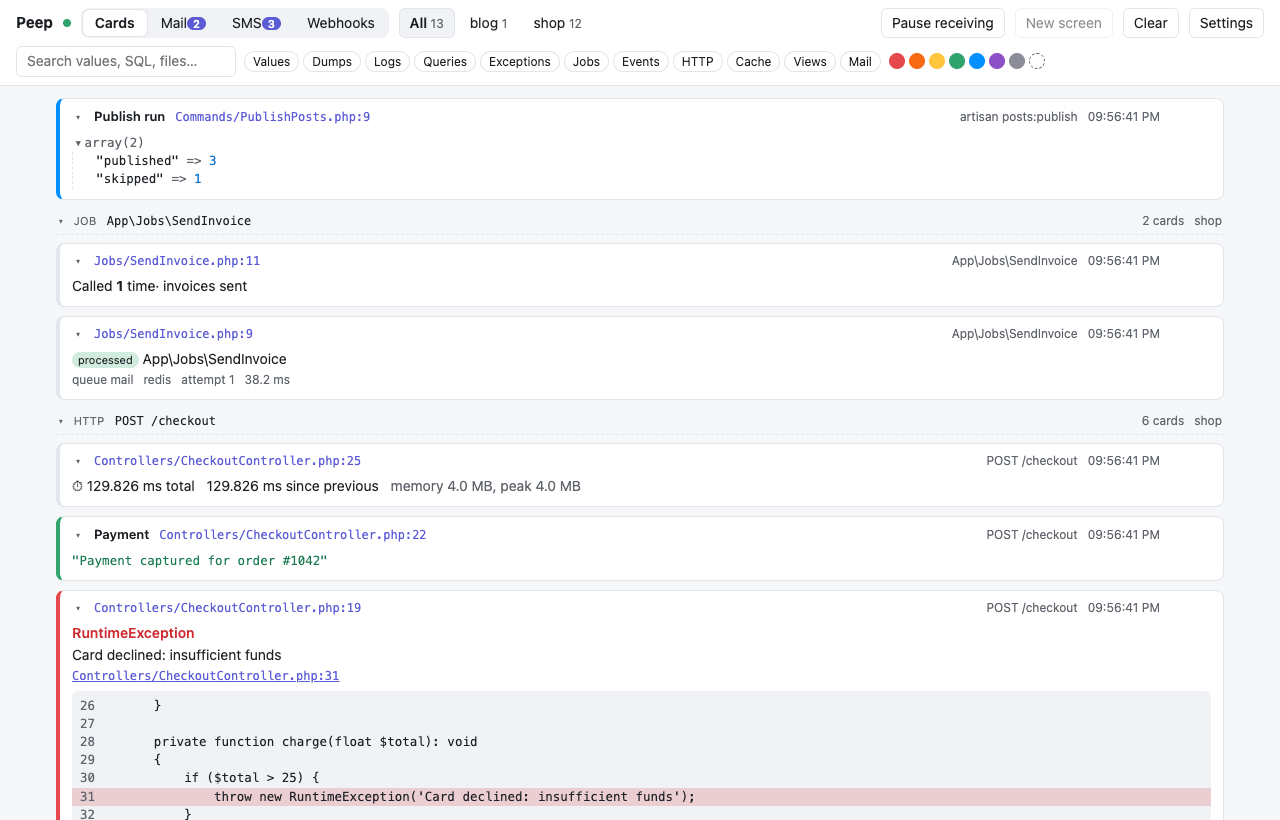
Works with PHP 7.1 to 8.5 and Laravel 5.5 to 13. More screenshots are on the website and in the wiki.
Installation
Peep has two pieces. You set up each one once:
| Piece | What it does | Where it goes |
|---|---|---|
| The viewer | The window where everything your app sends shows up | On your computer |
The peep() package (shibbirweb/peep) |
Adds peep() to your code and sends what you give it to the viewer |
In each PHP project you want to debug |
Want to try what comes next? Betas are built from
develop: install the package withcomposer require shibbirweb/peep:@beta --devand get the viewer from the newest release marked Pre-release. The steps below install the stable release.
Installing with an AI agent? Paste this into Claude Code, Codex, Cursor or any other coding agent, in your project:
Install Peep for this project and this machine, following https://github.com/shibbirweb/peep/blob/HEAD/llms-install.mdThe agent picks the right download for your computer, adds the package, turns Peep on and checks that it works. The steps below are the same, by hand.
Step 1: Install the viewer
Choose one of these. Most people want the desktop app.
| Desktop app (recommended) | Viewer in your browser | |
|---|---|---|
| Good for | Everyone | Computers where you cannot install apps |
| You need | macOS 11 or later, Windows 10 or 11, or Linux | PHP 8.5 on your computer |
| You get | Its own window, a tray icon, notifications and updates | The viewer in a browser tab |
Option A: the desktop app
-
Open the newest release and download the file for your computer from Assets:
Your computer Download Mac with Apple silicon (M1 or later) Peep_<version>_aarch64.dmgMac with an Intel chip Peep_<version>_x64.dmgWindows Peep_<version>_x64-setup.exeUbuntu or Debian Peep_<version>_amd64.debAny other Linux Peep_<version>_amd64.AppImageNot sure which Mac you have? Apple menu → About This Mac shows the chip.
-
Install it and open it. The app is not signed with an Apple or Microsoft certificate yet, so the first time your system asks you to confirm:
-
macOS: open the
.dmgand drag Peep into Applications. Open Peep; when macOS says it cannot open it, click Done. Go to System Settings → Privacy & Security, scroll down to "Peep" was blocked, click Open Anyway and enter your password. If macOS says Peep is damaged, run this in Terminal, then open Peep again:xattr -dr com.apple.quarantine /Applications/Peep.app
-
Windows: run the installer. When Windows protected your PC appears, click More info, then Run anyway.
-
Linux:
sudo apt install ./Peep_<version>_amd64.deb, or make the AppImage runnable withchmod +xand start it.
You only do this once. Every step in detail, and help when something goes wrong: installing the desktop app.
-
-
Peep opens its window. It also lives in the tray (the menu bar on macOS) while it runs.
The desktop app brings its own PHP, so you do not need to install PHP for it.
Option B: the viewer in your browser
-
Check that this computer has PHP 8.5:
php -vshould printPHP 8.5. -
Download
peep-server.pharfrom the newest release. -
Start it in a terminal, from the folder you saved it to, and keep that terminal open:
php peep-server.phar serve
Your browser opens the viewer at http://127.0.0.1:23517. Press Ctrl+C in the terminal to stop it.
Step 2: Add Peep to your project
In your project's folder (the one with composer.json):
composer require shibbirweb/peep --dev
--dev keeps Peep out of your production install. Your project can use any PHP from 7.1 to 8.5; only the viewer cares about PHP 8.5, and the desktop app brings its own.
No Composer in this project? The global install adds peep() to every PHP script on your computer instead.
Step 3: Turn Peep on
-
Laravel: nothing to do. Peep is on in every environment except
production. -
Any other PHP app: set the environment variable
PEEP_ENABLED=true(in your.envfile, if your app loads one), or create apeep.phpfile in the project's root folder:<?php return ['enabled' => true];
Peep is off until you turn it on, so it never runs on a live site by accident.
Step 4: See it work
Put this anywhere in your code, then run that code (open the page, run the command or the test):
peep('Hello from my app');
A card with Hello from my app appears in the viewer. From here, send anything: peep($user), peep($request->all()), peep()->table($rows). See the API reference.
Nothing appears? Check that:
- The viewer is running (the desktop app is open, or
php peep-server.phar serveis still running). - Peep is on (Step 3).
- Your app runs on the same computer as the viewer. For Docker, Laravel Sail, a VM or another computer, see Docker and other machines.
More help: Troubleshooting.
What it does
peep($anything)from any PHP code, with colors, labels, tables, JSON, timing, traces, counters and pause.- Laravel out of the box: queries (with slow and duplicate detection), jobs, events, cache, the HTTP client, views, requests, logs, exceptions, mail and
dump(). - Query debugging that you switch on and off from the viewer while the app runs.
- Any PHP app through PSR-3, Monolog, Symfony VarDumper and a plain error handler.
- A mail and SMS catcher (SMTP, a Laravel mailer, and Mailgun-, Twilio- and Vonage-style APIs), with a webhook simulator that calls your app back with signed, templated payloads.
- The viewer in a browser tab or in the desktop app; choose in Settings.
- Debugging by AI agents:
vendor/bin/peep reportand an MCP server give Claude Code, Codex, Cursor and others what Peep caught as text, and the bundled skill teaches them to use it. - Safe by default: off in production, and it never slows down or breaks your app when the viewer is closed.
Requirements
| You use | It needs |
|---|---|
Your PHP app, with the peep() package |
PHP 7.1 to 8.5. Laravel 5.5 to 13 work out of the box |
| The desktop app | macOS 11 or later, Windows 10 or 11, or Linux with WebKitGTK 4.1. It brings its own PHP |
The viewer in your browser (peep-server.phar) |
PHP 8.5, on the computer that runs it |
Your app does not need PHP 8.5. Only the browser viewer does, and only if you choose it over the desktop app. Every Laravel version from 5.5 to 13 is tested on every PHP version it supports: see Version support.
Laravel in a minute
peep()->showQueries();                         // every query, with bindings and time
peep()->showSlowQueries(100);                  // queries slower than 100 ms
peep()->showDuplicateQueries();                // the same query run again (N+1)
peep()->countQueries(fn () => $order->load('items'));
peep()->showJobs()->showHttpClientRequests();
peep()->model($user);
collect($rows)->peep()->map(...);
Logs, reported exceptions, dump() and sent mail show up without any call. Set MAIL_MAILER=peep to send every mail to the viewer's inbox. To change what is captured, publish the config with php artisan vendor:publish --tag=peep-config. More in the Laravel guide.
Debugging with an AI agent
vendor/bin/peep skill --install          # the Peep skill, for Claude Code (.claude/skills/peep)
claude mcp add peep -- php vendor/bin/peep mcp   # optional: Peep's MCP tools
Then ask: "Use Peep to find out why checkout fails, fix it, and show me the report." The agent adds peep() calls, runs the code, reads vendor/bin/peep report (problems first, then every request), fixes the bug and removes its calls. See AI agents.
Documentation
The website and the wiki have everything, with screenshots. Both are written in docs/wiki and published by CI.
- Getting started and Installation
- Version support: PHP 7.1 to 8.5, Laravel 5.5 to 13
- API reference: every method of
peep()with its parameters, return value and examples, in four parts: values, inspecting, control and Laravel methods - Laravel, other frameworks and plain PHP, mail and SMS, webhooks, desktop app, AI agents
- Releasing: betas from
develop, stable releases frommain - Protocol, roadmap, feature list and implementation plan
Support Peep
- Star the repository. If Peep saves you time, a star on GitHub helps other PHP developers find it.
- Report a bug. Something wrong? Open a bug report with your Peep and PHP versions and the steps to reproduce.
- Request a feature. Missing something? Suggest a feature, starting with the problem it would solve.
- Security problem? Please report it privately: see SECURITY.md.
Contributing
See CONTRIBUTING.md. Pull requests go into develop.
License
MIT. See LICENSE.