
restruct / silverstripe-svg-images

SVG image support for Silverstripe: uploads, CMS previews, real vector manipulation (resize/crop/pad) and sanitization
Package info
github.com/restruct/silverstripe-svg-images
Type:silverstripe-vendormodule
pkg:composer/restruct/silverstripe-svg-images
Fund package maintenance!
Requires
- php: ^8.1
- ext-dom: *
- contao/imagine-svg: ^1.0
- enshrined/svg-sanitize: ^0.22 || ^1
- silverstripe/assets: ^2 || ^3
- silverstripe/framework: ^5 || ^6
- silverstripe/vendor-plugin: ^2 || ^3
Requires (Dev)
- silverstripe/recipe-testing: ^3 || ^4
Suggests
- ext-gd: Required for generating PNG test images in /dev/svg-compare
- jonom/focuspoint: Focus-point aware cropping (FocusFill etc.) for SVGs as well as raster images
- restruct/silverstripe-focuspointcropper: Manual crop regions (CropData) for SVGs as well as raster images
Provides
None
Conflicts
None
Replaces
None
README
Maintained by Restruct. If this module saves you time, you can support ongoing maintenance.
This module provides comprehensive SVG support in Silverstripe's asset management system, including:
- CMS thumbnail/preview support for SVG files in AssetAdmin
- Real SVG manipulation (resize, crop) that modifies viewBox/dimensions while preserving vectors
- SVG sanitization on upload to remove potentially dangerous content
- Dimension parsing from SVG viewBox/width/height attributes
- Automatic class handling for SVGs uploaded through Image relations
Version Compatibility
| Branch | Module version | Silverstripe | PHP |
|---|---|---|---|
main |
3.x |
5, 6 | 8.1+ (8.3+ on Silverstripe 6) |
| - (tags only) | 2.0 - 2.1 |
6 | 8.3+ |
ss4/5 |
1.3 - 1.4 |
4, 5 | 7.4+ |
| - (tags only) | 1.0 - 1.2 |
3 |
composer.json on each branch is the source of truth for exact constraints. 3.x replaces both
1.x and 2.x; they receive no further releases. Upgrading? See UPGRADING.md and
CHANGELOG.md.
Requirements and installation
- Silverstripe 5 or 6 (
silverstripe/frameworkandsilverstripe/assets), PHP 8.1+,ext-dom - Optional: jonom/focuspoint and/or
restruct/silverstripe-focuspointcropper
for their SVG-aware methods (see below),
ext-gdfor the/dev/svg-comparetest images
composer require restruct/silverstripe-svg-images
Then flush and build the database (sake dev/build flush=1 on Silverstripe 5,
sake db:build --flush on 6). SVG uploads are allowed and handled as images from then on.
How it works
The module configures Silverstripe to use the SVGImage class for .svg files via class_for_file_extension. This happens automatically for files uploaded through AssetAdmin.
SVG uploads through Image relations
When uploading SVGs through relation fields (has_one, has_many, or many_many to Image), Silverstripe's ORM enforces the relation's class type, ignoring the class_for_file_extension config. This module includes SVGImageExtension which automatically corrects the ClassName to SVGImage after the file is written.
This happens transparently - no configuration needed.
SVG Manipulation
Unlike raster images, SVG manipulation preserves the vector format by modifying viewBox and width/height attributes. The module uses contao/imagine-svg for manipulation.
Core operations (always available):
Fit($width, $height)- Resize to fit within bounds, maintaining aspect ratioFitMax($width, $height)- Same as Fit, but only if image is largerFill($width, $height)- Crop and resize to fill exact dimensionsFillMax($width, $height)- Same as Fill, but only if image is largerPad($width, $height)- Fit within bounds and add transparent padding to reach exact dimensionsScaleWidth($width)- Scale to specific width, maintaining aspect ratioScaleHeight($height)- Scale to specific height, maintaining aspect ratioScaleMaxWidth($width)- Scale to max width, only if largerScaleMaxHeight($height)- Scale to max height, only if largerCropWidth($width)/CropHeight($height)- Crop to a width/height from the centre, keeping the other dimension (never enlarges)CropRegion($x, $y, $width, $height)- Crop to a region, in the original's coordinatesResampled()- Returns the SVG unchanged (for compatibility with Image templates)
Manipulated SVGs are stored as variants (just like raster image variants), so they're cached and only generated once.
To disable manipulation and return original SVGs unchanged (legacy behavior):
Restruct\Silverstripe\SVG\SVGImage:
  enable_svg_manipulation: false
Optional Extensions
This module provides optional extensions that are automatically applied when their corresponding modules are installed:
Crop Support (requires restruct/silverstripe-focuspointcropper)
When the FocusPointCropper module is installed, SVGs also get:
applyCropData($cropDataJson)- Apply the crop region set in the CMS (usesCropRegion())
(CropRegion(), CropWidth() and CropHeight() no longer need this module; they are core
operations, above.)
FocusPoint Support (requires jonom/focuspoint)
When the FocusPoint module is installed, these additional methods become available:
FocusFill($width, $height)- Fill with focus-aware croppingFocusFillMax($width, $height)- Same as FocusFill, but only if image is largerFocusCropWidth($width)- Crop to width, centered on focus pointFocusCropHeight($height)- Crop to height, centered on focus point
SVG Sanitization
SVG files are automatically sanitized when they are written using enshrined/svg-sanitize: on upload (through AssetAdmin or a relation's upload field) and whenever a file's content is replaced. The unsanitized upload is not kept in the asset store. This removes potentially dangerous content like:
- JavaScript/event handlers
- External references (can be disabled)
- PHP tags
- Other XSS vectors
A file the sanitizer cannot parse is stored as uploaded.
Up to 1.4.1 and 2.1.0, sanitization never actually ran, despite being enabled by default. SVGs uploaded with those versions are unsanitized; see UPGRADING.md.
Configuration options:
Restruct\Silverstripe\SVG\SVGImage:
  # Disable sanitization (not recommended)
  sanitize_on_upload: false

  # Keep remote references (disabled by default for security)
  sanitize_remove_remote_references: false
Migrating existing SVG files
If you have existing SVG files in your database that were uploaded before installing this module, enable auto-migration:
Restruct\Silverstripe\SVG\SVGImage:
  auto_migrate_svg_class: true
Then build the database (dev/build on Silverstripe 5, sake db:build on 6). The migration will update the ClassName in File, File_Live, and File_Versions tables (including files with NULL or empty ClassName).
Note: The migration runs via
requireDefaultRecords(). If you usedev/build no-populate=1, the migration will be skipped. Rundev/build/defaultsseparately to trigger it, or run a normaldev/buildwithoutno-populate.
Usage in templates
<!-- Basic usage -->
<img src="$Image.URL" />

<!-- With manipulation (preserves vector format) -->
<img src="$Image.ScaleWidth(200).URL" />
<img src="$Image.Fill(100, 100).URL" />
<img src="$Image.Fit(300, 200).URL" />

<!-- Responsive example -->
<img src="$Image.ScaleWidth(400).URL" srcset="$Image.ScaleWidth(800).URL 2x" />

<!-- Works in mixed image/SVG contexts -->
<img src="$Image.Resampled.URL" />

<!-- FocusPoint methods (when jonom/focuspoint is installed) -->
<img src="$Image.FocusFill(400, 300).URL" />
Inline SVG
<!-- Add raw SVG inline -->
{$Image.SVG_RAW_Inline}

<!-- Conditional based on file type -->
<% if $Image.IsSVG %>
  {$Image.SVG_RAW_Inline}
<% else %>
  <img src="$Image.ScaleWidth(400).URL" />
<% end_if %>
Inline SVG with color manipulation
If you need to manipulate SVG colors or add CSS classes for inline SVGs, consider stevie-mayhew/silverstripe-svg. You can use it alongside this module by passing the asset path:
{$SVG($Image.Filename).fill('#FF9933').extraClass('my-icon')}
SVG Security
SVGs can expose attack vectors comparable to HTML/JS. This module mitigates risks through automatic sanitization, but you should still:
- Only accept SVG uploads from trusted users
- Use
<img>tags rather than inline SVG when possible (provides more browser security) - Keep the sanitization enabled (default)
For more information on SVG security risks, see OWASP SVG Security Cheat Sheet.
Configuration reference
Restruct\Silverstripe\SVG\SVGImage:
  # Enable real SVG manipulation (resize/crop)
  enable_svg_manipulation: true

  # Sanitize SVGs on upload
  sanitize_on_upload: true

  # Remove remote references during sanitization
  sanitize_remove_remote_references: true

  # Auto-migrate existing SVG files on dev/build
  auto_migrate_svg_class: false
Development Tools
SVG vs PNG Comparison Tool
A visual comparison tool is available at /dev/svg-compare (in dev mode, or for users with ADMIN or ALL_DEV_ADMIN permission) to verify that SVG manipulations behave consistently with PNG manipulations.
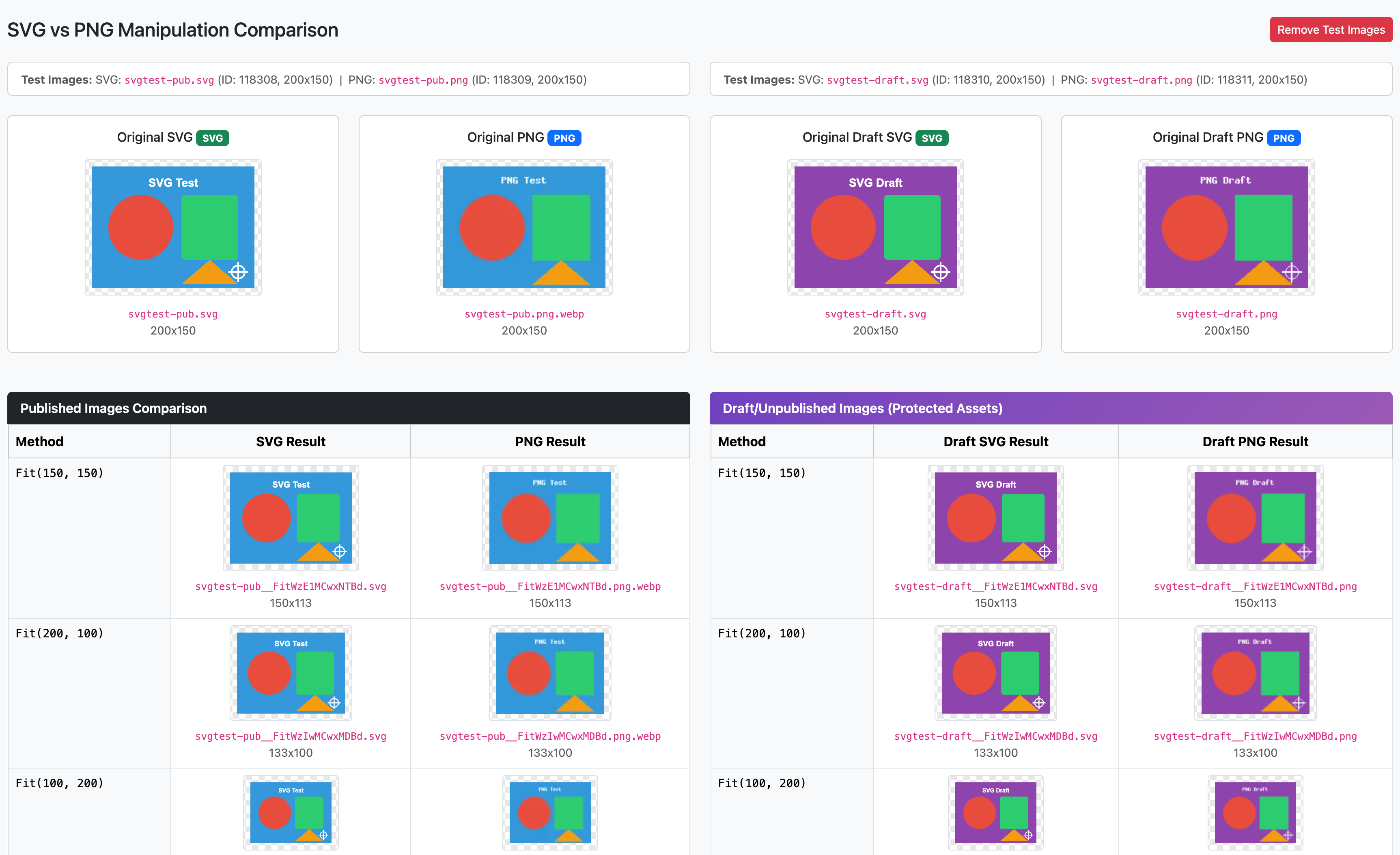
The tool:
- Compares all manipulation methods (Fit, Fill, Pad, Scale, etc.) side-by-side for SVG and PNG
- Tests both published and draft/protected assets
- Shows FocusPoint methods when
jonom/focuspointis installed - Includes bundled test images or accepts custom image IDs
- Displays badges and legends explaining each manipulation type
Clear SVG Variants Task
To clear all generated SVG variant files (useful after upgrading or when manipulation settings change):
# Silverstripe 6
vendor/bin/sake tasks:ClearSVGVariantsTask              # dry run - shows what would be deleted
vendor/bin/sake tasks:ClearSVGVariantsTask --confirm    # actually delete variants
vendor/bin/sake tasks:ClearSVGVariantsTask --confirm -v # with a line per file

# Silverstripe 5
vendor/bin/sake dev/tasks/ClearSVGVariantsTask
vendor/bin/sake dev/tasks/ClearSVGVariantsTask confirm=1
vendor/bin/sake dev/tasks/ClearSVGVariantsTask confirm=1 verbose=1
Only variants are deleted; the original SVGs stay. Variants will be regenerated on next request using the current manipulation settings.
Running the tests
The suite in tests/ needs a Silverstripe host project with silverstripe/recipe-testing, and
the module installed through a symlinked path repository (tests/ is export-ignored, so a
normal install has no tests). .github/workflows/ci.yml builds exactly such a host for
Silverstripe 5 and 6 and is the reference. jonom/focuspoint must be installed for the
focus-point tests to run instead of skipping.