
p-chess / chess-bundle


Provide integration with p-chess/chess library
Requires
- php: ^8.2
- p-chess/chess: ^1.2
- symfony/config: ^6.4 || ^7.4 || ^8.0
- symfony/dependency-injection: ^6.4 || ^7.4 || ^8.0
- symfony/http-kernel: ^6.4 || ^7.4 || ^8.0
- twig/twig: ^3.23
Requires (Dev)
- dg/bypass-finals: ^1.9
- friendsofphp/php-cs-fixer: ^3.95
- phpstan/phpstan: ^2.1
- phpstan/phpstan-strict-rules: ^2.0
- phpunit/phpunit: ^11.5 || ^12.5 || ^13.0
- symfony/phpunit-bridge: ^8.0
Suggests
None
Provides
None
Conflicts
None
Replaces
None
This package is auto-updated.
Last update: 2026-10-01 12:48:51 UTC
README
Installation
Run composer require p-chess/chess-bundle
Local development
This project is designed to run inside Docker via docker compose, with helper targets in Makefile.
Configuration
Create a service that extends PChess\ChessBundle\HtmlOutput and
implement the required methods.
You probably want to inject Symfony's router service here and use it
to return the required URLs.
Note that each route can be provided with an identifier for your game.
Create a configuration file, and use content like the following:
# config/packages/chess.yaml
chess:
    output_service: App\YourOutputService
This is an example of how routes can be defined (using an "id" parameter as an identifier):
# config/routes.yaml
move_start:
    path: /{id}/move/{from}
    methods: GET
    controller: ... # your controller action

move_cancel:
    path: /{id}
    methods: GET
    controller: ... # your controller action

move_promotion:
    path: /{id}/promote/{from}/{to}
    methods: GET
    controller: ... # your controller action

move_end:
    path: /{id}/move/{from}/{to}/{promotion}
    methods: POST
    controller: ... # your controller action
    defaults:
        promotion: ~
Note that move_end is the only route that actually changes the state of the game, so it must not be
reachable with a GET request. The board renders those squares as submit buttons of a POST form
(see the "CSRF protection" paragraph below); all the other routes only display something, and stay GET.
Usage
You can inject a service implementing \PChess\ChessBundle\ChessProviderInterface in your controller, then
implement different actions, using the provided \PChess\Chess\Chess object.
In your template, you can use the Twig function chess_render(chess) to render the board.
If you need to pass an identifier, use chess_render(chess, identifier) instead.
The main service you can use is \PChess\ChessBundle\SessionChessProvider.
This service allows you to keep chess games in session, providing the following methods:
getChess($identifier, $fen, $history)to get main\PChess\Chess\Chessinstance (as provided by interface)restart($identifier)to restart the gamesave($chess, $identifier)to save the game in sessionreverse($identifier)to switch sides
Using $identifier is not mandatory.
To get a list of currently allowed moves (optionally limited to a $from square), use the static
\PChess\ChessBundle\Mover::getAllowedMoves($chess, $from).
CSRF protection
Since ending a move is a POST request, you probably want to protect it with a CSRF token.
Override the getHiddenFields() method of your output service to add any hidden field to the
form wrapping the board:
protected function getHiddenFields(mixed $identifier = null): array
{
    return ['_token' => $this->csrfTokenManager->getToken('move'.$identifier)->getValue()];
}
Styling
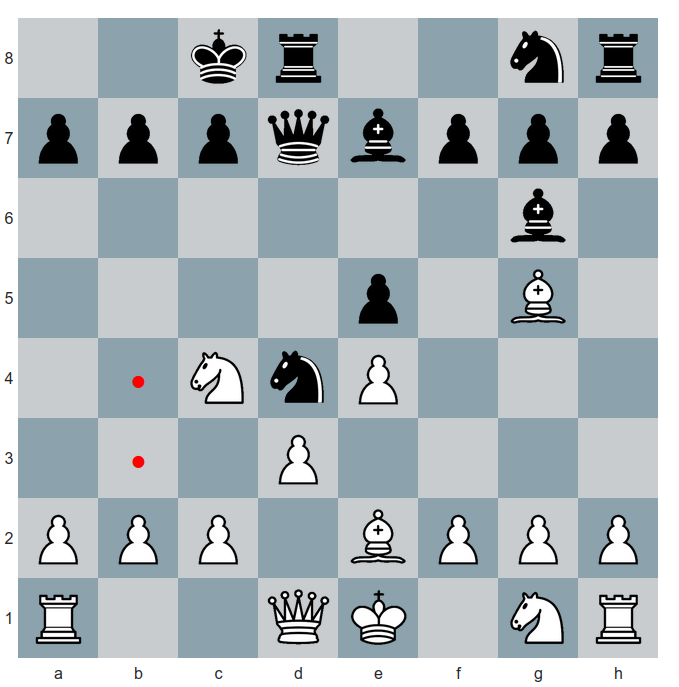
You can use the provided _board.scss file to style the board:
@import '~@p-chess/chess-bundle/scss/board';
Don't forget to update your frontend files, using npm or yarn.
The final result should be something like this:
Persisting a Chess object
You can easily save a Chess object into Doctrine (or other kinds of mapping libraries), using two fields/properties:
fen, and history.
The first one is a simple string. The second one can be a simple_array (for Doctrine), where you should put
the result of Mover::getHistoryStrings() method.
When retrieving an object, you should use fen and the result of Mover::getHistoryEntries() to build back your
Chess object.