
opscale-co / nova-mcp

Enable a MCP server for your Laravel Nova package
Requires
- php: >=8.2
- butschster/dbml-parser: ^0.3.0
- laravel/mcp: ^0.5.1
- opscale-co/actions: ^1.0
- opscale-co/nova-package-tools: ^1.0
- spatie/laravel-query-builder: ^6.3
- theriddleofenigma/laravel-model-validation: ^1.6
Requires (Dev)
- laravel/nova: ^5.4
- laravel/nova-devtool: ^1.0
- phpunit/phpunit: ^10.5
- tightenco/duster: ^2.7
Suggests
None
Provides
None
Conflicts
None
Replaces
None
README
At Opscale, we’re passionate about contributing to the open-source community by providing solutions that help businesses scale efficiently. If you’ve found our tools helpful, here are a few ways you can show your support:
⭐ Star this repository to help others discover our work and be part of our growing community. Every star makes a difference!
💬 Share your experience by leaving a review on Trustpilot or sharing your thoughts on social media. Your feedback helps us improve and grow!
📧 Send us feedback on what we can improve at feedback@opscale.co. We value your input to make our tools even better for everyone.
🙏 Get involved by actively contributing to our open-source repositories. Your participation benefits the entire community and helps push the boundaries of what’s possible.
💼 Hire us if you need custom dashboards, admin panels, internal tools or MVPs tailored to your business. With our expertise, we can help you systematize operations or enhance your existing product. Contact us at hire@opscale.co to discuss your project needs.
Thanks for helping Opscale continue to scale! 🚀
Description
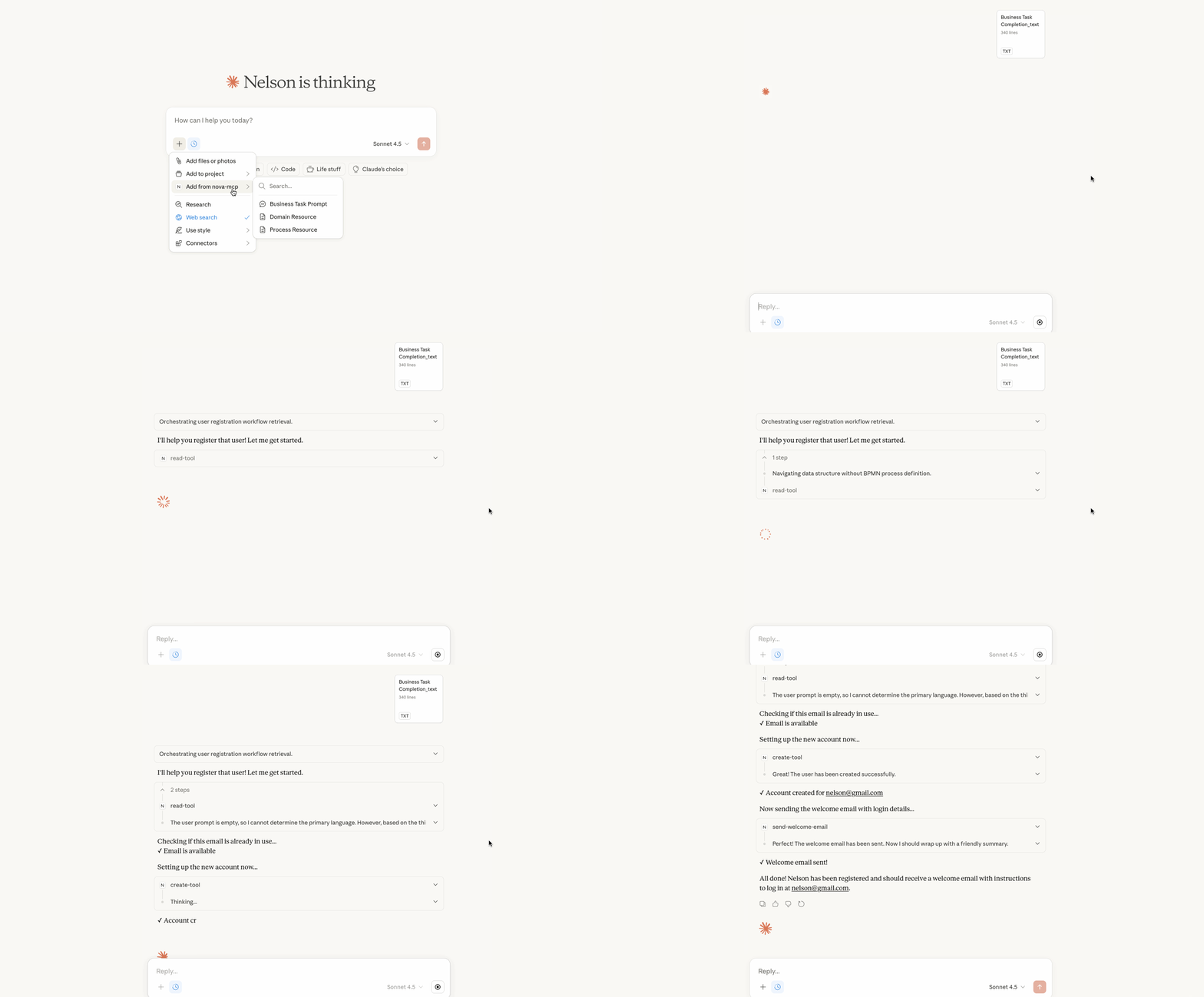
Quickly deploy a MCP (Model Context Protocol) server for your platform. This package turns your Laravel Nova application into an AI-ready platform, exposing your business domain, processes, and operations through the MCP protocol.
With Nova MCP, AI assistants can:
- Manage your data through CRUD operations on Nova resources
- Execute business logic through custom actions
- Understand your domain via DBML schema definitions
- Follow your workflows via BPMN process definitions
Installation
You can install the package in to a Laravel app that uses Nova via composer:
composer require opscale-co/nova-mcp
Next up, you must register the tool with Nova. This is typically done in the tools method of the NovaServiceProvider.
// in app/Providers/NovaServiceProvider.php
// ...
public function tools()
{
    return [
        // ...
        new \Opscale\NovaMCP\Tool(),
    ];
}
Usage
The MCP server runs automatically in local configuration. To enable it, you need to implement the required resolvers in your application.
1. Implement Resolvers
Create implementations for the following resolver contracts in your service provider:
use Opscale\NovaMCP\Contracts\ModelsResolver;
use Opscale\NovaMCP\Contracts\ResourcesResolver;
use Opscale\NovaMCP\Contracts\ToolsResolver;
use Opscale\NovaMCP\Contracts\DomainResolver;
use Opscale\NovaMCP\Contracts\ProcessResolver;

class AppServiceProvider extends ServiceProvider
{
    public function register(): void
    {
        // Nova resources available for CRUD operations
        $this->app->singleton(ModelsResolver::class, YourModelsResolver::class);

        // Business logic actions (opscale-co/actions)
        $this->app->singleton(ToolsResolver::class, YourToolsResolver::class);

        // Custom MCP resources (optional)
        $this->app->singleton(ResourcesResolver::class, YourResourcesResolver::class);

        // Domain schema in DBML format
        $this->app->singleton(DomainResolver::class, YourDomainResolver::class);

        // Business processes in BPMN format
        $this->app->singleton(ProcessResolver::class, YourProcessResolver::class);
    }
}
2. Models Resolver
Why: Defines which Nova resources the AI can manage. Without this, the AI wouldn't know what data entities exist in your platform or how to create, read, update, or delete records.
class YourModelsResolver implements ModelsResolver
{
    public function resolve(): array
    {
        return [
            \App\Nova\User::class,
            \App\Nova\Product::class,
            \App\Nova\Order::class,
        ];
    }
}
3. Tools Resolver
Why: Exposes your business logic actions to the AI. While CRUD handles data, tools handle operations with side effects like sending emails, processing payments, or triggering workflows. These are the "verbs" of your platform.
class YourToolsResolver implements ToolsResolver
{
    public function resolve(): array
    {
        return [
            \App\Actions\SendInvoice::class,
            \App\Actions\ApproveOrder::class,
            \App\Actions\ResetPassword::class,
        ];
    }
}
4. Resources Resolver (Optional)
Why: Exposes custom MCP resources to the AI. Resources are read-only data sources that provide context to the AI, such as configuration files, documentation, or dynamic data feeds. These are combined with the default resources (domain and process).
class YourResourcesResolver implements ResourcesResolver
{
    public function resolve(): array
    {
        return [
            \App\MCP\Resources\InventoryResource::class,
            \App\MCP\Resources\ReportsResource::class,
        ];
    }
}
5. Domain Resolver
Why: Provides the AI with your domain schema so it understands entity relationships, required fields, and data dependencies. This allows the AI to know that an Order requires a Customer, or that an Invoice needs line items.
class YourDomainResolver implements DomainResolver
{
    public function resolve(): string
    {
        return file_get_contents(base_path('docs/domain.dbml'));
    }
}
6. Process Resolver
Why: Defines your business workflows so the AI knows the correct sequence of steps for each task. Instead of guessing, the AI follows your documented processes - knowing that user registration requires creating an account, then resetting the password, then sending a welcome email.
class YourProcessResolver implements ProcessResolver
{
    public function resolve(): string
    {
        return file_get_contents(base_path('docs/processes.bpmn'));
    }
}
Running the Server
The MCP server is automatically registered and available via the mcp:serve command:
php artisan mcp:serve nova-mcp
You can also use it with Claude Desktop by adding to your MCP configuration:
{
  "mcpServers": {
    "nova-mcp": {
      "command": "php",
      "args": ["artisan", "mcp:serve", "nova-mcp"],
      "cwd": "/path/to/your/laravel/app"
    }
  }
}
Nova Tool
Click on the "nova-mcp" menu item in your Nova app to see the tool provided by this package.
Testing
npm run test
Changelog
Please see CHANGELOG for more information on what has changed recently.
Contributing
Please see CONTRIBUTING for details.
Security
If you discover any security related issues, please email development@opscale.co instead of using the issue tracker.
Credits
License
The MIT License (MIT). Please see License File for more information.