
muckiware / log-plugin

Mucki Log Plugin
Package info
github.com/muckiware/MuckiLogPlugin
Type:shopware-platform-plugin
pkg:composer/muckiware/log-plugin
Requires
- php: >= 8.2
- shopware/core: >= 6.5.8.0
Requires (Dev)
Suggests
None
Provides
None
Conflicts
None
Replaces
None
This package is auto-updated.
Last update: 2026-09-20 10:42:37 UTC
README
Logger Plugin for Shopware 6 Webshops
This Shopware 6 Plugin creates log files with file rotation, max file size setup, loglevels, etc. You can create for all your plugins own log fieles by context. like /var/log/myloginplugin.vendor.log, or /var/log/myextraplugin.vendor.log It can send emails by log events. For example: You get an error log event, and it can sends an email to a specific address.
Features overview
- Works for alle Shopware 6 versions, 6.6.x or greater
- Create log files with automatic file rotation by max file size and max file count
- Log files can automatically compress by gzip
- Easy to use logger interface, which can be used in all plugins and creates own log files by context
- Global log setup via plugin configuration, like log level, pattern for log content format, etc.
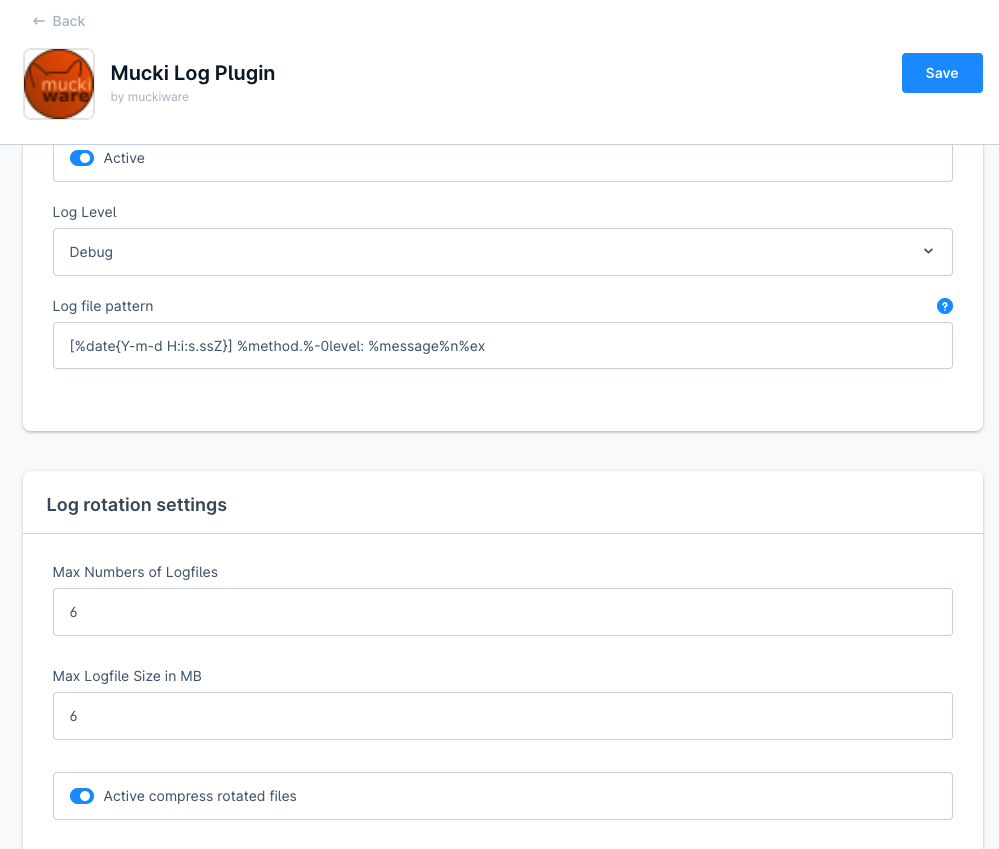
- Can send emails by log events
- Log viewer in the Administration — browse, search and download your log files directly from the admin, without shell access

Installation
composer require muckiware/log-plugin
bin/console plugin:install -a MuckiLogPlugin
Log Viewer (Administration)
The plugin ships with a built-in log viewer in the Shopware Administration, so you can inspect log files without SSH or filesystem access to the server.
Where to find it: Settings → Plugins → Log viewer.
What it does
- File selection — lists every
*.logfile in the configured log directory, sorted by last modification (newest first) and annotated with the file size, so the most relevant file is easy to spot. - Tail view — shows the most recent entries of the selected file. By default the last 2,000 lines are loaded; the file is read backwards in chunks, so even very large log files open quickly without loading the whole file into memory.
- Load more — appends the next older block of lines on top of the current view (byte-based pagination), letting you step back through the history of a large file on demand.
- Refresh — reloads the tail of the current file to pick up entries written since it was opened.
- In-file search — a live search field highlights all matches in the loaded content, with a match counter, next/previous navigation (the view scrolls to the active match) and an optional case-sensitive toggle.
- Download — downloads the complete, unmodified log file as an attachment.
Security & access control
- All requests are protected by the ACL privilege
muwa_log_viewer:read; the admin module route requires themuwa_log_viewer.viewerprivilege. Assign it via a Shopware ACL role to control who may read logs. - File access is restricted to the configured log directory. File names are validated (must end in
.log) and resolved against the real path of the log directory, so directory-traversal attempts (e.g.../../) are rejected.
API endpoints
The viewer is backed by three read-only admin-API actions:
| Method & path | Purpose |
|---|---|
GET /api/_action/muwa-log-viewer/files |
List available log files (name, size, mtime) |
GET /api/_action/muwa-log-viewer/content?file=<name>&lines=<n>&before=<byte> |
Read the tail of a file (lines 1–20,000, default 2,000; before for pagination) |
GET /api/_action/muwa-log-viewer/download?file=<name> |
Download the full log file |
How to use
In order not to create dependencies from Muckilog to other plugins, the original Monolog interface can be used. Muckilog plugin will replace the monolog method by using a decorator.
<?xml version="1.0" ?>
<container xmlns="http://symfony.com/schema/dic/services"
           xmlns:xsi="http://www.w3.org/2001/XMLSchema-instance"
           xsi:schemaLocation="http://symfony.com/schema/dic/services http://symfony.com/schema/dic/services/services-1.0.xsd">
  <services>
     <service id="YourPlugin\Storefront\Pagelet\Header\Subscriber\YourHeaderPageSubscriber">
       ...
       <argument type="service" id="Psr\Log\LoggerInterface"/>
         <tag name="kernel.event_subscriber"/>
     </service>
  </services>
</container>
<?php
declare(strict_types=1);
namespace YourPlugin\Storefront\Pagelet\Header\Subscriber;
use Shopware\Core\Framework\Api\Context\SalesChannelApiSource;
use Shopware\Core\Framework\Context;
use Shopware\Core\Framework\DataAbstractionLayer\EntityRepositoryInterface;
use Shopware\Core\Framework\DataAbstractionLayer\Search\Criteria;
use Shopware\Core\Framework\Struct\ArrayEntity;
use Shopware\Storefront\Pagelet\Header\HeaderPageletLoadedEvent;
use Symfony\Component\EventDispatcher\EventSubscriberInterface;
use Psr\Log\LoggerInterface;
/**
 * Class YourHeaderPageSubscriber
 */
class YourHeaderPageSubscriber implements EventSubscriberInterface
{

    public function __construct(
        ...
        protected LoggerInterface $logger
    ) {
        ...
        $this->logger = $logger;
    }
    /**
     * @return array
     */
    public static function getSubscribedEvents(): array
    {
        return [
            // Subscribing to HeaderPageLetLoadedEvent
            HeaderPageletLoadedEvent::class => 'HeaderPageletLoadedEvent',
        ];
    }
    /**
     * @param HeaderPageletLoadedEvent $event
     */
    public function HeaderPageletLoadedEvent(HeaderPageletLoadedEvent $event): void
    {
        $this->logger->debug('Call HeaderPageEvent', array('myplugin', 'vendor'));
        ...

        $this->logger->info('debug', 'Call HeaderPageEvent', array('myplugin', 'vendor'));
    }
}
Loglevels
You have these kind of log levels
//Regular logger usage
$this->logger->debug('Call HeaderPageletLoadedEvent', array('myplugin', 'vendor'));
$this->logger->info('Call HeaderPageletLoadedEvent', array('myplugin', 'vendor'));
$this->logger->warning('Call HeaderPageletLoadedEvent', array('myplugin', 'vendor'));
$this->logger->error('Call HeaderPageletLoadedEvent', array('myplugin', 'vendor'));
$this->logger->critical('Call HeaderPageletLoadedEvent', array('myplugin', 'vendor'));

//logger with context setup object usage
$loggerContext = array(
    'myplugin',
    'vendor',
    array('setup' =>
        array(
            'notificationEmail' => true,
            'notificationEmailReceiver' => 'notificationEmailReceiver@example.com',
            'notificationEmailSender' => 'notificationEmailSender@example.com',
        )
    )
);
$this->logger->critical('Call HeaderPageletLoadedEvent with mail notification', $loggerContext);
Decorator Coverage
MuckiLogPlugin intercepts Shopware and Symfony log calls through two complementary mechanisms.
1. Psr\Log\LoggerInterface — via service decorator
The primary decorator (LoggerServiceDecorator) wraps the default Symfony/Monolog logger. Any service
that injects the logger via the standard PSR-3 interface is automatically covered:
<argument type="service" id="Psr\Log\LoggerInterface"/>
This is the recommended way to use the logger in your own plugins.
2. id="logger" — via DI CompilerPass
Many Shopware core services use the explicit logger service ID instead of the interface alias:
<argument type="service" id="logger"/>
The LoggerDecoratorCompilerPass runs at container compile time, traverses all service definitions
and replaces every id="logger" reference with a reference to the LoggerServiceDecorator — except
for services that are transitive dependencies of the decorator itself (those would create circular
references).
What this means in practice: Log calls from Shopware core services like ProductStreamProcessor,
StockUpdater, or ElasticsearchEntitySearcher are routed through MuckiLogPlugin automatically,
without any code changes in those services.
Why Monolog channel loggers (id="monolog.logger.*") are not auto-decorated
Shopware registers a dedicated Monolog logger per concern (monolog.logger.event,
monolog.logger.messenger, monolog.logger.request, etc.). Decorating these channels with a
service decorator is architecturally incompatible with the current plugin design:
LoggerServiceDecorator → MuckiLogPlugin\Logging\Logger → LoggingEvent
→ muwa_logging_event.repository → Shopware DAL → most Shopware services
→ those Shopware services use channel loggers → circular reference
The correct approach for intercepting channel loggers is a Monolog Handler (a handler is a leaf node in the DI graph and does not create cycles). This is documented as a future improvement.
Context array convention
The decorator reads the PSR-3 context array to determine which log file to write to:
// Writes to var/log/myplugin.myvendor.log
$this->logger->error('Something failed', ['myvendor', 'myplugin']);

// Writes to var/log/dev.sw.log (default fallback)
$this->logger->error('Something failed', []);

// Writes with email notification
$this->logger->error('Critical failure', [
    'myvendor',
    'myplugin',
    ['setup' => [
        'notificationEmail'         => true,
        'notificationEmailReceiver' => 'ops@example.com',
        'notificationEmailSender'   => 'shop@example.com',
    ]]
]);
Important: The context array must use numeric indices
0(vendor) and1(plugin name). Associative arrays passed by Shopware core services (e.g.['exception' => ...]) are handled gracefully — they fall back to the defaultsw/devlog file without errors.
CLIs
bin/console muckiware:logger:send
This command execute the sending of open logger events by email. Regular will this execution runs by Shopware schedules all 600 seconds.
bin/console muckiware:logger:check
This command tests the Psr\Log\LoggerInterface injection path and writes sample log entries
across all log levels.
bin/console muckiware:logger:check-sw
This command tests the id="logger" injection path (typical Shopware core pattern) to verify
that the LoggerDecoratorCompilerPass correctly routes those calls through MuckiLogPlugin.
The first output line shows the actual class injected — it should read
MuckiLogPlugin\Services\LoggerServiceDecorator, not Monolog\Logger.
Testing
phpstan
Install
Install phpstan, if required
cd custom/plugin/MuckiLogPlugin
composer install
Execute
cd custom/plugins/MuckiLogPlugin
composer run-script phpstan
Unit test
Execute first time
./vendor/bin/phpunit --configuration="custom/plugins/MuckiLogPlugin" --testsuite "migration"
Execute regular run
./vendor/bin/phpunit --configuration="custom/plugins/MuckiLogPlugin"