
mage-os / module-shopping-feed

Product feed generation for Mage-OS and Magento Open Source, including Google Shopping, Local Inventory, and Promotions.
Package info
github.com/mage-os-lab/module-shopping-feed
Type:magento2-module
pkg:composer/mage-os/module-shopping-feed
Requires
- php: ~8.1.0 || ~8.2.0 || ~8.3.0 || ~8.4.0 || ~8.5.0
- magento/framework: ^103.0.6-p15
- magento/module-backend: >=100.0 <200.0
- magento/module-bundle: >=100.0 <200.0
- magento/module-catalog: >=100.0 <200.0
- magento/module-catalog-inventory: >=100.0 <200.0
- magento/module-catalog-rule: >=100.0 <200.0
- magento/module-config: >=100.0 <200.0
- magento/module-configurable-product: >=100.0 <200.0
- magento/module-customer: >=100.0 <200.0
- magento/module-directory: >=100.0 <200.0
- magento/module-downloadable: >=100.0 <200.0
- magento/module-eav: >=100.0 <200.0
- magento/module-grouped-product: >=100.0 <200.0
- magento/module-msrp: >=100.0 <200.0
- magento/module-quote: >=100.0 <200.0
- magento/module-review: >=100.0 <200.0
- magento/module-sales-rule: >=100.0 <200.0
- magento/module-shipping: >=100.0 <200.0
- magento/module-store: >=100.0 <200.0
- magento/module-tax: >=100.0 <200.0
- magento/module-ui: >=100.0 <200.0
- magento/module-url-rewrite: >=100.0 <200.0
- magento/module-weee: >=100.0 <200.0
- monolog/monolog: ^2.0 || ^3.0
- phpseclib/phpseclib: ^3.0
- psr/log: ^1.0 || ^2.0 || ^3.0
- symfony/console: ^5.4 || ^6.0 || ^7.0
Requires (Dev)
- bitexpert/phpstan-magento: 0.44.0
- magento/magento-coding-standard: 41
- magento/magento2-base: ^2.4.6-p15
- magento/module-fedex: >=100.0 <200.0
- magento/module-inventory-api: ^1.2
- magento/module-inventory-sales-api: ^1.2
- magento/module-offline-shipping: >=100.0 <200.0
- phpstan/phpstan: 2.3.1
- phpunit/phpunit: ^10.5 || ^12.5
Suggests
- magento/module-inventory-api: Enables Multi-Source Inventory support and Google Local Inventory feeds.
- magento/module-inventory-sales-api: Enables stock resolution and reservation-aware quantities.
- rocketweb/module-shopping-feed-migration-rocketweb: Optional, explicitly reviewed migration of Rocket Web feed configuration.
Provides
None
Conflicts
None
Replaces
None
- dev-main
- v1.2.5
- v1.2.4
- v1.2.3
- v1.2.2
- v1.2.1
- v1.2.0
- v1.1.0
- v1.0.0
- dev-fix/product-exclusion-store-labels
- dev-docs/1.2.4-documentation
- dev-chore/module-standards-compliance
- dev-release/1.2.3
- dev-feat/mageos-3.5-hardening
- dev-fix/issue-17-installed-version
- dev-release/1.2.2
- dev-fix/issue-14-malformed-markup
- dev-release/1.2.1
- dev-feat/ui-component-editor
- dev-feat/1.2-release
- dev-feat/1.1-release
- dev-fix/shipping-country-type-guard
- dev-docs/extensions-wiki
This package is auto-updated.
Last update: 2026-10-22 05:11:56 UTC
README

MageOS_ShoppingFeed turns a Mage-OS or Magento Open Source catalog into product data feeds for Google Shopping, Google Local Inventory, Google Promotions, Meta, Pinterest, TikTok, Microsoft Merchant Center, OpenAI Google-compatible and generic delimited recipients. Merchants define each feed's columns, filters, category taxonomy, schedule and optional FTP or SFTP delivery in the Admin. Cron writes the files under pub/media/mageos-shopping-feed. On the storefront, the module can add schema.org microdata for Google Automatic Item Updates, preselect product options from feed deep links, and send Google Ads view_item events.
The module consolidates four Rocket Web modules (generic, Google Shopping, Google Local Inventory and Google Promotions) into one independently named package. It has its own Composer name, namespace, module name, tables, configuration paths, routes, cron group, events and output names, so it can be installed beside the original Rocket Web packages without replacing or changing them. Moving from Rocket Shopping Feeds is a separate, explicit step; see Migrating from Rocket Shopping Feeds.
Compatibility
| Area | Support |
|---|---|
| Mage-OS | 3.5.0 and 3.6.0 are CI targets. |
| Magento Open Source | 2.4.8-p5 and 2.4.9 are CI targets. 2.4.7-p10 runs in a dedicated CI profile because its Flysystem dependency carries an upstream advisory; see the 2.4.7-p10 guidance. |
| Declared floor | magento/framework 103.0.6-p15 (Magento Open Source 2.4.6-p15) and PHP 8.1. Dependency resolution, a locked dependency audit and PHP 8.1 syntax are checked in CI. No 2.4.6 store is installed or tested. The PHP 8.1 tool graph retains the same visible Flysystem advisory as the dedicated 2.4.7-p10 compatibility profile. |
| PHP | 8.1 through 8.5, limited to what the chosen platform release supports. |
| Luma | Microdata, configurable and custom-option deep links, and Google Ads view_item events. Selection scripts use Magento's secure renderer for CSP support; verify the store's actual policy and theme overrides. |
| Hyvä | Microdata, native configurable deep links and custom-option deep links (registered with Hyvä's CSP helper). The Google Ads event bridge needs RequireJS and is not provided on Hyvä. |
| Headless / GraphQL | No GraphQL schema. Generated feed files work for any frontend; the storefront features above are Luma and Hyvä template features and are not tested on headless frontends. |
| Admin | Standard Magento Admin. The optional Qoliber Nebula grid is supported; feed editing, previews and logs then open in the standard Admin layout. |
| Inventory | Multi-Source Inventory is optional. Source-level Google Local Inventory feeds need the MSI APIs. |
The Check Extension workflow installs the package into each CI target, runs the unit and integration suites, compiles dependency injection, checks the Magento coding standard, runs PHPStan and audits the locked dependencies. Dated local, CI and store acceptance records are listed in Status and compatibility. External recipient ingestion (Google, Meta and the other providers) is not verified by this repository.
OpenAI beta: the bundled Google-compatible preset has not been updated to OpenAI's current public product-feed contract. Seller fields, URL names, variant structure, and preorder vocabulary differ. Obtain explicit acceptance of the exported sample before use; see the format gaps and current references.
Installation
Install the stable 1.2 release line from Packagist. See the 1.2.5 release notes for changes and upgrade requirements:
composer require 'mage-os/module-shopping-feed:^1.2.5'
bin/magento module:enable MageOS_ShoppingFeed
bin/magento setup:upgrade
bin/magento cache:clean
Upgrading to 1.2.5: run setup:upgrade; it creates the Skip from Being Submitted product attribute. Upgrading from 1.2.3 or earlier also needs the 1.2.4 step: enter a trusted SHA256 host-key fingerprint for every SFTP destination, because destinations without a matching fingerprint cannot authenticate or upload. See Uploads.
In production mode, also run bin/magento setup:di:compile and bin/magento setup:static-content:deploy. For a source checkout, use v1.2.5 at app/code/MageOS/ShoppingFeed, ensure its runtime Composer requirements (including phpseclib/phpseclib:^3.0) are installed in the application, and run the Magento commands without installing a second copy of this package. See source installation.
Configuration
Store-wide settings live in Stores > Configuration > Mage-OS > Mage-OS Shopping Feed. Everything else is set per feed in the feed editor.
Stores > Configuration > Mage-OS > Mage-OS Shopping Feed
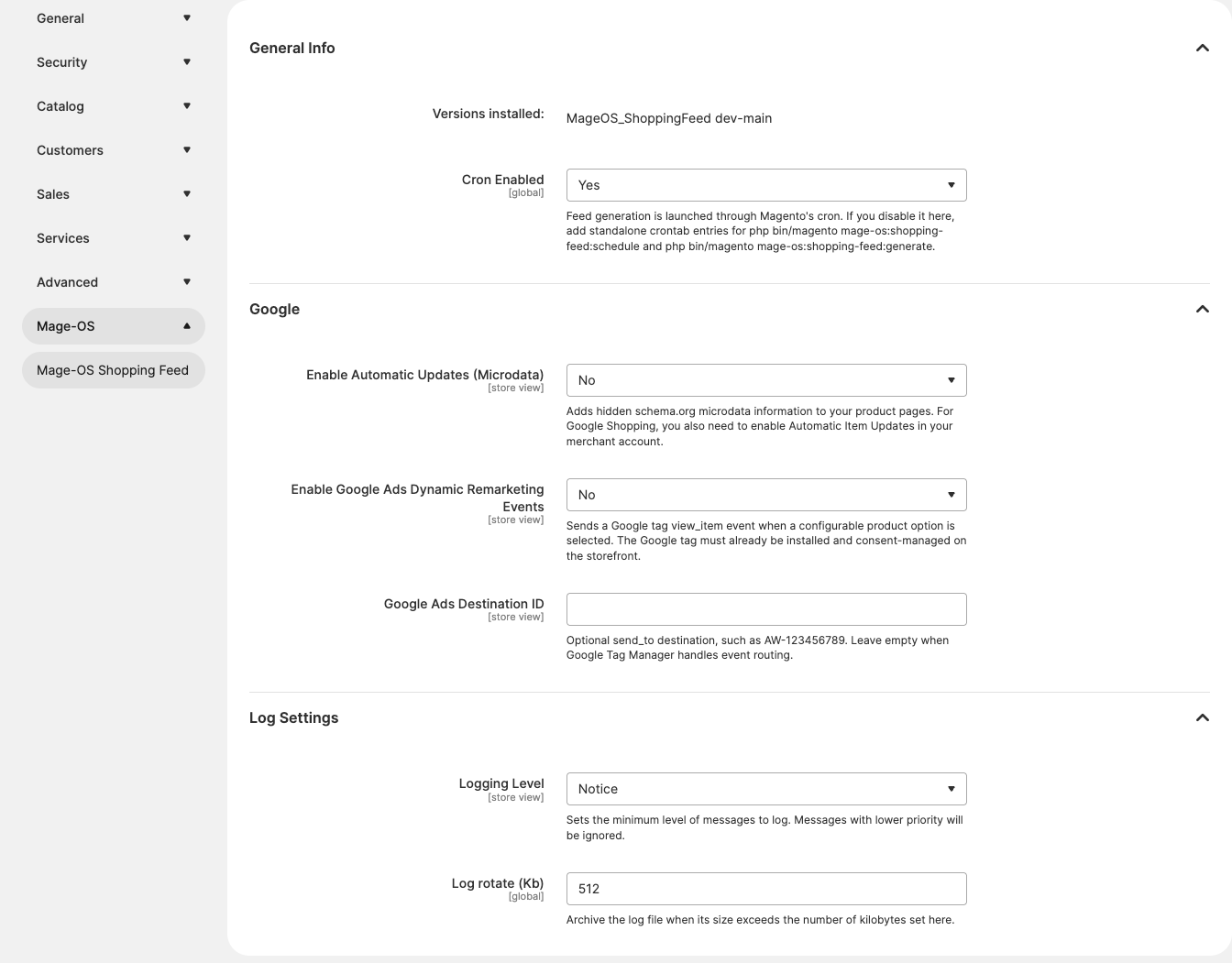
General Info
| Setting | Default | Scope | What it does |
|---|---|---|---|
| Versions installed | Read only | n/a | Shows the installed package version, or the module schema version when Composer metadata is unavailable. |
| Cron Enabled | Yes | Default | When No, the module's cron jobs do nothing. Schedule bin/magento mage-os:shopping-feed:schedule and bin/magento mage-os:shopping-feed:generate from your own crontab instead. |
| Setting | Default | Scope | What it does |
|---|---|---|---|
| Enable Automatic Updates (Microdata) | No | Default, website, store view | Adds schema.org product and offer microdata to product pages, built from the store's Google Shopping feed that has Use for microdata set to Yes. It also adds an aid parameter to configurable child links in feeds so landing pages show matching data. |
| Enable Google Ads Dynamic Remarketing Events | No | Default, website, store view | On Luma configurable product pages, sends a view_item event through the existing Google tag when a variant is selected. After a complete Luma configurable selection, the page dispatches a mageos:shopping-feed:view-item DOM event; this setting only controls the gtag call. |
| Google Ads Destination ID | Empty | Default, website, store view | Optional send_to value for those events, such as AW-123456789. Leave empty when Google Tag Manager routes events. |
Log Settings
| Setting | Default | Scope | What it does |
|---|---|---|---|
| Logging Level | Notice | Default | Minimum level written to each feed's log in var/log. The field is shown at website and store view scope, but generation reads only the default value. |
| Log rotate (Kb) | 512 | Default | Before a run, a larger log is archived to a unique .gz file. Its decompressed size and SHA256 must match before the active log is emptied; archive failure preserves it. |
mageos_shopping_feed/log/progress_every (30 seconds) has no Admin field. It is the minimum time between progress lines in a feed log and progress updates in the feed grid. Override it in app/etc/config.php or env.php if needed.
Feed editor: Catalog > Mage-OS Shopping Feed > Feeds Management
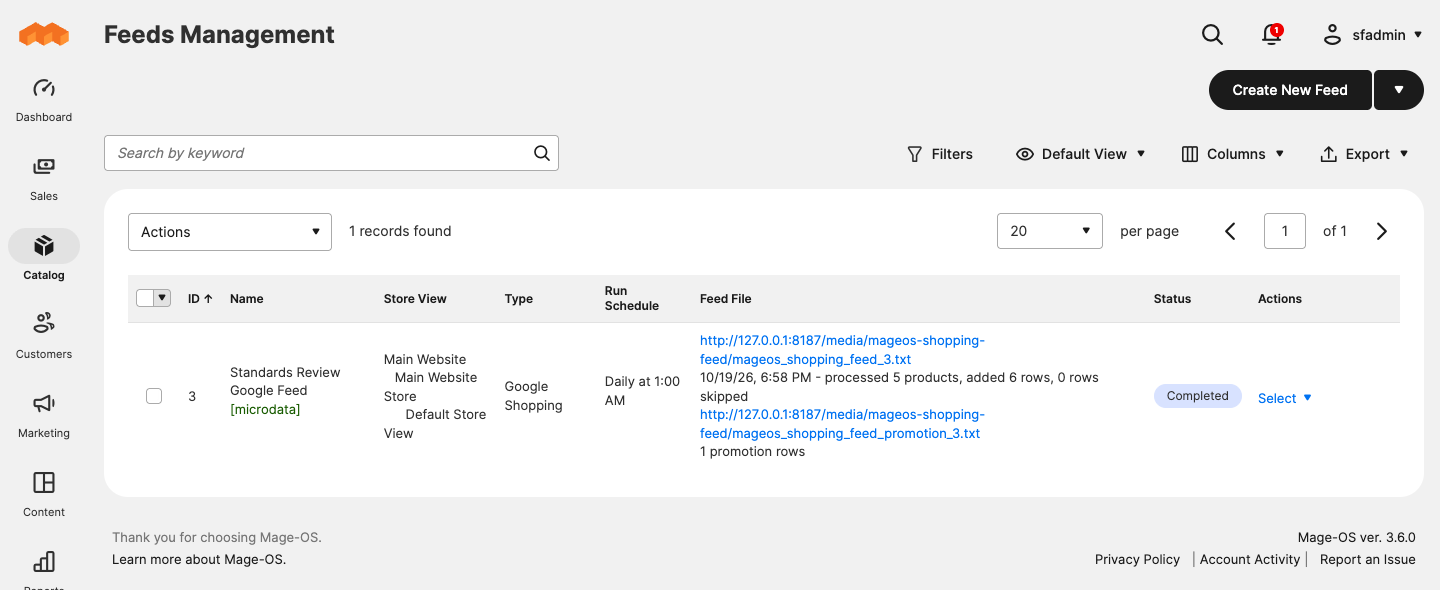
Choose Create New Feed and a preset, or open an existing feed. Every setting below is saved with that feed; the feed's Store View sets the store context for attributes, prices, URLs, categories, stock and currency. Defaults are those of a new feed and come from the preset. Where presets differ, the table says so, and the linked guide has the per-preset values.
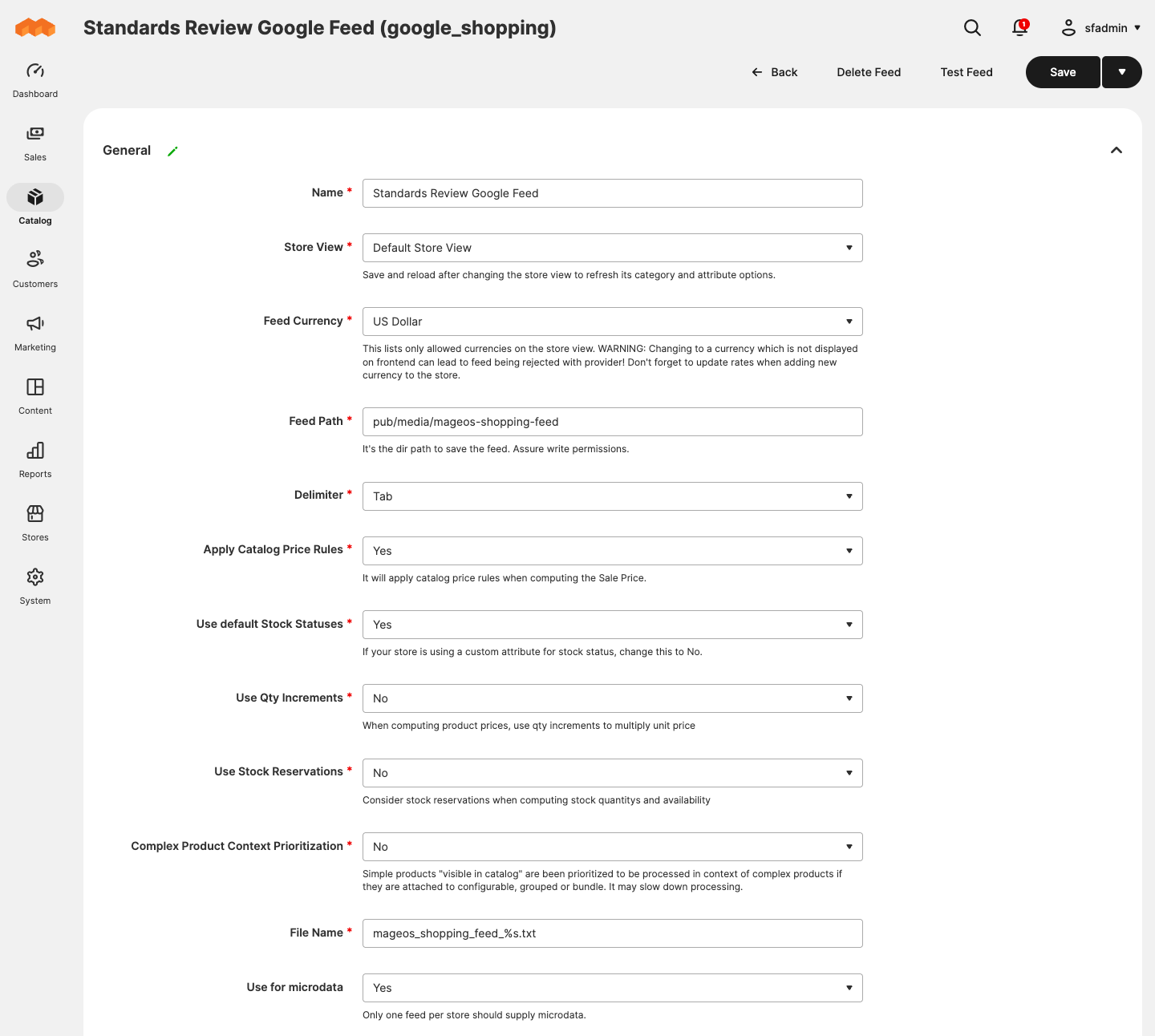
General
| Setting | Default | What it does |
|---|---|---|
| Name | Empty | Admin label. Some presets show setup notes here. |
| Store View | Default store view | Store context for the whole feed. Save and reopen after changing it to refresh store-dependent options. |
| Feed Currency | Store default currency | Currency used for prices and microdata. |
| Feed Path | pub/media/mageos-shopping-feed |
Output directory; must stay inside that directory. |
| Delimiter | Tab (TikTok: comma) | Field separator: tab, comma or Other. |
| Other Delimiter | Empty | Custom separator when Delimiter is Other. |
| Apply Catalog Price Rules | Yes | Uses catalog price rules when calculating sale prices. |
| Use default Stock Statuses | Yes | When No, the attribute below supplies availability. |
| Alternate Stock/Availability Attribute | None | Attribute used for availability when default stock statuses are off. |
| Use Qty Increments | No | Multiplies the unit price by the minimum sale quantity or quantity increment. |
| Use Stock Reservations | No (Local Inventory: Yes) | Subtracts pending reservations from aggregate quantities. |
| Complex Product Context Prioritization | No (catalog presets: Yes) | Skips a standalone simple product that belongs to an enabled configurable, bundle or grouped parent, so it is exported in the parent's context. |
| File Name | Per preset, such as mageos_shopping_feed_%s.txt |
Output file name; %s becomes the feed ID. |
| Cell Enclosure, Enclosure Escape, Empty Cell Value (Generic only) | Empty | CSV quoting and the value written for empty cells. A comma feed without an enclosure is quoted with " automatically. |
| Use for microdata (Google Shopping only) | Yes for a new Google Shopping feed | Makes this feed the source of storefront microdata. Only one feed per store view can have it. |
Columns Map: rows of Order, Column, Attribute or Directive, and Parameters. Each preset starts with its required columns. Directives compute values such as prices, availability, URLs, images, categories and identifiers; the Parameters control changes with the directive. See Columns and directives.
Categories Map
| Setting | Default | What it does |
|---|---|---|
| Feed Localization | en-US |
Locale for the provider taxonomy (not shown for Local Inventory). |
| Include products w/o category | Yes | When No, uncategorized products are left out. |
| Categories priority mode | Through all category depths | How category priority is compared (not shown for Local Inventory). |
| Inventory Source to Google Store Code (Local Inventory only) | Empty | One source=store_code per line; unmapped sources keep their code. |
| Taxonomy by Magento Category | All categories included | Per category: include or exclude, priority, provider taxonomy and product type. Local Inventory shows only Include. |
Product Filters
| Setting | Default | What it does |
|---|---|---|
| Allow Out of Stock | Yes | When No, out-of-stock products are left out. |
| Submit only products of these types | All standard types | Product types included. |
| Submit only products that have these attribute sets | All | Attribute sets included. |
| Skip Products with empty | Per preset | Skips a row when any listed column is empty. |
| Skip Products with Price above / below (Google Shopping only) | Empty | Price limits; empty means no limit. |
| Replace empty values | None | Fallback attribute or directive per column, tried in order. |
| Find and Replace | None | Text replacement in one column or all columns. |
| Limit column output | None | Truncates a column to a maximum number of characters. Preset limits are not added automatically; see Troubleshooting. |
| Adwords Price Buckets (Google Shopping only) | None | Labels for price ranges, used by the price bucket directive. |
See Filters and transformations.
Product Options (not shown for Local Inventory)
| Setting | Default | What it does |
|---|---|---|
| How to add product options | Multiple rows | One row with options combined, or one row per option value. |
| Multiple rows only for products in these categories | All products | Limits the multiple-row mode to these categories. |
Configurable Products, Grouped Products, Bundle Products
| Setting | Default | What it does |
|---|---|---|
| How to add associated products | Configurable: only associated products. Grouped: only the parent. Bundle: only associated products. | Which of the parent and its children become rows. |
| Allow Out of Stock (configurable, grouped) | Yes | Includes out-of-stock children. |
| Inherit parent Out of Stock status (configurable) | Yes | Children of an out-of-stock parent are out of stock. |
| Unique urls for associated products not visible | Yes | Gives children a deep link to the parent page with the variant preselected. |
| Associated Product Attribute Value Separator (configurable) | , |
Separator for combined attribute values. |
| Price Type (grouped) | Sum of associated products prices | Minimal price or the sum of the default quantities' prices. |
| Combined weight (bundle) | No | Uses the sum of the selections' weights. |
| Value inheritance by column (configurable, grouped) | None | Per column, whether the value comes from the child, the parent, or one falling back to the other. |
See Complex products.
Shipping (not shown for Local Inventory; used by the shipping directive)
| Setting | Default | What it does |
|---|---|---|
| Methods | None | Offline carrier methods to quote. Realtime carriers are not offered. |
| Countries | None | Countries to quote; with none selected, no shipping is exported. |
| Shipping Weight Column | shipping_weight |
Column whose value and unit give the weight; product weight otherwise. |
| Only Minimum Price | Yes | Keeps the cheapest rate per country. |
| Only Free Shipping | Yes | Keeps free methods only. |
| Add Tax to Shipping Price | No | Adds tax when a shipping tax class is configured. |
See Shipping.
Schedule: rows of Start At (hour), Batch Mode and Batch Limit (0 means 1000). A new feed starts with one 01:00 row; remove it before saving if you do not want scheduled runs. See Scheduling and queues.
Uploads: rows of Mode (SFTP or unencrypted FTP), Host, SFTP Host Key Fingerprint, Port (22), Username, Password, Path and Gzip. SFTP requires a trusted SHA256 server-key fingerprint before authentication. Passwords stay encrypted in saved model data and are never sent back to the browser. Existing SFTP destinations need a fingerprint after setup:upgrade. See Uploads.
Google Promotions (Google Shopping only): Enable feed, then per active cart price rule for the NOT LOGGED IN group: Include, Promotion Title (60 characters), Effective from/to and Display from/to. See Google Promotions.
Permissions
Test Feed requires Generate Feed in 1.2.4. The grid can still display its link to a read-only user, but the controller denies access; editor preview buttons are hidden without that permission.
| Resource | Allows |
|---|---|
| Catalog > Mage-OS Shopping Feed > Shopping Feeds | The grid, View Log and Export |
| Save Feed | Opening the editor, creating and saving feeds, and enabling, disabling and cloning them |
| Generate Feed | Run Now and Test Feed |
| Delete Feed | Deleting feeds |
| Stores > Settings > Configuration > Shopping Feeds Section | The configuration section above |
Getting started
-
Make sure Magento cron runs, then open Catalog > Mage-OS Shopping Feed > Feeds Management and choose Create New Feed > Google Shopping (or the preset you need).
-
In General, enter a name, pick the store view and currency, and keep the default path. Remove the default schedule row and leave Uploads empty for the first run.
-
Review Columns Map: map real GTIN, MPN and brand attributes, and check URLs, prices, availability and images.
-
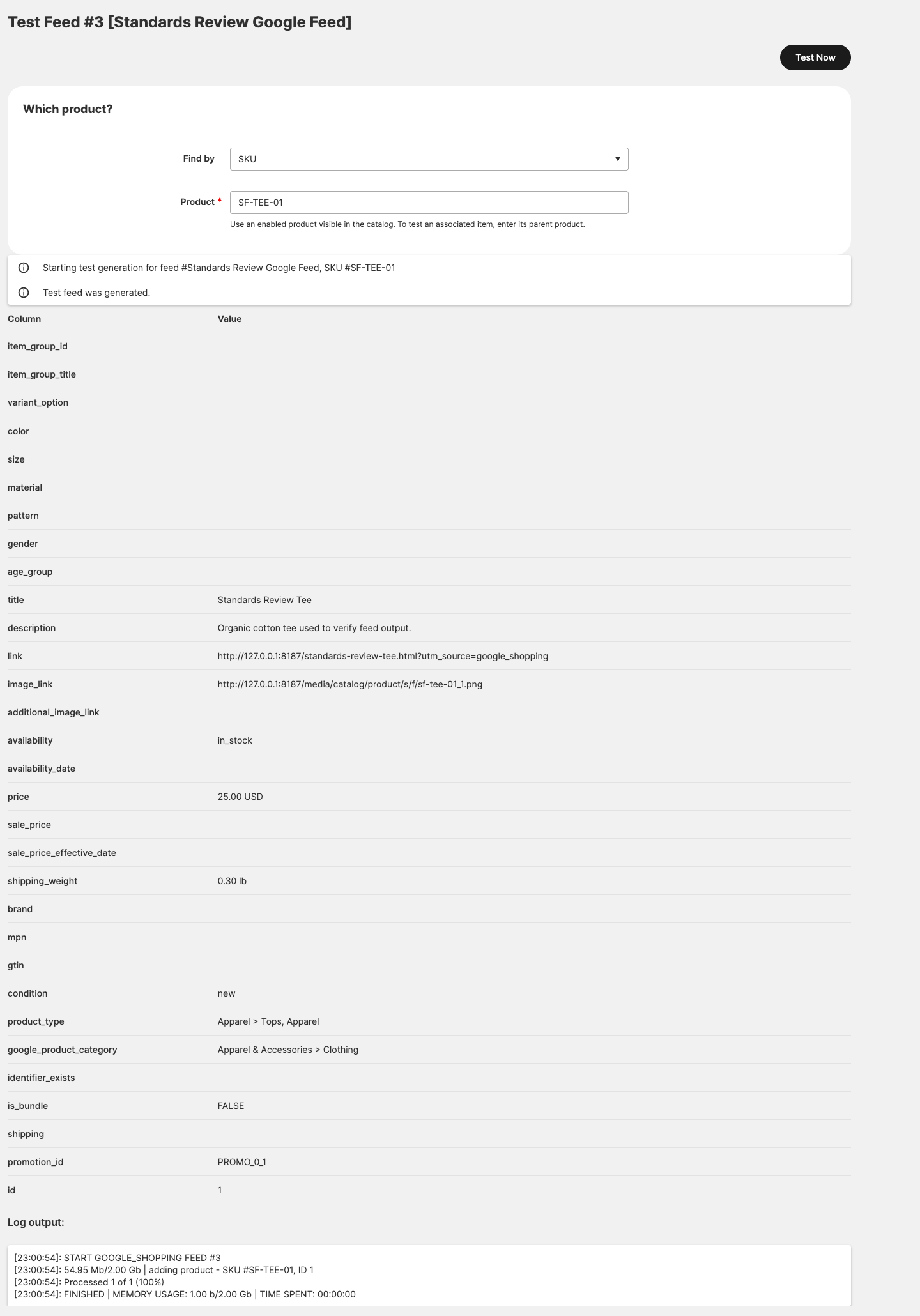
Save, then choose Test Feed in the grid and enter a known SKU. Compare each value with the product in the Admin and on the storefront.
-
Choose Run Now. Cron builds the file; the grid shows its status and a link to the file under
pub/media/mageos-shopping-feed, and View Log shows the run. -
When the output is accepted, add a schedule and, if the recipient fetches by FTP or SFTP, an upload destination.
The Quick start has a longer checklist, including fixtures worth testing first.
Where it shows up
- Admin: the Feeds Management grid (status, file link, Run Now, Test Feed, View Log, mass enable, disable, clone and delete), the feed editor, and the configuration section.
- Files: feeds under
pub/media/mageos-shopping-feed, publicly downloadable so recipients can fetch them; feed names contain the feed ID. Google Promotions write a companion file next to the Google Shopping feed. Logs arevar/log/mageos_shopping_feed_<id>.log. - Storefront: product pages carry the microdata and deep-link preselection, and Luma configurable pages send the optional
view_itemevents. - CLI:
bin/magento mage-os:shopping-feed:generate [feed_id] [test_sku]builds queued feeds, one feed, or one test SKU;bin/magento mage-os:shopping-feed:schedulequeues feeds from their schedules. - Cron: the
mageos_shopping_feedgroup queues scheduled feeds hourly and processes the queue every minute. - Extension points: events, UI form modifiers and parameter definitions are documented in the UI component editor guide.
When inspecting CSV or TSV feeds in a spreadsheet, import the columns as text and turn off formula evaluation; values starting with =, +, - or @ are kept as recipients expect them.
Troubleshooting
- A feed stays queued or never updates. Check that Magento cron runs and that Cron Enabled is Yes. Run
bin/magento mage-os:shopping-feed:generate <feed_id>to see errors directly, then check View Log. - Products are missing. Check the feed's store view and the product's website, the Product Filters, Skip Products with empty, and the category Include settings. Test Feed with the SKU shows the row as generated.
- Exclude one product (1.2.5). Run
bin/magento setup:upgradeafter upgrading. On the product form, set Shopping Feed > Skip from Being Submitted to Yes for the relevant store view. It defaults to No and also applies to configurable, grouped and bundle children; the feed log names skipped products. A merchant-created attribute with this code is preserved. - Store-view option labels (1.2.5). Select and multiselect columns use the feed's store-view labels and fall back to admin labels when no override exists. Release 1.2.4 and earlier always use admin labels.
- Long values make a provider reject or skip rows. Pinterest, TikTok, Microsoft and OpenAI validators skip overlong title or description values. Meta does not check text lengths locally. Preset character limits are not added to Limit column output automatically through 1.2.5, so add explicit limits and review the recipient's diagnostics.
- No microdata on product pages. Turn on Enable Automatic Updates (Microdata) for the store, set Use for microdata to Yes on exactly one Google Shopping feed for that store view, then flush the cache.
- Uploads fail. View Log shows the transfer error. Check host, port (22 for SFTP), credentials and that the remote path exists. SFTP also needs a trusted matching SFTP Host Key Fingerprint after
setup:upgrade; confirm changed keys with the recipient before replacing them.
More cases are in Logs and troubleshooting.
Migrating from Rocket Shopping Feeds
Installing this module does not read or change Rocket Web feeds, tables or configuration. The optional Rocket Web migration companion (rocketweb/module-shopping-feed-migration-rocketweb 1.0.0 on Packagist) previews legacy feed configuration and imports it into disabled Mage-OS feeds for review. Stores without legacy feeds only need the main module.
On staging, keep the legacy modules installed and enabled during schema upgrades, then install both packages:
composer require 'mage-os/module-shopping-feed:^1.2.5' \
  'rocketweb/module-shopping-feed-migration-rocketweb:^1.0' --no-update
composer update mage-os/module-shopping-feed \
  rocketweb/module-shopping-feed-migration-rocketweb --with-dependencies
bin/magento module:enable MageOS_ShoppingFeed RocketWeb_ShoppingFeedMigration
bin/magento setup:upgrade
Follow MIGRATION.md and the migration guide for backups, permissions, preview and import, output comparison, activation and rollback.
Documentation and support
Start with the documentation index. Composer dist archives exclude docs/ and dev/; the links below point to the repository copy.
- The Wiki source covers each preset, the editor, scheduling, uploads and troubleshooting. The public GitHub Wiki is published from it separately.
- Developer contract for the editor: UI component editor guide.
- CHANGELOG.md, release notes, and dated review records.
- Report vulnerabilities as described in SECURITY.md.
- Contributing and local checks: CONTRIBUTING.md.
- For setup and troubleshooting, use the Shopping Feed support bot on Rocket Web. Select Open support chat on the product page.
Provenance and license
The original code was developed by Rocket Web. The consolidated source and exact import revisions are documented in PROVENANCE.md. Original copyright and author attribution is retained in source files.
The package uses the Open Software License 3.0. Composer metadata, source notices and the bundled license are aligned on OSL-3.0. See LICENSING.md.