
c975l / social-bundle

Symfony bundle for the social side of a c975L site — social links managed in one single place, share buttons for several networks, and posts to Bluesky, Facebook, Instagram and LinkedIn, prepared as drafts, approved, then scheduled on a calendar.
Requires
- php: >=8.4
- ext-gd: *
- c975l/core-bundle: ^1.80.1
- doctrine/doctrine-bundle: ^3.3
- doctrine/orm: ^3.7
- easycorp/easyadmin-bundle: ^5.7
- imagine/imagine: ^1.5
- symfony/form: ^8.0
- symfony/framework-bundle: ^8.0
- symfony/intl: ^8.0
- symfony/lock: ^8.0
- symfony/security-bundle: ^8.0
- symfony/ux-twig-component: ^2.32|^3.0
- vich/uploader-bundle: ^3.0
Requires (Dev)
- chrome-php/chrome: ^1.16
- phpstan/phpstan: ^2.2
- phpstan/phpstan-deprecation-rules: ^2.0
- phpunit/phpunit: ^13.2
Suggests
None
Provides
None
Conflicts
None
Replaces
None
- dev-main
- v2.21.2
- v2.21.1
- v2.21.0
- v2.20.1
- v2.20.0
- v2.19.5
- v2.19.4
- v2.19.3
- v2.19.2
- v2.19.1
- v2.19.0
- v2.18.3
- v2.18.2
- v2.18.1
- v2.18.0
- v2.17.1
- v2.17.0
- v2.16.0
- v2.15.0
- v2.14.0
- v2.13.1
- v2.13.0
- v2.12.4
- v2.12.3
- v2.12.2
- v2.12.1
- v2.12.0
- v2.11.1
- v2.11.0
- v2.10.0
- v2.9.2
- v2.9.1
- v2.9.0
- v2.8.5
- v2.8.4
- v2.8.3
- v2.8.2
- v2.8.1
- v2.8.0
- v2.7.10
- v2.7.9
- v2.7.8
- v2.7.7
- v2.7.6
- v2.7.5
- v2.7.4
- v2.7.3
- v2.7.2
- v2.7.1
- v2.7.0
- v2.6.6
- v2.6.5
- v2.6.4
- v2.6.3
- v2.6.2
- v2.6.1
- v2.6.0
- v2.5.1
- v2.5.0
- v2.4.1
- v2.4.0
- v2.3.0
- v2.2.3
- v2.2.2
- v2.2.1
- v2.2.0
- v2.1.2
- v2.1.1
- v2.1
- v2.0.1
- v2.0.0
- v1.4.4
- v1.4.3
- v1.4.2
- v1.4.1
- v1.4.0
- v1.3.1
- v1.3.0
- v1.2.11
- v1.2.10
- v1.2.9
- v1.2.8
- v1.2.7
- v1.2.6
- v1.2.5.1
- v1.2.5
- v1.2.4
- v1.2.3
- v1.2.2
- v1.2.1
- v1.2
- v1.1.3
- v1.1.2
- v1.1.1
- v1.1
- v1.0.1
- v1.0
- v0.1
- dev-dev
This package is auto-updated.
Last update: 2026-10-30 13:43:16 UTC
README
Symfony bundle for the social side of a c975L site — posts to Bluesky, Facebook, Instagram, LinkedIn and YouTube, prepared as drafts, approved, then scheduled on a calendar, plus social links managed in one single place, share buttons for several networks and Google reviews imported.
Bundle page · Tutorials · Block kinds · Live demo · Demo back-office
Why SocialBundle

Add SocialBundle on top of the shared UiBundle + ConfigBundle foundation to run a site's social side from its own back-office: its contents posted on the networks, every post a draft read and approved before it goes out at its moment on a calendar, its texts written by the site's AI where it has a key — no third-party scheduling tool, no subscription. Social links, share buttons and Google reviews come along. No dependency on SiteBundle, ShopBundle or any other satellite bundle: a bundle with something to post hands it over through UiBundle's SocialContentSourceInterface, so it drops into any c975L site that needs one.
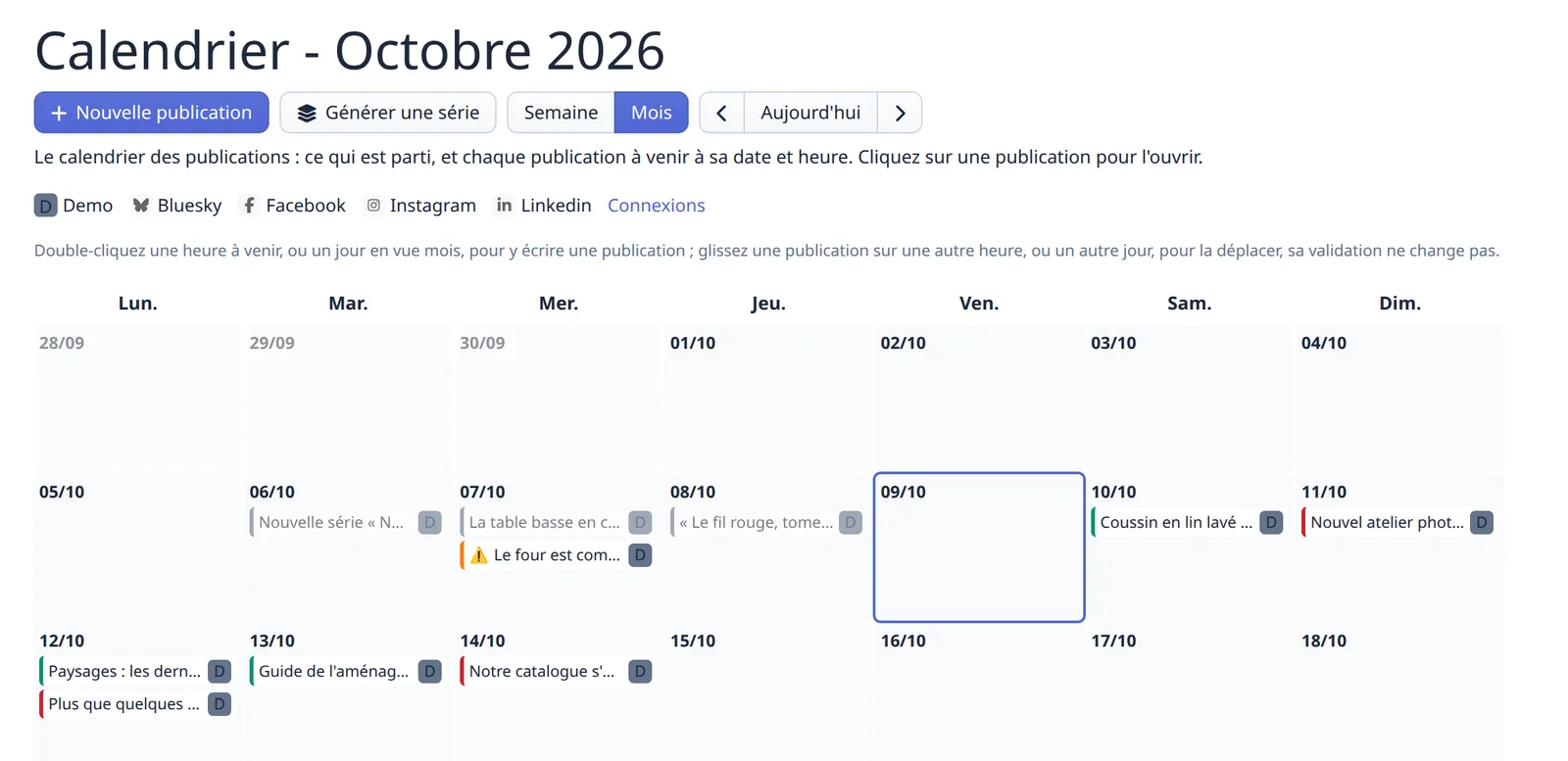
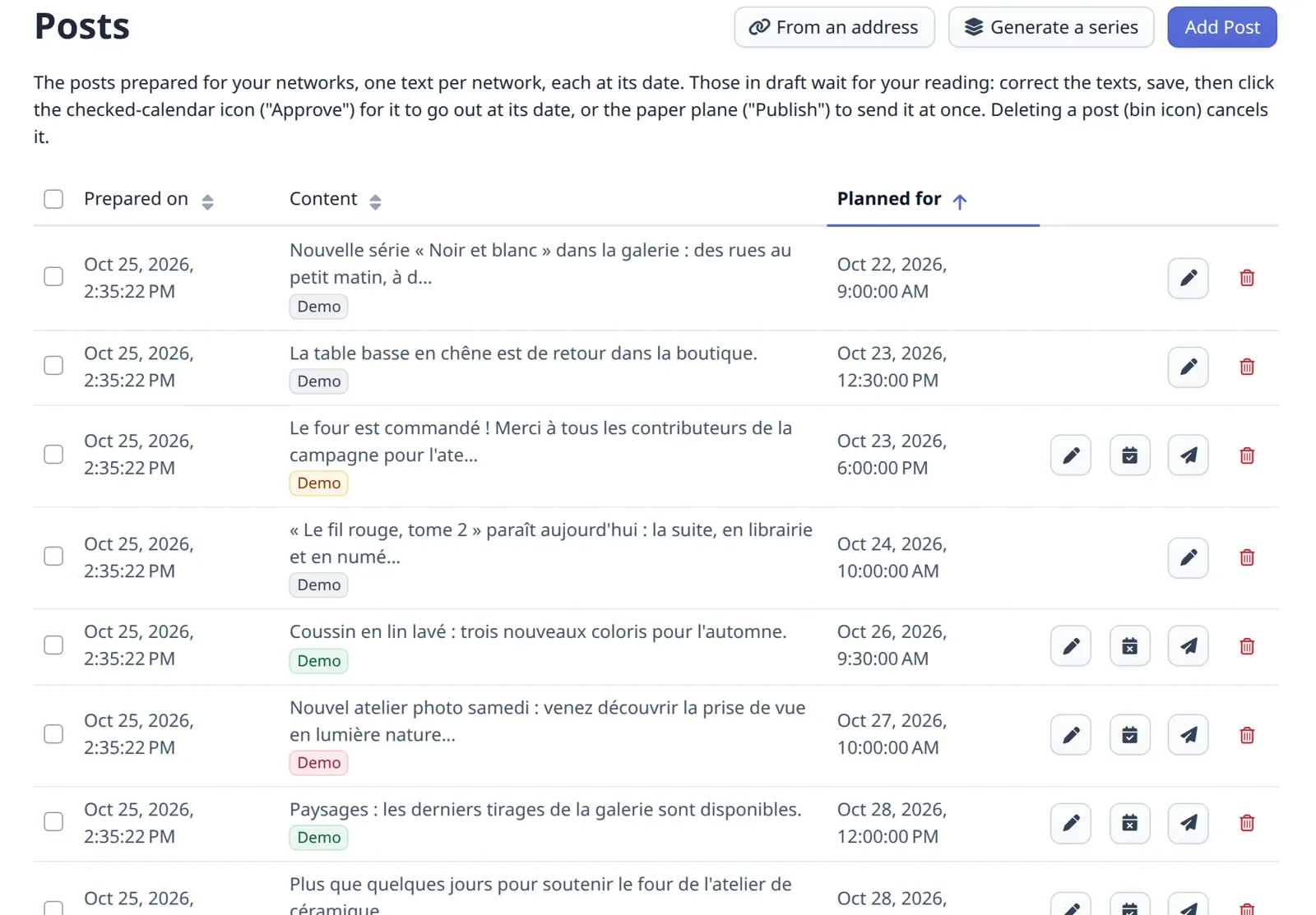
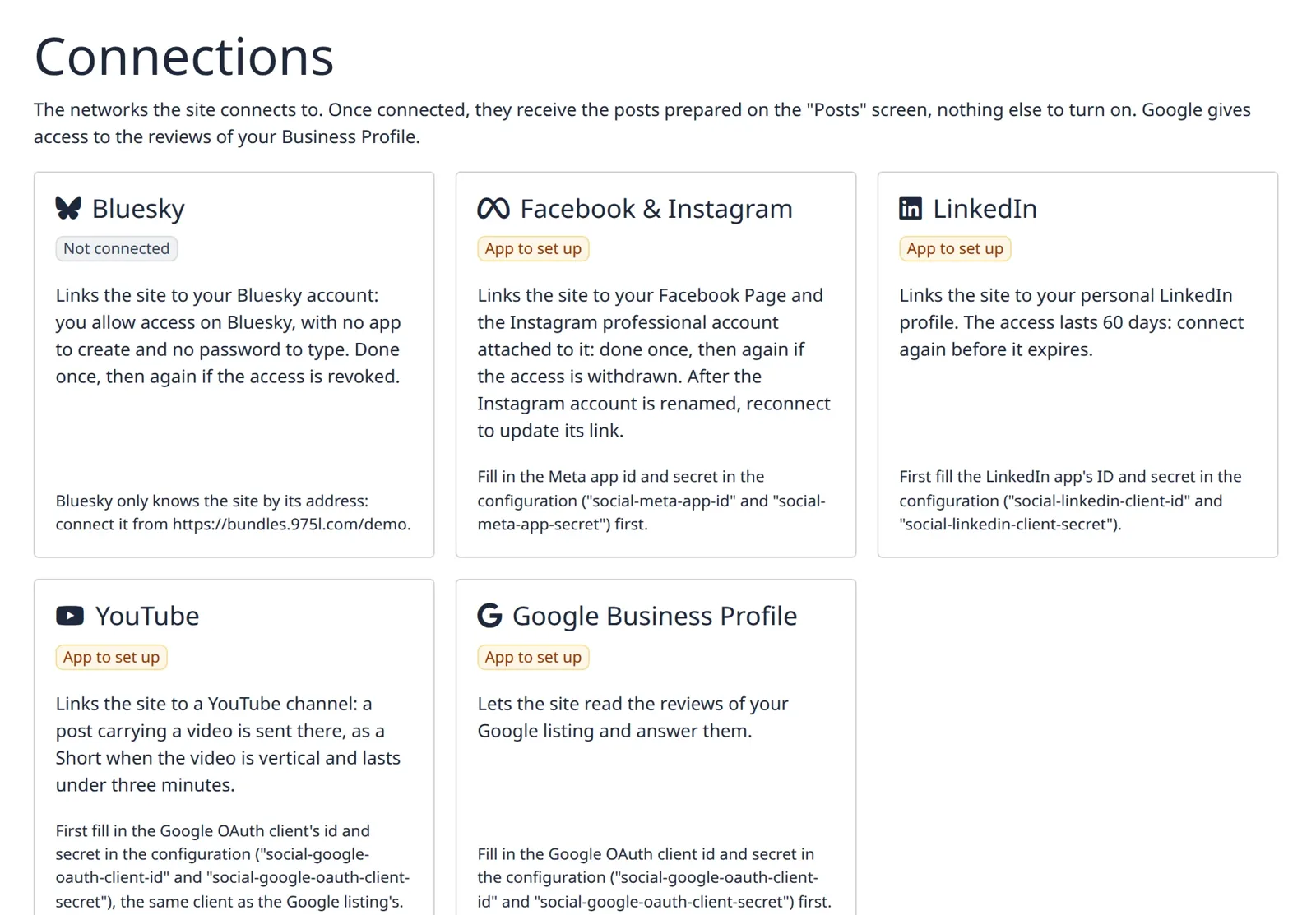
| Calendar | Posts | Connections |
|---|---|---|
 |
 |
 |
TL;DR — Publishing on the networks — Bluesky, Facebook, Instagram, LinkedIn and YouTube, every post a draft approved before it goes out, on a calendar — plus social links, share buttons and Google reviews, for a c975L site. The links are stored as a
social_linksblock reusing UiBundle's genericBlockentity rather than a dedicated table (the "singleton CRUD" pattern), displayed anywhere through asocial_links_displayblock or site-wide. Replaces the former ShareButtonsBundle.
Contents
- Setup — requirements · installation · assets
- Using it — publishing on the networks · social links block · admin management · rendering · styling · share buttons · site-wide auto-display · customer reviews · admin help procedures · guided projects · AI agent skills
Features
- Publishing on the networks: the site's contents posted on Bluesky, Facebook, Instagram, a LinkedIn profile and a YouTube channel, every post planned at a moment on a calendar, read, approved, then sent at that moment; see Publishing on the networks
- Pluggable networks and contents via
NetworkPublisherInterfaceand UiBundle'sSocialContentSourceInterface— both auto-discovered by interface - Social links block: a
ui.blockkind (social_links) storing an ordered list of links (network + url), plus a site-wide icon style (flat/monochrome, colored badge, ring, or text only) and label visibility - no dedicated entity/table - Admin CRUD for the social links block via EasyAdmin, outside of any page's block collection
- Rendering component to display the block wherever it lives, page-attached or not
- Pickable pointer block (
social_links_display) to drop the same site-wide links into any page's block flow, with no data re-entry - Share buttons: a
share_buttons()Twig function to let visitors share the current (or a given) page on 20 social networks, with an independently picked button shape and fill - Share buttons dashboard settings: pick which networks, and which button shape and fill, are used site-wide, plus an
enable-share-buttonsconfig key to auto-display them on every page with no template change - Pickable pointer block (
share_buttons_display) to drop those same site-wide share buttons into any page's block flow, with no data re-entry - Google reviews block (
google_reviews): the imported Google reviews left displayed, as a carousel with their average and where they come from - see The Google reviews block - Icon picker reusing c975L/UiBundle's searchable
IconPickerType - Stylesheet auto-registration via UiBundle's
BundleStylesheetProviderInterface— no manual<link>needed - Block silhouettes via UiBundle's
BundleStylesheetManagementProviderInterface— the bundle's kinds are drawn at thumbnail size in the back-office's visual block picker - Script auto-registration via UiBundle's
BundleScriptProviderInterface— no manual<script>needed - Admin menu entries registered automatically via
MenuProviderInterface, each open to thesite-role-editorrole their own screen states - Health check on the Google connection via
HealthCheckProviderInterface— the import is the one thing here that stops without anything looking wrong - Scheduled review import via
MaintenanceTaskProviderInterface— a site installing the bundle gets the nightly sync, one removing it stops running it - Admin help procedures contributed automatically via
ProcedureProviderInterface - Guided projects contributed automatically via
GuidedProjectProviderInterface— see Guided projects - Customer reviews: imported from the site's own Google Business Profile listing into c975L/UiBundle's
Reviewentity, which holds in the same table what visitors write on the site — this bundle brings the platforms and thegoogle_reviewsblock, Ui the moderation screen, where a Displayed switch hides a review for good; see Customer reviews - Pluggable review sources via
ReviewsSourceInterface— auto-discovered by interface, so a site adds its own platform without touching this bundle - A skill for coding agents, shipped in the package and read straight from
vendor/— see AI agent skills
Requirements
- PHP >= 8.4
- Symfony 8
- c975L/CoreBundle, the single package shipping ConfigBundle and UiBundle
- EasyAdmin 5.7 or later
Installation
Download
composer require c975l/social-bundle
Install assets
php bin/console assets:install --symlink
This exposes the bundle's compiled stylesheet at public/bundles/c975lsocial/css/styles.min.css.
It exposes a second sheet beside it, css/block-thumbs.min.css (compiled from sass/block-thumbs.scss): the silhouettes drawing this bundle's block kinds at thumbnail size, so an editor recognises them in the back-office's visual picker rather than reading a list of names. It is served through the ui.management_stylesheet tag, so it loads on the management screens only — a site showing the same silhouettes on a public page, a block showcase, contributes the file through its own stylesheet provider rather than every site carrying it on every page.
Two routes to enable, both serving the Google connection (see Routes): the consuming app has to import the bundle's controllers, or the "Connections" screen and its connect buttons break. Everything else the bundle contributes needs no route — EasyAdmin dashboard entries (auto-registered, see Admin management), a Twig component and Twig functions. Its configuration keys (social-enable-share-buttons, see Site-wide auto-display, and the Google ones listed under Connecting the site to Google) are auto-loaded like any other c975L bundle's, via php bin/console c975l:config:load-all.
Share buttons' popup behavior needs its Stimulus controller loaded: as long as your layout renders {{ importmap(['app']|merge(bundle_scripts())) }} (see c975L/UiBundle's bundle_scripts()), it gets auto-registered — no assets/bootstrap.js edit needed.
Symfony's AssetMapper still requires the entrypoint to be declared in your app's importmap.php though, since bundle_scripts() only feeds names to the importmap() Twig function, it doesn't create importmap entries itself:
Add one entry to importmap.php (one-time, at installation):
'@c975l/social-bundle/controllers.js' => [
  'path' => './vendor/c975l/social-bundle/assets/controllers.js',
  'entrypoint' => true,
],
Usage

One tile per kind, captured on the showcase at bundles.975l.com - a kind with several variants shows only its first one, and a kind with no example there has no tile. Colors are the showcase's own theme, not what a site with its own theme renders.
Social links block
Registers a social_links ui.block kind (see c975L/UiBundle's Block system) with a dedicated form (c975L\SocialBundle\Form\Block\SocialLinksType) and template (templates/blocks/SocialLinks.html.twig). Each link is a network (picked from every icon found under public/icons/ and public/bundles/*/icons/) and a url; label and icon are derived from the network at render time, not stored (social_link_label() spelling a brand its own way, YouTube, Apple Podcasts). Pick "Autre" to fall back to a free-text label and UiBundle's IconPickerType for a network with no icon of its own. The rows are dragged into the order they render in (UiBundle's ea-sortable.js): each carries a hidden position, read back on submit by UiBundle's PositionSorter and dropped, the array order being what is stored.
Buffer, Delicious, Evernote, Skype and StumbleUpon are no longer offered, their services being closed: a link already saved on one of them shows no icon, and has to be removed before the block is saved again.
Three settings apply to the whole block:
- Introduction text (
intro) - an optional rich-text lead-in (UiBundle'sTrixEditorType, the ecosystem's editor) rendered centered above the icon row (.social-links-intro). Left empty, nothing at all is rendered — no wrapper, no blank space. - Icon style (
iconStyle) -minimal(the flat, monochrome glyph, inheriting the surrounding text color),colored("Colored version": the same glyph turned white on a solid, brand-colored pill background),outline(a lighter brand-colored ring on a transparent background, filling in on hover) ortext("Text only": no glyph at all, the network's name standing as the link - for a footer row set as words, where a row of marks would compete with the site's own). The first three are CSS only (see Styling below), no separate icon asset - same glyph in every case;textprints no icon in the markup at all, and prints the label whatever Display label below says, an entry showing neither having nothing left to click. - Display label (
displayLabel) - whether the network name is shown as text next to the icon (still used asaria-labelregardless).
Unlike most block kinds, social_links is tagged pickable: false and therefore absent from a page's own block picker: it's a singleton, meant to be edited once and rendered wherever needed (see Rendering the block) rather than re-created with duplicate data on every page that wants it.
To insert those same links at a specific spot in a page's block flow (not just the fixed <twig:c975LSocial:SocialLinks/> component placement), pick the social_links_display kind from the page's block picker instead. It's a thin pointer: its own form has no fields and its template just renders <twig:c975LSocial:SocialLinks/> internally, so it always reflects the current site-wide links, edited only from Admin management — no separate data, no duplication, no extra table. Its rendered html is cached like any other block, with the singleton's own tag on top of its own (SocialBlockCacheTagProvider, feeding UiBundle's BlockCacheTagProviderInterface), so saving the links drops every page showing them.
Icons
Ships public/icons/ with flat, single-color 64×64 SVG glyphs (Font Awesome Free 6.5.1 brand icons, default black fill, no explicit fill set) for the 35 social/media networks (plus link, the copy button's glyph) the picker offers (Facebook, Instagram, Bluesky, LinkedIn, YouTube, TikTok, Pinterest, WhatsApp, Reddit, Discord, Threads, Mastodon, GitHub, Twitch, Spotify, SoundCloud, Deezer, Apple Podcasts, Podcast, Flickr, Medium, WeChat, Line, Behance, Dribbble, VK, Xing, Messenger, Snapchat, Telegram, Vimeo, Tumblr…). Only Font Awesome glyphs are kept here on purpose - no separate, pre-colored "official logo" badge asset: the colored icon style above is achieved entirely in CSS (inverting the glyph to white over a solid brand-colored background, see Styling), so every icon only needs to exist once.
IconServiceInterface::getIcons() merges every bundle's icons/ by filename, walking public/bundles/*/icons/ in alphabetical order before the app's own public/icons/: dropping a {network}.svg in the app overrides the one shipped here, while a same-named file in a package sorting after c975lsocial (c975lui) would silently shadow it.
Icon glyphs are derived from Font Awesome Free (CC BY 4.0) — keep attribution if you redistribute this bundle's icons on their own.
Admin management
Because a Block can normally only be created by attaching it to a Page (there's no page-independent block library in UiBundle), SocialLinksCrudController gives it its own small dashboard entry, scoped to kind = social_links — so it can be created/edited without needing a host page. The menu entry ("Social networks") is registered automatically through MenuProvider, under the "Social" section, which carries a fas fa-share-nodes icon. Access is controlled by the site-role-editor key in ConfigBundle. Each entry also carries a description — the very sentence its own screen shows, not a separate onboarding-only string — which the dashboard's onboarding tour picks up.
The edit form shows a preview of the rendered links below the list. The introduction text and the links themselves are static (reflects the last saved state, not unsaved edits to the form above), but "icon style", "display label" and the order the rows are dragged to update it live (see assets/js/social-links-preview.js, which follows UiBundle's ui.collection.reordered event).
Rendering the block
<twig:c975LSocial:SocialLinks/>
Under the hood, this looks up the first social_links block via BlockRepository::findOneByKind() (also exposed as the social_link_block() Twig function) and reuses UiBundle's render_block(). Renders nothing if no social_links block exists yet. Drop it in your footer, navbar, or anywhere else in your layout — it's not tied to any specific location.
Styling
The whole block is wrapped in a .social-links-block (a <div>, not a <section>: it carries no heading of its own, and a headingless <section> is invalid HTML — the same fallback UiBundle's own block components use). That wrapper owns the vertical step above the block, --section-space-tight (UiBundle's page rhythm, so the links are parted from the block above them exactly like any two page sections are), on the top edge only — and none of it inside a footer, where the band already sets its own room.
Ships .social-links / .social-link styles (centered flex row of icon links, wrapping to a second line rather than being clipped on a narrow screen), a .social-links-intro one (the optional introduction text, centered above the row) plus a footer .social-links variant tightening the gap and setting the band's own vertical room when used in a page footer. Loaded automatically via the ui.stylesheet tag — override the classes in your own SCSS if you need a different look.
The list also carries a .social-links--minimal / .social-links--colored / .social-links--outline / .social-links--text modifier class (from the block's icon style setting, see Social links block) and each <li> a .social-link--{network} one — hooks to target from your own SCSS rather than opinions this bundle imposes, except for two, both driven by sass/_social-brand-colors.scss (shared with share_buttons()'s own per-network colors below): under .social-links--colored, each .social-link--{network} gets a solid, brand-colored badge - background + white icon (same $white-icon-filter trick as share_buttons()) + black-or-white text, whichever reads on that background; under .social-links--outline, a brand-colored ring on a transparent background instead, filling in (and turning the icon white) on hover. "Autre" entries keep the default, unstyled look in both cases (no brand color to badge them with). Under .social-links--text the pill goes with the glyph - no background, no padding, no radius, underlined on hover - so the row follows the color and font of whatever it is placed in, a footer among the site's other text links being what it is meant for. Kept deliberately smaller (32px) and visually distinct from share_buttons()'s own badges (50-65px, see below) so the two icon rows don't compete for attention on the same page.
Share buttons
Migrated from the now-abandoned c975L/ShareButtonsBundle. Renders one link per network, each pointing directly at that network's share URL (built server-side from the shared page's URL) — no internal redirect route involved.
{# Full signature #}
{{ share_buttons(networks, shape, fill, alignment, displayIcon, displayText, url, id, displayIntro) }}

{# Display the main networks at the default shape and fill #}
{{ share_buttons() }}

{# Custom selection, ellipse-shaped, centered, icon only #}
{{ share_buttons(['facebook', 'linkedin', 'email'], 'ellipse') }}

{# Round buttons, brand-colored ring instead of a solid fill #}
{{ share_buttons('main', 'circle', 'outline') }}

{# Override the shared URL (defaults to the current page) #}
{{ share_buttons('main', 'wide', 'solid', 'center', true, false, 'https://example.com/my-page') }}
| Parameter | Type | Default | Description |
|---|---|---|---|
networks |
string[]|'main' |
'main' |
Network keys, or 'main' for the default set (facebook, bluesky, linkedin, pinterest, email) |
shape |
string |
'wide' |
wide, ellipse, square, rounded, or circle |
fill |
string |
'solid' |
solid, transparent, outline, or minimal |
alignment |
string |
'center' |
left, center, or right |
displayIcon |
bool |
true |
Show the network icon |
displayText |
bool |
false |
Show the network name |
url |
string|null |
null |
URL to share, defaults to the current page |
id |
string|null |
null |
HTML id set on the band, to link to it from a menu — only printed when set, an empty id="" being invalid and a repeated one worse |
displayIntro |
bool |
false |
Show the invitation line above the buttons (.social-share-intro, wording translated by this bundle). Off here, on for the site-wide band, which reads it from the dashboard instead (see Site-wide auto-display) |
Shape is the button's box and corners, nothing else: wide and ellipse render 65×50 (square and fully round corners respectively), square, rounded and circle render 50×50 (square, 12px and fully round). Fill is what paints that box, whatever its shape: solid is the network's own brand color, outline a brand-colored ring on a transparent background that fills in on hover, minimal the icon alone with no background or border, and transparent one translucent veil for every button instead of the brand colors.
The two are independent, so any of the 20 combinations is reachable — circle + outline and square + minimal are just two of them. Only transparent has an expectation of its own: it carries no color, so it reads as a faint veil of the surrounding text color — mixed off currentColor, which is what makes it darken on a light background and lighten on a dark one without being told which it sits on. It is meant either for a band painted through --social-share-background (see below), where the brand fills of solid would compete with the flat's own color, or for an unpainted band that should barely register.
Upgrading: these two parameters replaced a single
styleone, whose seven values were fixed shape/fill pairs. Those values are gone, not mapped — a call still passing one, or a singleton still carrying one, renders at the defaultswide+solid. See UPGRADE.md.
All networks are supported: facebook, bluesky, linkedin, pinterest, email, line, reddit, telegram, threads, tumblr, whatsapp, mastodon (through Share₂Fedi, which asks the reader for their own instance), and link, which copies the page's address to the clipboard rather than opening a network. Icons are resolved by network key through UiBundle's IconServiceInterface — the same brand SVGs used by the icon picker (public/icons/facebook.svg and so on), so dropping your own public/icons/{network}.svg in the consuming app overrides a bundle-provided one.
Hidden below 768px (mobile/tablet browsers have their own native share sheet), and clicking a button opens the target in a small centered popup instead of navigating away, via a Stimulus controller (see Install assets).
The band and its buttons are retuned through custom properties rather than by restating the rules — each is read with the value above as its own fallback, so a site setting none of them renders exactly as described:
| Property | Default | Retunes |
|---|---|---|
--page-share-margin-top |
2em |
The gap above the band, which sits between the page's content and the footer |
--social-share-display |
none below 768px, flex above |
The band's visibility, for a design showing it at every width |
--social-share-background |
transparent |
The band as a full-width colored flat, what UiBundle's sections get from their "background" field |
--social-share-padding |
0 |
Its breathing room, once painted |
--social-share-gap |
0.2em |
The space between buttons |
--social-share-btn-width / -height |
65px/50px (shape wide, ellipse), 50px/50px (the other three) |
The button box, whatever shape is picked |
--social-share-btn-margin |
0.2em |
Its own margin, on top of the band's gap |
--social-share-btn-radius |
0 (shape wide, square), 50% (ellipse, circle), 12px (rounded) |
The corners, whatever shape is picked |
--social-share-btn-background / -hover |
the network's brand color, color-mix(in srgb, currentColor 16%, transparent) / 30% (fill transparent) |
One uniform button instead of the brand fill |
--social-share-icon-filter |
none, invert(1) in dark mode |
The glyphs of the fills painting no dark badge under them (transparent, outline, minimal) |
--social-share-preview-background / -padding |
#4a4a4a / 1em |
The stand-in band the transparent fill is previewed over, in the dashboard and the block gallery — never on a real page |
The icons are black Font Awesome SVGs rendered as <img>, which a filter can only leave alone or invert — never tint. That is why the three colorless fills need --social-share-icon-filter where the veil itself needs nothing: currentColor carries the light/dark answer for a background, not for an image. The bundle flips it to invert(1) under :root[data-theme="dark"] and, with no data-theme set at all, under the visitor's OS preference — the same two selectors c975L/SiteBundle's own dark palette uses, so a band follows the site's theme with no wiring. Set it yourself for the one case neither can see: a dark band painted through --social-share-background while the site itself stays light.
Note the four before it have a per-variant default, one value per shape or fill: declaring one of them in :root replaces all of them at once, collapsing every variant into a single look, the shape and fill picked in the dashboard then changing nothing visible. --social-share-btn-background / -hover are offered in the theme file below for exactly that — a row painted one uniform color instead of the brand ones. The button box (--social-share-btn-width / -height / -radius) and --social-share-display are not: a design needing a size or a visibility no variant covers sets them in the app's own app.css, next to the rules it already takes over. --social-share-btn-margin is left out of that file too, the space between buttons already being --social-share-gap's.
scaffold/assets/styles/themes/social.css is the catalogue of the tokens meant to be set site-wide, installed by c975l:scaffold:install (see c975L/SiteBundle's "Themes"). One such file per bundle, each holding what that bundle reads, all concatenated into the single stylesheet the bundles already share — and each token shipped commented out at its own default, so the lines a site leaves active read as exactly what its design decides. --network-color is deliberately absent: it is set per network (.social-share-btn--facebook and its siblings each declare their own brand color), so one value in :root would paint every button alike. ScaffoldThemeTest fails if a themable token is missing from that file, if a value shown there is no longer the one in force, or if a line ships uncommented.
Site-wide auto-display
To show share buttons on every page without touching a single template, two pieces work together:
- "Share buttons" in the management menu (
ShareButtonsSettingsCrudController) — a small dashboard singleton (sameBlock-reuse technique as the social links block, no dedicated entity/table) letting you pick which networks, and which button shape and fill, are used site-wide. Networks are a drag-sortable checkbox list (seeassets/js/share-buttons-networks-sort.js) - their order controls the order buttons render in. A live preview (seeassets/js/share-buttons-preview.js) updates as you check/uncheck/reorder networks, change either select or toggle the invitation line below. That line ("Display the invitation text",displayIntro, checked by default) is the one shown above the buttons: its wording is the bundle's own, translated in every language it ships (label.share_intro), only its display being a setting — a singleton saved before the setting existed shows it too, and only an explicit uncheck turns it off. social-enable-share-buttons— a boolean c975L/ConfigBundle config key (falseby default), auto-loaded from this bundle'sconfig/configs.json, and filed under the Social networks drawer this bundle names.
While that key reads false, the "Share buttons" screen governs nothing, but it stays in the sidebar: its index says the band is off and, for site-role-admin (the bar ConfigCrudController states on itself), links to the social-enable-share-buttons config's own edit form through UiBundle's ConfigEditUrlResolver.
This bundle ships the band itself, as templates/shareButtons/default.html.twig — an <aside class="page-share"> wrapping the share_buttons_default() Twig function, already guarded by that config key. It reads those dashboard settings, falling back to share_buttons()'s own defaults ('main' networks, 'wide' shape, 'solid' fill) as long as nothing's been saved yet — and to the main networks again if every one of them is unchecked, social-enable-share-buttons being what hides the band.
c975L/SiteBundle's base layout includes it, outside <main> so the flex column leaves it against the footer:
{{ include('@c975LSocial/shareButtons/default.html.twig', ignore_missing: true) }}
An include resolves at runtime where a function call resolves at compile time, so a layout written that way keeps this bundle optional: ignore_missing renders nothing on a site not installing it, instead of failing on an unknown share_buttons_default(). That template path is a public contract — renaming it is a BC-break — and the markup lives here, the bundle owning the domain owning its fragment.
Flip social-enable-share-buttons to true in the dashboard and every page gets the buttons; leave it false (the default) and nothing changes. Calling share_buttons() directly, anywhere else in your own templates, is unaffected by any of this — it's a separate, always-manual entry point.
Hovering that band as an editor (the site-role-editor role) raises the same floating "Edit" button c975L/UiBundle draws over a block, pointing at the "Share buttons" screen — at the creation form as long as the singleton has never been saved. The fragment mounts UiBundle's blockEditOverlay controller itself, since a page composing no block at all renders no .blocks collection to mount it. The url comes from a share_buttons_edit_url() Twig function, usable in your own templates if you display the band some other way.
The "Share buttons" screen also carries an anchor: fill it in and the band gets that id on every page, so a navbar or footer entry can link straight to it (/#partage). Left empty — the default — the band renders with no id, exactly as before. It belongs to the site-wide settings rather than to a page, the auto-display being all-pages or nothing. share_buttons_default(id) also takes an optional id of its own, overriding that anchor for a single call.
To insert those same dashboard-defined buttons at a specific spot in a page's block flow (not just the automatic site-wide call above), pick the share_buttons_display kind from the page's block picker instead. Same thin-pointer technique as social_links_display: no display fields of its own, always reflects the current dashboard settings, edited only from the "Share buttons" screen.
Its one field is an anchor (same as UiBundle's page-section kinds, see that bundle's README "Anchors"): fill it in and the band gets that id, so a navbar/footer entry can link straight to it — a menu link's target select lists every block carrying an anchor. As with every page-section kind, the block's own id is appended to keep it unique on the page (partage → partage-12). Leave it empty and the band renders with no id: it never inherits the site-wide anchor above, which the layout's own call already uses on that same page.
Customer reviews
The reviews of the site's own Google listing, imported into the Review entity of c975L/UiBundle — which holds in the same table what visitors write on the site, the two being the same thing seen from two sides, and only Review::$source telling them apart.
This bundle brings the platforms, Ui owns the reviews. The entity, its repository, the moderation screen, the collection source displaying them and their theme tokens are all Ui's; what lives here is the google_reviews block, the connection to each platform (ReviewsSourceInterface), the import (ReviewSynchronizer and its command) and the push-back of a public reply (ReviewReplyPublisher, which implements Ui's ReviewReplyPublisherInterface). A site bringing no platform at all still gets a moderation screen, one that knows there is nothing to push.
Ui's ui-enable-reviews key (bool, false by default) governs what visitors write on the site - its form, its collection source - and not the Google reviews: the import, the moderation screen, this bundle's two guided projects and the google_reviews block stay whatever its value, the block showing the Google reviews as soon as one is there to show.
The public reply, the one thing the site writes back
What the moderation screen may and may not do to an imported review is c975L/UiBundle's business — in short, a review being its author's statement, it can be neither created nor edited nor deleted, only answered and shown or hidden with the list's Displayed switch. What this bundle performs is the public reply: Ui's screen saves it through ReviewReplyPublisherInterface, ReviewReplyPublisher pushes it to the platform the review came from, and it is stored only once the platform took it, so a visitor never reads an answer its author never received. Emptying the field removes the reply on both sides.
Sources able to take a reply implement ReviewsReplySourceInterface on top of ReviewsSourceInterface, so a read-only platform has no method to stub — and supports() answers false for it, which is what tells Ui's screen not to offer the field.
ReviewSynchronizer marks a newly imported review published: the platform moderated it before ever showing it, and holding it for a second moderation here would leave the site's average visibly apart from the listing's. A review it already holds is updated - text, rating, author, avatar, reply - but its status never is, so one hidden from the moderation list stays hidden through every later import. Google reviews arrive not verified: Google Maps itself says its reviews are not, an account having written one proving no purchase, and the card's "verified" badge saying otherwise would contradict the listing (L111-7-2).
The Google reviews block
Pick Google reviews (google_reviews, Sections) in a page's block picker. It draws the Google reviews the moderation list leaves displayed, newest first, as a carousel run by UiBundle's slider controller in its freeflow layout, its slides aligned on their start (sass/_google-reviews.scss): one card in view on a phone, two on a tablet, three on a computer, playing on its own, paused under the pointer, swiped, with arrows, dots and a pause button. Each card is UiBundle's own collection/ReviewItem.html.twig, fed by GoogleReviewsExtension (social_google_reviews(limit)) exactly as the collection block feeds it.
- Settings: a title (optional), the seconds between two turns (
5by default,0for arrows only) and how many reviews (empty for all), plus the in-page anchor every section kind offers. - Head: the average of every displayed Google review with its stars, never of the
limitfirst ones only. - Foot: "Reviews taken from our Google listing", always printed since reviews can be hidden one by one, and a link to all of them on Google built from
social-google-listing-url, left out while that key is empty. - Nothing to show, nothing rendered: no review displayed, and the block prints an empty string - no title, no wrapper.
- Cache: the reviews' own
ui_reviewstag (SocialBlockCacheTagProvider), emptied by UiBundle on every flush touching a review and byGoogleReviewsCacheInvalidationListenerwhen the listing url changes.
The block bar's own "hide" button takes the whole block off a page. The block gallery shows it with sample reviews (GalleryShowcaseProvider), its real render depending on the reviews a site holds.
Connecting the site to Google
The reviews endpoints live on the Business Profile API, whose access is not open by default: the Google Cloud project has to be allowlisted (a form in the Business Profile help centre, 7-10 business days) before its quota leaves 0 QPM. The OAuth app also has to be published "in production", or the refresh tokens it issues expire every seven days.
Once that is done, five config keys are auto-loaded from config/configs.json like any other c975L bundle's, via php bin/console c975l:config:load-all, under the same Social networks drawer:
| Key | Filled by |
|---|---|
social-google-oauth-client-id |
the admin, from the Google Cloud console |
social-google-oauth-client-secret |
the admin — sensitive, so encrypted at rest by ConfigBundle's VaultEncryptor |
social-google-oauth-refresh-token |
the connection itself — sensitive |
social-google-business-account-id |
the connection itself |
social-google-business-location-id |
the connection itself |
The last three are never typed: the Google tile of "Connections", in the sidebar's "Social" submenu, sends the editor to Google's consent screen, and /social/google/callback stores the refresh token, then resolves the account and listing the consenting account holds. A site owning several listings edits the two ids by hand afterwards, a picker for a case most sites never meet being a screen built for nobody.
An agency running several client sites fills the same client id and secret on each, and each client consents with their own Google account — so the token stored on one site only ever reaches that site's own listing.
Routes
This bundle's only routes — the Google connection's, the Meta one's (/social/meta/connect, /social/meta/callback) the LinkedIn one's (/social/linkedin/connect, /social/linkedin/callback), the YouTube one's (/social/youtube/connect, /social/youtube/callback) and the calendar's iCal feed (/social/calendar/{token}.ics, see Subscribing from a calendar app) — and the reason a consuming app now has to import its controllers:
# config/routes.yaml
c975l_social:
    resource: '@c975LSocialBundle/src/Controller/'
    type: attribute
Doctrine mapping and migration
The Review table is mapped and migrated with c975L/UiBundle's own entities, as its readme describes. This bundle owns its entities, SocialPost and its SocialPostTargets (what the publication prepared, one target per network), SocialMedia and SocialSeries (a series' settings, its posts linked to it), mapped automatically - their tables are created by the site's own migration:
php bin/console doctrine:migrations:diff
php bin/console doctrine:migrations:migrate
Importing
php bin/console c975l:social:reviews:sync              # every configured source
php bin/console c975l:social:reviews:sync --source=google
Meant for cron, never for a page render: platform quotas are counted per call, and a site has to keep serving its reviews while they are down. Each run upserts on (source, external_id), so re-running updates rather than duplicates, and the platform stays authoritative on every field — a reply withdrawn there disappears here too, and a review deleted there is removed here as well. That removal is skipped when a run brings nothing back at all, an empty answer being what a revoked token or an exhausted quota looks like. An unconfigured source is stepped over rather than failing the run.
Nothing to schedule by hand: SocialMaintenanceTaskProvider declares that run nightly through ConfigBundle's MaintenanceTaskProviderInterface, so a site installing the bundle gets it and one removing it stops running it, neither having anything to edit in its own MaintenanceSchedule. It is declared whatever the config says — the command steps over a site that configured no source, and one turning the reviews back on gets what came in meanwhile.
Invalidating the cache of the blocks displaying the reviews travels with the entity, in c975L/UiBundle — a sync leaves no stale block behind, with nothing to call by hand.
Watching over the connection
GoogleReviewsHealthCheckProvider contributes one row to ConfigBundle's health check page (kind social-google-reviews), run by c975l:health-check:run. It exists because this is the one place the bundle fails without anything looking wrong: a refresh token is revoked by a password change, by an owner leaving the listing, or on its own every seven days while the Cloud project is unpublished — and the import then stops while the site keeps serving the reviews of the last successful run.
Reading the config cannot tell a live token from a revoked one, both being a plain string, so the check asks Google for an access token. It reports, in order: nothing at all while the reviews are off or no Google application is declared, a warning when the keys are stored but the consent screen was never walked through, an error carrying Google's own reason when the connection is refused, a warning when the connection works but no listing is selected, and ok otherwise. Each row links to the Google connection, which is what fixes the first three.
Tying the site to the listing
SameAsProvider implements c975L/UiBundle's SameAsProviderInterface, so a page carrying a contact_details block publishes, in its sameAs, the Google listing and every social link this bundle already stores — nothing of it is retyped into the contact form.
The listing's public address goes in social-google-listing-url (https://www.google.com/maps?cid=…, the cid being permanent where a Place ID is not). It is listed first, being the profile Google reconciles the site against, where a social account only corroborates it.
sameAs is what states that the site and those profiles are one business; the contact block's own mapUrl field publishes hasMap, which only says a map of the place exists. Both are worth filling, they answer different questions.
Adding another source
Implement ReviewsSourceInterface (getName(), isConfigured(), fetch() yielding ReviewData) anywhere in the app: it is auto-tagged by interface, exactly like MenuProviderInterface and friends, so there is nothing to declare in services.yaml. Add ReviewsReplySourceInterface if the platform takes replies.
Publishing on the networks
The site's own contents — a photograph, a story, a product — posted on its Bluesky account, its Facebook Page, the Instagram professional account linked to that Page, LinkedIn, and its YouTube channel for the posts carrying a video - ticked by hand once a video is added, neither a draft prepared from a content nor a new post starting on it. There is no switch: the publication is on as soon as one network is connected, and nothing is prepared before. The "Posts" and "Calendar" screens are always in the sidebar, saying so while no network is connected. Every post is planned at a moment, on one network at least, and prepared as a draft: nothing goes out before someone has read and approved it.
This bundle publishes, the bundles owning the contents hand them over. A bundle with something to post implements UiBundle's SocialContentSourceInterface (declared there so it needs no dependency on this bundle), auto-tagged by interface: getNextContent() picks among the contents not posted yet, getContent() reads one again, and getRepeatAfterDays() says when a posted one may come back. The sources take turns, the one that had a post least recently being asked first. A source whose contents fall into groups — a gallery's categories — implements ScopedSocialContentSourceInterface instead, so a batch of drafts may be drawn from some of those groups.
How a post goes out
Every SocialPost holds a moment, plannedAt, from the start: a draft holds its place on the calendar as well as an approved post. It carries one SocialPostTarget per configured network, each with its own text written from social-publish-template ({title}\n\n{url} by default, any {name} the content has a value for) and cut to the network's own length. A post is prepared as a draft (red on the calendar); "Approve" turns its targets not out yet approved (green), and c975l:social:publish, run every 15 minutes by SocialMaintenanceTaskProvider, sends them once their moment has come, to the quarter of an hour. "Back to draft" takes an approved post back to a draft, at the same moment. A network refusing marks its target failed (orange) with its reason; approving the post again, or "Publish", tries it again. The run emails each refusal to email-to (SocialAdminMailer, in the site's email layout) with an address opening "Send the post again" (SocialPostCrudController::retryPost()): the networks that refused and why, "Send again now" to send those networks again (SocialPublisher::retryFailed(), a draft left a draft), or "Open to correct" — once per refusal, a failed target being no longer sent by the run.

The "Posts" screen (SocialPostCrudController, site-role-editor) lists the posts with each network's status, in the order they go out, opening on the page of the last one gone by. A draft is opened, its texts and its moment corrected and saved, then approved from the list with "Approve", or sent at once with "Publish", which sends every target not out yet. On a post's screen, "Post on" ticks the networks it goes to: unticked, a text not out yet is dropped (a published one stays, the record of what went out); ticked, a network gets its text written when the post is saved, by the site's AI or the template, approved along with the post when it was. A network the site is not connected to cannot be ticked. Each text carries UiBundle's rephrase button (Donovan), when the site has the writer key.
Writing a post. "New post" (the list's "Add Post", or the calendar's button) opens a post to write, planned at the next quarter of an hour; a double click on a coming quarter of an hour of the calendar's week or day, or a day of its month (at 9:00), opens it planned there. Its "Text" carries Donovan (rephrase and translation); saved, each network ticked gets a copy cut to its length, then editable on its own - changing the text writes again every text not out yet. Its address is optional: Facebook then posts the text alone, LinkedIn the image or the text alone.
Photos and videos. A post's screen holds its own pictures and videos (SocialMedia, Vich mapping social_media), in their order, each previewed, replaced by a new upload (under a name of its own, a referenced file left alone), described (alternative text) or removed. A picture is stored once, as a JPEG under public/medias/social/posts/ by a random name - turned upright, downscaled to 2048 px and its transparency laid on white (SocialMediaFile) - the one format every network takes; a video (MP4, MOV) is kept as it is and measured by ffprobe where the host has it. With none, a post prepared from a content goes out with that content's picture. Each network declares what it takes (NetworkPublisherInterface::getMediaRules(), read from its own documentation: Bluesky 4 pictures or one MP4 video of 10 min; Facebook 10 pictures or one video; Instagram a picture or a video required, a carousel of 10 mixed, Reels 3 s to 15 min; LinkedIn 20 pictures or one MP4 video of 3 s to 30 min; YouTube one MP4 or MOV video and nothing else, the content's picture being no stand-in - MediaRules::$videoRequired). SocialMediaChecker says on saving what a ticked network does not take, and refuses the post's approval until it does. Several pictures go out as Bluesky's images, a Facebook multi-photo post, an Instagram carousel or LinkedIn's multiImage; a video as Bluesky's video, a Facebook video - a Facebook Reel when it is vertical (9:16, 540 px wide at least) and lasts 3 to 90 s, the format Facebook shows beyond the Page's followers, its file sent to Meta rather than fetched, which a robots.txt keeping Meta's crawlers away would refuse -, an Instagram Reel, a LinkedIn video or a YouTube video (its text's first line the title, the rest the description, a Short on its own when vertical and under three minutes), the publication waiting up to five minutes for Instagram and LinkedIn to process it. "Add from the site", on a saved post's screen, takes pictures and videos from the libraries other bundles offer through UiBundle's PickableMediaProviderInterface (GalleryBundle's photographs and videos, SocialMediaPicker): a picture is copied as the post's own JPEG, a video only referenced. Each keeps the content it was picked from (SocialMedia::$sourceType, $sourceId), which the post holds - reserved, then published - as long as the media stays on it. social-media-retention-days (90 by default, 0 keeps everything): c975l:social:media:purge, nightly, deletes the uploads of the posts gone out on every network they have past that delay, and the JPEG copies Meta downloaded - the posts stay.
A series. "Generate a series" (the list's action, or the calendar's button) prepares several drafts at once, from a first moment, every N days (1 every day, 2 every other day, 7 every week), on some days of the week (Mondays, or Monday, Wednesday and Friday…) or every month (on the first moment's day, the last day of a shorter month): one text for all, a different text for each written by the site's AI from one instruction (SocialPostWriter::variants(), at the length of the shortest network ticked), or the site's next contents (SocialPublisher::prepareDrafts(), some sources or groups of them). With a text or the AI, sources ticked give each draft the picture of a content picked among them (SocialPublisher::createFromSources(), at random for a gallery), the draft keeping its text and the content's title - a three-a-day plan (colour in the morning, flowers at noon, black and white at night) being three series with their own start and groups. The content is reserved as soon as its draft exists. On the draft's screen, "Change the content" (SocialPublisher::redraw()/changeContent()) draws another one at random in the same group or takes one chosen among those still free, the former one freed with it and the texts written again for the new one (a post with its own text keeps it) — offered while nothing has gone out, for a source implementing UiBundle's BrowsableSocialContentSourceInterface. SocialContentStatusProvider implements UiBundle's SocialContentStatusProviderInterface the other way round, so the bundle owning the contents shows which ones are reserved or published in its own lists - a post's own content and the ones its medias were picked from alike, one gone out staying published whatever a later post reserves it for. A picture or a video given goes with every draft written, stored once under public/medias/social/series/ and only referenced - the purge leaves it, to delete by hand once the series has gone out. The series is kept with its settings (SocialSeries, each post linked to it): its drafts show in red on the calendar, are corrected, then approved one by one, together with the list's "Approve the selection", or all at once from the calendar's panel. "View the series", in the panel of any of its posts, opens its page (SocialCalendarController::series(), route social_calendar_series) - the menu's "Series" opening the one still running that ends first, the calendar when none is: its coming posts side by side, each approved or taken back to a draft, the drafts checked approved together by "Approve the selection" (every one checked to begin with, "Select all" checking or unchecking them all), its connected networks ticked or unticked on their badges, a picture or a title opening the calendar's panel of the post (a video played at its size, a post without any picture saying so, a copy duplicated there coming back to the page) - a post approved from that panel opening the next draft's once the page reloads -, filtered by what is left to approve, the other series still running a click away - a post's screen opened from there coming back to it once saved. "Prolong the series", at the top of that page or on any of its posts' screen, makes as many drafts again from the moment after its last post, with the same settings and the same media (SocialSeriesGenerator::prolong()). c975l:social:series:ending, nightly, emails email-to the series whose last post comes within social-series-ending-days (3 by default, 0 for none), each with a link to its page where "Prolong the series" is one click away (imported drafts linking to the calendar's week of their last one), once per ending - a prolonged series announced again when its new end comes near.
Imported drafts. Posts whose texts are written elsewhere - each its own idea, picture and first comment, which no series draws from the site's contents - come as a JSON file, made into one series of drafts by c975l:social:draft (SocialDraftImporter, mode import): {"title": "...", "posts": [{"at": "2026-11-02 09:30", "networks": ["linkedin"], "text": "...", "comment": "...", "media": "card.png", "url": "..."}]}, a picture's path read from the file's folder and copied as a series' media is, each at written YYYY-MM-DD HH:MM and still to come. Every mistake of the file is listed before anything is written. They wait in red on the calendar like any draft; the series is not prolonged, its ending being announced so that the next ones are imported.
"From an address" prepares a draft of any page, of this site or another, read from its Open Graph tags, at the moment chosen. Deleting a post cancels it; a content posted once is not offered again, whatever its targets became.
php bin/console c975l:social:publish                 # what the schedule runs: the approved posts whose moment has come
php bin/console c975l:social:publish --dry-run       # what each network would receive, sent nowhere
php bin/console c975l:social:publish --url=https://example.org/page --at="2026-10-06 09:00"   # a draft of a page, planned then (the next quarter of an hour by default)
php bin/console c975l:social:draft drafts.json --dry-run   # the drafts a JSON file describes, checked and listed, written nowhere
php bin/console c975l:social:draft drafts.json             # made, as one series waiting for approval
--dry-run shows every network, configured or not, so the texts can be read before any credential is plugged in. It still writes the JPEG copy Meta would download (see below), being the one the post will use.
Texts written by the site's AI
Where the site has an AI key - UiBundle's writer one ("Donovan (Writer)"), ui-ai-assistant-writer-*, whatever provider it names (Euria, OpenAI, Anthropic) - SocialPostWriter writes each network's text in one call: the network's own rules (length, hashtags, where the link goes, written in the bundle and the same for every site), the site's tone from social-ai-guidelines (audience, emojis, words to avoid) and the last three texts the site published on that network. A text it leaves out, writes too long or cannot be read is written by social-publish-template as before, and so is every text on a site with no key, or on a --dry-run, which never calls the AI. Its spend is recorded under its own AiUsage feature, social_post.
The calendar

The "Calendar" screen (SocialCalendarController, sidebar "Social", site-role-editor) opens on the current week, drawn as a grid of quarters of an hour from social-calendar-hour-start to social-calendar-hour-end (6 to 23 by default, a post outside them shown at the grid's edge), with a day view (the week's grid on one day, opened on today when the period shown holds it) and a month view one click away, a day's date in the week or the month opening that day: the posts that went out, at the moment they did - one card per run in the week, a network sent more than a quarter of an hour later getting its own, and one card per post and day in the month - and every post still to go out at its own moment, coloured by its state - a dashed red edge a draft, green approved, orange refused somewhere, grey gone out - each with its own glyph, a legend above the grid saying which is which, and a film glyph on a card a video goes out with. Every network shows as its own glyph on its official colour, greyed while the site is not connected to it, and a row above the grid says which ones are, with a link to "Connections". Its styles are sass/management.scss, compiled to public/css/management.min.css and loaded on the management screens only.
- Drag a card (UiBundle's
pointer-sort.js, mouse and finger alike; it follows the pointer and snaps to the quarter of an hour under it) onto a coming quarter of an hour of the week, or a coming day of the month where it keeps its time of day, to plan it there; its approval does not change. A post gone out everywhere does not move. The move is saved at once and the page reloaded; the controller dispatches a cancelablesocial-calendar:savedfirst, for a page refreshing itself otherwise. - Double-click a coming quarter of an hour, or a day of the month, to write a post planned there (see "Writing a post" above).
- Click a card to open its panel beside the calendar (
_social_calendar_panel.html.twig): its state and "Full screen" at the top, then the button approving it or taking it back to a draft - the same move as a drag -, for a post of a series its previous and next coming posts a click away (arrows in the panel's header,SocialPostRepository::findComingIdsBySeries()), "View the series" opening its page and "Approve the series" approving its coming drafts at once (one whose moment is gone left alone, one refused by a network left to its own button, one whose medias a network refuses left a draft with its reason - the same check as the list's "Approve the selection",SocialPostApprover), the field of its moment and its "Reschedule" button (read in the server's time zone, to the quarter of an hour), its medias - a picture opened larger in UiBundle's lightbox (c975LUi:Image:Zoom), a video played over the page with its sound, from the keyboard as well -, and each network's text, corrected there and saved together (routesocial_calendar_texts, an empty text or one past its network's limit refusing the save, a text gone out on its network read only), the connected networks it goes to, ticked and saved by "Save networks" (routesocial_calendar_networks, a network ticked getting its text written, until the post went out anywhere), and "Dupliquer", the post written again as a draft the day after, its medias, first comments, reshares and stories its own - the last two only where the network still offers them (routesocial_calendar_duplicate,SocialPostDuplicator). A network that refused the post, or its first comment, shows why under its text with "Post again on …" (or "Send the comment again on …"), sending that network alone at once (routesocial_calendar_retry,SocialPublisher::retryFailed()), a text corrected there saved first. A drop or networks ticked that a network's media rules refuse is warned at the top of the panel, as the post's screen does, and Escape closes the panel unless it is typed in one of its fields. The post's screen stays a link away for the text every network's own is cut from and its rephrasing (a click with Ctrl or Cmd on a card opens it straight away); opened from the calendar, as a new post double-clicked there, it comes back to the calendar once saved, in the view it was opened from - through "Add from the site" and "Change the content" too. The medias are dragged into another order or removed there (routesocial_calendar_medias, saved at once, the panel alone read again and the card taking the post's picture), with "Add from the site" and "Change the content" a link away; pictures and videos of the post's own are dropped on the dashed zone under them, or picked from the computer by a click on it (routesocial_calendar_upload, several at once, added after the others and stored as the post's screen stores an upload - a file of another type refusing the whole drop, said). All of it until the post has gone out on a network, which keeps what it went out with. - Drafts due: a post planned within 24 hours with a network still in draft - which that network will not receive - is said on the
/managementdashboard bySocialDraftAlertProvider(implements ConfigBundle'sAlertProviderInterface,SocialPostRepository::findDraftsPlannedBetween()), the calendar opening on the first one's day with its panel.
Subscribing from a calendar app
The calendar can also be read from Outlook, Evolution or Google Calendar (and from there on Android), read-only, as an iCalendar feed (SocialCalendarFeed, RFC 5545): one 15-minute event per post at its moment, from two months back to a year ahead, its state in brackets before its title ([To approve], [Approved]…), its networks and text in its description and as its categories, a link back to the calendar's week.
- On the calendar, unfold "Subscribe from a calendar" and click "Create the address": a secret address
https://<site>/social/calendar/<64 hex>.icsappears (SocialCalendarFeedController, routesocial_calendar_feed, outside/managementsince a calendar app holds no session — the token, kept in the restricted, encrypted configsocial-calendar-ics-token, is its only key). - Copy it into the calendar app:
- Evolution: New → Calendar, type "On the Web", paste the address; refreshed at the interval you choose.
- Google Calendar: Other calendars → + → From URL; it then shows on Android. Google refreshes it every few hours, at its own pace.
- Outlook: Add calendar → Subscribe from web.
- "Renew the address" replaces the token: the former address answers a 404 from then on — what to do if it leaked.
A wrong or withdrawn token answers a plain 404, telling nothing of the feed. The route needs nothing more than the bundle's controllers being imported (see Routes), and no access_control rule may cover /social/calendar.
One calendar for several sites
Several sites posting on the same accounts (a company site, its blog, its short links…) each keep their own calendar, and none shows the whole week — nor that two of them post on Bluesky the same morning. One of them can gather the others, without the bundle knowing anything of your sites:
-
On each site, create its feed's address as above.
-
On the site gathering them, paste the others into the config
social-calendar-shared-feeds(restricted, encrypted, JSON), each site's name then its address:{ "blog": "https://blog.example.com/social/calendar/<64 hex>.ics", "short links": "https://short.example/social/calendar/<64 hex>.ics" } -
Subscribe your calendar app to that site's feed only.
Its calendar then shows the other sites' posts too, greyed and read-only (no drag, no panel), their site's name on them, a click opening the post on its own site. Its feed adds them, their site's name in brackets before their title. The feeds are all asked at once by SocialSharedCalendar, with a 3-second timeout, and each kept 10 minutes in cache.app (a failure, 2): a feed down, an address refused (its key renewed on the other site, to paste again), garbled, or an entry without an address only leaves that site out, said by its name and never by its address, which holds its key, said in small on the calendar and as a dashboard alert (SocialSharedCalendarAlertProvider, which reads the last failures from the cache and never a feed). The feeds are parsed by SocialCalendarParser, a minimal reader of what SocialCalendarFeed itself writes — no dependency.
No loop: a site reads another's feed with ?own=1, which answers its own posts alone, and the posts it shares carry X-SOCIAL-SHARED, skipped when read — two sites may list each other. An entry giving the site's own feed is refused, its posts would show twice.
Connecting the networks
Before connecting anything: site-url holds the site's public https address. Every network is connected from "Connections", in the sidebar's "Social" submenu: one tile per network, saying whether it is connected, its app still to set up, or neither, and listing the accounts it reaches, each opened on its network in a new tab. Connect from the production site: the networks call it back on its public address, and Bluesky's tile refuses any other host.

Bluesky, step by step
- Optionally fill
social-bluesky-handlewith the account to post as (name.bsky.social, or a custom domain handle). Left empty, you pick the account on Bluesky's page. - Open "Connections" and click "Connect" on the Bluesky tile, sign in on Bluesky if asked, and allow access.
- Back on the dashboard, a success message confirms it;
social-bluesky-oauth-sessionandsocial-bluesky-handleare filled.
Nothing to create on Bluesky's side. If the connection is revoked in Bluesky's settings, click the link again.
A site whose posts need a content warning picks it in social-bluesky-label: sexual (suggestive), nudity, porn or graphic-media (violent or gory), none by default. Every post then carries it as a self-label (com.atproto.label.defs#selfLabels), and Bluesky's apps blur it from the start for whoever does not want that content, as Bluesky's rules require for adult content.
Language. A post is written in its content's language (UiBundle's SocialContent::$locale), which a multilingual site corrects on the post's screen (SocialPost::$locale, the site's languages from SiteLocales); Bluesky files the post under it (langs), the site's default language otherwise.
Facebook Page and Instagram, step by step
Meta needs an app, created once by whoever manages the Pages. Kept in development mode, it works for its own administrators on the Pages they manage, with no App Review and no Business Verification. One app can serve several sites.
- On developers.facebook.com/apps, click Create app, give it a name and a contact email. No business portfolio is needed.
- Pick the use cases "Manage everything on your Page" and "Manage messaging & content on Instagram", choosing its "API setup with Facebook login" variant — together they bring
business_management(the Pages held through a business portfolio),pages_show_list,pages_read_engagement,pages_manage_posts,instagram_basicandinstagram_content_publish. - In Facebook Login for Business > Settings, add to Valid OAuth Redirect URIs one line per site:
https://<your-site>/social/meta/callback. Keep Strict mode and Enforce HTTPS on. - In App settings > Basic, fill the privacy policy URL (and the terms of service and data deletion URLs) with the site's own pages, then copy the App ID and, after clicking Show, the App secret.
- Set them on the site as
social-meta-app-idandsocial-meta-app-secret. - Click "Connect" on the Facebook et Instagram tile of "Connections" and allow access with the Facebook account managing the Page, ticking that Page and its Instagram account under "Edit access". An account managing several Pages is sent back to "Pick the Page" (
Management\SocialMetaPageController::index()): one card per Page, the Instagram account Meta links to it shown with its@handle, the one picked becoming the site's.social-meta-page-id, the Page token andsocial-meta-instagram-idare filled; without an Instagram professional account linked to the Page, only Facebook is connected, which the success message says.
Leave the app unpublished: publishing it triggers Meta's App Review, only needed if other people's Pages were to be connected. Instagram posting also needs the Instagram account to be a professional one (Business or Creator), linked to the Page in Meta Business Suite.
Story. On a network implementing StoryPublisherInterface - Facebook and Instagram - each post's screen offers "Also as a story" under that network's text: ticked, the post goes out, then its picture goes out as a story, seen for 24 hours. The picture is the post's first own one, the content's image otherwise (a video does not go), framed 9:16 at 1080 x 1920 on the site's background (SocialImageExporter::storyUrl()), a site's square included. Facebook gets it uploaded unpublished then made a Page story (/photos then /photo_stories), Instagram as a STORIES container. A story created through the API takes no text, link nor sticker: it never leads to the post, it is a story of its own. The permissions are those already asked for. A refused story leaves the post published, emailed like a refusal, and "Send the post again" sends the story alone (SocialPostTarget::isStoryPending()); a post without any picture unticks it, its reason kept. A JSON draft takes it as "story": true.
LinkedIn profile, step by step
LinkedIn needs an app too, created once by the member whose profile the posts go out on. Its two self-serve products are enough to post on that member's own profile: no review, no partner program. One app can serve several sites.
- On linkedin.com/developers/apps, click Create app. LinkedIn asks for a LinkedIn Page to attach it to, even to post on a personal profile: pick a Page you administer, then verify the association from the link LinkedIn generates (Settings > Verify), opened by an admin of that Page. Fill the privacy policy URL with the site's own page, and upload a logo.
- In Products, request "Share on LinkedIn" and "Sign In with LinkedIn using OpenID Connect". Both are granted at once and bring the
w_member_social,openidandprofilescopes. Leave "Community Management API" out of this app: it is the one posting on a Page, and LinkedIn wants it alone in an app of its own (see LinkedIn Page, step by step). - In Auth > Authorized redirect URLs for your app, add one line per site:
https://<your-site>/social/linkedin/callback. - Still in Auth, copy the Client ID and the Primary Client Secret, and set them on the site as
social-linkedin-client-idandsocial-linkedin-client-secret. - Click "Connect a profile" on the LinkedIn tile of "Connections", sign in with the member's account and allow access. The access token and the member's id are filled.
LinkedIn hands a self-serve app no refresh token: the access token lasts 60 days, and the profile has to be connected again before then - the LinkedIn tile and the health check say when the end is near, and c975l:social:linkedin:reminder, nightly, emails email-to 14 days ahead, then 3, with the address of "Connections".
First comment. LinkedIn shows a post carrying a link to fewer people. On a network implementing FirstCommentPublisherInterface - LinkedIn alone today - each post's screen offers a "First comment" under that network's text: filled in, the post goes out without its link card (its picture alone) and the site comments it right away, as the post's author, with that text - the link written there after a short sentence. The comment goes through LinkedIn's unversioned /v2/socialActions endpoint, the one the self-serve "Share on LinkedIn" product documents: its versioned /rest twin answers a 403 (partnerApiSocialActions) to any app without the Community Management API. A refused comment leaves the post published: it is emailed like a refusal, and "Send the post again" sends the comment alone (SocialPostTarget::isCommentPending()). Left empty, the post goes out with its card as before. On a Page, the comment goes through the same endpoint with the Page as its actor: whether LinkedIn takes it there is still to be checked once a Page app is granted.
LinkedIn Page, step by step
Posting on a LinkedIn Page (an organization) rather than on a profile takes the Community Management API, which LinkedIn grants on request and wants as the only product of its app: a site posting on a Page has an app of its own for it, without OpenID Connect - the member is read through /v2/me and the Pages they administer or post for as content administrator through /rest/organizationAcls, their names read in one call.
- On linkedin.com/developers/apps, create a dedicated app, attached to the Page the posts go out on and verified by an admin of that Page (Settings > Verify).
- In Products, request "Community Management API" alone. Access starts at the Development tier, asked for by a registered legal entity and granted after LinkedIn's review. It brings, among others,
r_basicprofile,w_member_social,w_organization_socialandrw_organization_admin. - In Auth, add the same redirect URL as a profile app:
https://<your-site>/social/linkedin/callback- one callback serves both. - Set this app's Client ID and Primary Client Secret as
social-linkedin-client-idandsocial-linkedin-client-secret, in place of a profile app's. - Click "Connect a Page" on the LinkedIn tile of "Connections" and allow access with the account of an admin, or a content admin, of the Page. A single Page administered is stored at once; several are held in the session, ten minutes at most, until one is picked on "Pick the LinkedIn Page".
social-linkedin-organization-idandsocial-linkedin-organization-nameare filled with the token and the member, and the tile shows the Page, linked. A member administering no Page is told so, and nothing is written. A button whose consent asks scopes the app was not granted - the Page one on a profile app, or the other way round - says the app is the wrong one. Connecting a profile again empties both, the posts going back to the profile.
The posts, their pictures and videos then go out as urn:li:organization:<id> (LinkedInClient::author()), the token still lasting 60 days. The Development tier caps the calls at 500 a day for the app and 100 a day for each member - a member connected on several sites shares them: waiting for a video to be processed asks LinkedIn 30 times, 10 seconds apart, rather than more often. The Standard tier has to be asked for within twelve months of the Development tier being granted.
Reshare on the member's profile. On a network implementing ProfileResharePublisherInterface - LinkedIn, once a Page is connected - each post's screen offers a "Reshare on my profile" under that network's text: filled in, the post goes out on the Page, then the site shares it again as the member who connected the Page, on their own profile, with that text above it (reshareContext of the Posts API, w_member_social). Left empty, nothing is reshared. A refused reshare leaves the post published, emailed like a refusal, and "Send the post again" sends the reshare alone (SocialPostTarget::isResharePending()). Each reshare is one more call within the Development tier's 100 a day per member. A JSON draft takes it as "reshare" (see c975l:social:draft).
YouTube channel, step by step
YouTube needs a Google Cloud project with an OAuth client, created once on a regular Google account (a brand account, the kind a channel often belongs to, cannot open the Cloud console). One project can serve several sites, and should: YouTube's API audit, below, is granted per project. Its keys are the ones the reviews use (social-google-oauth-client-id and -secret, see Connecting the site to Google): a site using both enables both APIs in the same project. The channel gets its own refresh token: a Google token only covers the scopes granted in its consent, and the channel often belongs to another Google account than the listing.
- On console.cloud.google.com/projectcreate, create the project. Its id must start with a letter and cannot be changed afterwards. Google asks for a billing account when one exists: the YouTube API costs nothing.
- In APIs & Services > Library, enable YouTube Data API v3.
- In Google Auth Platform > Overview, click Get started: an app name (shown on the consent screen, a generic one when several sites share it), the support email (Google only offers the project owner's address or a Google group they manage), audience External, a contact email, then accept the Google API Services User Data Policy and click Create.
- In Google Auth Platform > Data Access, click Add or remove scopes and paste in Manually add scopes
https://www.googleapis.com/auth/youtube.upload, https://www.googleapis.com/auth/youtube.readonly, then Add to table, Update and Save. - In Google Auth Platform > Branding, fill the home page, privacy policy and terms of service URLs, and add every site's domain to Authorized domains - a redirect URI on a domain left out is refused. Save.
- In Google Auth Platform > Audience, click Publish app and confirm: the status turns In production. Left in Testing, the refresh token dies after seven days. An app in production asking for a sensitive scope it has not had verified only shows a warning on the consent screen ("Google hasn't verified this app"), which its owner clicks through ("Advanced > Go to…"): no verification is needed for one's own channel.
- In Google Auth Platform > Clients, click Create client, type Web application, and add to Authorized redirect URIs one line per site:
https://<your-site>/social/youtube/callback. Click Create, and copy the Client secret from the window that opens: it is shown once only (a lost one is replaced from the client's page, Add secret). - Set the Client ID and the secret on the site as
social-google-oauth-client-idandsocial-google-oauth-client-secret, and ticksocial-youtube-made-for-kidsfor a children's channel: YouTube requires every upload to say whether it is made for kids, and turns off its comments and notifications when it is. - Click "Connect" on the YouTube tile of "Connections", pick in Google's chooser the account holding the channel (a brand channel is listed under the person managing it), and allow access. The tile then shows the channel's name, linked: check it is the right one.
social-youtube-oauth-refresh-token,social-youtube-channel-idandsocial-youtube-channel-titleare filled.
Adding a site later only takes its domain in Branding (step 5), its redirect URI in the client (step 7) and the same two keys on the site. YoutubeHealthCheckProvider adds a row to the health check page (kind social-youtube), an error carrying Google's reason once the channel's refresh token is refused.
The API audit. Google may lock the videos an unaudited API project uploads as private - not seen on a project created in October 2026, whose uploads went out public. Should it happen, the publication logs a warning naming the video, the owner switches it to public by hand in YouTube Studio, and the project goes through YouTube's API Services audit (the form YouTube API Services - Audit and Quota Extension, a few weeks, asking for an end-to-end screencast of the upload). Otherwise the audit only raises the quota: the default one (10,000 units a day, an upload costing 1,600) allows about six videos a day.
What happens behind
Bluesky is connected from its tile of "Connections": no app to create anywhere and no password to type. The site is a confidential client of the AT Protocol's OAuth on its own, publishing its client metadata at /social/bluesky/client-metadata.json and its public key at /social/bluesky/jwks.json (both anonymous, built on site-url, so it has to be the public https address). The owner consents on Bluesky's page — for the account social-bluesky-handle names, or the one picked there when it is empty — and the site keeps the session in social-bluesky-oauth-session and fills the handle. It asks only repo:app.bsky.feed.post?action=create blob:image/* blob:video/*: posting, and uploading the post's picture or video - a site connected before the current list was asked for connects again once to post one: its tile says so, and c975l:social:bluesky:reminder, nightly, emails email-to once per list, with the address of "Connections". Every call is DPoP-bound; the access token lasts under 30 minutes and is refreshed before a post, under a lock and from a fresh read of the session so two processes never spend the same refresh token, the refresh token lasting 180 days and renewed at every use, so a site posting at least every few months never has to connect again. The client key, social-bluesky-oauth-key, is generated on the first request and kept: changing it means connecting again. Its key id is its RFC 7638 thumbprint, and the connection only starts from the site-url host — started from a local copy pointing at the production site-url, Bluesky would check the local key against the production one and refuse it. BlueskyOAuthClient does all of it with openssl alone (Es256Signer), no JWT library. Emptying the session disconnects the account.
The OAuth connection is the only way in: there is no app password to fall back on. An image above 2 MB is left out rather than failing the post.
Meta needs an app of the site owner's own, created on developers.facebook.com and left in development mode (used by its admin alone, it needs neither App Review nor Business Verification), with <site>/social/meta/callback as its redirect URI. Its two keys, social-meta-app-id and social-meta-app-secret, are restricted, like Google's. Its tile of "Connections" then fills the others: social-meta-page-id, the Page token (sensitive, and non-expiring) and social-meta-instagram-id, plus social-meta-page-name and social-meta-instagram-username, the names the tile shows and links - left empty, without blocking the connection, on a site not yet through c975l:config:load-all. One call to /me/accounts brings every Page the account manages with its token and its linked Instagram account (id, username): a single Page is stored at once, several are held in the session, ten minutes at most, until one is picked on "Pick the Page", then dropped from it.
social-image-format picks the visual: framed (the default) posts the picture as it is, framed only where a network requires it; square posts one 1080 x 1080 square on every network, the picture centred on the site's own background colour (theme-color-background, white when the theme sets none). Both are JPEG copies under public/medias/social/, written once per picture and reused.
Meta downloads the image itself and refuses WebP, Instagram taking a JPEG within a range of ratios only: SocialImageExporter writes a framed JPEG copy under public/medias/social/, and Instagram takes no post without an image.
Adding another network
Implement NetworkPublisherInterface (getName(), isConfigured(), getMaxLength(), getMediaRules(), publish(), preview()) anywhere in the app: it is auto-tagged by interface, nothing to declare in services.yaml. publish() throws rather than reporting a failure, so the target keeps the network's own reason.
Admin help procedures
ProcedureProvider (implements ConfigBundle's ProcedureProviderInterface) reads config/procedures.json and contributes one entry per documented admin workflow (configuring social links, configuring share buttons, displaying the Google reviews) to ConfigBundle's ProcedureBuilder, which aggregates every bundle's procedures for the dashboard AI assistant. Each entry ships fr/en/es translations, resolved to the current locale by ProcedureJsonReader.
Guided projects
SocialGuidedProjectProvider (implements ConfigBundle's GuidedProjectProviderInterface, auto-tagged like MenuProviderInterface) contributes ten replayable exercises to the /management dashboard's "Guided projects" panel: "Put up the links to your networks" (one list for the whole site, rendered wherever the block is put), "Set the share buttons" (which networks, in which order, and what they look like), "Connect the establishment's Google listing", "Read and display the Google reviews", "Generate a series of posts", "Review and publish on your networks", "Connect the Facebook Page and Instagram", "Connect the Bluesky account", "Connect the LinkedIn profile" and "Plan your posts on the calendar". They run at 4010 to 4100, inside the 4000 block GuidedProjectProviderInterface reserves this bundle — that docblock states every bundle's, so the range is read there rather than recopied.
The Google side is two parcours rather than one, split on who actually does the work. Connecting the listing is the agency's own job: the two OAuth keys are restricted configs, so a single Cloud application is filled on every client site (see Customer reviews) and each client consents with their own Google account. Reading the reviews, answering them and putting them on a page is the site's own editor. Kept as one parcours, it declared the lowest of the three bars it crossed and opened on a 403 for the very role it named.
The connection parcours deliberately doesn't re-document the Google Cloud console: a step's description is inserted as plain text (buildElement('p', …) in ConfigBundle's guided-project.js), so it could carry no link anyway, and a walkthrough of screens Google redesigns would rot silently in every site installing the package. Its first step names the wait and sends the reader to the afficher-avis-google help procedure, which is markdown and links to Google's own pages. Its last two steps carry no highlight, consenting leaving the site entirely and coming back through the callback's own redirect — and the import that follows needs nothing scheduled by hand (see Customer reviews).
Both Google parcours open on another bundle's screen: ConfigBundle's config list for the connection, the two OAuth keys being configs, and UiBundle's ReviewCrudController for the reviews, which are its entity whatever platform brought them in.
Every project is contributed whatever the site uses, the screens they walk being always in the sidebar.
Each project declares the role its own screens demand rather than the dashboard's, no role implying another: site-role-editor for seven of them, and ROLE_SUPER_ADMIN for the Google, Meta and LinkedIn connections — a literal, exactly as ConfigBundle states it on its own restricted actions, since ConfigCrudController hides a restricted config from every user below it. Too low a bar and GuidedProjectBuilder offers a parcours opening on a 403 instead of dropping it. Each connection walks three screens gated on three of these roles at once, so its role key lists all three — ROLE_SUPER_ADMIN, site-role-admin and site-role-editor — and GuidedProjectBuilder offers the parcours only to a user holding them together. The Bluesky connection has no restricted config to fill, so it lists site-role-admin and site-role-editor alone, and opens on "Connections" itself - as the calendar parcours opens on its screen, both routes of their own rather than CRUD indexes. Every connection points at its tile's "Connect" button once "Connections" is open.
Only the opening step of each carries an url (an AdminUrlGenerator index, or the router for the two screens above): from there the panel walks the screen the user has been sent to, highlighting the button or the field they are meant to use next, in the order the form renders them. The two singleton screens are pointed at with .action-new, .action-edit — the index offers "create" until the row exists and "edit" ever after, and whichever is on screen is the one to click. The settings fields reuse the markers their own JS already reads ([data-share-networks-sortable], [data-share-shape-select], [data-share-fill-select], [data-share-display-intro-checkbox], [data-social-links-icon-style-select]), rather than ids of their own; the two fields with no marker of their own are pointed at with the trix-editor the introduction's textarea is replaced by, and with the anchor field's EasyAdmin id (#Block_data_anchor). The reply step points at .action-edit, the class EasyAdmin's own edit action keeps whatever the icon and the label ReviewCrudController renames it with. The publication parcours points at the actions' own classes (.action-prepareUrlPost, then .action-approvePost and .action-publishPost back on the list, both being offered there only). The series parcours opens on generateSeries and points at the form's own ids (#social_series_frequency, #social_series_mode, #social_series_media). The calendar parcours points at the drop zones ([data-social-calendar-target="zone"]).
AI agent skills
The package ships a skill of its own, skills/c975l-social/SKILL.md, written for the coding agent of the site installing this bundle rather than for someone modifying it. Point your agent at it:
vendor/c975l/social-bundle/skills/
It holds what an agent gets wrong when left to its own habits — that the links and the share buttons have no entity or table of their own, that a layout includes the share band rather than calling its Twig function, that the old style argument is gone rather than mapped, that an icon dropped in the app overrides the one shipped here — alongside the block kinds, the Twig functions, the config keys, the publication's extension points and the CSS tokens, each named as it actually is in the sources.
Nothing is installed, nothing is copied into your project: the file sits in vendor/ like any other part of the package and follows it at each composer update. A user of Claude Code wanting it to load by itself symlinks it into their own skills directory:
ln -s ../../vendor/c975l/social-bundle/skills/c975l-social .claude/skills/c975l-social
Tests\SkillsTest keeps the file honest: every path, route, config slug, command, class member, Twig function, block kind and component it quotes is checked against the sources, so renaming any of them fails the build rather than leaving an agent confidently wrong.
Tip
If this project helps you save development time:
- star it on GitHub — helps others find it
- open an issue to share how you use it — genuinely useful feedback
And if you'd like to support the work directly, the Sponsor button at the top of the GitHub page is there for that. Thank you!