
bymayo / content-freeze

Allows a content freeze in the CMS
Package info
github.com/bymayo/craft-content-freeze
Type:craft-plugin
pkg:composer/bymayo/content-freeze
Requires
- php: >=8.2
- craftcms/cms: ^5.7.0
Requires (Dev)
- craftcms/phpstan: dev-main
Suggests
None
Provides
None
Conflicts
None
Replaces
None
This package is auto-updated.
Last update: 2026-09-24 14:13:20 UTC
README

Content Freeze for Craft CMS 5
Content Freeze lets you temporarily pause content editing in the Craft control panel, so nothing changes in the CMS whilst you carry out work like moving hosting, migrating between environments, running a major update, or locking down ahead of a launch - all times when a stray edit could clash with your changes or be lost.
Schedule a freeze (now or for in the future) and the plugin moves the affected user groups into a view-only copy of their group, then restores them automatically when it lifts. Warn editors with a notice bar and pane, email them as it's scheduled, starts and ends, and optionally back up the database when it begins.
Contents
- Features
- Install
- Requirements
- Setup
- Permissions
- Console commands
- Backups
- Email notifications
- Front-end templating
- Supported Plugins
- Caveats
- Support
Features
- Multiple freezes - Create as many as you need, each with its own optional schedule (date from/to)
- Scheduling - Freezes activate and lift automatically at their start/end times
- Dashboard widget - Lists active and upcoming freezes
- Notice bar - Show a bar at the top of the CMS while a freeze is active
- Notice pane - Show a full-screen notice when users log in during a freeze
- Custom notices - Set plugin-wide defaults, and optionally override the bar/pane per freeze, with
{dateFrom},{dateTo}and{remaining}tokens - Database backups - Optionally queue a backup when a freeze becomes active
- Email notifications - Optionally email affected users when a freeze is scheduled, becomes active and ends
- Front-end variable - Block front-end actions while frozen with the
craft.contentFreezeTwig variable - Permissions - Control access with the Access Content Freeze permission
- Console commands - Trigger (enable) or lift (disable) freezes from the command line by ID
Install
- Install with Composer via
composer require bymayo/content-freezefrom your project directory - Enable / Install the plugin in the Craft Control Panel under
Settings > Plugins - Follow the Setup instructions below
You can also install the plugin via the Plugin Store in the Craft Admin CP by searching for Content Freeze.
Requirements
- Craft CMS 5.x
- PHP 8.2
- MySQL (No PostgreSQL support)
Setup
While a freeze is in effect, the plugin moves your editors into a view-only user group, then moves them back when it lifts.
- Sort your content editors into user groups.
- Go to Content Freeze in the CP nav and click New freeze.
- Use the Clone button to make a view-only copy of a group (you'll be prompted to name it).
- For each group, choose a Move Users To group and toggle Enabled (skip groups that don't need CP access, e.g. Customers). The table shows how many users are in each group, so you can see how many will be moved.
- Set the freeze's Enabled toggle, and optionally a Date From / Date To - leave either blank for an open-ended start or end.
- Optionally override the notice bar/pane for this freeze under Notices.
Plugin-wide settings are edited under Settings → Plugins → Content Freeze. To set them in code instead, copy the plugin's src/config.php to config/content-freeze.php.
Permissions
Access to the Content Freeze section is controlled by the Access Content Freeze permission (under Settings → Users → [group/user] → Permissions). Admins always have access.
Two actions require additional Craft permissions, so a non-admin can't use the plugin to grant other users access they don't already control:
- Cloning a view-only group requires the Manage user groups permission.
- Choosing a Move Users To target requires permission to assign users to that group - only groups you're allowed to assign appear in the dropdown. (Moving users into a group grants them that group's permissions, so this prevents privilege escalation.)
Notices
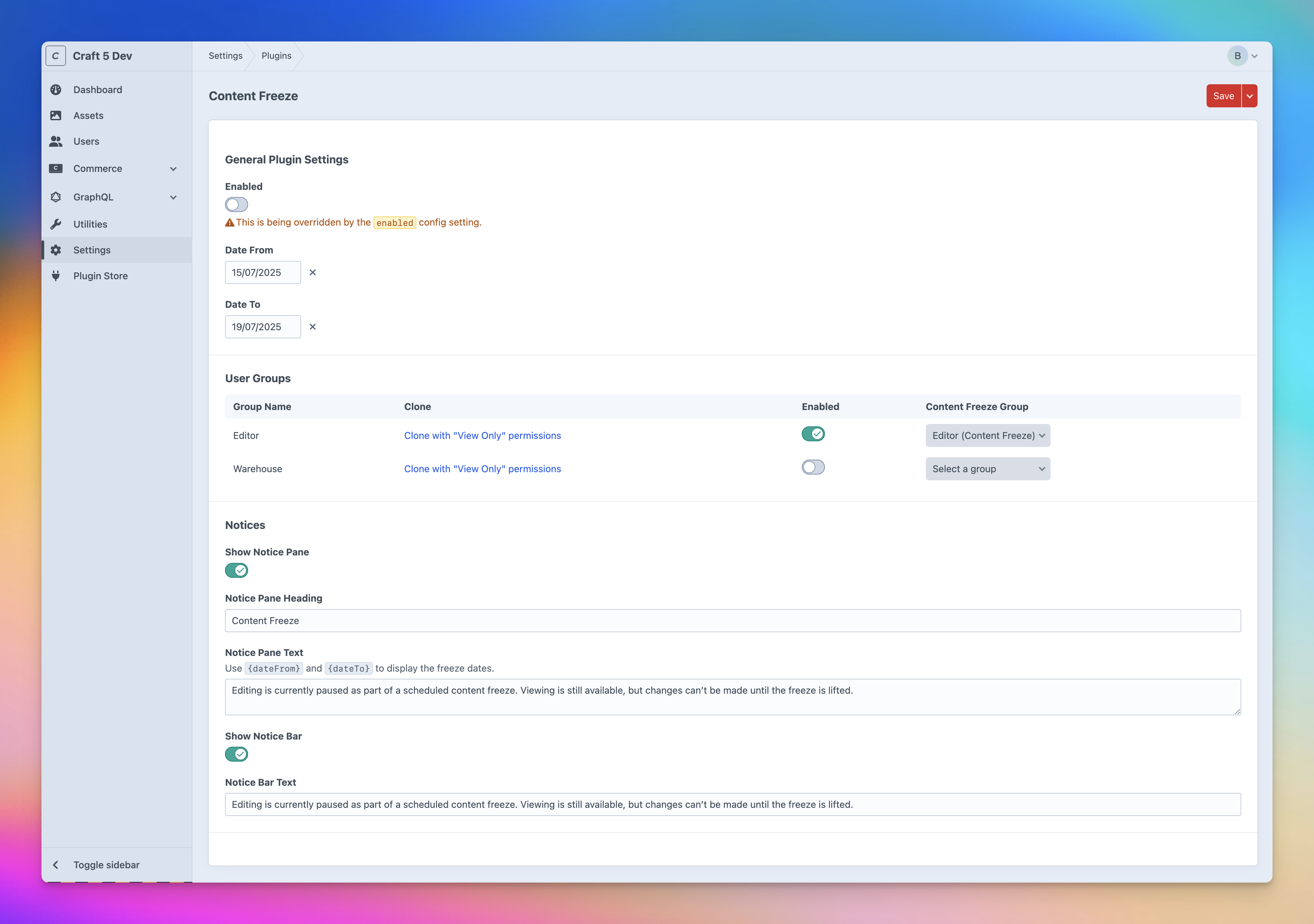
While a freeze is in effect, editors see a notice bar at the top of the CP and (on login) a full-screen notice pane. Set the default wording under Settings → Plugins → Content Freeze, or override it per freeze under its Notices tab.
Three tokens are available in the bar and pane text:
| Token | Renders | With no date set |
|---|---|---|
{dateFrom} |
The freeze's start date/time, e.g. 3/9/2026, 09:00 |
now |
{dateTo} |
The freeze's end date/time, e.g. 5/9/2026, 17:00 |
further notice |
{remaining} |
How long is left, rounded to the largest unit, e.g. 3 hours |
a while |
{remaining} uses the same wording as the “Ends in …” label on the freeze list and dashboard widget.
By default the pane spells out the window (from {dateFrom} until {dateTo}) and the bar counts down (will resume in {remaining}), but you can mix them however you like:
Editing is paused until {dateTo} - about {remaining} left.
Console commands
# Reconcile the freeze state for the current time (use on a cron - see below)
php craft content-freeze/run

# List every freeze with its id, status and window
php craft content-freeze/freezes/list

# Trigger (enable) a freeze by id, applied immediately
php craft content-freeze/freezes/enable <id>

# Lift (disable) a freeze by id, applied immediately
php craft content-freeze/freezes/disable <id>
Freezes are applied on every CP request, but for scheduled freezes to activate/lift precisely at their start/end times - even when nobody is in the control panel - run the reconcile command on a schedule:
* * * * * php craft content-freeze/run
* * * * * php craft queue/run
The queue/run line ensures the queued user moves actually execute (Craft also runs the queue automatically on web requests).
Backups
Enable Back Up Database on Freeze (under Settings → Plugins → Content Freeze, or backupOnFreeze in config.php) to queue a database backup when a freeze becomes active. Saved to storage/backups; database only (not files).
Email notifications
Turn on Notify Users by Email on a freeze to email the affected users (in the frozen groups, with CP access) when it's scheduled, when it starts, and when it ends.
Edit the wording under Utilities → System Messages ({{ name }}, {{ description }}, {{ dateFrom }}, {{ dateTo }} and {{ user }} are available).
Front-end templating
A craft.contentFreeze Twig variable is available in your front-end templates, so you can react to a freeze being in effect - for example hiding a form, disabling add-to-cart, or showing a message. It's time-based, so it's accurate without any control-panel activity.
Is a freeze currently in effect?
{% if craft.contentFreeze.enabled %}
    <p>Editing is paused while a content freeze is in effect.</p>
{% endif %}
Hide a form / block an action while frozen:
{% if not craft.contentFreeze.enabled %}
    <form method="post">
        {# ...contact form, comment form, etc. #}
    </form>
{% else %}
    <p>Submissions are temporarily paused.</p>
{% endif %}
Stop purchases (Commerce):
{% if craft.contentFreeze.enabled %}
    <button disabled>Checkout unavailable during freeze</button>
{% else %}
    <a href="{{ cart.getCheckoutUrl() }}">Checkout</a>
{% endif %}
Show the freeze window / details:
{% set range = craft.contentFreeze.dateRange %}
{% if craft.contentFreeze.enabled %}
    {% if range.from %}<p>Frozen from {{ range.from|datetime('short') }}</p>{% endif %}
    {% if range.to %}<p>Editing resumes {{ range.to|datetime('short') }}</p>{% endif %}
{% endif %}

{# Loop the active freezes for names/dates #}
{% for freeze in craft.contentFreeze.freezes %}
    <li>{{ freeze.name }}{% if freeze.dateTo %} - until {{ freeze.dateTo|datetime('short') }}{% endif %}</li>
{% endfor %}
Available on craft.contentFreeze:
| Property/method | Returns | Notes |
|---|---|---|
craft.contentFreeze.enabled |
bool |
True if any freeze is in effect right now |
craft.contentFreeze.freezes |
Freeze[] |
The freezes currently in effect (see below) |
craft.contentFreeze.dateRange.from |
DateTime or null |
Earliest start across active freezes |
craft.contentFreeze.dateRange.to |
DateTime or null |
Latest end across active freezes |
Each freeze in .freezes exposes:
| Property | Returns | Notes |
|---|---|---|
freeze.name |
string |
The freeze name |
freeze.description |
string |
The freeze description (may be empty) |
freeze.dateFrom |
DateTime or null |
Start date, or null if open-ended |
freeze.dateTo |
DateTime or null |
End date, or null if open-ended |
freeze.enabled |
bool |
Whether the freeze is enabled |
freeze.status |
string |
active, scheduled, ended or disabled |
freeze.startsIn |
string or null |
Human-readable countdown to start (scheduled freezes) |
freeze.endsIn |
string or null |
Human-readable countdown to end (active freezes) |
Supported Plugins
When cloning a view-only group, these plugins' view/read/access permissions are kept (anything that can edit is dropped):
- Craft Commerce
accessplugin-commercecommerce-manageorders
- Solspace Freeform
accessplugin-freeformfreeform-formsaccessfreeform-submissionsaccessfreeform-submissionsreadfreeform-notificationsaccess
- Verbb Formie
accessplugin-formieformie-accessformsformie-accesssubmissionsformie-accesssentnotifications
- Verbb Comments
accessplugin-comments
- nystudio107 SEOmatic
accessplugin-seomaticseomatic:dashboard
- Verbb Navigation
accessplugin-navigation
Adding support for other plugins
Any plugin's view/read/access permissions can be preserved by adding their handles to the viewOnlyKeepPermissions array in config/content-freeze.php (lowercase). You can find the exact handles under Settings → Users → [group] → Permissions. For example:
'viewOnlyKeepPermissions' => [
    'accessplugin-myplugin',
    'myplugin-viewsomething',
],
Caveats
- Admins aren't restricted. Craft's admin flag grants full access regardless of user group, so admins can still edit during a freeze. Make sure anyone who edits content is in a user group, not just flagged as an admin.
- User groups are required. Freezing works by swapping users between groups, so your editors need to be organised into user groups.
- Permissions must come from groups, not individual users. A freeze only changes a user's group, so it only affects permissions granted through a group. If you've assigned edit permissions directly to a user (rather than via a group), those stay in place during a freeze and that user can keep editing. Make sure editors get their permissions from a user group.
- The view-only clone is a snapshot. Clone copies a group's view permissions as they are at that moment - if you change the original group's permissions later, re-clone to pick them up.
- One target group per source. A "Move Users To" group can only belong to one source group, so give each frozen group its own view-only group.
- Scheduling needs cron for exact timing. Without
content-freeze/runon a cron, scheduled freezes activate and lift on the next control-panel request rather than precisely on time. - User moves run on the queue. Make sure your queue is running, or there may be a delay before users are actually moved when a freeze starts or ends.
Support
If you have any issues (Surely not!) then I'll aim to reply to these as soon as possible. If it's a site-breaking-oh-no-what-has-happened moment, then hit me up on the Craft CMS Discord - @bymayo