
3brs / sylius-ppl-parcelshops-plugin

PPL parcelshops plugin for Sylius
Package info
github.com/3BRS/sylius-ppl-parcelshops-plugin
Type:sylius-plugin
pkg:composer/3brs/sylius-ppl-parcelshops-plugin
Requires
- php: ^8.3
- 3brs/sylius-shipment-export-plugin: ^2.2
- nyholm/psr7: ^1.8.2
- sylius/sylius: ^2.1
Requires (Dev)
- behat/behat: ^3.34 || ^4.0
- behat/mink: ^1.12
- behat/mink-selenium2-driver: ^1.4
- dbrekelmans/bdi: ^1.4
- dmore/chrome-mink-driver: ^2.7
- doctrine/annotations: ^2.0
- friends-of-behat/mink-browserkit-driver: ^1.6.2
- friends-of-behat/mink-debug-extension: ^2.1
- friends-of-behat/mink-extension: ^2.7.5 || ^3.0@alpha
- friends-of-behat/page-object-extension: ^0.3
- friends-of-behat/suite-settings-extension: ^1.0
- friends-of-behat/symfony-extension: ^2.6.2
- friends-of-behat/variadic-extension: ^1.3
- php-http/message-factory: ^1.0.0
- phpstan/phpstan: ^2.1
- phpstan/phpstan-doctrine: ^2.0.12
- phpstan/phpstan-strict-rules: ^2.0
- phpstan/phpstan-symfony: ^2.0
- phpstan/phpstan-webmozart-assert: ^2.0
- phpunit/phpunit: ^10.5
- rector/rector: ^2.0.10
- robertfausk/behat-panther-extension: ^1.2 || ^2.0
- robertfausk/mink-panther-driver: ^1.1.2
- slevomat/coding-standard: ^7.0.15
- sylius-labs/behat-chrome-extension: ^1.5
- sylius-labs/coding-standard: ^4.2
- sylius/sylius-rector: ^3.0
- symfony/browser-kit: ^6.4 || ^7.4 || ^8.0
- symfony/cache: ^6.4.17 || ^7.4 || ^8.0
- symfony/debug-bundle: ^6.4 || ^7.4 || ^8.0
- symfony/dotenv: ^6.4 || ^7.4 || ^8.0
- symfony/framework-bundle: ^6.4 || ^7.4 || ^8.0
- symfony/http-foundation: ^6.4 || ^7.4 || ^8.0
- symfony/http-kernel: ^6.4 || ^7.4 || ^8.0
- symfony/intl: ^6.4 || ^7.4 || ^8.0
- symfony/maker-bundle: ^1.60
- symfony/panther: ^2.3
- symfony/web-profiler-bundle: ^6.4 || ^7.4 || ^8.0
- symplify/easy-coding-standard: ^10.3.0
Suggests
None
Provides
None
Conflicts
- api-platform/core: <4.2.0
- api-platform/json-schema: <4.2.0
- api-platform/metadata: <4.2.0
- api-platform/symfony: <4.2.0
- babdev/pagerfanta-bundle: <3.7.0
- doctrine/collections: <1.7.0
- doctrine/data-fixtures: <1.8.0
- doctrine/dbal: <2.13.3
- doctrine/doctrine-bundle: <2.13.1
- doctrine/orm: <2.19.0
- fakerphp/faker: <1.24.0
- friendsofsymfony/rest-bundle: <3.1.0
- imagine/imagine: <1.5.0
- jms/serializer-bundle: <4.2.0
- knplabs/knp-menu: <3.3.0
- knplabs/knp-menu-bundle: <3.5.0
- lexik/jwt-authentication-bundle: <2.12
- liip/imagine-bundle: 2.17.0
- masterminds/html5: <2.7.5
- payum/core: <1.7.6
- psr/http-factory: <1.1.0
- sylius/resource-bundle: <1.13.1
- sylius/sylius: <2.1.0
- sylius/twig-extra: >=0.9.0 <0.9.1
- sylius/twig-hooks: >=0.9.0 <0.9.1
- symfony/cache: <6.4.17
- symfony/css-selector: <4.4.24
- symfony/framework-bundle: >=5.4.0 <=5.4.20|>=6.0.0 <=6.0.16|>=6.1.0 <=6.1.8|>=6.2.0 <=6.2.2|6.2.8
- symfony/mime: <5.4.0
- symfony/web-link: <5.3.0
- symplify/easy-coding-standard: <10.3.0|12.5.10
- twig/intl-extra: <3.0
- twig/twig: <2.14.7
- webmozart/assert: <1.11.0
- willdurand/negotiation: <3.0
Replaces
None
This package is auto-updated.
Last update: 2026-10-12 10:28:36 UTC
README
PPL parcelshop plugin


Requirements
| Package | Version |
|---|---|
| PHP | ^8.3 |
| Sylius | ^2.1 |
| Symfony | ^6.4 || ^7.4 || ^8.0 |
For Sylius 2.0 support, use version 2.0.x of this plugin. For Sylius 1.x support, use version 1.x of this plugin.
Features
- Enables sending shipments via PPL to PPL parcelshops.
- The user can choose the PPL parcelshops from the map during checkout in the Shipment step
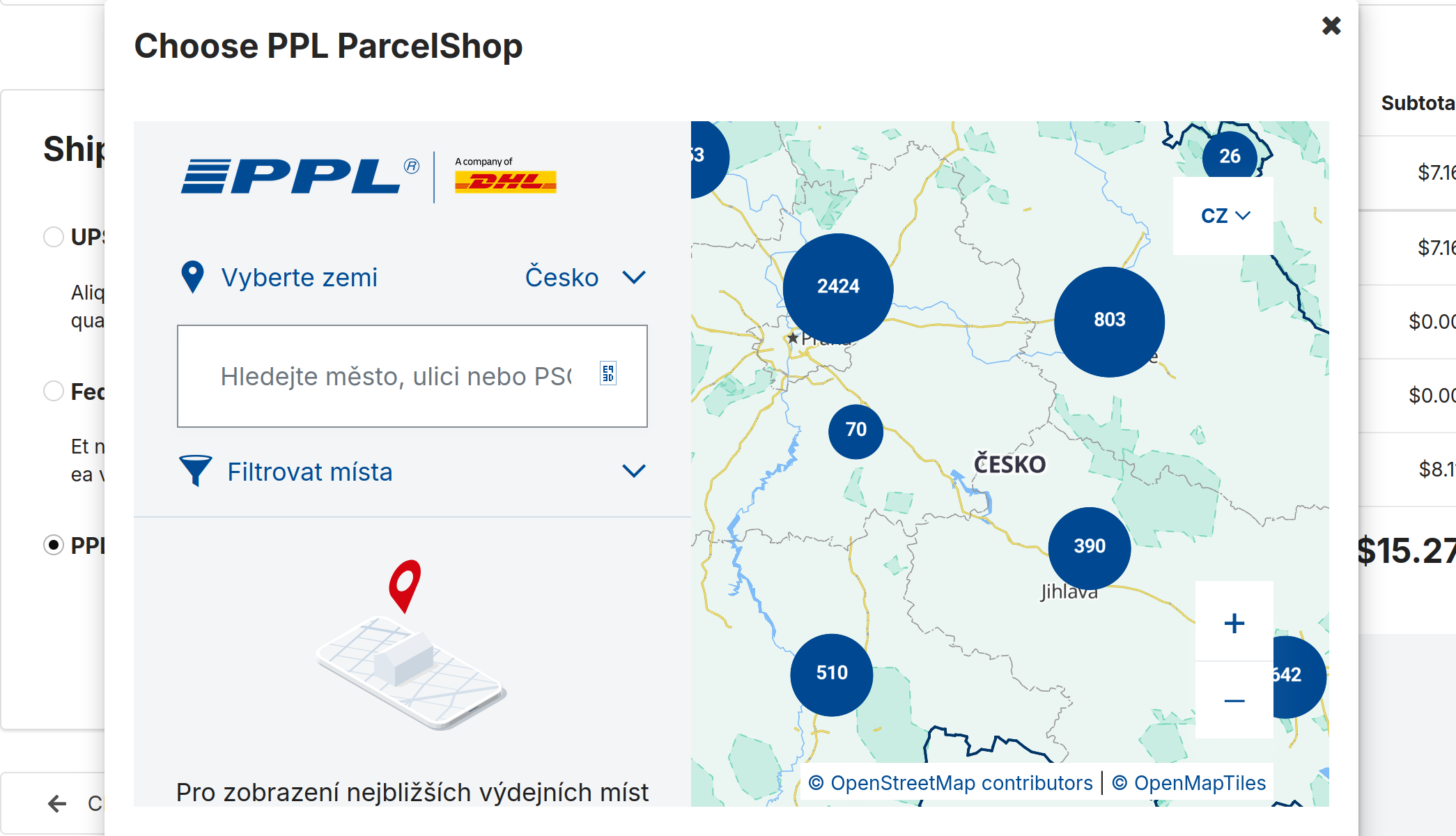
- See PPL parcelshop in final checkout step and also in the admin panel.
- Export CSV with the PPL parcelshops shipments and import it easily into PPL's system.

PPL CSV import configuration
- Configure CSV structure in your client zone https://klient.ppl.cz
Installation
1. Install the plugin via Composer
composer require 3brs/sylius-ppl-parcelshops-plugin
2. Register the bundles
Add plugin classes to your config/bundles.php:
return [
    // ...
    ThreeBRS\SyliusShipmentExportPlugin\ThreeBRSSyliusShipmentExportPlugin::class => ['all' => true],
    ThreeBRS\SyliusPplParcelshopsPlugin\ThreeBRSSyliusPplParcelshopsPlugin::class => ['all' => true],
];
3. Import routing
Add routing to config/routes.yaml:
threebrs_sylius_shipment_export_plugin:
    resource: "@ThreeBRSSyliusShipmentExportPlugin/Resources/config/admin_routing.yml"
    prefix: '/%sylius_admin.path_name%'

threebrs_sylius_ppl_parcelshops_plugin:
    resource: '@ThreeBRSSyliusPplParcelshopsPlugin/Resources/config/routing.yaml'
    prefix: /
4. Import plugin configuration
Add config import to config/packages/_sylius.yaml:
imports:
    # ...
    - { resource: "@ThreeBRSSyliusShipmentExportPlugin/Resources/config/config.yml" }
    - { resource: "@ThreeBRSSyliusPplParcelshopsPlugin/Resources/config/config.yaml" }
5. Configure entity models
Your Entity Shipment has to implement \ThreeBRS\SyliusPplParcelshopsPlugin\Model\PplShipmentInterface.
You can use the trait \ThreeBRS\SyliusPplParcelshopsPlugin\Model\PplShipmentTrait.
Example:
<?php

namespace App\Entity\Shipping;

use Doctrine\ORM\Mapping as ORM;
use Sylius\Component\Core\Model\Shipment as BaseShipment;
use ThreeBRS\SyliusPplParcelshopsPlugin\Model\PplShipmentInterface;
use ThreeBRS\SyliusPplParcelshopsPlugin\Model\PplShipmentTrait;

#[ORM\Entity]
#[ORM\Table(name: 'sylius_shipment')]
class Shipment extends BaseShipment implements PplShipmentInterface
{
    use PplShipmentTrait;
}
Your Entity ShippingMethod has to implement \ThreeBRS\SyliusPplParcelshopsPlugin\Model\PplShippingMethodInterface.
You can use the trait \ThreeBRS\SyliusPplParcelshopsPlugin\Model\PplShippingMethodTrait.
Example:
<?php

namespace App\Entity\Shipping;

use Doctrine\ORM\Mapping as ORM;
use Sylius\Component\Core\Model\ShippingMethod as BaseShippingMethod;
use ThreeBRS\SyliusPplParcelshopsPlugin\Model\PplShippingMethodInterface;
use ThreeBRS\SyliusPplParcelshopsPlugin\Model\PplShippingMethodTrait;

#[ORM\Entity]
#[ORM\Table(name: 'sylius_shipping_method')]
class ShippingMethod extends BaseShippingMethod implements PplShippingMethodInterface
{
    use PplShippingMethodTrait;
}
For more details on entity customization, see Sylius docs - Customizing Models.
6. Create and run database migrations
Generate and run doctrine migrations to add the required database columns:
bin/console doctrine:migrations:diff
bin/console doctrine:migrations:migrate
Configuration
The plugin can be configured using the following parameters in your config/packages/_sylius.yaml or config/services.yaml:
parameters:
    # Shipping method codes that should be exported to PPL CSV format
    # Default: ['ppl_parcel_shop']
    # IMPORTANT: Only shipments using shipping methods with these codes will be exported
    threebrs_sylius_ppl_parcelshops_plugin_ppl_shipping_method_codes: ['ppl_parcel_shop', 'your_custom_ppl_method']

    # Country codes where PPL parcelshop service is available
    # Default: ['CZ', 'SK', 'DE', 'PL', 'HU', 'BG', 'RO', 'NL', 'AT']
    threebrs_sylius_ppl_parcelshops_plugin_ppl_countries: ['CZ', 'SK', 'DE', 'PL', 'HU', 'BG', 'RO', 'NL', 'AT']
Note: The threebrs_sylius_ppl_parcelshops_plugin_ppl_shipping_method_codes parameter determines which shipments will appear in the export list. Make sure your shipping method code matches one of the codes in this array, otherwise the shipments won't be available for export.
Usage
1. Create a PPL Parcelshop Shipping Method
- Go to the admin panel: Shipping Methods → Create
- Fill in the basic information:
- Code: Use
ppl_parcel_shop(default) or a custom code that matches thethreebrs_sylius_ppl_parcelshops_plugin_ppl_shipping_method_codesparameter - Zone: Select appropriate shipping zone
- Calculator: Choose your preferred shipping calculator
- Code: Use
- Check the "To PPL ParcelShop enabled" option
- Configure PPL country options:
- Display ParcelShops from selected countries: Choose which countries' parcelshops should be available for selection (multiple selection allowed)
- Default selected country on the map with ParcelShops: Choose which country will be pre-selected when the parcelshop map opens
- Save the shipping method
Important: The shipping method code must be listed in the threebrs_sylius_ppl_parcelshops_plugin_ppl_shipping_method_codes parameter (see Configuration section above). If using a custom code, add it to this parameter in your configuration.
2. Customer Checkout Flow
When a customer selects a PPL parcelshop shipping method during checkout:
- A PPL parcelshop selector widget will appear
- The customer can choose their preferred parcelshop from an interactive map
- The selected parcelshop information (ID, name, address) is saved with the shipment
- The parcelshop details are visible in the order confirmation
3. Export Shipments to PPL
- Go to the admin panel: Shipment Export
- Select the PPL ParcelShop exporter type
- Choose the shipments you want to export
- Click Export to download a CSV file
- Import the CSV file into PPL's system
The CSV export includes all necessary information for PPL processing:
- Parcelshop ID and details
- Recipient information
- Package weight and dimensions
- Cash on delivery amount (if applicable)
- Order reference
Development
Usage
- Develop your plugin in
/src - See
bin/for useful commands
Testing
After your changes you must ensure that the tests are still passing.
$ composer install
$ bin/console doctrine:schema:create -e test
$ bin/behat
$ bin/phpstan.sh
$ bin/ecs.sh
License
This library is under the MIT license.